1. Introduction
The Pentax K-3 Mark III is a flagship APS-C DSLR camera designed for enthusiasts and professional photographers. It combines a heritage of craftsmanship with modern technologies to deliver exceptional image quality and robust performance. This manual provides detailed instructions for setting up, operating, and maintaining your camera.

Figure 1.1: Pentax K-3 Mark III camera overview, highlighting its compact size, 25.7MP resolution, 12fps continuous shooting, 5-axis 5.5-step stabilization, and ISO 1.6 million sensitivity.
Video 1.1: Official product video for the Pentax K-3 Mark III, showcasing its design, features, and capabilities.
2. What's in the Box
Verify that all the following items are included in your package:
- Pentax K-3 Mark III Camera Body
- Strap O-ST162
- ME Finder Cap
- Battery D-LI90P
- USB Power Adapter
- Power Plug
- USB Cable I-USB166
- Eye Cup FU (attached to camera)
- Hot Shoe Cover FK (attached to camera)
- Synchro Socket 2P Cap (attached to camera)
- Body Mount Cap KII (attached to camera)
- Battery Grip Contact Cover (attached to camera)
3. Initial Setup
3.1. Attaching a Lens
The K-3 Mark III uses a Pentax KAF mount. Align the red dot on the lens with the red dot on the camera body's lens mount, then rotate the lens clockwise until it clicks into place.

Figure 3.1: Front view of the Pentax K-3 Mark III camera body, showing the lens mount for attaching compatible lenses.
3.2. Inserting Battery and SD Cards
Open the battery compartment cover and insert the D-LI90P battery. The camera features dual SD card slots. Slot 1 is compatible with UHS-II cards for high-speed read/write operations.

Figure 3.2: Close-up view of the Pentax K-3 Mark III's side, showing the open cover for the dual SD card slots.
4. Operating Basics
4.1. Viewfinder and LCD Monitor
The camera features a newly designed optical viewfinder with a 100% field of view and 1.05x image magnification, offering a bright and immersive viewing experience. The high-resolution touch screen LCD allows for intuitive menu navigation and image review.

Figure 4.1: Detailed diagram of the K-3 Mark III's optical viewfinder, highlighting its high-refraction glass pentaprism and low distortion for a natural, bright field of view.
4.2. Camera Controls
The K-3 Mark III features a newly added joystick for intuitive AF point control and a Smart Function button for quick access to frequently used settings. The top LCD panel provides essential shooting information at a glance.

Figure 4.2: View of the camera's top panel, showing the mode dial, exposure compensation, ISO button, and the informative top LCD screen.
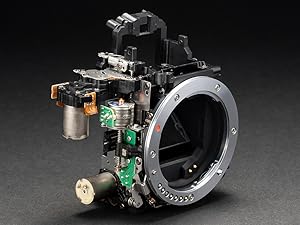
Figure 4.3: Rear view detail showing the newly added joystick for precise autofocus point selection.
5. Advanced Features
5.1. In-Body 5-Axis Shake Reduction (SR II)
The PENTAX SR II mechanism provides up to 5.5-shutter-step image stabilization on 5 axes, ensuring blur-free images even with telephoto lenses or in challenging low-light conditions. This system is compatible with all Pentax lenses ever manufactured.

Figure 5.1: Visual representation of the camera's 5-axis Shake Reduction system, showing compensation for pitch, yaw, roll, and X/Y movements.
5.2. High-Speed Continuous Shooting
The newly developed mirror, shutter drive mechanism, and PRIME V image processing engine enable continuous shooting at up to 12 frames per second (FPS), ideal for capturing fast-moving subjects.

Figure 5.2: Internal components of the camera, illustrating the high-speed drive system for rapid image capture.
5.3. SAFOX13 AF System
The enhanced SAFOX13 AF system expands the autofocus points to 101, providing a wider AF area, faster response, and highly accurate subject capture.
5.4. Pixel Shift Resolution System
Utilizing the in-body SR II mechanism, the Pixel Shift Resolution System captures four separate images by shifting the image sensor by a single pixel for each, then synthesizes them into a single composite image. This process obtains all color data for each pixel, resulting in super-high-resolution images with finer details and more accurate colors, while also reducing false colors (moire).
5.5. Compatibility with Classic Lenses
The K-3 Mark III supports manual input of lens focal length for classic lenses, allowing for accurate metering and saving aperture values as Exif data. It also accommodates TAv mode.
6. Image Quality
The camera features a new back-illuminated CMOS image sensor with approximately 25.7 effective megapixels and a low-pass filterless design to maximize resolution. Combined with the PRIME V imaging engine and accelerator unit II, it achieves excellent descriptive power across the entire sensitivity range, with multi-dimensional image space filtering reducing noise while preserving fine contours.

Figure 6.1: Illustration of the 25.7MP back-illuminated CMOS image sensor and the PRIME V image processing engine, key components for high image quality.

Figure 6.2: A sample image showcasing the camera's ability to reproduce texture and details with high fidelity.
7. Connectivity
The K-3 Mark III supports Wi-Fi connectivity for wireless image transfer and remote camera control via a smartphone or tablet. It also features a USB-C port for fast data transfer and charging.

Figure 7.1: System configuration diagram illustrating various connectivity options, including USB, HDMI, and wireless LAN.
8. Maintenance
8.1. Rugged Construction and Weather Resistance
The camera's chassis is built with high-strength, lightweight magnesium alloy. With 95 seals applied to the body, it offers a dust-proof and drip-proof design, allowing for reliable operation in harsh environments.

Figure 8.1: Disassembled view of the K-3 Mark III, showcasing its magnesium alloy body and internal weather-sealing points.
8.2. General Care
To ensure longevity, keep the camera clean and dry. Use a soft, lint-free cloth for cleaning. Avoid exposing the camera to extreme temperatures or direct sunlight for extended periods. Regularly check and clean the sensor if necessary, using appropriate sensor cleaning tools.
9. Troubleshooting
If you encounter any issues with your Pentax K-3 Mark III, please refer to the following general troubleshooting steps:
- Camera not powering on: Ensure the battery is fully charged and correctly inserted.
- Images are blurry: Check your focus settings, ensure adequate shutter speed for the scene, and verify that Shake Reduction is enabled if needed.
- Memory card error: Ensure the SD card is correctly inserted and not locked. Try formatting the card (this will erase all data) or using a different card.
- Lens not recognized: Ensure the lens is securely attached and clean the lens and camera contacts.
For more detailed troubleshooting or persistent issues, please contact Pentax customer support.
10. Specifications
| Feature | Specification |
|---|---|
| Model Name | PENTAX K-3 Mark III |
| Sensor Type | CMOS (APS-C) |
| Photo Sensor Resolution | 25.7 MP |
| Image Stabilization | 5-Axis (SR II) |
| Continuous Shooting | 12 FPS |
| Autofocus Points | 101 |
| Video Resolution | 2160p (4K) |
| Display Type | Touch Screen LCD (3.2 Inches) |
| Viewfinder | Optical (1.05x Magnification) |
| Connectivity | Wi-Fi, USB |
| Body Material | Magnesium Alloy |
| Weather Resistance | Dust-proof, Drip-proof (95 seals) |
| Memory Slots | 2 (Slot 1 UHS-II compatible) |
| UPC | 027075302549 |
11. Warranty and Support
11.1. Warranty Information
The Pentax K-3 Mark III comes with a 1-year warranty covering parts and labor from the date of purchase. Please retain your proof of purchase for warranty claims.
11.2. Customer Support
For technical assistance, service, or further inquiries, please visit the official Pentax support website or contact your local authorized service center. Contact information can typically be found on the manufacturer's website or in the documentation included with your product.


