
MAITE 01dvd98157
MAITE Mini DVD Player User Manual
Model: 01dvd98157
Introduction
Thank you for purchasing the MAITE Mini DVD Player. This compact and versatile device is designed to enhance your home entertainment experience, offering multi-region DVD playback, CD playback, and USB media file support. Its portable design and multiple connectivity options make it ideal for various settings, from your living room to car trips. Please read this manual carefully to ensure proper use, optimal performance, and longevity of your device.
Safety Information
- Do not expose the unit to rain or moisture to prevent fire or electric shock.
- Do not open the casing. Refer all servicing to qualified personnel.
- Ensure proper ventilation around the unit. Do not block ventilation openings.
- Avoid placing the unit near heat sources such as radiators, heat registers, stoves, or other apparatus (including amplifiers) that produce heat.
- Use only attachments/accessories specified by the manufacturer.
- Unplug this apparatus during lightning storms or when unused for long periods.
- Keep out of reach of children.
Package Contents
Please check the box for the following items:
- 1 x MAITE Mini DVD Player
- 1 x HDMI Cable (1.2m, 4K/60Hz compatible)
- 1 x AV Output Cable (1m, 4K/60Hz compatible)
- 1 x Remote Control (batteries not included)
- 1 x User Manual
- 1 x DVD Player Stand
- 1 x USB Power Cable
- 1 x Wall Charger (Power Adapter)
Product Overview

Figure 1: Front view of the MAITE Mini DVD Player, showcasing its compact design, included cables (HDMI, RCA), and the adjustable stand. The image highlights its 1080P Full HD output capability.

Figure 2: The MAITE Mini DVD Player demonstrating its compatibility with various televisions using both RCA and HDMI cables. Key features like 1080P HD, fast reading, memory playback, noise cancellation, and remote control are highlighted.

Figure 3: This image illustrates the versatile power options for the MAITE Mini DVD Player, including car charger, wall charger (adapter included), and power bank, emphasizing its portability and "plug and play" convenience.

Figure 4: The MAITE Mini DVD Player positioned vertically on its angle-adjustable stand, showcasing its unique ability to function as a desktop CD player and display your favorite discs. The stand features silicone protective coating.
Front Panel
- Disc Tray: For inserting DVDs and CDs.
- Display Screen: Shows current status, track number, and time.
- Power Button: Turns the unit on/off.
- Volume Controls: Adjusts audio output volume.
- Play/Pause Button: Starts or pauses playback.
- Stop Button: Stops playback.
- Next/Previous Buttons: Skips tracks or chapters.
Rear Panel
- HDMI Output: Connects to TVs or monitors for high-definition video and audio.
- AV Output (RCA): Connects to older TVs or audio systems using composite video and stereo audio cables.
- USB Port: For playing media files from USB flash drives.
- DC IN Port: For connecting the power adapter.
Remote Control
The remote control allows you to operate all functions of the DVD player from a distance. Insert two AAA batteries (not included) into the remote control before use.
Setup
Connecting to a TV/Monitor
- Power Off: Ensure both the DVD player and your TV/monitor are powered off before making any connections.
- HDMI Connection (Recommended for HD):
- Connect one end of the provided HDMI cable to the HDMI OUT port on the DVD player.
- Connect the other end of the HDMI cable to an HDMI IN port on your TV/monitor.
- AV Connection (for older TVs):
- Connect the yellow plug of the provided AV cable to the Video OUT (yellow) port on the DVD player.
- Connect the red and white plugs to the Audio OUT (red and white) ports on the DVD player.
- Connect the other end of the AV cable to the corresponding Video IN and Audio IN ports on your TV.
- Power Connection:
- Connect the USB power cable to the DC IN port on the DVD player.
- Plug the other end of the USB power cable into the provided wall charger or a compatible USB power source (e.g., power bank, car charger).
- Power On: Turn on your TV/monitor and select the correct input source (HDMI or AV) that corresponds to your connection. Then, turn on the DVD player.
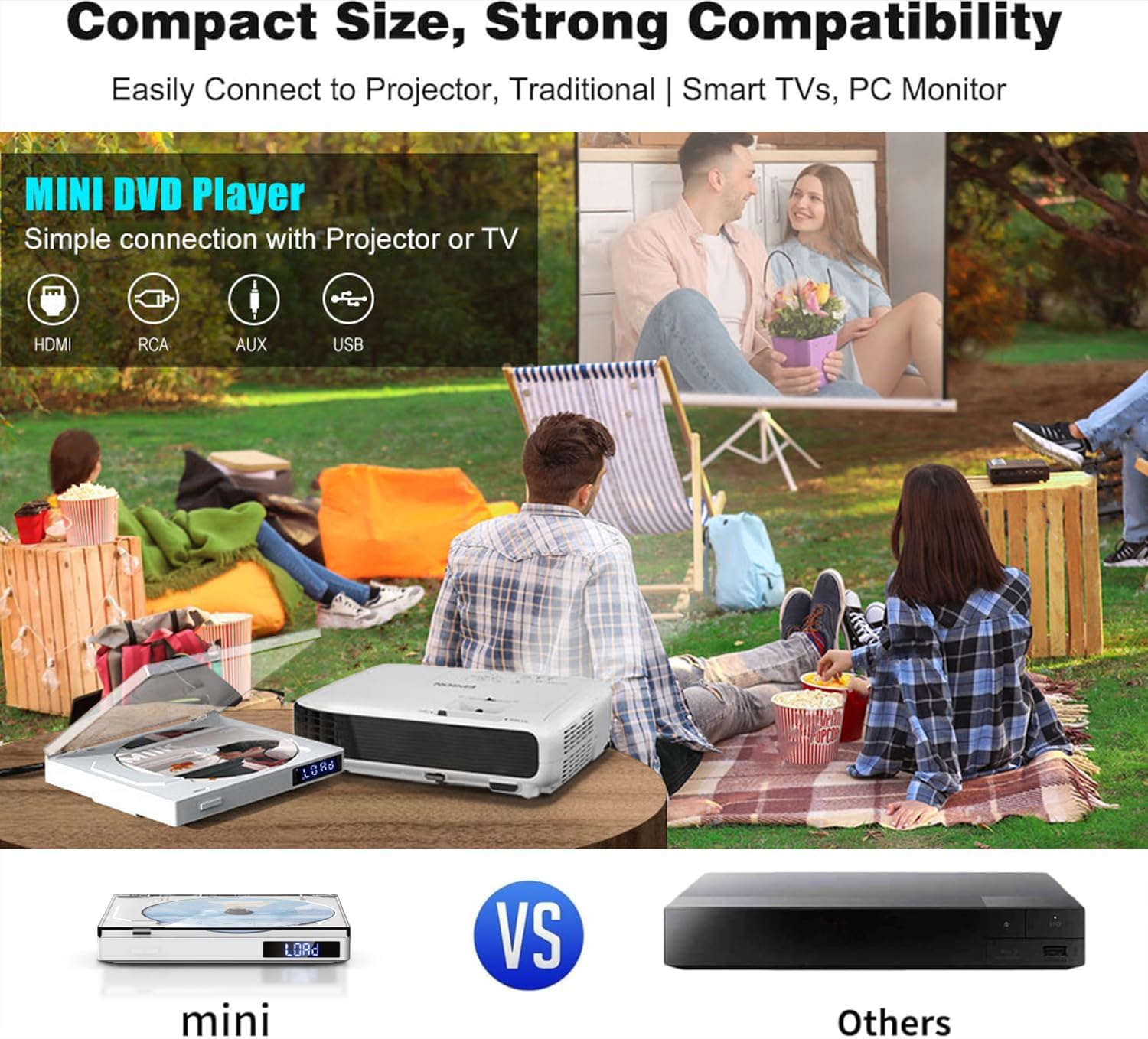
Figure 5: The MAITE Mini DVD Player demonstrating its compact size and strong compatibility, easily connecting to projectors, traditional TVs, smart TVs, and PC monitors via HDMI, RCA, AUX, and USB ports.
Operating Instructions
Playing a DVD/CD
- Ensure the DVD player is powered on and connected to your display.
- Gently open the disc tray cover.
- Place a DVD or CD onto the disc spindle with the label side facing up.
- Close the disc tray cover. The player will automatically load the disc and begin playback.
- Use the remote control or front panel buttons to control playback (Play/Pause, Stop, Skip, Volume).

Figure 6: This image illustrates the "No Jamming Flip Cover Design" of the MAITE Mini DVD Player, showing the easy process of opening the cover, inserting a disc, and closing it for playback.
USB Playback
The player supports various media formats from USB drives, including AVI (Xvid, MP4V, MPEG-1) D2VX, MPG, MPEG, MP3, MP4, ASF.
- Insert your USB flash drive into the USB port on the rear panel of the DVD player.
- The player should automatically detect the USB drive and display a menu for selecting media types (Picture, Music, Video).
- Navigate through the folders and files using the remote control's arrow keys and "OK" button.
- Select the desired file to begin playback.
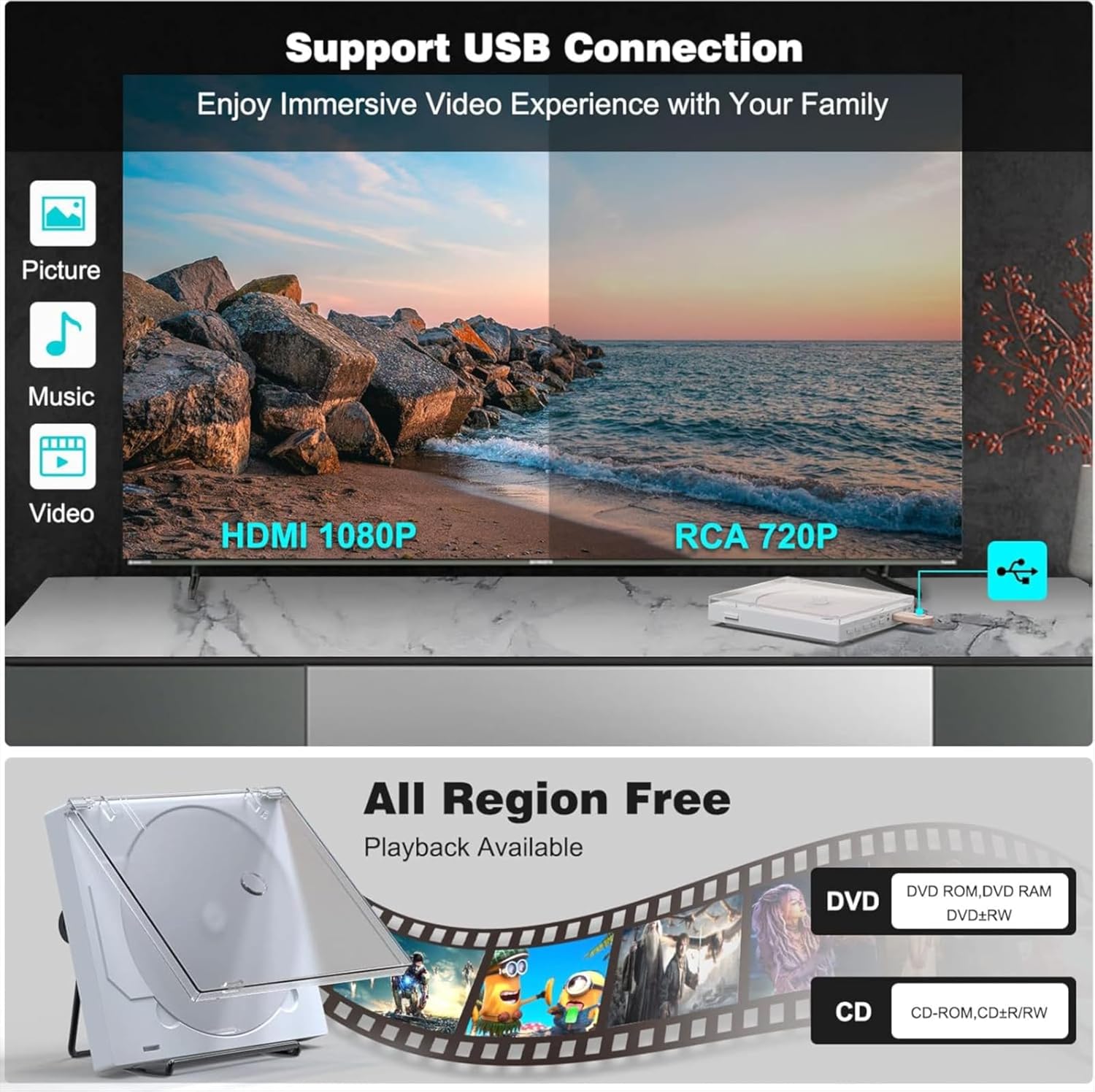
Figure 7: This image highlights the USB connection support of the MAITE Mini DVD Player, allowing users to enjoy immersive video experiences. It also visually compares the superior quality of HDMI 1080P output versus RCA 720P.
Multi-Region Playback
This MAITE DVD player is designed to be multi-region compatible, allowing playback of DVDs from various regions, including Region 2. No special settings are required; simply insert your disc.

Figure 8: A couple enjoying a movie, illustrating the MAITE Mini DVD Player's region-free playback capability for various disc formats including CD, DVD, DVD-R/+R, DVD-/+RW, CD-R/-RW, and VCD.
Maintenance
Cleaning the Unit
- Wipe the exterior of the unit with a soft, dry cloth. Do not use abrasive cleaners or solvents.
- For stubborn stains, lightly dampen the cloth with water and a mild detergent, then wipe dry immediately.
- Do not spray cleaning solutions directly onto the unit.
Disc Care
- Handle discs by their edges to avoid fingerprints on the playing surface.
- Keep discs clean. Wipe them gently from the center outwards with a soft, lint-free cloth.
- Store discs in their cases when not in use to prevent scratches and dust accumulation.
Troubleshooting
| Problem | Possible Cause | Solution |
|---|---|---|
| No power | Power cable not connected; Power outlet faulty. | Ensure power cable is securely connected. Try a different power outlet. |
| No picture/sound | Incorrect input source selected on TV; HDMI/AV cables not connected properly. | Select the correct input source on your TV (e.g., HDMI 1, AV). Check all cable connections. |
| Disc not playing | Disc is dirty or scratched; Disc format not supported; Disc inserted incorrectly. | Clean the disc. Check if the disc format is supported (Blu-ray is not supported). Ensure the disc is inserted label side up. |
| USB not recognized | USB drive format not supported; Files not in supported format; USB drive faulty. | Ensure USB drive is FAT32 formatted. Check if media files are in supported formats (AVI, MPG, MP3, MP4, ASF). Try a different USB drive. |
| Remote control not working | Batteries are dead or inserted incorrectly; Obstruction between remote and player. | Replace batteries, ensuring correct polarity. Remove any obstructions. Point remote directly at the player's sensor. |
Specifications
- Model: 01dvd98157
- Brand: MAITE
- Color: White
- Connectivity: HDMI, RCA, USB
- Supported Disc Formats: CD, VCD, SVCD, CD-R, CD-RW, EVD, DVD, DVD-9, DVD-R, DVD-RW (Blu-ray excluded)
- Supported USB File Formats: AVI (Xvid, MP4V, MPEG-1) D2VX, MPG, MPEG, MP3, MP4, ASF
- Resolution: 1920x1080 (1080P Full HD via HDMI)
- Audio Output Mode: Stereo
- Power Input: 5V via Micro-USB
- Dimensions: Approximately 3 cm (thickness)
- Weight: Approximately 0.35 kg
- Special Features: Compact design, Multi-region playback, Vertical/Horizontal operation with stand, Car compatibility.
Warranty and Support
Your MAITE Mini DVD Player comes with a one-year warranty from the date of purchase. We also offer a 30-day return policy for a full refund. For any technical assistance or customer service inquiries, please contact our support team. We provide 24/7 customer service and technical support to ensure your satisfaction.
For support, please refer to the contact information provided on the product packaging or the seller's page where you purchased the item.

Figure 9: MAITE's commitment to customer support, including 24-hour online service, 30-day unconditional return, 60-day return guarantee, and lifetime technical support.