
Zorratin A0105220-5-BB
Zorratin Silicone Smart Key Fob Cover User Manual
Model: A0105220-5-BB
1. Product Overview
The Zorratin Silicone Smart Key Fob Cover is designed to provide robust protection for your vehicle's key fob. This cover helps prevent damage from drops, scratches, and general wear, extending the life and maintaining the appearance of your expensive key fob. It is engineered to fit snugly without interfering with the key fob's signal or button functionality.

Image 1.1: Two black silicone key fob covers, showcasing the design and button layout for lock, unlock, trunk, and panic functions.
2. Compatibility
This silicone key fob cover is specifically designed for 5-button key fobs compatible with various Cadillac and Corvette C7 models. To ensure a perfect fit, please verify that your key fob matches the shape, button layout, and corner design shown in the compatibility guide below.
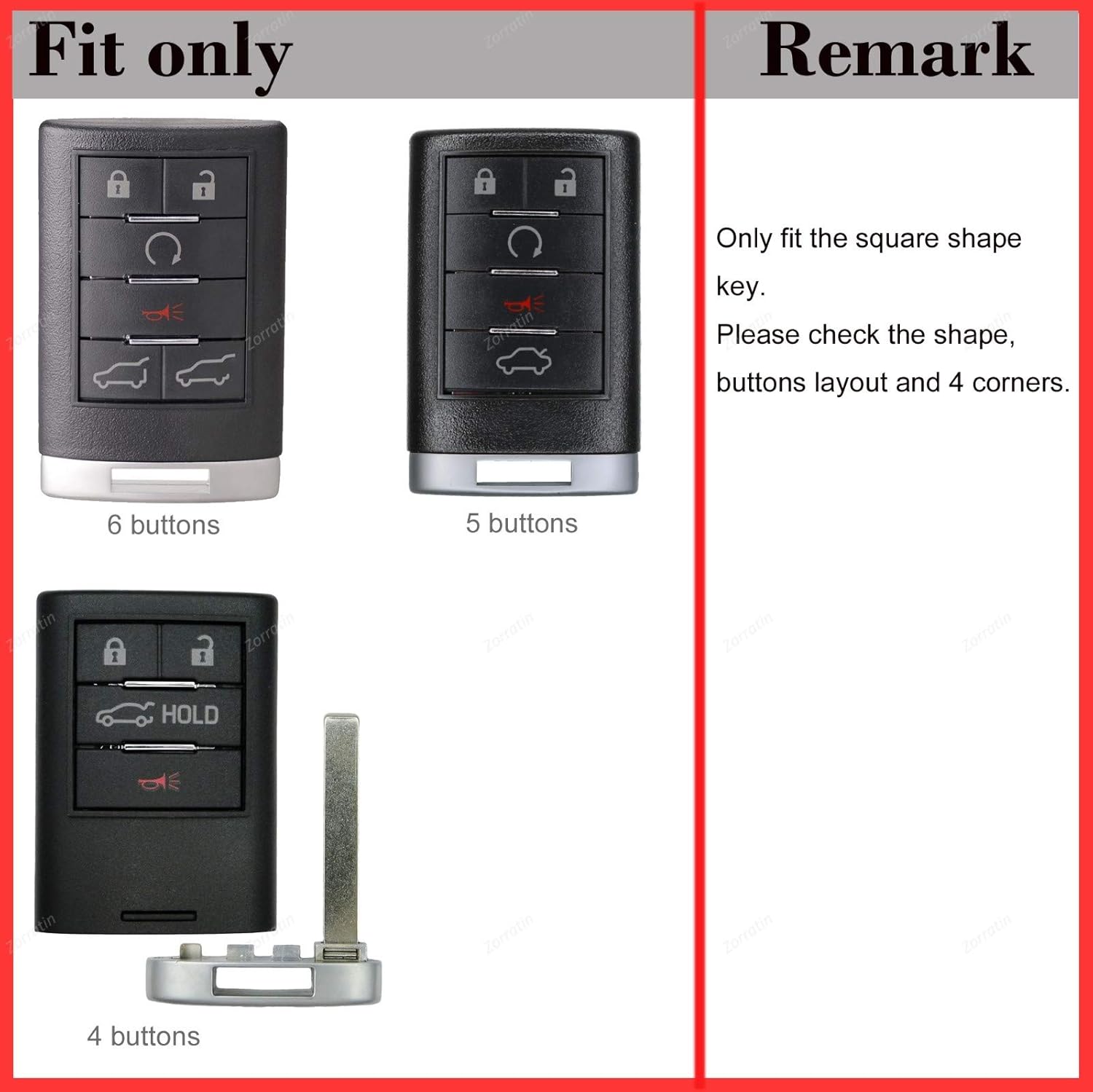
Image 2.1: Compatibility guide illustrating the specific 5-button square key fob shape this cover is designed for, alongside other non-compatible shapes.
Compatible Key Fob Models:
- Corvette C7
- Cadillac CTS
- Cadillac ATS
- Cadillac SRX
- Cadillac STS
- Cadillac DTS
Note: Only fits key fobs with a square shape and the exact 5-button layout as depicted.
3. Installation Guide
Installing the Zorratin Silicone Smart Key Fob Cover is a quick and straightforward process, typically taking less than 10 seconds.
- Prepare Your Key Fob: Ensure your key fob is clean and free of any debris or moisture.
- Align the Cover: Orient the silicone cover so that the button cutouts align with the buttons on your key fob. The open bottom of the cover should face the bottom of your key fob.
- Slide On: Gently slide the key fob into the silicone cover from the bottom opening. Apply even pressure to guide the fob fully into the cover until it sits snugly.
- Adjust (if necessary): Once the fob is inside, gently adjust the cover to ensure all buttons are perfectly aligned with their corresponding raised indicators on the silicone cover.


Image 3.1: Various views of the silicone key fob cover, demonstrating its form and features for easy installation.
4. Operating Instructions
Once installed, the silicone cover allows for full functionality of your key fob. The design ensures that button presses are registered accurately and the signal transmission remains unimpeded.
- Button Responsiveness: The cover features solid button signs that align with your key fob's buttons, ensuring tactile feedback and preventing accidental presses.
- Signal Integrity: The silicone material does not interfere with the key fob's radio frequency signal, allowing for normal remote locking, unlocking, and vehicle start functions.
- Durability: The cover provides an additional layer of protection against daily wear and tear, impacts, and scratches.
5. Maintenance and Care
To ensure the longevity and appearance of your silicone key fob cover, follow these simple maintenance guidelines:
- Cleaning: Wipe the cover periodically with a damp cloth to remove dust and dirt. For tougher stains, a mild soap solution can be used. Rinse thoroughly and air dry completely before re-installing on the key fob.
- Avoid Harsh Chemicals: Do not use abrasive cleaners, solvents, or harsh chemicals, as these can damage the silicone material.
- Storage: If removing the cover for extended periods, store it in a clean, dry place away from direct sunlight and extreme temperatures.

Image 5.1: Benefits of silicone rubber, highlighting its properties that contribute to the cover's durability and ease of maintenance.
6. Troubleshooting
If you encounter any issues with your silicone key fob cover, refer to the following common problems and solutions:
| Problem | Possible Cause | Solution |
|---|---|---|
| Cover does not fit the key fob. | Incorrect key fob model or button layout. | Verify your key fob matches the exact shape and button configuration shown in the compatibility section (Section 2). This cover is designed for specific 5-button square key fobs. |
| Buttons are difficult to press or misaligned. | Cover not fully seated or misaligned. | Remove the cover and re-install, ensuring it is fully pushed onto the key fob and all button indicators align perfectly with the key fob's buttons. |
| Cover feels loose after installation. | Incorrect key fob model or manufacturing variation. | Double-check compatibility. If the key fob is correct, contact customer support for assistance. |
| Signal interference or reduced range. | Highly unlikely with silicone; possibly external interference or key fob battery issue. | The silicone material does not block signals. Check your key fob's battery or test its functionality without the cover to rule out other issues. |
7. Product Specifications
| Attribute | Detail |
|---|---|
| Brand | Zorratin |
| Model Name | smart key fob cover |
| Item Model Number | 5 buttons |
| Manufacturer Part Number | A0105220-5-BB |
| Material | Silicone |
| Color | 2pcs, Black,Black |
| Product Dimensions | 3 x 2 x 1 inches |
| Item Weight | 0.704 ounces (0.02 Kilograms) |
| Exterior Finish | Smooth |
| Special Features | Perfect fit like a glove, reduces accidental button presses, soft and smooth feel. |
8. Warranty and Support
Zorratin stands behind the quality of its products. While specific warranty details are not provided in this manual, typically silicone products are covered against manufacturing defects. For any product-related inquiries, technical support, or warranty claims, please contact Zorratin customer service through the retailer where the product was purchased or visit the official Zorratin store page on Amazon.
Online Support: Visit the Zorratin Store on Amazon
no relevant documents
Ask a question about this manual
Ask about setup, troubleshooting, compatibility, parts, safety, or missing instructions. Manuals+ will review the question and use this page’s manual context to help answer it.