
1. Introduction
Thank you for choosing the SKMEI 1301 Smart Bluetooth Digital Sports Watch. This manual provides detailed instructions to help you understand and operate your new watch effectively. Please read this manual carefully before use and keep it for future reference.
2. Product Overview
Key Features:
- Digital Time Display (8-digit: Week, Hours, Minutes, Seconds)
- Automatic Time Synchronization with Smartphone
- 12/24 Hour Format Option
- 24-Hour 3D Pedometer
- Calorie Consumption Measurement
- Distance Tracking
- Alarm Function (settable via app)
- Stopwatch/Chronograph with Split Function
- EL Backlight for low-light conditions
- Bluetooth Connectivity for Android and iOS devices
- Call, SMS, and Social Media App Notifications (QQ, WeChat, Twitter, Facebook, WhatsApp, Skype)
- Low Battery Reminder
- Remote Camera Control
- Sports Data Upload and Cloud Backup via App
- 50-Meter Water Resistance
Watch Components:
Familiarize yourself with the watch's buttons and display symbols.

Image: This image illustrates the various function symbols on the watch display and labels the 'Light', 'Mode', and 'Start' buttons. Key symbols include Date, Steps, Calorie, Distance, Stopwatch, Remote Camera, Call Remind, App Remind, Bluetooth, Alarm, Week, and Time.
3. Setup
3.1 Initial Setup
Upon first use, ensure the watch has sufficient power. The watch's time and date will automatically synchronize with your smartphone after successful pairing.
3.2 App Installation and Bluetooth Pairing
- Download the App: Scan the QR code provided in the watch's packaging or search for the official SKMEI app in your smartphone's app store (compatible with Android and Apple iOS systems).
- Enable Bluetooth: On your smartphone, go to settings and enable Bluetooth.
- Pair the Watch: Open the installed app. Follow the on-screen instructions to search for and pair with your SKMEI 1301 watch. Ensure the watch's Bluetooth is active (it can be turned on/off via the watch for power saving).
- Data Synchronization: Once paired, the watch will automatically synchronize time, date, and other settings with your phone. Sports data will also be uploaded to the app.

Image: This image displays the watch connecting via Bluetooth to a smartphone running the companion app, showing fitness data. It highlights compatibility with various smartphone brands including Sony, HTC, Samsung, LG, Apple, Xiaomi, and Huawei.
4. Operating Instructions
4.1 Time Display and Synchronization
The watch displays time in an 8-digit format, including the week, hours, minutes, and seconds. When connected to your smartphone, the time and date automatically synchronize, eliminating the need for manual adjustment. You can select between 12-hour and 24-hour formats, which will also sync with your phone's settings.
4.2 Pedometer, Calories, and Distance
The watch features a 24-hour 3D pedometer that accurately tracks your steps, estimates calorie consumption, and calculates the distance covered. This data can be uploaded to the companion app on your smartphone for detailed analysis and tracking of your fitness progress.
4.3 Alarm Function
The alarm function can be set and managed through the dedicated smartphone application. Once set in the app, the alarm time will synchronize with your watch.
4.4 Stopwatch
The stopwatch (chronograph) function allows for precise timing up to 23 hours, 59 minutes, and 59 seconds. It also includes a split function for recording intermediate times.
4.5 EL Backlight
To illuminate the display in dark conditions, press the S4 button. The EL backlight will stay on for approximately two seconds.
4.6 Bluetooth Control
Bluetooth connectivity can be toggled on or off directly from the watch. Turning off Bluetooth when not needed can help conserve battery life.
4.7 Notifications
When connected to your smartphone, the watch will provide reminders for incoming calls, SMS messages, and notifications from various social media applications such as QQ, WeChat, Twitter, Facebook, WhatsApp, and Skype.
4.8 Remote Camera
The watch supports remote camera control, allowing you to trigger your smartphone's camera from a distance. Refer to the app for specific instructions on enabling and using this feature.
5. Maintenance
5.1 Water Resistance
The SKMEI 1301 watch is water-resistant up to 50 meters. This means it is suitable for daily use, such as hand washing, rain, and brief immersion in water. It is not recommended for diving or prolonged underwater activities. Avoid pressing buttons underwater.
5.2 Battery
The watch features a low battery reminder. An icon will flash on the display when the battery voltage drops below 2.4V, indicating that the battery needs to be replaced. Battery replacement should be performed by a qualified technician to maintain water resistance.
5.3 Cleaning
Clean the watch regularly with a soft, dry cloth. For stubborn dirt, a slightly damp cloth can be used, followed by drying. Avoid using chemical cleaners or solvents.
6. Troubleshooting
- Watch not turning on: Check the battery level. If the low battery icon is flashing, replace the battery.
- Bluetooth connection issues: Ensure Bluetooth is enabled on both the watch and your smartphone. Make sure the watch is within range of your phone. Try restarting both devices and the app.
- Time/Date not syncing: Verify that the watch is successfully paired with the app and that your phone's time settings are correct.
- No notifications: Check app permissions on your smartphone to ensure the SKMEI app has access to notifications. Also, confirm that notification settings are enabled within the app.
- Inaccurate step count: Ensure the watch is worn correctly on your wrist. Calibrate the pedometer through the app if available.
If you encounter persistent issues, please refer to the support section of the companion app or contact customer support.
7. Specifications
| Feature | Description |
|---|---|
| Brand | SKMEI |
| Model Number | 1301 |
| Display Type | Digital |
| Mirror Material | Resin |
| Case Material | ABS |
| Strap Material | Artificial Leather (PU) |
| Clasp Material | Stainless Steel |
| Water Resistance | 50 Meters |
| Dial Width | 50 mm |
| Dial Thickness | 13 mm |
| Strap Width | 22 mm |
| Watch Length | 253 mm |
| Operating System Compatibility | Android, iOS |
| Connectivity | Bluetooth |
| Item Weight | 11 grams |
| Color | Black |
The watch is designed for a wrist perimeter between 170mm (minimum) and 220mm (maximum).
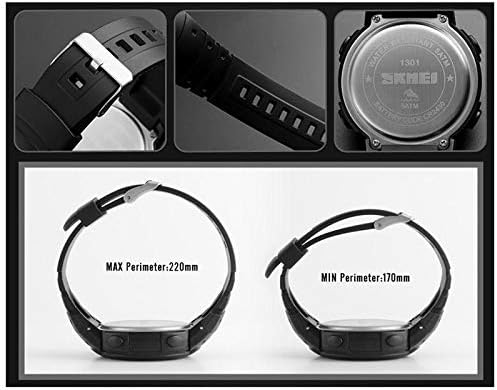
Image: This image shows the watch from different angles, highlighting the strap, buckle, and the back casing with model number '1301 SKMEI'. It also illustrates the minimum (170mm) and maximum (220mm) wrist perimeter for comfortable wear.
8. Warranty and Support
For warranty information and customer support, please refer to the documentation included with your purchase or visit the official SKMEI website. You can also find support resources within the companion smartphone application.