
1. Introduction
Thank you for choosing the TEKMAGIC 751315216081 Digital Sports Watch. This watch is designed for active individuals, featuring a robust 100-meter water resistance, making it suitable for swimming, diving, and various water sports. It includes essential functions such as a stopwatch, alarm, dual time zone display, and backlight. This manual provides detailed instructions to help you set up and operate your watch effectively.

Image 1.1: The TEKMAGIC Digital Sports Watch, highlighting its water resistance for activities like scuba diving.
2. Setup and Initial Configuration
Before using your watch, please ensure it is properly set up. The watch comes with a pre-installed battery (CR2025).
2.1 Button Functions Overview
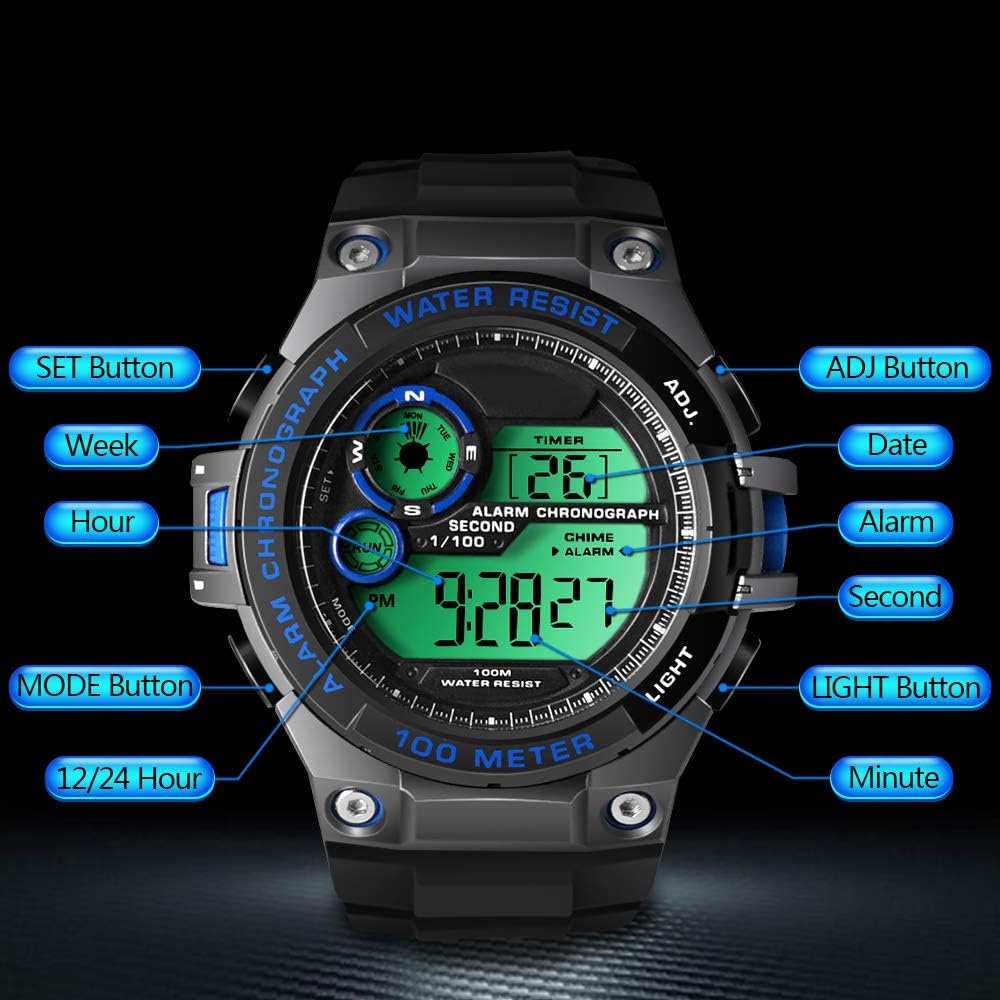
Image 2.1: Overview of watch buttons and their primary functions.
- SET Button (Top Left): Used to enter and confirm settings.
- MODE Button (Bottom Left): Cycles through different modes (Time, Chronograph, Alarm, Timer, Dual Time).
- ADJ Button (Top Right): Adjusts values during setting.
- LIGHT Button (Bottom Right): Activates the backlight.
2.2 Setting Time and Date
- From the normal time display, press and hold the SET button until the seconds start flashing. This indicates you are in setting mode.
- Press the MODE button to cycle through the settings: Seconds → Hour → Minute → 12/24 Hour Format → Month → Date → Day of Week.
- Use the ADJ button to increase the flashing value. Hold ADJ for faster adjustment.
- Once all settings are adjusted, press the SET button to exit the setting mode and save your changes.
Note: If no button is pressed for a period during setting, the watch may automatically exit setting mode.
2.3 Adjusting the Strap
The watch features a comfortable TPU strap with a buckle clasp. Adjust the strap to fit your wrist securely but not too tightly. The strap is designed to accommodate wrist circumferences from 160mm to 215mm.

Image 2.2: Watch dimensions and strap adjustment range.
3. Operating Instructions
3.1 Mode Selection
Press the MODE button to cycle through the following functions:
- Normal Time Display
- Chronograph (Stopwatch)
- Alarm
- Timer (Countdown)
- Dual Time Zone
3.2 Using the Chronograph (Stopwatch)
- Press MODE until "CHRONO" or "STW" appears on the display.
- Press ADJ to start the stopwatch.
- Press ADJ again to pause the stopwatch.
- To reset, press SET while the stopwatch is paused.

Image 3.1: The watch displaying the stopwatch function.
3.3 Setting and Using the Alarm
- Press MODE until "ALARM" appears.
- Press and hold SET until the hour digits flash.
- Use ADJ to set the desired hour.
- Press MODE to move to the minute setting, then use ADJ to set the minutes.
- Press SET to confirm and exit.
- To activate/deactivate the alarm, press ADJ while in Alarm mode (without holding SET). An alarm icon will appear/disappear.

Image 3.2: The watch displaying alarm and calendar features.
3.4 Using Dual Time Zone
- Press MODE until "DUAL TIME" or "T2" appears.
- Press and hold SET until the hour digits flash.
- Use ADJ to set the desired hour for the second time zone.
- Press MODE to move to the minute setting, then use ADJ to set the minutes.
- Press SET to confirm and exit.

Image 3.3: The watch displaying the dual time zone function.
3.5 Activating the Backlight
Press the LIGHT button (bottom right) to illuminate the display for easy viewing in low-light conditions. The backlight will remain on for a few seconds.

Image 3.4: The watch display with backlight activated.
3.6 Hourly Chime
The watch has an hourly chime function. To activate or deactivate it, navigate to the normal time display. Press the SET button once (do not hold). The chime icon will appear or disappear, indicating its status.
4. Maintenance
4.1 Water Resistance
This watch is water resistant up to 10 ATM (100 meters). This means it is suitable for swimming, snorkeling, and recreational diving. Do not press any buttons while the watch is submerged in water to prevent water ingress. Avoid exposing the watch to hot water or steam, as this can compromise the seals.
4.2 Battery Replacement
The watch uses a CR2025 battery, which typically lasts 1.5 to 2 years. If the display becomes dim or the watch stops functioning, it is likely time to replace the battery. Battery replacement should ideally be performed by a qualified watch technician to ensure the water resistance seal is maintained.
4.3 Cleaning
Clean the watch regularly with a soft, damp cloth. For stubborn dirt, a mild soap solution can be used, followed by rinsing with clean water and drying thoroughly. Avoid using harsh chemicals or abrasive materials.
5. Troubleshooting
5.1 Watch Not Functioning or Display Unclear
- Issue: The watch display is blank, dim, or showing incorrect characters.
- Solution: The battery may be depleted. Replace the CR2025 battery. It is recommended to have this done by a professional to ensure water resistance.
5.2 Difficulty Setting Time/Date
- Issue: Unable to set the correct time or date, or settings revert.
- Solution: Ensure you are pressing and holding the SET button long enough to enter the setting mode (seconds flashing). Cycle through settings using MODE and adjust values with ADJ. Always press SET to confirm and exit the setting mode. If the issue persists after a battery change, contact support.
5.3 Watch Strap Breaks
- Issue: The watch strap breaks or detaches.
- Solution: The strap is made of TPU. While durable, excessive force or wear can cause damage. Replacement straps may be available from the manufacturer or third-party retailers.
6. Specifications
| Brand | TEKMAGIC |
| Model Number | 751315216081 (W60-UK-RD) |
| Display Type | Digital |
| Movement | Japanese Quartz |
| Water Resistance Depth | 100 Meters (10 ATM) |
| Case Material | Resin |
| Dial Window Material | High Transparency Resin |
| Band Material | TPU (Thermoplastic Polyurethane) |
| Clasp Type | Buckle |
| Case Diameter | 55 mm |
| Case Thickness | 18 mm |
| Band Width | 22 mm |
| Wrist Circumference (Min/Max) | 160 mm / 215 mm |
| Battery Type | CR2025 (Included) |
| Battery Life | 1.5 to 2 years |
| Product Weight | 62 Grams |
| Special Features | Alarm, Countdown Timer, Chronograph, Dual Time Zone, 12/24 Hour Format, Backlight, Hourly Chime, Calendar |
7. Warranty and Support
For information regarding warranty coverage, please refer to the documentation provided with your purchase or contact the retailer.
If you encounter any issues not covered in this manual or require further assistance, please contact TEKMAGIC customer support through their official website or the retailer where the product was purchased. Please have your model number (751315216081) and purchase details ready.