
Introduction
This manual provides comprehensive instructions for the SKMEI 1257 Digital Sports Watch. Please read this guide carefully to understand its features, proper operation, and maintenance to ensure optimal performance and longevity of your watch.
Product Overview
Watch Components
The SKMEI 1257 watch features four control buttons, each with specific functions:
- A. LIGHT Button (Top Left): Activates the EL backlight for improved visibility in low-light conditions.
- B. MODE Button (Bottom Left): Cycles through the watch's various operational modes (Timekeeping, Stopwatch, Alarm, Dual Time, Countdown).
- C. START Button (Top Right): Used to start/stop functions and adjust selected settings during setup.
- D. RESET Button (Bottom Right): Used to reset functions and select items during setting adjustments.
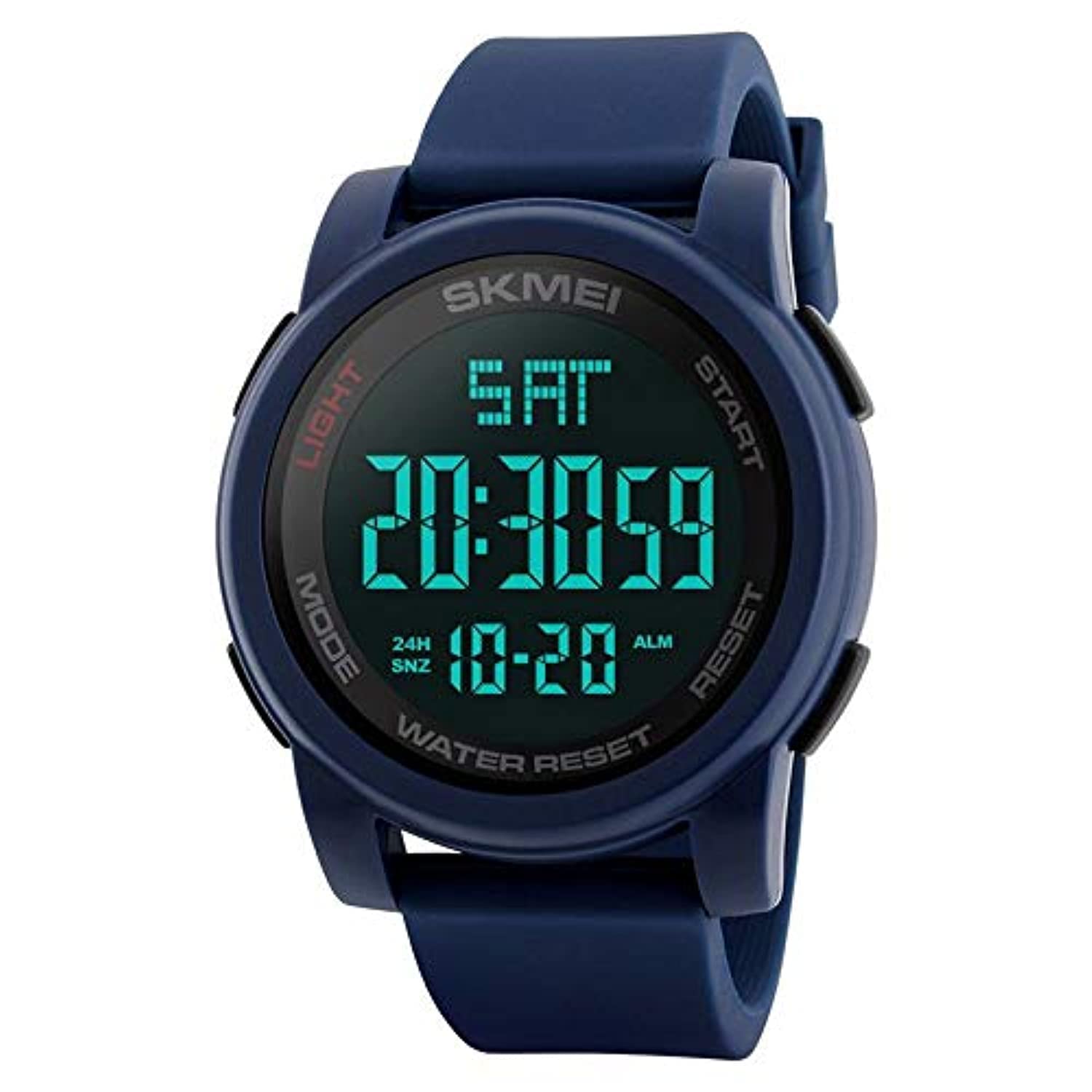
Front view of the SKMEI 1257 Digital Sports Watch, illustrating the location of the four control buttons: LIGHT (top left), MODE (bottom left), START (top right), and RESET (bottom right).
Display Modes
The watch features a clear digital display. The EL backlight function allows for easy reading in the dark.

This image illustrates the difference between the normal display mode and the EL light display mode. Press the LIGHT button to illuminate the display for clear viewing in low light conditions.
Initial Setup
Setting Time and Date
- In the Timekeeping Mode, press the MODE button repeatedly until the seconds digit begins to flash. This indicates you are in setting mode.
- Press the RESET button to cycle through the various setting items: seconds, hour, minute, month, date, and day of the week.
- Use the START button to adjust the currently flashing item to the desired value.
- Once all settings are correct, press the MODE button to exit the setting mode and return to normal timekeeping.
12/24 Hour Format
In Timekeeping Mode, press the START button to toggle between the 12-hour (with AM/PM indicator) and 24-hour display formats.
Operating Instructions
Stopwatch Function
- From Timekeeping Mode, press the MODE button once to enter Stopwatch Mode. The display will show '00:00:00'.
- Press START to begin timing.
- Press START again to pause timing.
- To resume timing after pausing, press START.
- Press RESET to clear the stopwatch to zero.
- Press MODE to return to Timekeeping Mode.
Alarm Function
- From Timekeeping Mode, press the MODE button twice to enter Alarm Mode.
- Press RESET to select either the hour or minute setting, which will begin flashing.
- Use the START button to adjust the flashing hour or minute to your desired alarm time.
- Press MODE to confirm the alarm time and exit the setting mode.
- To turn the alarm ON or OFF, press the START button while in Alarm Mode (not in setting mode). An alarm icon will appear/disappear.
- When the alarm sounds, press any button to stop it.
Countdown Timer
- From Timekeeping Mode, press the MODE button three times to enter Countdown Mode.
- Press RESET to select either the hour or minute setting, which will begin flashing.
- Use the START button to adjust the flashing hour or minute for your desired countdown duration.
- Press MODE to confirm the countdown time and exit the setting mode.
- Press START to begin or pause the countdown.
- Press RESET to reset the countdown timer to its initial set time.
Dual Time Function
- From Timekeeping Mode, press the MODE button four times to enter Dual Time Mode.
- Press RESET to select either the hour or minute setting for the second time zone, which will begin flashing.
- Use the START button to adjust the flashing hour or minute to the desired time for the second time zone.
- Press MODE to confirm the dual time setting and exit.
Luminous Display (Backlight)
Press the LIGHT button (top left) at any time to illuminate the display for a few seconds, allowing you to read the time in dark environments.
Water Resistance Guidelines
The SKMEI 1257 watch is designed with a water resistance rating of 50 meters (5 ATM or 164 feet). This rating means the watch is suitable for everyday use and can withstand splashes, rain, and brief immersion in water, such as during swimming or cold water bathing.
Important Precautions:
- Do not press any buttons while the watch is submerged in water. Pressing buttons underwater can compromise the watch's water seals and allow water to enter.
- Avoid exposing the watch to steam or hot water. This includes hot showers, saunas, or hot tubs. High temperatures can cause the waterproof seals to expand and contract, potentially damaging them and leading to water ingress.
- After exposure to saltwater, rinse the watch with fresh water and dry it thoroughly with a soft cloth to prevent corrosion.
Maintenance
Cleaning
Regularly wipe the watch case and strap with a soft, dry cloth. For stubborn dirt, use a slightly damp cloth with a mild soap solution, then wipe clean with a fresh damp cloth and dry thoroughly. Avoid using harsh chemicals or abrasive materials.
Battery Replacement
When the display becomes dim, or the watch functions become erratic, the battery may need replacement. It is highly recommended to have the battery replaced by a qualified watch technician. This ensures that the watch's water resistance is properly maintained after the battery compartment is opened.
Storage
Store your watch in a cool, dry place away from direct sunlight, extreme temperatures, and strong magnetic fields when not in use.
Troubleshooting
| Problem | Possible Cause | Solution |
|---|---|---|
| Display is blank or dim. | Low battery. | Replace the battery (recommended by a professional). |
| Time is inaccurate. | Incorrect time setting or strong magnetic interference. | Re-set the time according to the "Setting Time and Date" instructions. Keep away from strong magnetic fields. |
| Water or condensation inside the watch. | Buttons pressed underwater, or exposure to hot water/steam. | Stop using the watch immediately and seek professional repair to prevent further damage. Avoid further water exposure. |
| Buttons are unresponsive or stuck. | Dirt, debris, or internal malfunction. | Clean around the buttons. If the problem persists, seek professional service. |
Specifications
| Feature | Detail |
|---|---|
| Brand | SKMEI |
| Model | 1257 |
| Movement Type | Electronic (Quartz) |
| Display Type | Digital |
| Case Material | PC (Polycarbonate) |
| Strap Material | Silicone |
| Buckle Type | Pin Buckle |
| Case Shape | Round |
| Case Diameter | 39 mm |
| Dial Thickness | 15 mm |
| Strap Width | 22 mm |
| Water Resistance Depth | 50 meters (5 ATM) |
| Special Functions | Alarm, Luminous (EL Backlight), Stopwatch, Countdown, Dual Time, Day Calendar, 12/24 Hour Format |
| Power Source | Battery |
| Product Weight | 55 g |
| Country of Origin | China |
Warranty and Support
For specific warranty information, return policies, or technical support, please refer to the documentation included with your original purchase. It is advisable to keep your purchase receipt or proof of purchase as it may be required for warranty claims. You may also contact the retailer or manufacturer directly for assistance.


