
1. Introduction
This manual provides essential instructions for the safe and efficient operation, setup, and maintenance of your Comix S2812 Cross-Cut Paper Shredder. Please read this manual thoroughly before using the shredder and retain it for future reference.
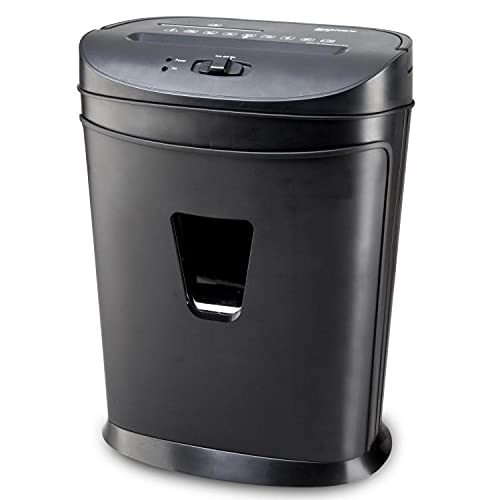
Image: Front view of the Comix S2812 Cross-Cut Paper Shredder. This image displays the overall design of the shredder unit.
2. Safety Instructions
To prevent injury or damage to the shredder, always follow these safety precautions:
- Keep hands, hair, and loose clothing away from the paper entry slot.
- Do not insert more than the maximum recommended number of sheets (12 sheets of A4 70g paper) to avoid jams.
- Unplug the shredder when not in use or before cleaning, moving, or emptying the waste bin.
- Do not allow children or pets near the shredder.
- Do not spray aerosols or lubricants into the shredder.
- Do not shred items containing adhesive, such as labels or sticky notes, as this can cause jams and damage the blades.
- Operate the shredder on a flat, stable surface.
- Avoid placing the shredder near heat sources or in direct sunlight.
3. Package Contents
Verify that all items are present in the package:
- Comix S2812 Shredder Unit (Shredder Head and Waste Bin)
- User Manual
4. Product Features
The Comix S2812 shredder offers the following features:
- Cross-Cut Shredding: Shreds documents into small 4 x 35 mm particles for enhanced security.
- High Capacity: Shreds up to 12 sheets of A4 (70g) paper simultaneously.
- Multi-Media Shredding: Dedicated slots for shredding CDs/DVDs and credit cards.
- Separate CD Bin: Features a separate internal bin for shredded CDs/DVDs, simplifying waste separation.
- Pull-Out Waste Bin: Convenient pull-out design for easy emptying.
- Energy Saving Mode: Automatically reduces power consumption when idle.
- Auto-Off-Rev Switch: Provides automatic start/stop, manual reverse, and overheat protection.

Image: Close-up of the shredder head highlighting energy-saving technology and durable entries for paper and CD shredding with a separate CD bin.

Image: The Comix S2812 shredder with its pull-out waste bin extended, illustrating the convenient design for waste disposal.
5. Setup
- Unpack: Carefully remove all components from the packaging.
- Position: Place the shredder on a flat, stable surface near a power outlet. Ensure there is adequate space around the unit for ventilation.
- Assemble: Place the shredder head securely onto the waste bin. Ensure it is properly seated to activate the safety switch.
- Connect Power: Plug the power cord into a standard electrical outlet.
6. Operating Instructions
- Power On: Locate the switch on the shredder head. Set it to the "AUTO" position. The shredder is now ready for operation.
- Shredding Paper:
- Insert up to 12 sheets of A4 (70g) paper straight into the paper entry slot.
- The shredder will automatically start and stop once the paper has passed through.
- Do not force paper into the slot. If the shredder struggles, reduce the number of sheets.
- Shredding CDs/Credit Cards:
- Insert one CD/DVD or credit card into the dedicated media entry slot.
- The shredder will automatically shred the item.
- Shredded media will fall into a separate internal bin for easy disposal.
- Duty Cycle: The shredder has a duty cycle of 3 minutes on and 40 minutes off. This means it can operate continuously for 3 minutes before requiring a 40-minute cool-down period to prevent overheating. Exceeding the duty cycle may activate the overheat protection, temporarily disabling the shredder.
- Reverse Function: In case of a paper jam, set the switch to the "REV" (Reverse) position to clear the jam.
- Power Off: When finished shredding, set the switch to the "OFF" position and unplug the shredder from the power outlet.
7. Maintenance
Regular maintenance ensures optimal performance and extends the life of your shredder.
- Emptying the Waste Bin: When the waste bin is full, set the switch to "OFF" and unplug the shredder. Carefully pull out the waste bin and empty its contents. Reinsert the bin securely.
- Oiling the Blades: To maintain shredding performance, regularly oil the shredder blades. Apply shredder oil (specifically designed for paper shredders) to a sheet of paper and shred it. Repeat this process periodically, especially after heavy use.
- Cleaning: Wipe the exterior of the shredder with a soft, dry cloth. Do not use abrasive cleaners or solvents.
8. Troubleshooting
| Problem | Possible Cause | Solution |
|---|---|---|
| Shredder does not turn on. |
|
|
| Paper jam. |
|
|
| Shredder stops during operation. |
|
|
9. Specifications
| Feature | Detail |
|---|---|
| Model | S2812 |
| Shred Type | Cross Cut |
| Shred Size | 4 x 35 mm |
| Paper Shred Capacity | 12 sheets (A4, 70g) |
| Media Shred Capacity | 1 CD/DVD, 1 Credit Card |
| Entry Width | 220 mm |
| Shred Speed | 2.5 meters/minute |
| Duty Cycle | 3 minutes ON / 40 minutes OFF |
| Noise Level | 72 dB |
| Special Features | Energy Saving Mode, Pull-out Bin, Separate CD Bin, Auto-Off-Rev Switch |
| Item Weight | 8 kg |
10. Warranty and Support
For warranty information or technical support, please refer to the warranty card included with your product or contact the retailer where you purchased the Comix S2812 shredder. You may also visit the official Comix website for further assistance.