
GUUGEI Digital Pen
GUUGEI 2-in-1 Capacitive Stylus Pen (4 Pack) Instruction Manual
Model: Digital Pen
1. Introduction
Thank you for choosing the GUUGEI 2-in-1 Capacitive Stylus Pen. This manual provides essential information for the proper setup, operation, and maintenance of your stylus pens. These pens are designed to enhance your interaction with capacitive touch screen devices, offering precision and comfort for various tasks.
2. Product Overview
The GUUGEI 2-in-1 Capacitive Stylus Pen features a dual-tip design, combining a high-precision clear disc tip with a soft fiber tip. Constructed from durable stainless steel and aluminum, it provides a comfortable grip and a responsive touch experience across a wide range of devices.

Figure 1: Overview of the GUUGEI 2-in-1 Capacitive Stylus Pen set, showcasing the four available colors and their protective caps.
Key Features:
- 2-in-1 Design: Equipped with both a clear disc tip for precision and a soft fiber tip for general use.
- High Precision & Sensitivity: The clear disc tip allows for accurate positioning, ideal for writing and drawing.
- Anti-scratch Tips: Designed to protect your screen from scratches and fingerprints.
- Universal Compatibility: Works with all capacitive touch screen devices, including iPhones, iPads, Android phones, and tablets.
- No Charging or Bluetooth: Ready to use out of the box without the need for power or pairing.
- Durable Construction: Made from stainless steel and aluminum for a comfortable and lasting feel.
Components:

Figure 2: Detailed view of the stylus components, highlighting the soft fiber tip, aluminum barrel, rubber grip, clear disc tip, and protective cap.
- Soft Fiber Tip: Located at one end, suitable for general navigation, tapping, and scrolling.
- Stainless Aluminum Barrel: The main body of the pen, providing durability and a lightweight feel.
- Comfortable Rubber Grip: Textured grip area for enhanced comfort during extended use.
- High Precision Clear Disc Tip: Located at the other end, designed for precise writing, drawing, and detailed tasks.
- Protective Cap: Covers the clear disc tip when not in use to prevent damage.
3. Setup
The GUUGEI Capacitive Stylus Pen is designed for immediate use without complex setup procedures.
- Unpack: Remove the stylus pens from their packaging.
- No Charging Required: The stylus does not require any battery or charging.
- No Bluetooth Pairing: No Bluetooth connection or special applications are needed. The stylus functions like a finger on the touch screen.
- Remove Cap: If using the clear disc tip, gently unscrew the protective cap.

Figure 3: The stylus is ready to use without charging, Bluetooth, or app settings.
4. Operating Instructions
The stylus offers two distinct tips for different uses:
- Using the Clear Disc Tip: This tip is ideal for tasks requiring high precision, such as writing, drawing, or selecting small icons. The clear disc allows you to see exactly where your mark is being made on the screen. Hold the stylus as you would a regular pen and gently touch the disc to the screen.
- Using the Soft Fiber Tip: This tip is suitable for general navigation, scrolling, tapping, and coloring. It provides a smooth glide across the screen and is comfortable for everyday use.

Figure 4: The clear disc tip provides fine point precision for writing and drawing, while the mesh fiber tip is used for navigation and scrolling.
The stylus is compatible with a wide range of devices, including:
- iPads (6th, 7th, 8th, 9th generation), iPad Pro, iPad Air, iPad Mini
- iPhones (16, 15, 14, 13, 12, 11 series, Pro Max, XS Max, XR, X, 8, 7, 6s, 6 Plus)
- Android Tablets and Phones (Samsung Galaxy, Google Pixel, Moto, BLU, OnePlus, TCL, ZTE, Xiaomi)
- Chromebook Laptops
- E-readers and other capacitive touch screen devices.
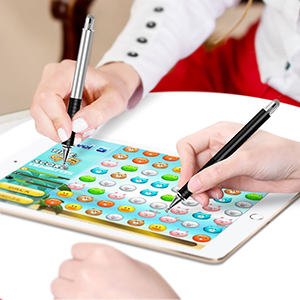
Figure 5: The stylus is universally compatible with Apple, Android, and Windows capacitive touch screen devices.
5. Important Considerations
- Clear Plastic Disc: Do not remove the clear plastic disc from the tip. This disc is crucial for the stylus to receive and conduct the touch screen signal. Without it, the stylus will not function correctly.
- Screen Protection: While the stylus tips are designed to be anti-scratch, it is recommended to use a screen protector on your device. This helps guard against any potential damage or scratches that might occur from dirt on the disc/screen, damaged tips, or manufacturing defects.
- Palm Rejection: This is a universal stylus and does not feature palm rejection technology. Avoid resting your palm on the screen while using the stylus, as this may interfere with its functionality.
6. Maintenance
Proper care will extend the lifespan and performance of your stylus pens.
- Cleaning: Gently wipe the stylus body and tips with a soft, dry, lint-free cloth. Avoid using harsh chemicals or abrasive materials.
- Tip Care: Ensure the clear disc tip remains clean and free of debris. If the disc appears damaged or dirty, it may affect performance.
- Storage: Always replace the protective cap over the clear disc tip when the stylus is not in use to prevent damage. Store the pens in a clean, dry place.
7. Troubleshooting
| Problem | Possible Cause | Solution |
|---|---|---|
| Stylus not responding or inaccurate. |
|
|
| Screen scratches. |
|
|
8. Specifications
- Model: Digital Pen
- Material: Aluminum, Plastic, Stainless Steel
- Item Weight: 0.811 ounces (23 Grams)
- Item Diameter: 9 Millimeters
- Package Dimensions: 8.5 x 4.53 x 0.63 inches
- Compatible Devices: Capacitive touch screen Android tablets, Chromebook laptops, Samsung Galaxy/Google Pixel/Moto/BLU/Oneplus/Tcl/Zte/Xiaomi smartphones, iPad (6th, 7th, 8th, 9th gen), iPad Pro, iPad Air, iPad Mini, iPhone (all series including 16, 15, 14, 13, 12, 11, XS Max, XR, X, 8, 7, 6s, 6 Plus).
- Batteries Required: No
- Batteries Included: No
9. Warranty and Support
Specific warranty information for the GUUGEI 2-in-1 Capacitive Stylus Pen is not provided in this manual. Please refer to the product listing on the retailer's website or contact the manufacturer directly for details regarding warranty coverage and terms.
For product support, inquiries, or to report any issues, please contact GUUGEI customer service through the official channels provided on their website or the retailer's platform where the product was purchased.