
1. Product Overview
The RegiisJoy W88 Pro Arcade Game Console is a retro gaming system featuring 36,800 built-in games, including over 300 3D titles. It is powered by an S812 chip with a 128GB memory card, designed for smooth gameplay. The console supports Wi-Fi and Ethernet connectivity for downloading additional games and offers various features such as game saving, loading, searching, and customization options.

Image 1.1: The RegiisJoy W88 Pro Arcade Console with its dimensions (25.1"L x 8.6"W x 2.7"H) and included accessories: HDMI to VGA adapter, USB cable, HDMI cable, two spare buttons, power adapter, and VGA cable.
2. Setup Instructions
- Unboxing: Carefully remove the console and all accessories from the packaging.
- Protective Film Removal: The console surface has a transparent protective film. Gently peel this film off before use to reveal the console's design.
- Connect to Display: Connect the console to your television, PC monitor, or projector using the appropriate cable (HDMI or VGA). Ensure your display device is set to the correct input source.
- Insert Memory Card: Ensure the 128GB memory card is properly inserted into the console.
- Power Connection: Connect the power adapter to the console and then plug it into a power outlet.
- Power On: Locate the power switch on the back of the console and turn it to the "ON" position.

Image 2.1: Rear view of the console showing the power switch, RJ45 (Ethernet) port, audio output, HDMI port, VGA port, volume control, settings button, and USB ports. This image also illustrates connections to a projector, monitor, and television.
Video 2.1: This video demonstrates the installation process of the RegiisJoy W88 Pro Arcade Console, including connecting cables and powering on the device.
Video 2.2: This video shows how to remove the protective film from the console's surface.
3. Operating Instructions
3.1 Basic Navigation
Use the joysticks and buttons to navigate through the main menu and select games. The console features a user-friendly interface with categories for easy game selection.

Image 3.1: The console's loading screen, displaying "3D Pandora Pro" and "RegiisJoy" branding, indicating the system is starting up.
3.2 Game Management
- Save/Load Games: The P1 pause button allows you to save your game progress and load saved states.
- Search Games: Utilize the search function to quickly find specific titles within the extensive game library.
- Hide Games: Games can be hidden from the main list if desired.
- Favorite List: Pin your favorite games to the top of the list for quick access.
- Recent Plays: The console tracks recently played games for easy resumption.
3.3 System Settings
Access the system settings to customize various aspects of your gaming experience:
- Language: Supports 6 languages: English, Spanish, Japanese, Korean, Simplified Chinese, and Traditional Chinese.
- Button Customization: Remap buttons to suit your play style.
- Difficulty/Health/Playtime: Adjust game difficulty, character health, or playtime for certain games.
- Volume Control: Adjust the volume using the knob on the back panel. A 3.5mm headphone jack is available for private listening.
- Backlight: The console features vibrant backlight with dual light/power switches.

Image 3.2: Screenshots of the system settings menu (left) and game settings menu (right), showing options for language, game market, difficulty, and more. The bottom images show the game market interface and Wi-Fi connection settings.
Video 3.3: This video demonstrates how to modify various settings on the RegiisJoy W88 Pro Arcade Console, including language and game-specific options.
3.4 Adding More Games
The console supports dual Ethernet and Wi-Fi connectivity. Connect to the internet to access the game market and download additional games. Over 50,000 extra games are available.
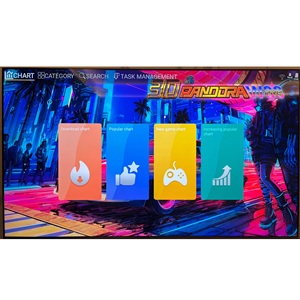
Image 3.4: The game market interface, showing options for downloading new, popular, and trending games.
4. Maintenance
- Cleaning: Use a soft, dry cloth to clean the console's surface. Avoid abrasive cleaners or solvents.
- Protective Film: As mentioned in setup, the console comes with a transparent protective film. This can be removed for a clearer view of the design.
- Memory Card Care: The 128GB memory card is crucial for game storage and system operation. Handle it with care.
5. Troubleshooting
- System Malfunctions: For common system malfunctions, try resetting the machine by removing and reinserting the memory card.
- No Power: Ensure the power adapter is securely connected to both the console and a working power outlet. Check that the power switch on the back of the console is in the "ON" position.
- No Display: Verify that the HDMI or VGA cable is securely connected to both the console and your display device. Confirm that your display device is set to the correct input source.
- Slow Game Downloads/Server Issues: Ensure a stable internet connection (Wi-Fi or Ethernet). If issues persist, try restarting the console and re-accessing the game market. Note that download speeds can vary.
- Controller Connection Issues (for 3rd/4th players): When connecting additional USB controllers, ensure they are plugged in before navigating to the controller setup menu in the system settings. Key bindings may require trial and error as the system may not display a universal button layout.
- Game Aspect Ratio: Older games may appear stretched on modern 16:9 screens. If your TV has an aspect ratio setting (e.g., 4:3 mode), you can adjust it there. The console itself may not offer this specific setting.
- Unplayable 3D/PSP/Dreamcast Games: Some games, particularly those originally designed for consoles like PSP or Dreamcast, may require an external USB gamepad for proper control, as they are not optimized for arcade stick input. Some foreign language versions of games may also be included, which may not be playable without language proficiency.
6. Specifications
| Feature | Detail |
|---|---|
| Model Number | AGC-2 (W88 Pro) |
| Built-in Games | 36,800 (including 300+ 3D games) |
| Processor | S812 chip |
| Memory Card | 128 GB |
| Connectivity | Wi-Fi, Ethernet (RJ45) |
| Output Resolution | 1280x720 (HD) |
| Display Type | HDMI, VGA |
| Number of Players | Up to 4 (requires 2 additional USB controllers for 3-4 players) |
| Controller Type | Dual 3D Joysticks, Button Control |
| Power Source | Corded Electric |
| Item Dimensions (L x W x H) | 25.1" x 8.6" x 2.7" |
| Material Type | Metal, Polycarbonate |
| Supported Languages | English, Spanish, Japanese, Korean, Simplified/Traditional Chinese |
| UPC | 729008874412 |
7. Warranty and Support
For any questions regarding the RegiisJoy W88 Pro Arcade Game Console, please visit the official RegiisJoy website for support. While specific warranty details are not provided in this manual, the manufacturer aims to provide assistance for product inquiries.
Note: Protection plans may be available for purchase separately through retailers, offering extended coverage beyond the manufacturer's standard support.