
1. Introduction
Thank you for choosing the UnionSine HD-2510 Ultra Slim Portable External Hard Drive. This manual provides essential information for setting up, operating, and maintaining your device. Please read it carefully to ensure optimal performance and longevity of your hard drive.

Image: The UnionSine HD-2510 external hard drive, showcasing its sleek black design.
What's in the Box:
- Portable External Hard Drive (UnionSine HD-2510)
- USB 3.0 Cable
- User Manual
2. Key Features
- Ultra-Fast Data Transfers: Equipped with a USB 3.0 thickened copper core cable, this hard drive offers super-fast transfer speeds. Theoretical read speeds reach 110MB/s-133MB/s, and write speeds reach up to 103MB/s.
- Ultra-thin and Quiet Operation: The motherboard incorporates a JMicron 578 noise-free solution, ensuring a quiet working environment. Its lightweight and portable design allows for easy carrying.
- Plug and Play: No software installation is required. Simply connect the drive, and it's ready for use.
- Double Anti-interference: The hard disk chip features an aluminum anti-interference layer for enhanced heat dissipation and data protection. An additional signal shielding layer ensures faster and more stable transmission speeds compared to other hard drives.

Image: Detailed view of the hard drive highlighting its mirror design, rounded edges, chamfered edge, and barcode.

Image: The hard drive connected to a laptop, emphasizing the high-quality USB cable and its protective layers for stable data transfer.
3. Setup
The UnionSine HD-2510 is designed for simple plug-and-play operation. Follow these steps to get started:
- Connect the USB Cable: Insert the smaller end of the included USB 3.0 cable into the port on your UnionSine external hard drive.
- Connect to Your Device: Plug the larger USB end of the cable into an available USB 3.0 port on your computer (PC or Mac), laptop, PS4, or Xbox console.
- Automatic Recognition: Your device should automatically detect the external hard drive. For computers, it will appear as a new drive letter in 'My Computer' (Windows) or on the desktop/Finder (Mac).
- Initial Setup (if prompted): In rare cases, your operating system might prompt you to format the drive before use. Refer to the 'Compatibility & Formatting' section for guidance on supported file systems.
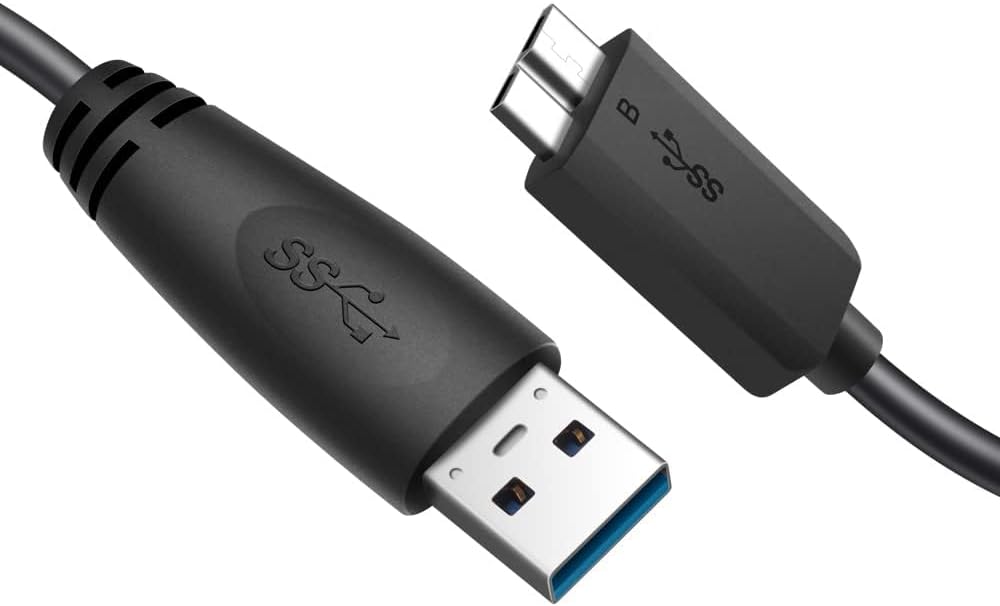
Image: Close-up of the USB 3.0 cable, showing both ends for connection to the hard drive and host device.
For detailed installation instructions, please refer to the quick installation guide included in the packaging.
4. Operating Your Hard Drive
Data Transfer:
Once connected, you can transfer files to and from your UnionSine HD-2510 external hard drive just like any other storage device. Simply drag and drop files or use your operating system's copy/paste functions.
- For Windows: Open 'File Explorer' (or 'My Computer'), locate the external drive, and drag files into its folder.
- For Mac: The drive icon will appear on your desktop. Drag files to and from this icon.
- For PS4/Xbox: Follow the console's specific instructions for external storage setup and game/data transfer.

Image: The UnionSine HD-2510 connected and in use with a laptop, demonstrating its seamless integration for data management.
Safe Removal:
Always safely eject or unmount the hard drive before disconnecting it from your device to prevent data corruption. This can typically be done via the 'Safely Remove Hardware' icon in the Windows system tray or by dragging the drive icon to the Trash/Eject icon on Mac.
5. Compatibility & Formatting
The UnionSine HD-2510 is broadly compatible with various operating systems and gaming consoles:
- PC (Windows 7 or higher)
- Mac (Mac OS X)
- Laptop
- PS4
- Xbox One
- Xbox 360
- Linux
- Android
The product is pre-formatted with EXFAT. If the drive is not recognized upon initial plug-in, you may need to re-format it to a compatible file system for your specific device. Refer to the table below for supported formats:

Image: Table showing supported file system formats for various operating systems and devices.
Important Note:
Some Xbox and PS devices require storage capacity greater than 250GB for proper recognition. For these devices, please purchase a 320GB or above capacity model to avoid unrecognized storage issues.
6. Maintenance
To ensure the longevity and optimal performance of your UnionSine HD-2510, follow these maintenance guidelines:
- Handle with Care: Although designed to be durable, avoid dropping or subjecting the hard drive to strong impacts.
- Keep Clean: Use a soft, dry cloth to clean the exterior of the drive. Avoid liquid cleaners or abrasive materials.
- Temperature and Humidity: Store and operate the drive in a cool, dry environment. Avoid extreme temperatures and high humidity, which can damage internal components.
- Ventilation: Ensure the drive has adequate airflow, especially during prolonged use. The built-in aluminum foil protective layer aids in heat dissipation, but proper ventilation is still beneficial.
- Safe Ejection: Always follow the safe removal procedure before disconnecting the drive to prevent data corruption.
7. Troubleshooting
If you encounter issues with your UnionSine HD-2510, try the following solutions:
Drive Not Recognized:
- Check Connections: Ensure the USB cable is securely plugged into both the hard drive and your device's USB port. Try a different USB port.
- Restart Device: Sometimes, a simple restart of your computer or console can resolve recognition issues.
- Try Another Device: Connect the hard drive to a different computer or console to determine if the issue is with the drive or the original device.
- Check Disk Management (Windows) / Disk Utility (Mac): The drive might be recognized but not assigned a drive letter or formatted. You may need to initialize or format the drive. (Refer to Compatibility & Formatting section).
Slow Data Transfer:
- Use USB 3.0 Port: Ensure you are connecting the drive to a USB 3.0 port on your device for optimal speeds. USB 2.0 ports will result in significantly slower transfers.
- Check Cable: Ensure you are using the original USB 3.0 cable provided. Damaged or non-compliant cables can affect performance.
- Close Background Applications: Other running applications or processes might be consuming system resources, affecting transfer speeds.
- Defragment (Windows HDD only): For traditional hard drives, defragmenting the drive can sometimes improve performance. (Not applicable for SSDs).
Drive Making Unusual Noises:
- While the drive is designed for quiet operation, persistent clicking, grinding, or loud whirring noises may indicate a potential issue. Back up your data immediately and contact customer support.
8. Specifications

Image: Diagram showing the physical dimensions of the UnionSine HD-2510 hard drive.
| Feature | Detail |
|---|---|
| Brand | UnionSine |
| Model Number | HD2510 |
| Digital Storage Capacity | 500 GB |
| Hard Drive Type | Mechanical Hard Disk |
| Hard Drive Form Factor | 2.5 Inches |
| Hard Drive Interface | USB 3.0 |
| Hard Drive Rotational Speed | 5400 RPM |
| Connectivity Technology | USB |
| Color | Black |
| Item Weight | 7.7 ounces |
| Product Dimensions (LxWxH) | 4.56 x 3.15 x 0.5 inches |
| Compatible Devices | Desktop, Laptop, PS4, Xbox |
| Installation Type | External Hard Drive |
9. Warranty and Support
Warranty Information:
The UnionSine HD-2510 External Hard Drive comes with a 3-Year Limited Warranty. This warranty covers defects in materials and workmanship under normal use. Please retain your proof of purchase for warranty claims.
Customer Support:
For technical assistance, troubleshooting, or warranty inquiries, please visit the official UnionSine website or contact their customer support directly. Refer to the packaging or the quick installation guide for specific contact details.
You can also find a digital version of the user manual here: User Manual (PDF)