
1. Introduction
The K LAKEY NTAG215 NFC Stickers are versatile, programmable Near Field Communication (NFC) tags designed for a wide range of applications. These stickers allow users to store and transfer small amounts of data, automate tasks, and interact with NFC-enabled devices with a simple tap. This manual provides detailed instructions for their setup, programming, and optimal use.
Each sticker features an NTAG215 chip, offering 504 bytes of user memory, making them suitable for various functions from sharing contact information to triggering device settings.

Figure 1: K LAKEY NTAG215 NFC Stickers
2. Product Overview
2.1 Key Features
- NTAG215 Chip: Ensures broad compatibility and reliable performance across NFC-enabled devices.
- Memory Capacity: 504 bytes of user memory, sufficient for storing URLs, contact details, small commands, and more.
- Compact Size: Each sticker has a 25mm (1 inch) diameter, allowing for discreet placement.
- Durable Construction: Made from PET/Coated Paper with a strong adhesive backing.
- Longevity: Designed for up to 10,000 read/write cycles and data retention for over 10 years.
2.2 Components
Each K LAKEY NTAG215 NFC sticker consists of several layers:
- NFC Chip: The core component that stores data.
- Antenna: Facilitates communication with NFC readers.
- PET/Coated Paper: The durable outer material.
- Adhesive Layer: For secure attachment to surfaces.
- Release Paper: Protects the adhesive until application.
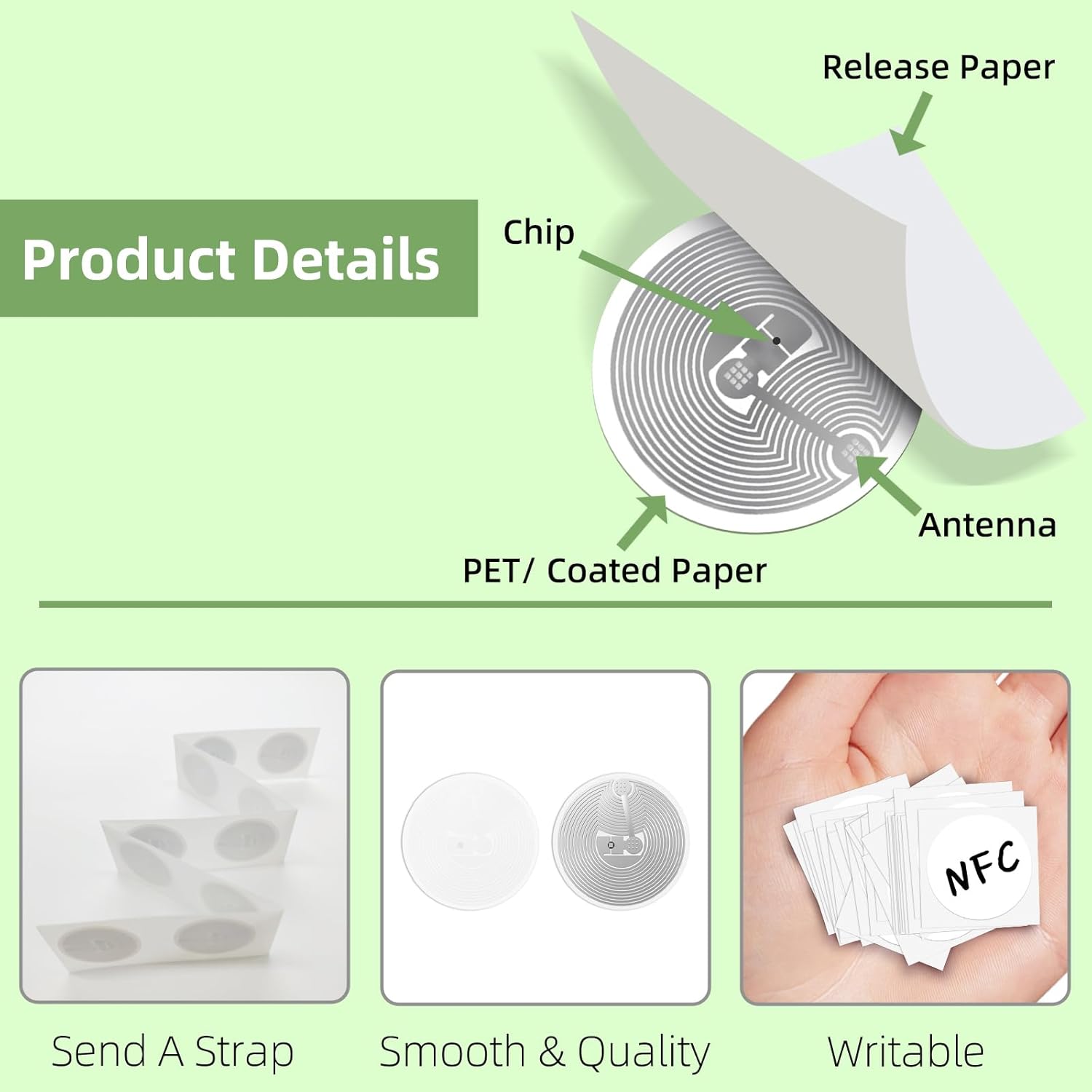
Figure 2: Internal Components of an NFC Sticker

Figure 3: Sticker Size Comparison (1 inch / 25mm diameter)
3. Setup and Programming
3.1 Requirements
- An NFC-enabled smartphone or device.
- An NFC programming application (e.g., "NFC Tools" available on Android and iOS app stores).
3.2 Programming Steps
- Download and install an NFC programming application on your smartphone.
- Open the application and select the desired action or data type you wish to write to the sticker (e.g., a website URL, contact information, a command to toggle Wi-Fi).
- Hold the K LAKEY NTAG215 NFC sticker near your device's NFC reader. The NFC reader is typically located on the top or back of your smartphone.
- Follow the on-screen prompts in the application to confirm the write operation. A confirmation message usually indicates successful programming.

Figure 4: Using an NFC Information App to Verify Tag Details
3.3 Common Applications
- Contact Sharing: Program a sticker with your contact details for easy sharing.
- Website/App Launch: Embed a URL to open a specific website or launch an application.
- Device Automation: Create shortcuts to change phone settings like Wi-Fi, Bluetooth, or sound profiles.
- Gaming Compatibility: Use with TagMo for Amiibo emulation on compatible gaming systems like Wii U and new 3DS.
- Access Control: Integrate into systems for quick access (e.g., door entry, as shown in Figure 5).

Figure 5: Example of NFC Sticker for Access Control

Figure 6: NFC Stickers for Gaming Applications (Amiibo)

Figure 7: General NFC Sticker Usage Example
4. Compatibility and Limitations
4.1 Device Compatibility
K LAKEY NTAG215 NFC Stickers are compatible with:
- Most NFC-enabled Android smartphones and tablets.
- NFC-enabled devices for TagMo and Amiibo functions.
- Gaming systems such as Wii U and new 3DS.
4.2 iOS Device Considerations
iPhones (iPhone 7 and newer) can read NTAG215 tags. However, writing capabilities and the amount of data that can be reliably read may vary depending on the iOS version and the specific NFC application used. Shorter data strings, such as URLs, are generally read more consistently by iOS devices.
4.3 Important Limitations
- Metal Surfaces: These NFC stickers are not suitable for use on metal surfaces. Metal can interfere with the NFC signal, preventing proper reading or writing.
- Water Exposure: Avoid direct contact with water to maintain the sticker's integrity and functionality.
- Read/Write Distance: The optimal read/write distance is typically between 1-10 cm, which can vary based on the reading device and environmental factors.
5. Troubleshooting
5.1 Tag Not Reading or Writing
- NFC Enabled: Ensure that the NFC function is enabled on your smartphone or reading device.
- Correct Positioning: Reposition the NFC sticker relative to your device's NFC reader. The optimal position can vary by device.
- Surface Interference: Verify that the sticker is not placed on a metal surface, as this will prevent it from functioning correctly.
- iOS Specific Issues: For iOS devices, try writing shorter data strings or using a different NFC application, as some apps or data lengths may have limited compatibility.
- Tag Verification: Use an NFC information application (e.g., "TagInfo") to confirm that the sticker is indeed an NTAG215 type and is detectable.
5.2 Data Corruption
If the data on your sticker appears corrupted or cannot be read, attempt to re-program the sticker using your NFC programming application.
6. Specifications

Figure 8: K LAKEY NTAG215 NFC Sticker Specifications
| Specification | Detail |
|---|---|
| Model Number | AE-STICKER-W-10 |
| Chip Type | NTAG215 |
| User Memory | 504 Bytes |
| Diameter | 25mm (1 inch) |
| Material | PET/Coated Paper |
| Agreement Type | ISO/IEC 14443A & 18000-3 |
| Readable Times | Up to 10,000 cycles |
| Data Storage Time | Over 10 years |
| Read/Write Distance | 1-10 cm |
7. Warranty and Support
No specific warranty information is provided with the K LAKEY NTAG215 NFC Stickers. For product support or inquiries, please refer to the seller's contact information or the platform where the product was purchased.