
Introduction
This manual provides instructions for the Kalenji W200M Digital Sport Watch. Please read carefully to ensure proper use and maintenance of your device.
Product Overview
Watch Components
The Kalenji W200M features a digital display and multiple function buttons for various modes and adjustments.
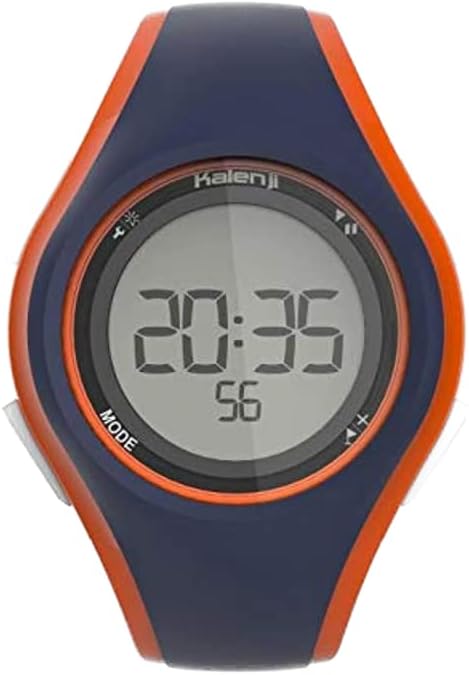
This image displays the Kalenji W200M Digital Sport Watch. The watch features a dark blue and orange polyurethane casing. The digital display shows the time as 20:35 and 56 seconds. Buttons are visible on the sides, with 'MODE' clearly labeled on the bottom left.
Key Features
- 1/100th second stopwatch for precise timing.
- Backlight for improved visibility in low-light conditions.
- Alarm clock function for daily reminders.
- Date display.
- Water resistance suitable for swimming (up to 50 meters), with buttons usable underwater.
- Resistance to chlorinated pool water, sea water, and sweat.
- Large numbers on the display for clear visibility during activities.
- Easy setting via intuitive on-screen icons.
Setup
Initial Setup and Time/Date Adjustment
To set the time and date on your Kalenji W200M watch:
- Press the MODE button (typically on the bottom left side) repeatedly until the time setting mode is displayed. The hours or minutes will usually flash.
- Use the adjustment buttons (often on the right side, e.g., top right for increment, bottom right for decrement) to set the correct hours, minutes, and seconds.
- Continue pressing MODE to cycle through date settings (day, month, year) and adjust each value as needed using the adjustment buttons.
- Press MODE again to exit the setting mode and save your changes.
Refer to the icons on the watch screen for visual guidance during the adjustment process.
Operating Functions
Stopwatch Function
The watch includes a 1/100th second stopwatch for timing activities.
- Press the MODE button to navigate to the stopwatch display.
- Press the START/STOP button (usually top right) to begin timing.
- Press START/STOP again to pause or resume the stopwatch.
- Press the RESET button (often bottom right) to clear the stopwatch to zero.
Backlight
To activate the backlight for improved visibility in low light conditions, press the backlight button (typically top left). The backlight will illuminate for a few seconds.
Alarm Clock
To set the alarm:
- Press the MODE button to navigate to the alarm setting display.
- Use the adjustment buttons to set the desired alarm time (hours and minutes).
- Press MODE to confirm the alarm time and activate the alarm. An alarm icon will typically appear on the display.
The alarm will sound at the set time daily. Press any button to silence it.
Water Resistance Guidelines
Water Resistance Information
The Kalenji W200M watch is designed for various water activities.
- Suitable for swimming up to 50 meters depth.
- Buttons can be operated underwater without compromising water resistance.
- Resistant to chlorinated pool water, sea water, and sweat.
Important: Avoid exposing the watch to hot water or steam (e.g., hot showers, saunas) as this can compromise the water seals and lead to damage.
Maintenance
Care and Cleaning
- Clean the watch regularly with a soft, damp cloth.
- Avoid using chemical cleaners or abrasive materials, which can damage the watch's finish or seals.
- Rinse the watch with fresh water after exposure to salt water or chlorine, then dry thoroughly with a soft cloth.
Battery Replacement
When the display dims or functions become erratic, the battery may need replacement. This should ideally be performed by a qualified technician to ensure the watch's water resistance is maintained after the battery change.
Troubleshooting
Common Issues and Solutions
| Problem | Possible Cause | Solution |
|---|---|---|
| Display is blank or dim | Low battery | Replace battery (professional service recommended to maintain water resistance). |
| Buttons not responding | Watch may be in a locked mode or internal issue | Try pressing the MODE button repeatedly to cycle through modes. If issue persists, contact support. |
| Water inside display | Water resistance compromised | Immediately stop using the watch and seek professional repair. Avoid extreme temperature changes. |
Specifications
Technical Details
- Model: W200M
- Movement Type: Quartz
- Display Type: Digital
- Band Material: Polyurethane
- Water Resistance: Suitable for swimming (up to 50 meters)
- Features: 1/100 stopwatch, backlight, alarm, date display
- Targeted Group: Unisex
Warranty and Support
Product Support
For warranty information or further assistance with your Kalenji W200M Digital Sport Watch, please refer to the documentation provided at the point of purchase or contact the retailer directly.