Introduction
Thank you for choosing the Generic WS-887 Mini Bluetooth Speaker. This manual provides detailed instructions for the proper setup, operation, and maintenance of your device. Please read this manual thoroughly before use to ensure optimal performance and longevity of your speaker.
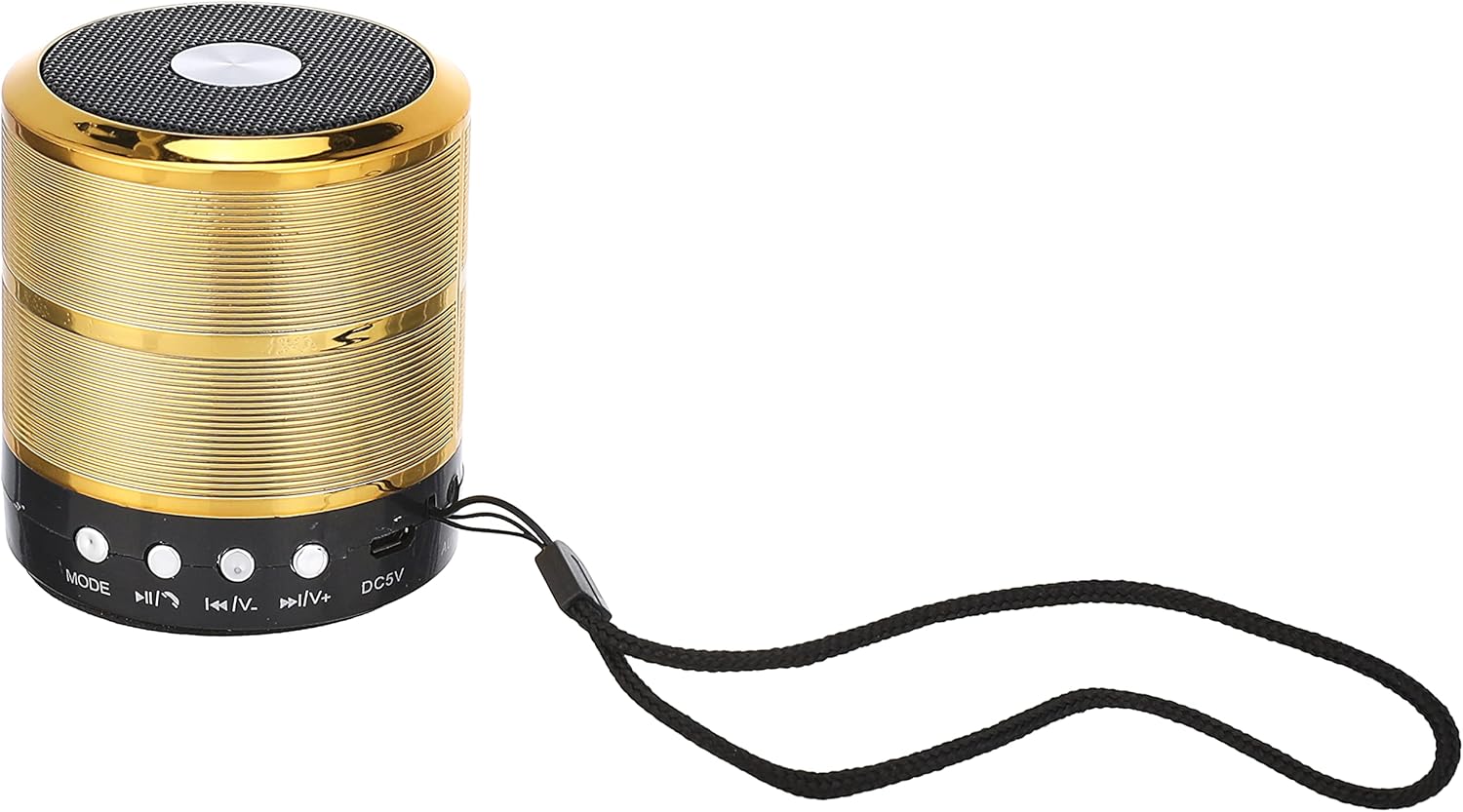
This image displays the Generic WS-887 Mini Bluetooth Speaker, highlighting its compact cylindrical design. The front panel features control buttons for mode selection, track navigation, volume adjustment, and play/pause, along with a micro-USB charging port and a lanyard.

This image demonstrates the compact and portable size of the WS-887 Mini Bluetooth Speaker, shown resting in a hand. The speaker measures approximately 3.1 inches (7 cm) in height, emphasizing its suitability for travel and on-the-go use.
Setup
1. Unpacking
Carefully remove all components from the packaging. Please ensure the following items are present:
- Generic WS-887 Mini Bluetooth Speaker
- USB Charging Cable (typically included)
- User Manual (this document)
2. Charging the Speaker
Before initial use, fully charge the speaker. Connect the micro-USB end of the charging cable to the speaker's DC5V port and the USB-A end to a compatible USB power source (e.g., computer USB port, USB wall adapter). A charging indicator light (if present, refer to speaker for specific light behavior) will typically illuminate during charging and turn off or change color when fully charged.
The micro-USB charging port (DC5V) is located on the front panel of the speaker, next to the control buttons.
3. Powering On/Off
To power on the speaker, locate the ON/OFF switch on the bottom of the device and slide it to the "ON" position. To power off, slide the switch to the "OFF" position.

The underside of the speaker features an ON/OFF slide switch for power control. A label provides essential product information including 'Model: WS887', 'R.M.S.: 3W', 'Impedance: 3', and 'Power Supply: USB(DC+5V)' for reference.
Operating Instructions
1. Bluetooth Pairing
- Ensure the speaker is powered on. It will typically enter Bluetooth pairing mode automatically, indicated by a flashing LED light (color and pattern may vary).
- On your mobile device (smartphone, tablet, computer), enable Bluetooth.
- Search for available Bluetooth devices. The speaker should appear as "WS-887" or a similar name.
- Select "WS-887" to connect. Once paired, the speaker will usually emit an audible confirmation tone, and the LED indicator will stop flashing or change to a solid light.
- If prompted for a password, enter "0000".
Note: The speaker will automatically attempt to reconnect to the last paired device when powered on, if that device's Bluetooth is active and within range.
2. Audio Playback and Controls
The speaker features several control buttons on its front panel:
- MODE Button: Press to switch between available modes (e.g., Bluetooth, USB/TF Card, FM Radio if supported).
- Play/Pause Button (►▮▮): Press once to play or pause audio.
- Previous Track / Volume Down (◀◀|V-):
- Short press: Go to the previous track.
- Long press: Decrease volume.
- Next Track / Volume Up (►►|V+):
- Short press: Go to the next track.
- Long press: Increase volume.
The control panel showing the MODE button, track navigation/volume buttons, and play/pause button.
3. USB/TF Card Playback
The speaker supports playing audio files directly from a USB flash drive or a TF (MicroSD) card. Insert the USB drive into the USB-A port or the TF card into its dedicated slot (if present, not explicitly visible in images but common for these speakers). Press the MODE button to switch to USB or TF card mode. The speaker will automatically begin playing supported audio files.
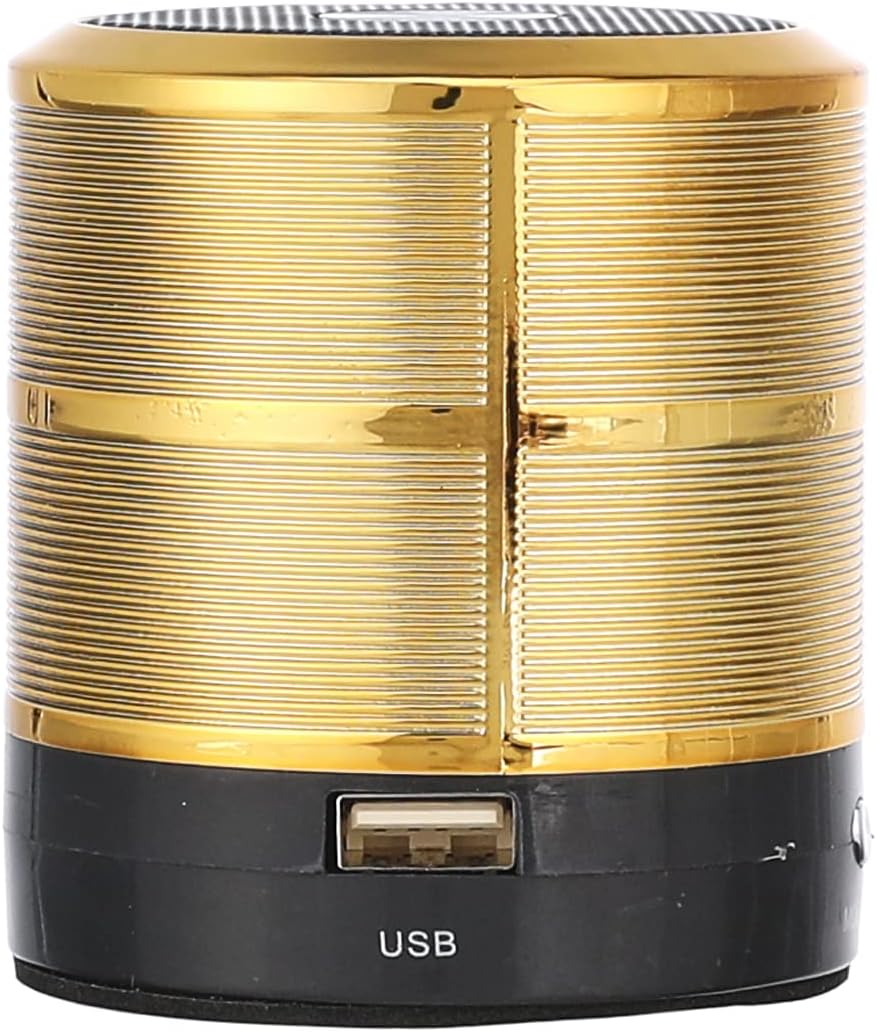
The USB-A port for connecting a USB flash drive is located on the side of the speaker.
Maintenance
1. Cleaning
Wipe the speaker's exterior with a soft, dry, lint-free cloth. Do not use abrasive cleaners, waxes, or solvents. Avoid getting moisture into any openings.
2. Storage
When not in use for extended periods, store the speaker in a cool, dry place, away from direct sunlight and extreme temperatures. It is recommended to charge the battery periodically (e.g., every 3 months) to maintain battery health.
3. Battery Care
To prolong battery life, avoid fully discharging the speaker frequently. Charge the speaker when the battery low indicator (if present) is active. Do not expose the battery to high temperatures or attempt to disassemble it.
Troubleshooting
| Problem | Possible Cause | Solution |
|---|---|---|
| Speaker does not power on. | Battery is discharged. | Charge the speaker using the provided USB cable. |
| Cannot pair with Bluetooth device. | Bluetooth is not enabled on the device; speaker is not in pairing mode; device is too far. |
|
| No sound or low volume. | Volume is too low on speaker or connected device; incorrect mode selected. |
|
| Audio playback from USB drive not working. | USB drive not inserted correctly; unsupported file format; speaker not in USB mode. |
|
Specifications
| Model Name | WS-887 |
| Brand | Generic |
| Speaker Type | Bluetooth Speakers |
| Connectivity Technology | Bluetooth, USB |
| Audio Output Mode | Stereo |
| Frequency Response | Up to 20 KHz |
| Power Supply | USB (DC+5V) |
| RMS Power | 3W |
| Impedance | 3 Ohms |
| Product Dimensions | 5 x 7 x 17 cm; 200 g |
| Material | Mixed Materials |
| Mounting Type | Tabletop |
| Special Features | USB Port |
Warranty and Support
For warranty information and customer support, please refer to the documentation provided at the time of purchase or contact your retailer. Specific warranty terms may vary by region and retailer.
Keep your purchase receipt as proof of purchase for any warranty claims.


