
Ohniyou GLX004
Ohniyou 42'' Retractable Ceiling Fan with Lights
Model: GLX004
User Instruction Manual

Main product image of the Ohniyou 42-inch Retractable Ceiling Fan.
Product Overview
The Ohniyou 42'' Retractable Ceiling Fan with Lights is a modern and functional addition to any room. It combines the utility of a ceiling fan with the aesthetic of a chandelier, featuring retractable blades that disappear when not in use. This fan offers advanced control options, including a remote and a mobile application, along with dimmable lighting and a quiet DC motor.
Key Features:
- Remote & APP Control: Conveniently manage fan speeds, light settings, and fan direction.
- Dimmable LED Light: Adjust light brightness from 10% to 100% and choose from 3 color temperatures (yellow, warm, white).
- Silent DC Motor: Operates quietly with 6 speed settings, ideal for bedrooms and living areas.
- Reversible Motor: Allows for year-round use, circulating cool air in summer and warm air in winter.
- Retractable Blades: Four invisible ABS acrylic blades automatically extend when the fan is on and retract when off, transforming the unit into a sleek light fixture.
- High-Quality Materials: Constructed with clear crystal, high-quality metal, pure copper motor, and glass lampshade for durability and stable performance.

Product dimensions and recommended room sizes for optimal performance.
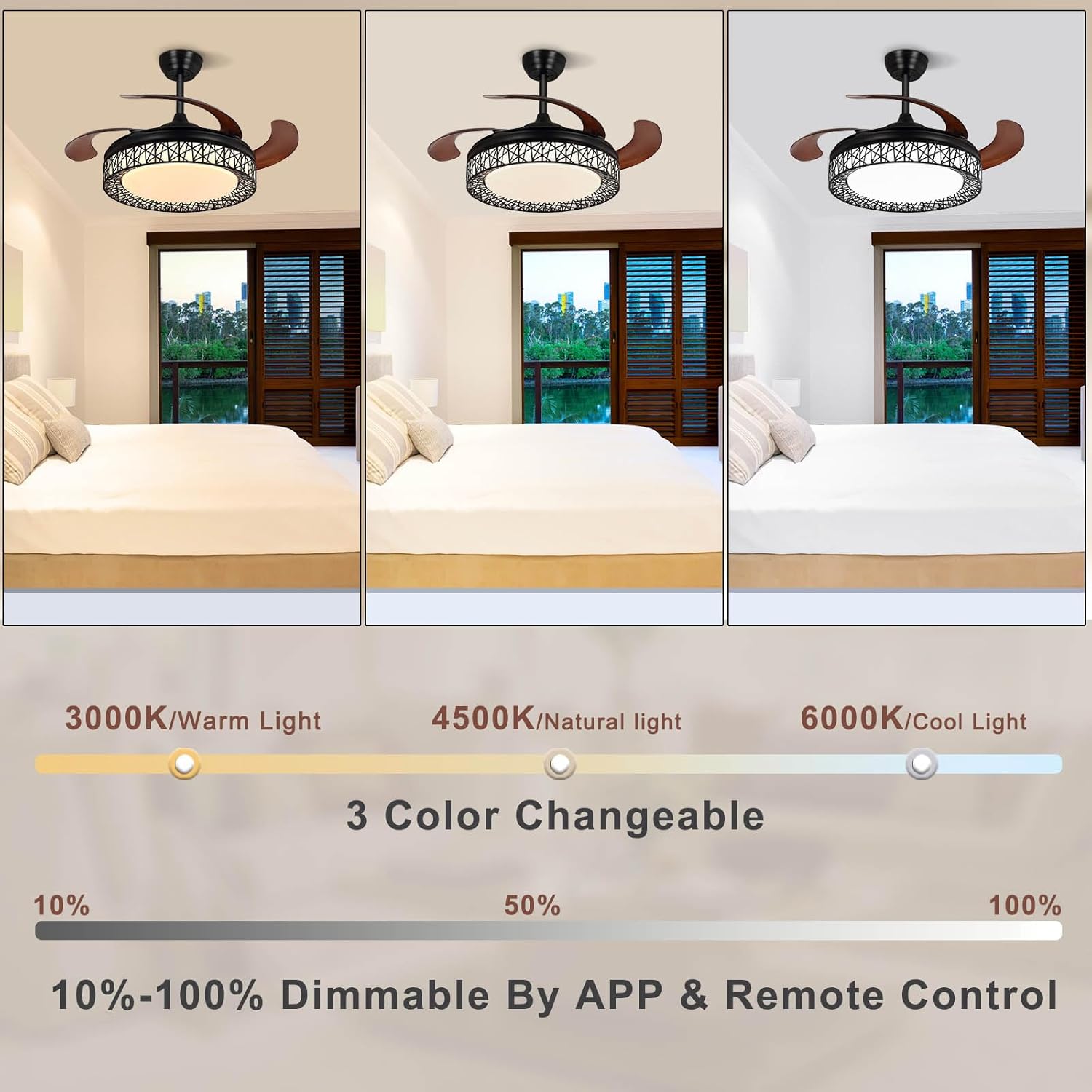
Illustration of the 3 color changeable light settings and dimmable range.

The fan's powerful yet quiet operation, suitable for peaceful environments.

Demonstration of the reversible DC motor for year-round air circulation.

Visual representation of the fan blades extending when on and retracting when off.

Comparison of features between the Ohniyou fan and an ordinary ceiling fan.
Installation Guide
For detailed installation instructions, please refer to the official Installation Manual (PDF) provided with your product. Below is a helpful video and image illustrating key steps and requirements.
This video demonstrates the step-by-step installation process for the Ohniyou 42'' Retractable Ceiling Fan.

Important installation requirements, including suitable ceiling types and minimum clearances.
Operating Your Ceiling Fan
Remote Control Functions:

Detailed layout of the remote control with functions for light, fan speed, and direction.
- Light ON/OFF: Turns the light on or off.
- Three-color segmentation: Cycles through different light color temperatures (yellow, warm, white).
- Brightness plus/reduction: Adjusts the light brightness.
- Color temperature plus/reduction: Fine-tunes the light color temperature.
- Wind direction Forward/Reverse: Changes the fan's rotation direction for summer or winter mode.
- 6 powerful speeds: Selects fan speed from 1 to 6.
- Natural wind mode: Simulates natural breeze.
- Timer setting (2H): Sets a 2-hour timer for automatic shut-off.
- Night light: Activates a low-brightness night light mode.
- Turn All Off: Turns off both the fan and the light.
APP Control Functions:
Control your fan conveniently via the dedicated mobile application. Download the app from http://www.jasonghost.com/fanlamppro/ or by scanning the QR code in the image below.

Overview of the Smart APP Control interface, showing various functions and settings.
This video illustrates the basic functions of the Ohniyou Retractable Ceiling Fan, including fan speed and light adjustments.
This video showcases the retractable blades and lighting features of the Ohniyou 42-inch ceiling fan.
A demonstration of the retractable ceiling fan with its integrated lighting.
Maintenance
To ensure optimal performance and longevity of your Ohniyou ceiling fan, regular maintenance is recommended.
Cleaning:
The surface of the fan and light is smooth and easy to clean. Use a soft, damp cloth to wipe down the exterior. Avoid abrasive cleaners or solvents that may damage the finish.
General Care:
- Periodically check all screws and connections to ensure they are secure.
- Ensure the fan blades are free from obstructions.
- Do not attempt to lubricate the motor. It is permanently lubricated.
Troubleshooting
If you encounter any issues with your Ohniyou ceiling fan, please refer to the common troubleshooting steps below. For more complex problems, contact customer support.
Remote Control Not Working:
This video provides instructions on how to re-pair the remote control if it is not functioning correctly.
- Ensure batteries are correctly installed and not depleted.
- Try re-pairing the remote control with the fan as shown in the video above.
- Ensure there are no obstructions between the remote and the fan's receiver.
APP Connection Issues:
Learn how to download the app and connect it to your Ohniyou ceiling fan for smart control.
- Ensure your phone's Bluetooth is enabled.
- Follow the app's pairing instructions carefully, often involving turning the fan off and on at the wall switch.
- Make sure the app has necessary permissions to access Bluetooth and location services.
General Issues:
- Fan not turning on: Check power supply at the circuit breaker and ensure all electrical connections are secure.
- Light not working: Verify light settings on remote/app. If the light strip is replaceable, ensure it is properly installed.
- Unusual noise: Ensure all mounting screws are tightened. Check if the fan blades are properly balanced and free from any obstructions.
Product Specifications
| Specification | Detail |
|---|---|
| Brand | Ohniyou |
| Model Name | GLX004 |
| Color | Black |
| Product Dimensions | 42"D x 42"W x 9.84"H |
| Item Weight | 14.97 Pounds |
| Power Source | DC |
| Voltage | 110 Volts |
| Wattage | 48 watts |
| Number of Blades | 4 |
| Blade Material | Plastic |
| Noise Level | 40 dB |
| Control Method | App, Remote |
| Room Type | Bedroom |
| Indoor/Outdoor Usage | Outdoor, Indoor |
| UPC | 756588289589 |
Warranty and Support
For warranty information and technical support, please refer to the documentation included with your product or contact Ohniyou customer service directly.
Customer Support Email: ohnyou@ledphy.com
Optional protection plans are available for extended coverage. Please refer to your purchase details for more information.
Ask a question about this manual
Ask about setup, troubleshooting, compatibility, parts, safety, or missing instructions. Manuals+ will review the question and use this page’s manual context to help answer it.