
1. Introduction
Thank you for choosing the Binwo XML T6 LED Tactical Flashlight. This high-quality flashlight is designed for reliability and performance in various outdoor and emergency situations. It features a powerful XML T6 LED, a zoomable head for adjustable focus, and multiple lighting modes. Please read this manual carefully to ensure proper use and maintenance of your device.
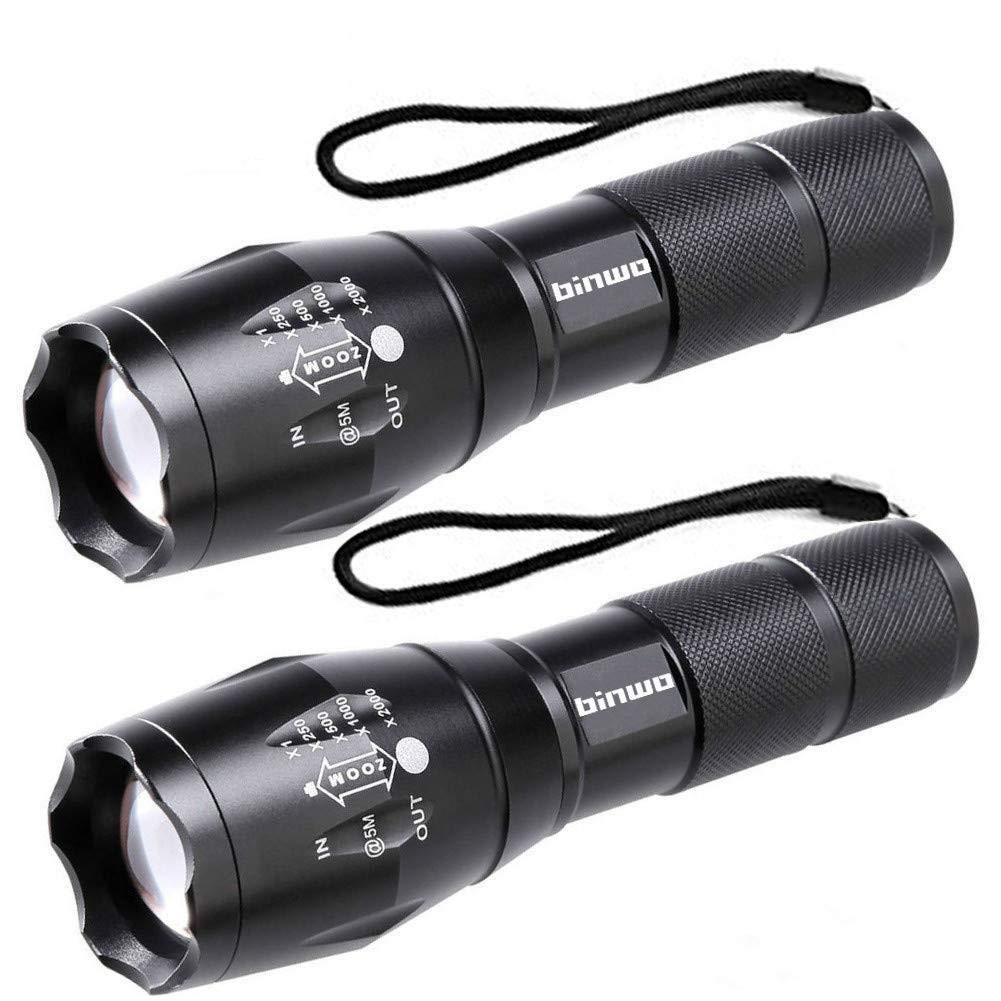
Figure 1: Binwo XML T6 LED Tactical Flashlight. This image shows the compact, black aluminum body of the flashlight, highlighting its textured grip and the adjustable head for beam focus.
2. Product Specifications
| Brand | Binwo |
| Model | XML T6 LED Tactical Flashlight |
| Light Source | XML T6 LED |
| Max Lumen Output | Up to 2000 Lumens |
| Beam Distance | Up to 660 feet |
| Material | Aluminum Alloy |
| Color | Black |
| Water Resistance | Water Resistant |
| Special Features | Durable, Zoomable Head, Multiple Modes |
| ASIN | B091CKBXMS |
3. Package Contents
Your Binwo XML T6 LED Tactical Flashlight package should include:
- 2 x Binwo XML T6 LED Tactical Flashlights
- 1 x User Manual
4. Setup
4.1 Battery Installation
- Unscrew the tail cap of the flashlight by turning it counter-clockwise.
- Insert the required battery type (e.g., 18650 rechargeable battery or 3 AAA batteries using the included adapter, if applicable) with the positive (+) end facing towards the flashlight head.
- Screw the tail cap back on clockwise until it is securely tightened. Ensure the cap is fully tightened to maintain water resistance.
Note: Batteries are typically not included and must be purchased separately. Refer to the packaging for specific battery requirements.
5. Operating Instructions
5.1 Power On/Off
Press the power button located on the tail cap to turn the flashlight ON or OFF.
5.2 Changing Modes
With the flashlight ON, lightly press the power button (without fully clicking it off) to cycle through the different lighting modes. Common modes include:
- High: Maximum brightness for powerful illumination.
- Medium: Moderate brightness for general use and extended battery life.
- Low: Low brightness for close-range tasks or preserving night vision.
- Strobe: Flashing light for signaling or disorientation.
- SOS: International Morse code signal for emergencies.
5.3 Adjusting Focus (Zoom Function)
To adjust the beam focus, gently slide the head of the flashlight forward or backward. Sliding the head forward will narrow the beam for a focused spotlight, while sliding it backward will widen the beam for a broad floodlight.
6. Maintenance
- Cleaning: Wipe the flashlight body with a soft, damp cloth. Do not use abrasive cleaners or solvents.
- Lubrication: Periodically apply a thin layer of silicone grease to the O-rings and screw threads to maintain water resistance and smooth operation.
- Battery Care: Remove batteries if the flashlight will not be used for an extended period to prevent leakage and damage. Store batteries in a cool, dry place.
- Storage: Store the flashlight in a dry environment, away from direct sunlight and extreme temperatures.
7. Troubleshooting
| Problem | Possible Cause | Solution |
|---|---|---|
| Flashlight does not turn on. | Dead or incorrectly inserted batteries. Loose tail cap. | Replace batteries or ensure they are inserted correctly. Tighten the tail cap securely. |
| Light is dim or flickers. | Low battery power. Loose connections. Dirty contacts. | Replace batteries. Ensure tail cap is tight. Clean battery contacts with a clean cloth. |
| Modes are not changing. | Button not pressed lightly enough. | Ensure you are lightly pressing the power button to cycle modes, not fully clicking it off. |
8. Safety Information
- Do not shine the flashlight directly into eyes, as the powerful LED can cause temporary vision impairment.
- Keep out of reach of children.
- Do not disassemble the flashlight head or LED assembly.
- Use only recommended battery types.
- Dispose of batteries responsibly according to local regulations.
9. Warranty and Support
Binwo products are manufactured to high-quality standards. For warranty information or technical support, please refer to the contact details provided with your purchase or visit the official Binwo website. Please retain your proof of purchase for warranty claims.