
1. Introduction
This manual provides detailed instructions for the safe and effective use of your DT8580 Infrared Thermometer. This device is designed for non-contact temperature measurement, offering a wide temperature range and dual laser targeting for precision. Please read this manual thoroughly before operation and retain it for future reference.
2. Safety Information
WARNING: LASER RADIATION. DO NOT STARE INTO BEAM. CLASS 2 LASER PRODUCT.
- Do not point the laser directly at eyes or indirectly off reflective surfaces.
- Do not use the thermometer near explosive gases, steam, or dust.
- Keep the device away from children.
- Do not attempt to disassemble or modify the device.
- Ensure proper battery installation and disposal.
- This device is not intended for medical use.
3. Product Overview
The DT8580 Infrared Thermometer features a digital display, ergonomic grip, and dual laser pointers for accurate targeting. It measures temperature from -50°C to 580°C (-58°F to 1076°F).

Figure 1: DT8580 Infrared Thermometer with various angles and digital display.
4. Setup
4.1 Battery Installation
- Locate the battery compartment on the handle of the thermometer.
- Gently open the battery compartment cover.
- Insert a 9V battery, ensuring correct polarity (+/-).
- Close the battery compartment cover securely.

Figure 2: The DT8580 thermometer shown with a 9V battery, indicating the type of battery required.

Figure 3: View of the DT8580 with its battery compartment open, illustrating where the 9V battery is inserted.
5. Operating Instructions
5.1 Taking a Measurement
- Point the thermometer at the target surface.
- Press and hold the trigger. The laser pointers will activate, indicating the measurement area.
- The temperature reading will appear on the digital display.
- Release the trigger to hold the reading on the display.
5.2 Distance to Spot Ratio (D:S)
The DT8580 has a D:S ratio of 12:1. This means that at a distance of 12 inches, the measurement spot diameter is 1 inch. For accurate readings, ensure the target spot is entirely within the field of view of the thermometer.
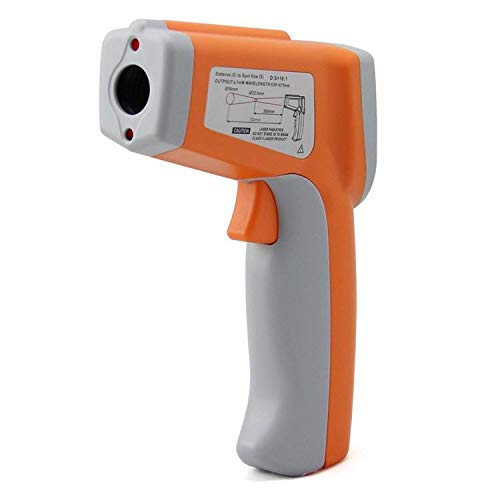
Figure 4: The DT8580 thermometer with a diagram illustrating the distance-to-spot ratio for accurate measurements.
5.3 Unit Selection (°C/°F)
Press the "MODE" button to cycle through available settings. Look for the °C/°F indicator on the display and press the appropriate button (usually an arrow or dedicated button near "MODE") to switch between Celsius and Fahrenheit.
5.4 Emissivity Adjustment
The DT8580 may feature adjustable emissivity for measuring different surface types accurately. Refer to the on-screen indicators or additional buttons to adjust emissivity if available. Common emissivity values are 0.95 for most organic materials and painted surfaces, and lower values for reflective metals.
6. Maintenance
6.1 Cleaning
- Wipe the device with a soft, damp cloth. Do not use abrasive cleaners or solvents.
- Clean the lens with a soft cloth or cotton swab, being careful not to scratch it.
6.2 Storage
Store the thermometer in a cool, dry place, away from direct sunlight and extreme temperatures. Remove the battery if the device will not be used for an extended period.
7. Troubleshooting
| Problem | Possible Cause | Solution |
|---|---|---|
| No display/Device won't turn on | Low or dead battery; incorrect battery installation | Replace battery; ensure correct polarity |
| Inaccurate readings | Distance to spot ratio too large; emissivity setting incorrect; dirty lens | Move closer to target; adjust emissivity; clean lens |
| Laser not working | Laser function disabled; device malfunction | Check settings for laser activation; contact support if persistent |
8. Specifications
| Feature | Detail |
|---|---|
| Model | DT8580 |
| Temperature Range | -50°C to 580°C (-58°F to 1076°F) |
| Distance to Spot Ratio (D:S) | 12:1 |
| Display Type | Digital |
| Connectivity Technology | Infrared |
| Power Source | Battery Powered (9V battery) |
| Outer Material | Plastic |
| Included Components | Infrared Thermometer |
| Product Care Instructions | Wipe to clean |
| Item Weight | 11 grams |
| Manufacturer | Generic |
| ASIN | B091BMP4VK |
9. Warranty and Support
Specific warranty information is not provided with this product. For support or inquiries, please refer to the retailer or point of purchase.