
IsEasy 1760202-L
IsEasy Elektro Autark Ceramic Hob 6000W 59cm - User Manual
1. Introduction
Thank you for choosing the IsEasy Elektro Autark Ceramic Hob. This manual provides essential information for the safe and efficient use of your new appliance. Please read it thoroughly before installation and operation, and keep it for future reference.
This 6000W ceramic hob features 4 high-power cooking zones and 9 adjustable heat levels, designed for quick and efficient cooking. It includes multiple safety features and a user-friendly touch control interface.

Image 1.1: The IsEasy 4-zone ceramic hob with its 6000W power, suitable for various cookware.
2. Safety Instructions
To prevent accidents and ensure proper operation, observe the following safety precautions:
- Electrical Safety: Ensure the appliance is correctly wired and grounded by a qualified electrician. Do not attempt to modify the electrical connection yourself.
- Overheat Protection: The hob is equipped with an overheat protection system that automatically shuts down the heating zones if they reach excessive temperatures.
- Child Safety Lock: Activate the child lock function to prevent accidental operation by children.
- Residual Heat Indicator: Be aware of the residual heat indicator (H) which signals that a cooking zone is still hot after use. Avoid touching hot surfaces.
- Proper Cookware: Use only cookware suitable for ceramic hobs. Ensure pots and pans have flat bottoms and are appropriately sized for the cooking zones.
- Ventilation: Ensure adequate ventilation around the appliance during and after use.

Image 2.1: Always use the child safety lock to prevent accidental operation.
3. Product Overview
3.1 Features
- Power: 6000W total maximum power.
- Cooking Zones: 4 high-power ceramic radiant zones (1200W, 1200W, 1800W, 1800W).
- Heat Levels: 9 adjustable heat levels for precise cooking control.
- Control: Intuitive touch control panel.
- Timer: 1-99 minute timer function.
- Safety: Overheat protection, residual heat indicator, child safety lock, automatic shutdown.
- Design: Sleek ceramic glass surface, suitable for built-in installation.
3.2 Control Panel and Cooking Zones
The hob features a touch-sensitive control panel located at the front. Each cooking zone has its own controls for power adjustment and timer settings.

Image 3.1: Overview of the four cooking zones and the integrated touch control panel.

Image 3.2: The touch control interface with symbols for power, timer, and child lock.
4. Setup and Installation
The IsEasy ceramic hob is designed for built-in installation. Professional installation by a qualified electrician is recommended.
4.1 Dimensions and Cut-out
Ensure your countertop has the correct cut-out dimensions for proper fitting and ventilation.
- Product Dimensions (L x W x H): 59 x 52 x 5.8 cm
- Cut-out Dimensions (L x W x H): 57 x 49.5 x 5.7 cm

Image 4.1: Product and cut-out dimensions for installation.
4.2 Electrical Connection
The hob requires a 220-240V electrical supply. The appliance comes with wiring for direct connection. An appropriate circuit breaker and wiring gauge must be used according to local electrical codes.
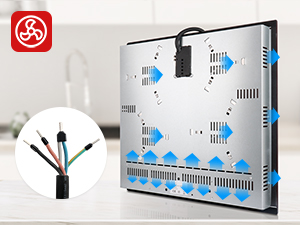
Image 4.2: Electrical wiring instructions. Consult a professional for installation.
5. Operating Instructions
5.1 Power On/Off
- To turn on: Touch the power button (ON/OFF symbol). The display will show '0' for all zones.
- To turn off: Touch the power button again.
5.2 Adjusting Heat Levels
- Select the desired cooking zone by touching its corresponding control.
- Use the '+' and '-' buttons to adjust the heat level from 1 (low) to 9 (high).

Image 5.1: The 9 power levels offer precise temperature control for diverse cooking needs.
5.3 Timer Function
- To set the timer: Select a cooking zone, then touch the timer button (clock symbol).
- Use the '+' and '-' buttons to set the desired cooking time from 1 to 99 minutes.
- The cooking zone will automatically turn off once the timer expires.

Image 5.2: Utilize the 1-99 minute timer for precise cooking control.
5.4 Child Safety Lock
- To activate: With the hob off, press and hold the child lock button (lock symbol) for a few seconds until 'Lo' appears on the display.
- To deactivate: Press and hold the child lock button again until 'Lo' disappears.
5.5 Residual Heat Indicator
After a cooking zone is turned off, an 'H' will appear on its display if the surface is still hot. Do not touch the surface until the 'H' disappears.
5.6 Suitable Cookware
The ceramic hob is compatible with various types of cookware, including:
- Iron pans
- Aluminum pans
- Ceramic pans
- Stainless steel pans
- Copper pans
- Heat-resistant glass pans
Ensure cookware has a flat bottom for optimal heat transfer.

Image 5.3: Examples of suitable cookware for your ceramic hob.
6. Maintenance
Regular cleaning and maintenance will prolong the life of your ceramic hob.
- Cleaning the Surface: Allow the hob to cool completely before cleaning. Use a soft cloth and a mild detergent or a specialized ceramic hob cleaner. Avoid abrasive cleaners, scouring pads, or harsh chemicals that can scratch the glass surface.
- Spills: Wipe up spills immediately, especially sugary liquids, to prevent them from hardening and damaging the surface.
- Ventilation: Ensure the ventilation openings on the underside of the hob are not blocked to maintain efficient cooling.
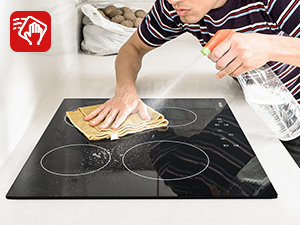
Image 6.1: Cleaning the ceramic glass surface is easy with appropriate cleaners.
7. Troubleshooting
If you encounter issues with your hob, refer to the following common problems and solutions:
| Problem | Possible Cause | Solution |
|---|---|---|
| Hob does not turn on | No power supply; Child lock activated | Check circuit breaker; Deactivate child lock (refer to section 5.4) |
| Cooking zone not heating | Incorrect cookware; Zone not selected; Overheat protection activated | Use suitable cookware; Select zone and set power level; Allow hob to cool down |
| Display shows 'H' | Residual heat | This is normal. Do not touch the surface until 'H' disappears. |
| Hob makes unusual noise | Normal operation noise (e.g., cooling fan) | This is typically normal for ceramic hobs with cooling systems. If noise is excessive or unusual, contact support. |
If the problem persists after attempting these solutions, please contact customer support.
8. Specifications
| Feature | Detail |
|---|---|
| Brand | IsEasy |
| Model Number | 1760202-L |
| Product Dimensions (L x W x H) | 59 x 52 x 5.8 cm |
| Product Weight | 9.25 kg |
| Power | 6000W |
| Voltage | 220-240V |
| Number of Heating Elements | 4 |
| Heating Element Type | Ceramic Radiant |
| Control Type | Touch |
| Installation Type | Built-in (Slide-in) |
| Surface Material | Ceramic Glass |
| Special Features | Parental Control, Timer, Residual Heat Indicator |
| Included Components | Ceramic hob unit only |
9. Warranty and Support
For warranty information, technical support, or service inquiries, please contact the seller or manufacturer directly. Keep your purchase receipt as proof of purchase.
Manufacturer: IsEasy
Seller: IsEasy Appliances
Ask a question about this manual
Ask about setup, troubleshooting, compatibility, parts, safety, or missing instructions. Manuals+ will review the question and use this page’s manual context to help answer it.