
Introduction
Thank you for choosing the Alpicool CHS55 40L Portable Car Refrigerator & Freezer. This appliance is designed to provide reliable cooling and freezing for your food and beverages, whether you are on a road trip, camping, or simply need extra refrigeration at home. This manual provides essential information for safe operation, setup, maintenance, and troubleshooting to ensure optimal performance and longevity of your unit. Please read this manual thoroughly before use and keep it for future reference.
Safety Instructions
To prevent injury to yourself and others or damage to your appliance, please observe the following safety precautions:
- Ensure the power supply voltage matches the voltage specified on the appliance's rating label.
- Do not operate the appliance if the power cord or plug is damaged. Contact qualified service personnel for repair.
- Keep the ventilation openings clear of obstructions. Ensure adequate airflow around the unit for efficient operation.
- Do not use electrical appliances inside the food storage compartments unless they are of the type recommended by the manufacturer.
- Do not store explosive substances such as aerosol cans with a flammable propellant in this appliance.
- Avoid touching cold surfaces with bare hands, especially when the appliance is operating at freezing temperatures, to prevent frostbite.
- Always disconnect the power supply before cleaning or performing maintenance.
- This appliance is not intended for use by persons (including children) with reduced physical, sensory or mental capabilities, or lack of experience and knowledge, unless they have been given supervision or instruction concerning use of the appliance by a person responsible for their safety.
Product Overview
The Alpicool CHS55 is a versatile portable refrigerator and freezer featuring dual compartments for independent temperature control. Its robust design makes it suitable for various environments.
Key Components

Image: Detailed view of the Alpicool CHS55 control panel, door latch, handle, vent cover, drain plug, and foot pads. The control panel features buttons for increasing and decreasing temperature, settings, power on/off, and a digital display.
- Control Panel: Digital display for temperature, temperature adjustment buttons (+/-), settings button, and power button.
- Door Latch: Securely closes the lid to maintain internal temperature.
- Handle: Ergonomic handles on both sides for easy portability.
- Vent Cover: Ensures proper airflow for the compressor. Keep clear of obstructions.
- Drain Plug: Located at the bottom for easy water drainage during cleaning.
- Foot Pad: Provides stability and elevates the unit for better ventilation.
Setup
Unpacking
- Carefully remove the refrigerator from its packaging.
- Remove all packing materials, including any protective films or tapes.
- Inspect the appliance for any signs of damage. If damaged, do not use and contact your retailer.
- Place the refrigerator on a flat, stable surface, ensuring adequate ventilation around all sides. Allow at least 10 cm (4 inches) of space around the unit.
Power Connection
The Alpicool CHS55 supports multiple power options for versatile use:

Image: Diagram illustrating the multi-charging options for the Alpicool CHS55, including 12V DC for car use, 24V DC for outdoor use (e.g., with a power station), and 100-240V AC for indoor use. Icons also show portability, battery protection, solar panel/power station compatibility, and dual use.
- DC Power (12V/24V): Use the provided DC power cord to connect the refrigerator to your vehicle's cigarette lighter socket (12V or 24V). This is ideal for car travel, RVs, and outdoor use with compatible power sources.
- AC Power (100-240V): Use the provided AC adapter and power cord to connect the refrigerator to a standard household electrical outlet (100-240V). This is suitable for home, dorm, or hotel use.
- Power Station/Solar Panel: The unit can also be powered by a portable power station or solar panel setup (sold separately) for extended off-grid use.
Ensure the power connection is secure before operating the unit.
Operating Instructions
Powering On/Off
Press and hold the power button on the control panel for a few seconds to turn the unit on or off. The digital display will illuminate when the unit is powered on.
Temperature Control
The Alpicool CHS55 features dual compartments, allowing for independent temperature control for each zone. The adjustable temperature range is from -20°C to 20°C (-4°F to 68°F).
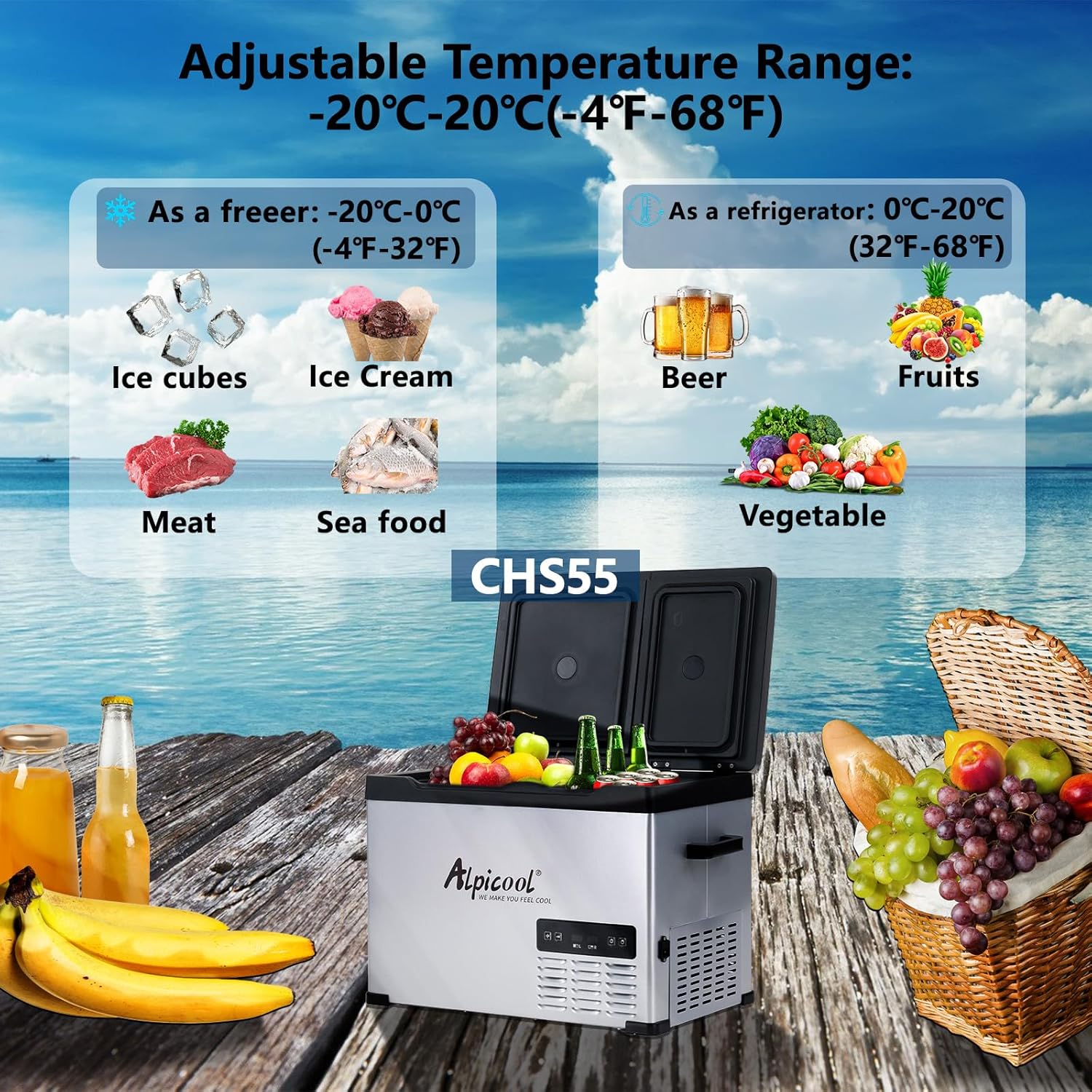
Image: Visual representation of the Alpicool CHS55's adjustable temperature range. It shows that the unit can function as a freezer (from -20°C to 0°C / -4°F to 32°F) for items like ice cubes, ice cream, meat, and seafood, and as a refrigerator (from 0°C to 20°C / 32°F to 68°F) for items like beer, fruits, and vegetables.
- Press the 'SET' button to select the compartment you wish to adjust (L for left, R for right).
- Use the '+' and '-' buttons to increase or decrease the desired temperature.
- The display will flash while setting and then return to the current temperature after a few seconds.
MAX and ECO Modes
The unit offers two operating modes to optimize performance and energy consumption:

Image: An illustration of the Alpicool CHS55's dual compartments with separate doors, emphasizing individual temperature control. An arrow indicates the cycle between MAX and ECO modes, highlighting energy efficiency.
- MAX Mode: Provides maximum cooling power for rapid temperature reduction. This mode consumes more energy.
- ECO Mode: An energy-saving mode that reduces power consumption while maintaining the set temperature. Ideal for prolonged use or when power efficiency is critical.
- To switch between modes, press the 'SET' button until 'MAX' or 'ECO' appears, then use the '+' or '-' button to select your desired mode.
Battery Protection Mode
The refrigerator features a 3-level battery protection system to prevent your vehicle's battery from running out. When the input voltage drops below a certain level, the unit will automatically shut off.

Image: A graphic illustrating the 3-level battery protection mode for the Alpicool CHS55. It shows a table with voltage reference points for DC 12V and DC 24V inputs, indicating the 'Cut Out' (shutdown) and 'Cut In' (restart) voltages for Low, Medium, and High protection modes. The image also shows the refrigerator placed in a car trunk, emphasizing its use in vehicles.
| Mode | DC 12V | DC 24V | ||
|---|---|---|---|---|
| Cut Out | Cut In | Cut Out | Cut In | |
| Low Mode (L) | 8.5V | 10.9V | 21.3V | 22.7V |
| Medium Mode (M) | 10.1V | 11.1V | 22.3V | 23.7V |
| High Mode (H) | 11.1V | 12.4V | 24.3V | 25.7V |
To adjust the battery protection mode, press the 'SET' button until the battery icon appears, then use the '+' or '-' button to select H (High), M (Medium), or L (Low). It is recommended to use 'H' mode when connected to a car battery to prevent discharge, and 'M' or 'L' mode when connected to an external power bank or solar system.
Maintenance
Cleaning
- Always disconnect the power supply before cleaning.
- Clean the interior and exterior surfaces with a damp cloth and mild detergent. Do not use abrasive cleaners or solvents.
- Wipe dry thoroughly after cleaning.
- Periodically clean the ventilation openings to ensure proper airflow and prevent dust buildup. Use a soft brush or vacuum cleaner.
- If there is water accumulation, use the drain plug at the bottom to empty the water.
Storage
- If the appliance will not be used for an extended period, clean it thoroughly and ensure it is completely dry.
- Leave the lid slightly ajar to prevent odors and mold growth.
- Store the unit in a dry, well-ventilated area, away from direct sunlight and extreme temperatures.
Troubleshooting
If you encounter issues with your Alpicool CHS55, refer to the table below for common problems and solutions.
| Problem | Possible Cause | Solution |
|---|---|---|
| Appliance not turning on | No power supply; Damaged power cord/adapter; Low battery voltage (car) | Check power connection; Replace damaged parts; Adjust battery protection mode or charge car battery. |
| Poor cooling performance | Insufficient ventilation; Overloaded compartment; Door not sealed properly; High ambient temperature | Ensure clear vents; Do not overfill; Check door seal; Operate in a cooler environment if possible. |
| Unit making unusual noise | Unit not level; Fan obstruction; Compressor issue | Place on a level surface; Clear fan area; Contact customer support if noise persists. |
| Display shows error code | Sensor fault; Voltage issue | Refer to specific error code in a more detailed manual (if available) or contact customer support. |
If the problem persists after attempting these solutions, please contact Alpicool customer support for further assistance.
Specifications
Detailed technical specifications for the Alpicool CHS55 40L Portable Car Refrigerator & Freezer:

Image: Diagram showing the dimensions and capacity of the Alpicool CHS55 40L model. It illustrates the external measurements (Length 65.3cm/25.7in, Width 36.9cm/14.5in, Height 49.5cm/19.5in) and provides examples of how many common beverage containers (355ml cups, 500ml bottles, 750ml shakers) can fit inside.
| Feature | Specification |
|---|---|
| Brand | Alpicool |
| Model Number | CHS55 |
| Capacity | 39.6 Liters (40L) |
| Dimensions (L x W x H) | 66.5 x 44 x 55 cm (26.2 x 17.3 x 21.7 inches) |
| Item Weight | 15.1 Kilograms (33.3 lbs) |
| Voltage | 12 Volts (DC), 24 Volts (DC), 100-240 Volts (AC) |
| Noise Level | 45 dB |
| Temperature Range | -20°C to 20°C (-4°F to 68°F) |
| Cooling Performance | Can reduce internal temperature from 25°C (77°F) to 0°C (32°F) in approximately 15 minutes. |
| Included Components | Refrigerator, AC adapter, DC power cord |
| Country of Origin | China |
Warranty and Support
Alpicool products are manufactured to high-quality standards. For information regarding warranty coverage, please refer to the warranty card included with your purchase or visit the official Alpicool website. If you require technical support, have questions about operation, or need to report a defect, please contact Alpicool customer service through the contact information provided on their official website or through your retailer.
Please have your model number (CHS55) and purchase date ready when contacting support.