
1. Introduction
This instruction manual provides essential information for the setup, operation, and maintenance of your Kassionel NH404UD Universal Remote Control. This remote is designed to be compatible with various Magnavox TV models, offering a straightforward replacement solution.
Compatible Magnavox TV models include, but are not limited to:
- 39ME413V/F7
- 46ME313V/F7, 46ME313V/F7A
- 40ME313V/F7
- 39ME313V/F7, 39ME313V/F7A
- 50ME313V/F7
- 40ME314V/F7, 40ME324V/F7
- 55ME314V/F7, 55ME345V/F7
- 50ME345V/F7

Image 1.1: Angled view of the Kassionel NH404UD Universal Remote Control, showcasing its button layout.
2. Setup
2.1 Battery Installation
The Kassionel NH404UD remote control requires two (2) AAA alkaline batteries for operation. Batteries are not included with the remote control.
- Locate the battery compartment cover on the back of the remote control.
- Slide the cover downwards or press the latch (if present) to open the compartment.
- Insert two AAA batteries, ensuring the positive (+) and negative (-) terminals align correctly with the markings inside the compartment.
- Replace the battery compartment cover by sliding it back into place until it clicks securely.

Image 2.1: Rear view of the remote control with the battery cover removed, illustrating the battery insertion process.
2.2 Initial Use
This remote control is pre-programmed for compatible Magnavox TV models. No additional programming steps are required. Once batteries are installed, the remote is ready for immediate use.

Image 2.2: The remote control in use, emphasizing its plug-and-play functionality without requiring programming.
3. Operation
The NH404UD remote control features a standard layout for intuitive control of your Magnavox television. Below is a guide to the primary functions of the buttons.
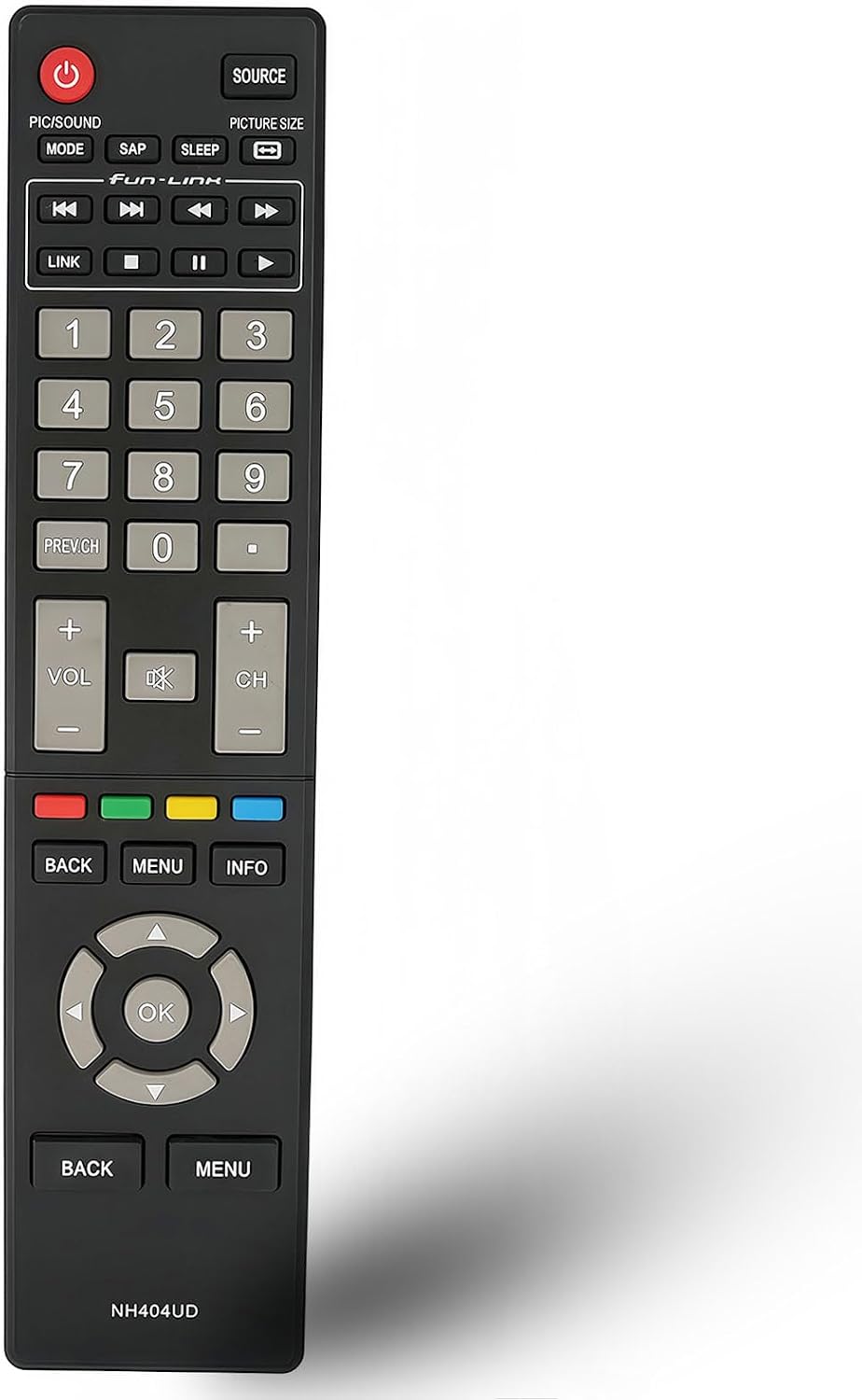
Image 3.1: Front view of the remote control, highlighting the various buttons and their labels.
| Button | Function |
|---|---|
| POWER (⬤) | Turns the television on or off. |
| SOURCE | Selects input sources (e.g., HDMI 1, AV, Component). |
| PIC/SOUND MODE | Adjusts picture or sound modes. |
| SAP | Selects Secondary Audio Program (SAP) for alternate audio tracks. |
| SLEEP | Sets a timer for the TV to turn off automatically. |
| PICTURE SIZE | Changes the aspect ratio or picture size. |
| Number Buttons (0-9) | Direct channel selection. |
| PREV.CH | Returns to the previously viewed channel. |
| VOL +/- | Adjusts the volume level. |
| MUTE (🔇) | Mutes or unmutes the television audio. |
| CH +/- | Changes the channel up or down. |
| BACK | Returns to the previous menu or screen. |
| MENU | Opens the TV's main menu. |
| INFO | Displays information about the current program or input. |
| Navigation Buttons (Up, Down, Left, Right) | Navigates through menus and options. |
| OK | Confirms selections in menus. |
4. Maintenance
4.1 Battery Replacement
When the remote control's performance diminishes or it stops responding, it is likely time to replace the batteries. Follow the battery installation steps outlined in Section 2.1. Always replace both batteries simultaneously with new AAA alkaline batteries.
4.2 Cleaning
To clean the remote control, use a soft, dry cloth. For stubborn dirt, lightly dampen the cloth with water or a mild, non-abrasive cleaner. Avoid using harsh chemicals or excessive moisture, as these can damage the remote's electronics.
4.3 Storage
Store the remote control in a cool, dry place away from direct sunlight and extreme temperatures. If the remote will not be used for an extended period, it is recommended to remove the batteries to prevent leakage and potential damage.
5. Troubleshooting
- Remote not responding:
- Ensure batteries are correctly installed with proper polarity.
- Replace old batteries with new AAA alkaline batteries.
- Check for any obstructions between the remote control and the TV's infrared sensor.
- Ensure you are within the effective range of the TV's IR receiver.
- Specific buttons not working:
- This remote is pre-programmed for Magnavox TVs. Verify your TV model is listed as compatible.
- Clean the remote control, especially around the unresponsive buttons, to remove any debris.
- TV not turning on/off:
- Confirm the TV is plugged into a working power outlet.
- Try using the power button directly on the TV to rule out a TV issue.
6. Specifications
| Feature | Detail |
|---|---|
| Model Number | NH404UD |
| Brand | Kassionel |
| Compatible Devices | Magnavox Televisions |
| Power Supply | 2 x AAA Alkaline Batteries (not included) |
| Dimensions (L x W x H) | 8.39 x 1.39 x 0.9 inches |
| Item Weight | 3.17 ounces |
| Special Feature | Pre-Programmed (No setup required) |
| Color | Black |
7. Warranty and Support
For any questions, concerns, or support regarding your Kassionel NH404UD Universal Remote Control, please contact the seller or manufacturer directly through your purchase platform. Refer to your purchase documentation for specific warranty details and contact information.