
Introduction
This manual provides instructions for the proper use and maintenance of your YueLi Drone Cleaning Kit. This kit is designed to help maintain the cleanliness and functionality of your DJI FPV drone, other drones, cameras, and precision equipment.
Kit Contents
The YueLi Drone Cleaning Kit includes the following items:
- Alcohol dry and wet pack (3 sets)
- Sensor cleaning stick (1)
- Dual-purpose cleaning pen (1)
- Brush (1)
- Cleaning cloth (1)
- Air blower (1)
- Round tip cotton swab (3)
- Storage bag (1)

Image: All components of the YueLi Drone Cleaning Kit, including wipes, sensor cleaning swab, cleaning pen, brush, air blower, cotton swabs, and storage case.
Setup
The YueLi Drone Cleaning Kit is ready for use upon unboxing. Ensure all components are present and undamaged. The kit comes with a storage bag for organized keeping of all tools.

Image: The cleaning kit components neatly stored inside the provided zippered storage bag.
Operating Instructions
Follow these guidelines for effective cleaning of your drone, camera, or other precision equipment.
1. Using the Air Blower
The air blower is used to remove loose dust and debris from surfaces without direct contact. This is especially useful for sensitive areas like lenses and sensors.
- Hold the air blower firmly.
- Point the nozzle towards the area to be cleaned.
- Squeeze the bulb repeatedly to generate a strong burst of air.
- Avoid touching the nozzle to the surface being cleaned.

Image: Demonstrates the use of the blue air blower for removing dust from a drone's camera lens, FPV goggles, and the remote control joystick area.
2. Using the Cleaning Brush
The cleaning brush is suitable for removing dust from larger surfaces and crevices.
- Gently brush away dust from the desired surface.
- For delicate areas, use light strokes.
- The brush can be used on drone bodies, remote controls, and other equipment.

Image: Shows the black cleaning brush being used to clean dust from the surface of a drone's motor mount and a remote control's buttons.
3. Using the Dual-Purpose Cleaning Pen
This pen features a soft brush on one end and a carbon cleaning tip on the other, ideal for lenses and optical surfaces.
- Brush End: Use the retractable brush to gently sweep away loose dust from lenses or screens.
- Carbon Tip End: For fingerprints and smudges, remove the cap from the carbon tip. Gently rub the tip in a circular motion on the lens surface. Do not apply excessive pressure.
- Replace the cap after use to replenish the carbon compound.

Image: Illustrates the use of the dual-purpose cleaning pen, showing its brush and carbon tip, and how to use it on a drone's camera lens and FPV goggles.
4. Using Alcohol Dry and Wet Packs
These two-step wipes are effective for removing stubborn smudges and sanitizing surfaces.
- First, use the "Wet 1" wipe to clean the surface.
- Immediately follow with the "Dry 2" wipe to remove any residue and polish the surface.
- These are suitable for screens, drone bodies, and remote controls.
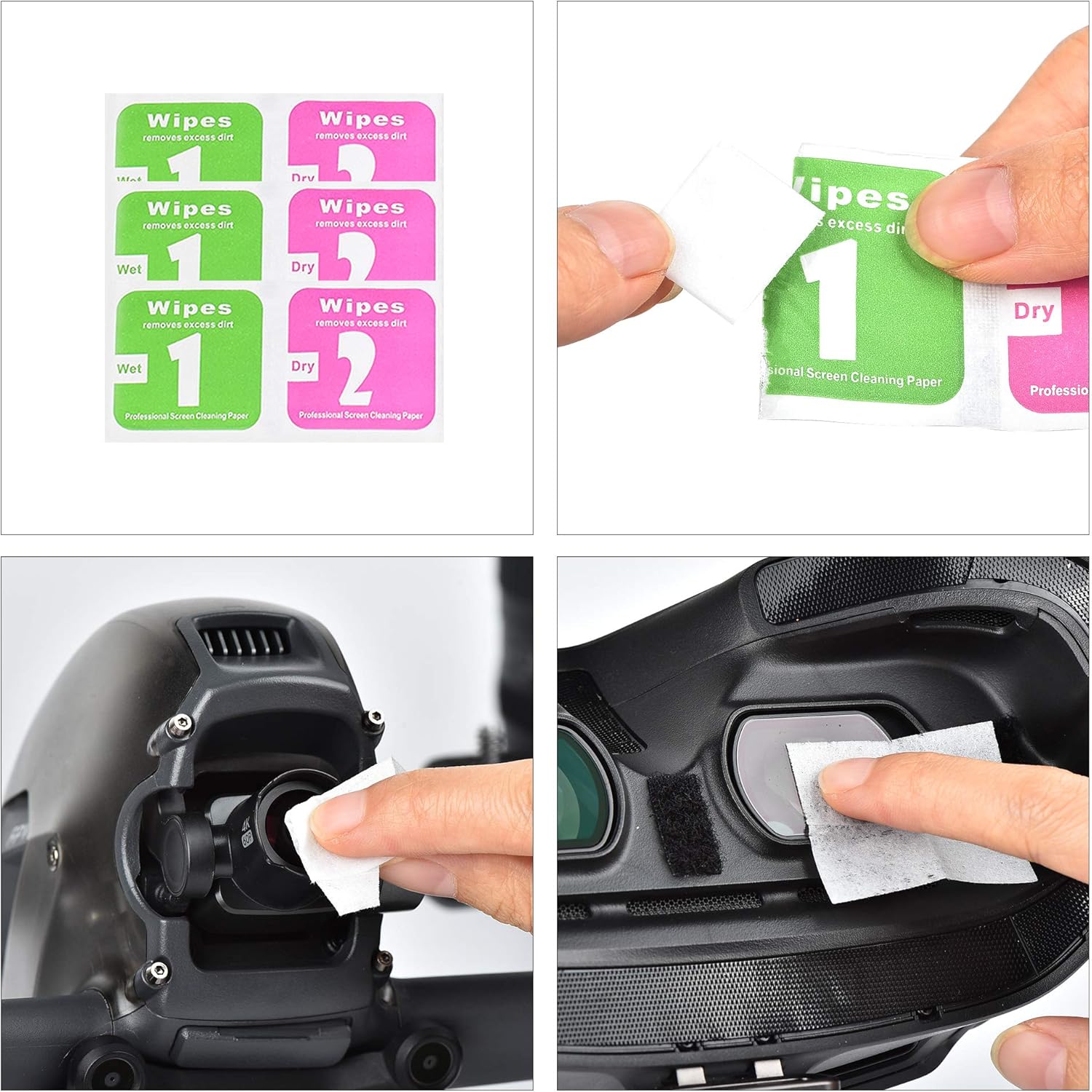
Image: Depicts the two-step process of using the "Wet 1" and "Dry 2" alcohol wipes on a drone's camera lens and FPV goggles screen.
5. Using Round Tip Cotton Swabs
Cotton swabs are useful for reaching small crevices and applying cleaning solutions precisely.
- Use for detailed cleaning of small gaps, buttons, or ports.
- Can be used dry or lightly dampened with a suitable cleaning solution (not included, or use the wet wipe solution).

Image: Shows three round-tip cotton swabs and their application for cleaning intricate parts of a drone's camera and a remote control's joystick.
6. Using the Sensor Cleaning Stick and Cleaning Cloth
The sensor cleaning stick is specifically designed for delicate sensor cleaning, while the cloth is for general polishing.
- Sensor Cleaning Stick: Use with extreme care on camera sensors. Follow specific camera manufacturer guidelines for sensor cleaning. Typically, a single, gentle swipe across the sensor is recommended.
- Cleaning Cloth: Use the microfiber cleaning cloth for general wiping and polishing of screens, lenses, and drone surfaces after initial cleaning.

Image: Displays the sensor cleaning stick and a blue microfiber cleaning cloth, demonstrating the cloth's use on FPV goggles.
General Cleaning Tips:
- Always start with the least intrusive method (e.g., air blower) to remove loose dust.
- Avoid touching optical surfaces with bare hands.
- Clean in a dust-free environment if possible.
- Refer to your drone or camera's specific manual for any unique cleaning requirements.

Image: A collage of nine images showing various cleaning tools (air blower, brush, cleaning pen, wipes, cotton swab, microfiber cloth) being used on different parts of a drone and its remote control.
Maintenance
To ensure the longevity and effectiveness of your cleaning kit:
- Store all components in the provided storage bag when not in use to prevent contamination.
- Keep the kit in a cool, dry place away from direct sunlight.
- Replace alcohol dry and wet packs once they are used or if they dry out.
- Clean the microfiber cloth periodically by hand washing with mild soap and air drying.
- Ensure the cap is securely placed on the dual-purpose cleaning pen to preserve the carbon tip.
Troubleshooting
If you encounter issues while cleaning:
- Smudges remain after cleaning: Ensure you are using the correct tool for the type of smudge. For fingerprints, use the carbon tip of the cleaning pen or the wet/dry alcohol wipes.
- Dust not removed by air blower: Some dust may be stuck due to static or moisture. Try using a soft brush or a dry microfiber cloth after the air blower.
- Scratches appear: Always use gentle pressure. Avoid abrasive materials. If scratches appear, it may indicate improper cleaning technique or a contaminated tool. Discard and replace any tool that may have picked up abrasive particles.
- Wipes are dry: Replace the alcohol dry and wet packs with new ones.
Specifications
| Feature | Detail |
|---|---|
| Product Name | YueLi Drone Cleaning Kit |
| Model Number | B0917BY262 |
| Compatibility | DJI FPV, other drones, cameras, precision equipment |
| Product Weight (including packaging) | Approximately 135 grams |
| Item Weight | 0.176 ounces |
| Package Dimensions | 1.97 x 1.97 x 0.39 inches |
| Material | Cotton (for some components) |
| UPC | 764256641010 |
Warranty and Support
Specific warranty information for the YueLi Drone Cleaning Kit is not provided in the product details. For any product support or inquiries, please refer to the retailer or the manufacturer, YueLi, directly.
You may visit the YueLi Store on Amazon for more information.