
1. Introduction
The NETGEAR WAX620 is a Cloud Managed Wireless Access Point designed to deliver high-performance WiFi 6 (802.11ax) connectivity for small and medium businesses. This dual-band AX3600 access point supports up to 256 client devices, offering enhanced throughput, network reliability, and advanced security features. It is compatible with existing WiFi 6, WiFi 5, and older devices, providing a scalable solution for your wireless network needs.

Figure 1: NETGEAR WAX620 Wireless Access Point, front view.
2. What's in the Box
Verify that your package contains the following items:
- Insight Managed WiFi 6 AX3600 Dual Band Multi-Gig Access Point (WAX620)
- Installation guide
- Warranty/support information card
Note: An AC power adapter is not included and must be purchased separately if Power over Ethernet (PoE+) is not utilized.
3. Setup and Installation
3.1 Powering the Device
The WAX620 Access Point can be powered using Power over Ethernet Plus (PoE+) or an optional AC power adapter (model PAV12V, sold separately).
- PoE+ Power: Connect an Ethernet cable from a PoE+ capable switch or injector to the 2.5G Ethernet PoE+ port on the access point.
- AC Power: If PoE+ is not available, connect an optional AC power adapter (PAV12V) to the power input port.
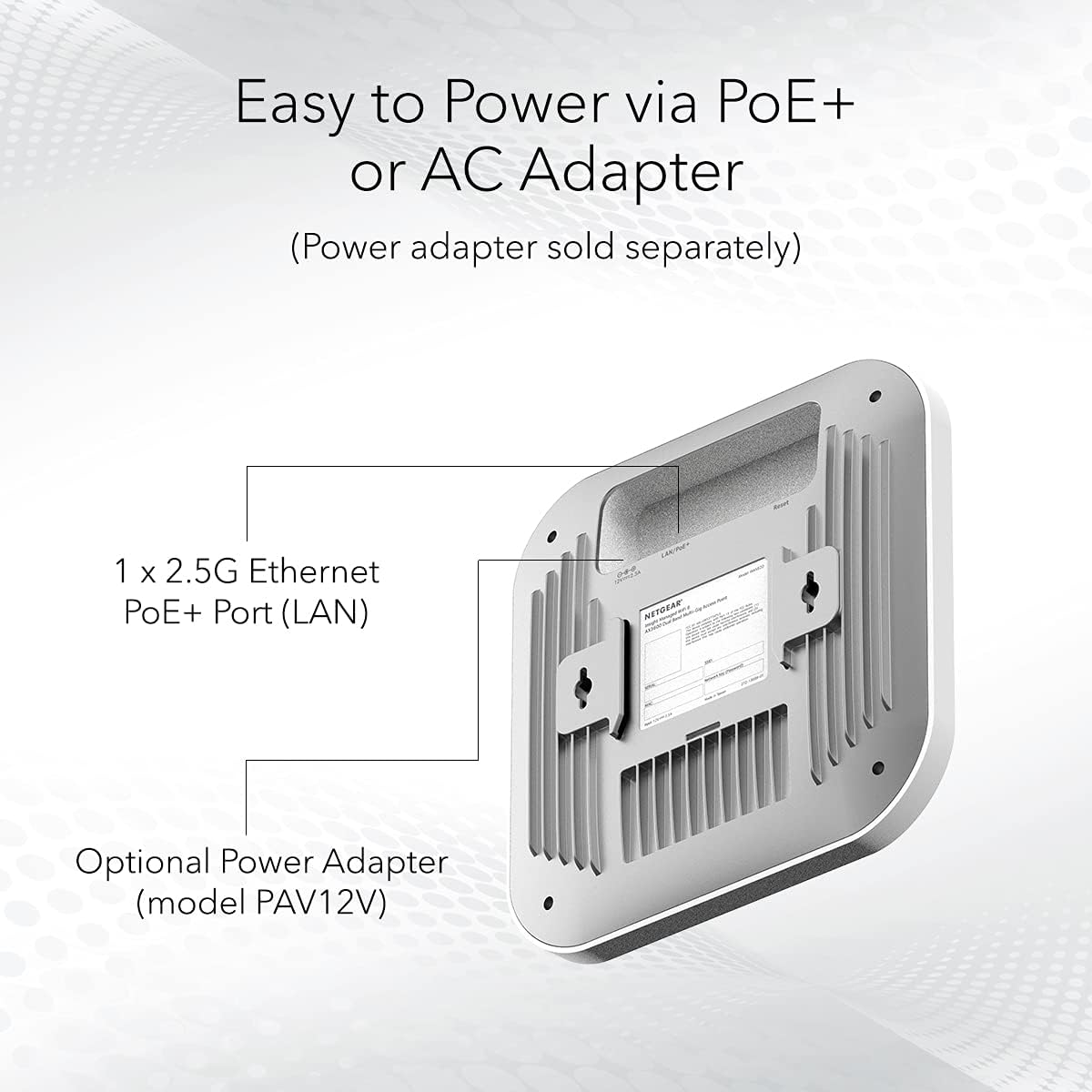
Figure 2: Powering the WAX620 via PoE+ Ethernet port or optional AC adapter.
3.2 Mounting Options
The WAX620 includes flexible mounting hardware for secure installation on a wall or a suspended ceiling.
- Wall Mount: Use the provided bracket and screws to secure the access point to a wall.
- Ceiling Mount: Attach the access point to a suspended ceiling grid using the appropriate mounting clips.
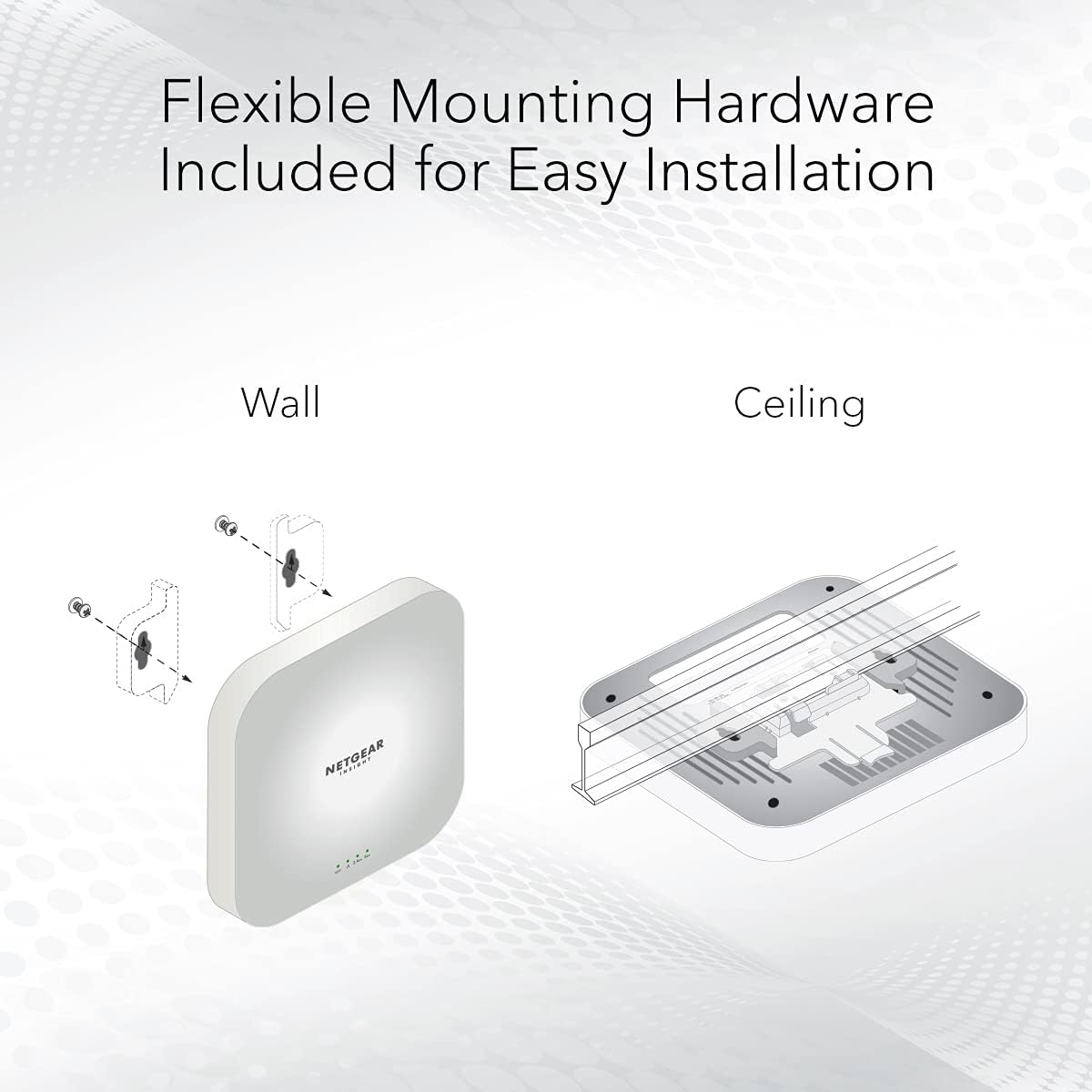
Figure 3: Wall and ceiling mounting options for the WAX620.
3.3 Initial Configuration with NETGEAR Insight
The WAX620 is managed remotely via the NETGEAR Insight app or cloud portal. A 1-year Insight subscription is included.
- Download the NETGEAR Insight app from your mobile device's app store or visit the Insight cloud portal.
- Create an Insight account or log in to an existing one.
- Follow the on-screen instructions to discover and add your WAX620 access point to your Insight network.
- Configure your WiFi settings, including SSIDs, security protocols, and other network parameters.

Figure 4: NETGEAR Insight dashboard for remote management.
4. Operating the Access Point
The WAX620 provides robust wireless connectivity with advanced features for optimal network performance.
4.1 WiFi 6 Capabilities
Leveraging WiFi 6 (802.11ax) technology, the WAX620 offers:
- Dual-Band AX3600 Speed: Simultaneous operation on 2.4 GHz and 5 GHz bands for high-speed data transfer.
- High Client Capacity: Supports up to 256 client devices concurrently.
- Extended Coverage: Provides up to 3,000 sq. ft. of WiFi coverage.

Figure 5: Overview of WAX620 features including speed, client capacity, and coverage.
4.2 Network Management Features
Through NETGEAR Insight, you can manage various network settings:
- Multiple SSIDs: Create up to 8 separate SSIDs for different user groups or purposes.
- Load Balancing: Distribute client devices across access points for optimal performance.
- Band Steering: Automatically direct clients to the less congested 5 GHz band.
- Assisted Roaming: Facilitate seamless transitions for clients between access points.
- VLAN Support: Implement VLANs for network segmentation and enhanced security.
4.3 Security Features
The WAX620 incorporates robust security measures:
- WPA3 Support: Utilizes the latest WiFi Protected Access 3 security standard.
- Network and Client Isolation: Prevents connected devices from communicating with each other, enhancing security.
- Rogue AP Detection: Identifies unauthorized access points on your network.
5. Maintenance
Regular maintenance ensures optimal performance and security of your WAX620 access point.
- Firmware Updates: Periodically check for and apply firmware updates through the NETGEAR Insight app or cloud portal. Firmware updates often include performance improvements, new features, and security patches.
- Monitoring: Use the NETGEAR Insight dashboard to monitor network health, client activity, and potential issues.
- Physical Inspection: Ensure the access point is free from dust and obstructions to maintain proper ventilation.
6. Troubleshooting
If you encounter issues with your WAX620 access point, consider the following troubleshooting steps:
- No Power: Verify that the Ethernet cable is securely connected to a PoE+ source or that the optional AC adapter is properly plugged in. Check the power LED on the device.
- No Internet Connection: Ensure the access point is connected to a working network switch or router with internet access. Check the status of your upstream network devices.
- Poor WiFi Performance:
- Check for physical obstructions or interference sources (e.g., microwaves, cordless phones).
- Ensure the access point is centrally located for optimal coverage.
- Use the NETGEAR Insight app to analyze channel utilization and adjust WiFi channels if necessary.
- Cannot Access Insight: Ensure your device has an active internet connection. Verify your Insight account credentials.
- Factory Reset: If issues persist, you may perform a factory reset. Locate the reset button on the device (typically a small pinhole) and press and hold it for approximately 10 seconds while the device is powered on. This will restore the access point to its default settings.
For further assistance, refer to the NETGEAR support website or contact technical support.
7. Specifications
Key technical specifications for the NETGEAR WAX620 Access Point:
| Feature | Description |
|---|---|
| WiFi Speed | 3.6 Gbps, AX3600 |
| WiFi Coverage | Up to 3,000 sq. ft., 256 client devices |
| WiFi Connectivity | WiFi 6, 802.11ax, backwards compatible with 802.11a/g/n/ac |
| Wired Connectivity | (1) 2.5 Gigabit Ethernet LAN port with PoE+ |
| Network Security | Up to 8 SSIDs, Separate VLAN control, WPA3 security, backwards compatible with WPA2/WPA1 |
| Dimensions (LxWxH) | 9.55 x 9.55 x 3.9 inches |
| Item Weight | 2.31 pounds |
| Power Input | PoE+ (802.3at) or optional 52V DC AC adapter |
| Model Number | WAX620-100NAS |

Figure 6: Detailed technical specifications of the WAX620.
8. Warranty and Support
NETGEAR provides comprehensive support for the WAX620 Access Point.
- Warranty: The product includes a 5-year hardware warranty.
- Technical Support: Access 24/7 technical support from trained experts.
- NETGEAR Insight: A 1-year subscription to NETGEAR Insight for remote management is included.
For detailed warranty information and to access support resources, visit the official NETGEAR support website: www.netgear.com/support/

Figure 7: Information on enterprise-level security and NETGEAR's warranty and support services.