Introduction
Thank you for choosing the Carepod Mini 21P Ultrasonic Cool Mist Humidifier. This manual provides essential information for the safe and efficient operation, maintenance, and troubleshooting of your device. Please read these instructions carefully before use and retain them for future reference.
The Carepod Mini 21P is designed to improve air quality by delivering a cool mist, ideal for small spaces such as nurseries, kids' rooms, bedrooms, living rooms, and offices. Its simple design with minimal parts ensures easy cleaning and maintenance.
Product Components
Your Carepod Mini 21P humidifier includes the following parts:
- Carepod Main Lid: Contains the control panel and mist outlet.
- Clear Water Tank: Transparent tank for water storage, featuring rounded corners for easy cleaning.
- Oscillator Wand: The component responsible for generating ultrasonic vibrations to create mist.
- Power Cable: For connecting the humidifier to an electrical outlet.
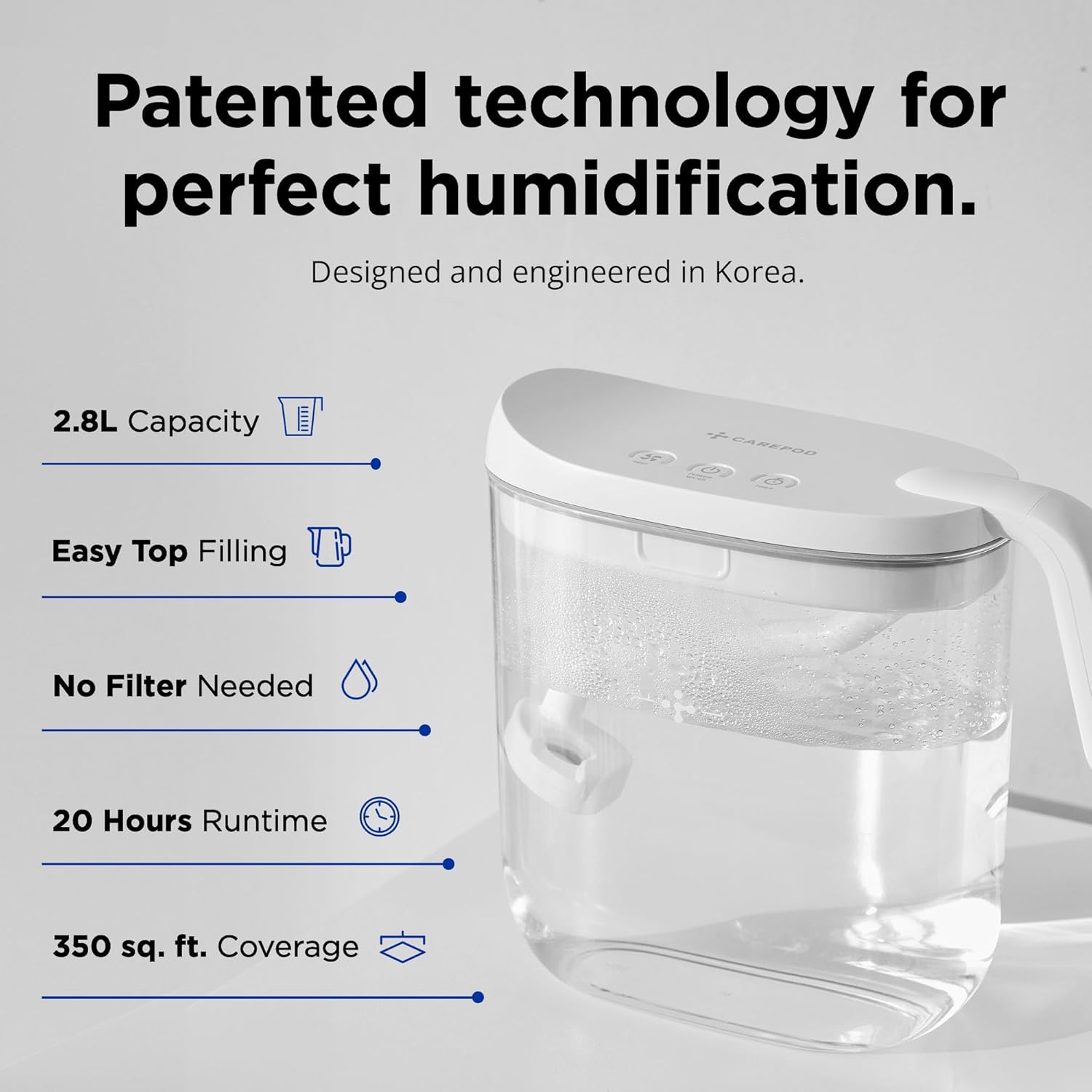
Figure 1: Assembled Carepod Mini 21P Humidifier.

Figure 2: The three main washable components of the Carepod Mini 21P: the control panel lid, the oscillator wand, and the water tank.
Setup
- Unpack: Carefully remove all components from the packaging.
- Placement: Place the humidifier on a firm, flat, and elevated surface, at least 2 feet (60 cm) off the floor. Ensure it is at least 3 feet (90 cm) away from beds and moisture-sensitive items like wood furniture, electronics, and artwork to allow for proper mist circulation and prevent condensation. The humidifier is suitable for rooms up to 350 square feet.
- Fill Water Tank: Remove the main lid and fill the clear water tank with clean, cool water. For best performance and to prevent white dust, use distilled or filtered water. Do not exceed the 'MAX' fill line indicated on the tank.
- Assemble: Place the oscillator wand back into the water tank, ensuring it is properly seated. Then, securely place the main lid onto the water tank.
- Connect Power: Plug the power cable into the designated port on the humidifier's handle, then connect the adapter to a standard electrical outlet.
Operating Instructions
The Carepod Mini 21P features an intuitive control panel with touch-sensitive buttons for easy operation.

Figure 3: Control panel of the Carepod Mini 21P.
- Power On/Off: Press the Power/Water button (center button) to turn the humidifier on or off. The indicator light will illuminate when the unit is active.
- Adjust Mist Level: Press the Mist button (left button) to cycle through the three mist output levels: Low (100ml/h), Medium (250ml/h), and High (300ml/h). The corresponding indicator light will show the selected level.
- Set Timer: Press the Timer button (right button) to set an automatic shut-off time. Available settings are 4 hours, 6 hours, and 8 hours. The humidifier will automatically turn off after the selected duration.
- Automatic Shut-off: The humidifier is equipped with an automatic shut-off function that activates when the water level is low. This prevents dry run damage and ensures safe operation. The power indicator light may turn red or flash to indicate low water.
- Water Level Indicator: The transparent water tank allows for easy monitoring of the water level. The LED power light also indicates the current water level.
Maintenance
Regular cleaning is crucial for maintaining optimal performance and hygiene of your Carepod Mini 21P humidifier. Clean the unit at least once a week for best results.
Video: Instructions on how to clean the Carepod Mini humidifier, demonstrating the simple disassembly and washing process for its few components.
Cleaning Steps:
- Disconnect Power: Always unplug the humidifier from the power outlet before cleaning.
- Disassemble: Remove the main lid and detach the oscillator wand from the lid. Empty any remaining water from the tank.
- Clean Water Tank: Wash the transparent water tank by hand with regular dishwashing soap and rinse thoroughly. The rounded corners ensure no hidden spots for buildup.
- Clean Oscillator Wand: Wash only the bottom part of the oscillator wand with dishwashing soap and rinse. Avoid getting the electrical plug on the lid wet.
- Dry Components: Fully dry all three pieces (lid, wand, tank) before reassembling.
- Reassemble: Once dry, reassemble the humidifier by attaching the wand to the lid and placing the lid back onto the tank.
Important Do's and Don'ts:
- DO use distilled or filtered water to ensure best performance and longevity, and to minimize mineral buildup (white dust).
- DO fill to the MAX line to prevent damage and maintain proper function.
- DO replace water every 48 hours to keep it fresh and clean.
- DON'T leave the wand in water when not in use; empty the tank.
- DON'T get the electric plug wet.
- DON'T clean the control panel lid with water; wipe it clean with a damp cloth.
- DON'T lift the humidifier by the handle alone when the tank is full, as the handle is part of the lid and not securely attached to the tank.
- DON'T add foreign substances like essential oils or chemicals, as these can damage the tank and wand.
Troubleshooting
If you encounter issues with your Carepod Mini 21P, please refer to the following common problems and solutions:
| Problem | Possible Cause | Solution |
|---|---|---|
| No mist is being produced. | Low water level; unit not powered on; oscillator wand not properly seated. | Check water level and refill if necessary. Ensure the power cable is securely connected and the unit is turned on. Verify the oscillator wand is correctly placed. |
| White dust around the humidifier. | Using hard tap water with high mineral content. | Switch to distilled or filtered water to reduce mineral output. Regularly clean the unit to remove mineral buildup. |
| Water leakage or excessive condensation around the unit. | Overfilling the water tank; improper placement; mist output too high for room size. | Do not exceed the MAX fill line. Ensure the unit is placed on an elevated surface and away from sensitive items. Adjust mist level to a lower setting if condensation is excessive. |
| Unit turns off unexpectedly. | Low water level (auto shut-off activated); timer setting reached. | Refill the water tank. Check the timer setting and reset if continuous operation is desired. |
Specifications
- Brand: Carepod
- Model Name: Carepod Mini MS021P
- Capacity: 2.8 Liters (0.74 Gallons)
- Floor Area Coverage: Up to 350 Square Feet
- Operation Mode: Ultrasonic Cool Mist
- Mist Output Levels: 3 (100ml/h, 250ml/h, 300ml/h)
- Runtime: Up to 20 hours (Level 1), 10 hours (Level 3)
- Timer Settings: 4 hours, 6 hours, 8 hours
- Special Features: Easy Clean, Whisper-Quiet Operation, Auto Shut-off, Adjustable Humidity Control
- Product Dimensions: 6.02"D x 11.81"W x 9.92"H
- Item Weight: 2.5 Pounds
- Voltage: 220 Volts (AC)
- Wattage: 25 watts
- Included Components: Carepod Main Lid, Clear Water Tank, Oscillator, Power Cable
Warranty and Support
For warranty information, please refer to the official Carepod website or contact Carepod customer support directly. Keep your purchase receipt as proof of purchase for any warranty claims.
If you require further assistance or have questions not covered in this manual, please visit the Carepod Store or contact their customer service.


