
1. Introduction
The Dynavox AMP-S MKII is a versatile amplifier and speaker switch designed to manage audio connections in Hi-Fi stereo and surround sound systems. This device allows users to select between different audio configurations without the need for frequent cable changes.
Key features include a robust metal casing with a 4mm solid aluminum front plate, ensuring durability and aesthetic integration with existing Hi-Fi components. The AMP-S MKII incorporates deeper banana sockets (approximately 18mm) for secure connections of heavy speaker cables and features a larger internal cabling cross-section (2.5mm²) for optimal signal transmission. A high-quality rotary switch with a zero position protects connected devices from short circuits.
2. Setup
2.1 Unpacking
Carefully remove the AMP-S MKII from its packaging. Inspect the unit for any signs of damage during transit. Retain the packaging for future transport or storage.
2.2 Placement
Place the AMP-S MKII on a stable, flat surface near your audio components. Ensure adequate ventilation around the unit, although as a passive device, heat generation is minimal.
2.3 Connections
The AMP-S MKII features gold-plated terminals compatible with both banana plugs and bare wire connections. Ensure all connections are secure and that speaker polarity (+ to + and - to -) is maintained for all components.
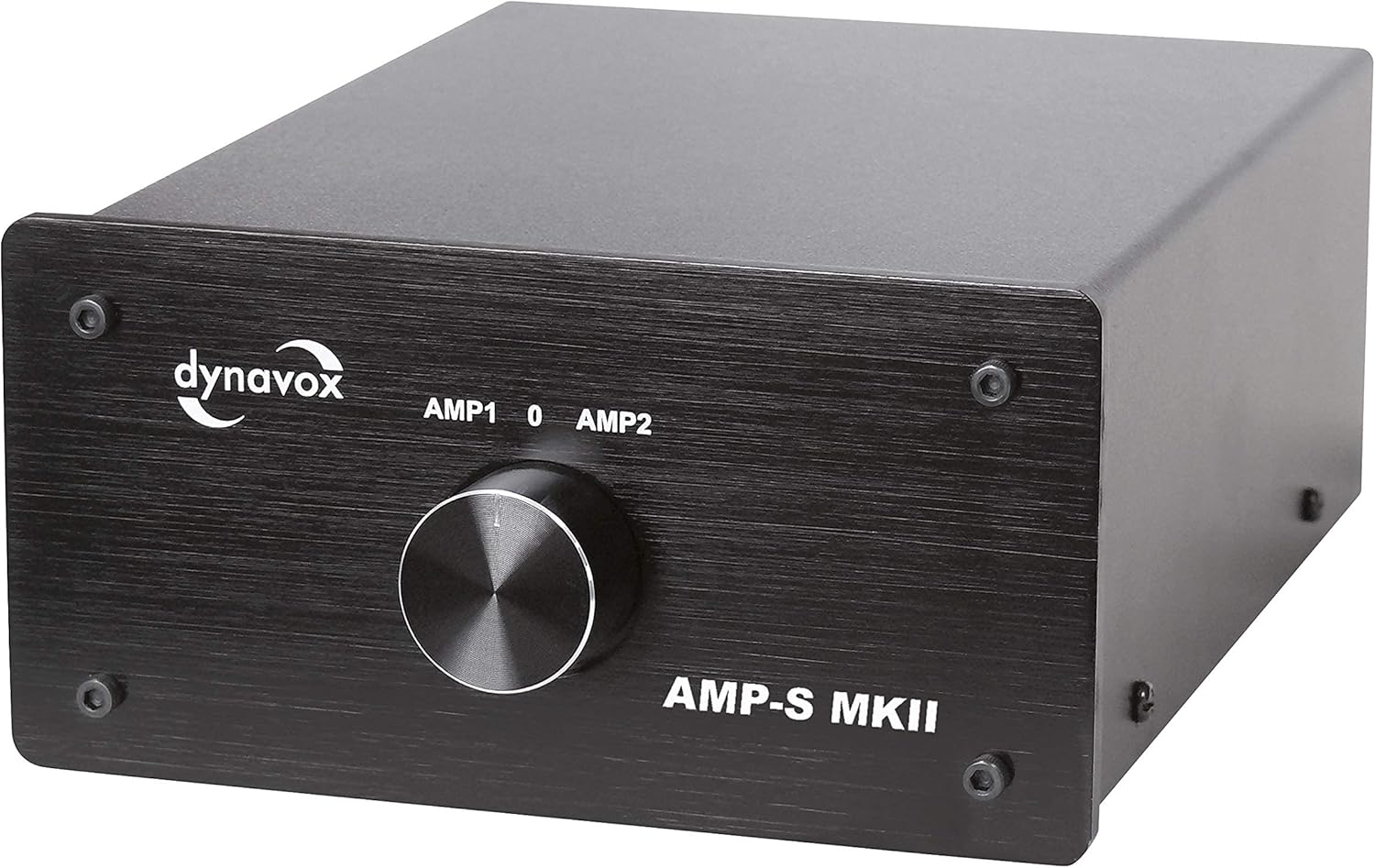
Figure 1: Rear panel showing AMP1, AMP2, and Speaker Out connections for left (L) and right (R) channels. Each connection supports banana plugs or bare wire.
- Connecting Amplifiers: Connect the speaker outputs of your first amplifier to the AMP1 L/R terminals. Connect the speaker outputs of your second amplifier to the AMP2 L/R terminals.
- Connecting Speakers: Connect your speaker pair to the Speaker Out L/R terminals.
Note: Ensure all amplifiers are turned off before making any connections to prevent damage to your equipment.
3. Operating Instructions
3.1 Powering On/Off
The Dynavox AMP-S MKII is a passive device and does not require external power. It operates by mechanically switching audio signals.
3.2 Switching Modes
The front panel features a rotary switch with three positions: AMP1, 0, and AMP2.

Figure 2: Front panel of the Dynavox AMP-S MKII, featuring the rotary selector switch for AMP1, 0 (off), and AMP2.
- Selecting an Amplifier (2 Amplifiers to 1 Speaker Pair): This is the primary function as indicated by the rear panel labels. Connect two amplifiers to the AMP1 and AMP2 inputs, and your single pair of speakers to the Speaker Out. Rotate the switch to AMP1 to route the signal from Amplifier 1 to your speakers, or to AMP2 to route the signal from Amplifier 2 to your speakers.
- Zero Position (0): When the switch is in the 0 position, both amplifier inputs are disconnected from the speaker output. This acts as a safety measure, preventing signal flow and protecting your equipment during changes or when not in use.
- Switching Speaker Pairs (1 Amplifier to 2 Speaker Pairs): While the labels are for amplifiers, this unit can also be configured to switch between two speaker pairs from a single amplifier. To do this, connect your single amplifier's speaker outputs to the AMP1 L/R terminals. Connect your first pair of speakers to the AMP2 L/R terminals and your second pair of speakers to the Speaker Out L/R terminals. Rotate the switch to AMP2 to listen through the first speaker pair, or to AMP1 to listen through the second speaker pair.
Always ensure the switch is in the 0 position before changing amplifier or speaker selections to prevent potential damage to your audio components.
4. Maintenance
4.1 Cleaning
To clean the unit, use a soft, dry cloth. For stubborn marks, a slightly damp cloth with mild detergent can be used, followed by a dry cloth. Avoid abrasive cleaners or solvents, as these can damage the finish.
4.2 General Care
Keep the unit away from direct sunlight, excessive heat, moisture, and dust. Ensure cables are not under tension and are routed neatly to prevent accidental disconnections or damage.
5. Troubleshooting
- No Sound:
- Check that the rotary switch is set to either AMP1 or AMP2, not 0.
- Verify all amplifier and speaker cables are securely connected and that polarity is correct.
- Ensure the selected amplifier is powered on and functioning correctly.
- Distorted Sound:
- Check for loose cable connections.
- Ensure the power output of your amplifiers does not exceed the maximum switching power of the AMP-S MKII (200 W/channel).
6. Specifications
| Feature | Specification |
|---|---|
| Model | AMP-S MKII |
| Brand | Dynavox |
| Maximum Switching Power | 200 W per channel |
| Internal Cabling Cross-Section | 2.5 mm² |
| Dimensions (W x D x H) | Approx. 144 x 210 x 78 mm |
| Weight | Approx. 1.6 kg |
| Connectors | Gold-plated terminals (compatible with banana plugs or bare wire) |
| Housing Material | Robust metal casing with 4mm aluminum front plate |
| Color | Black |
| Compatible Devices | Stereo amplifier, Surround amplifier |
| Model Number | 1070-00011-SW |
7. Warranty and Support
For warranty information and technical support, please refer to the documentation provided with your purchase or visit the official Dynavox website. Keep your proof of purchase for any warranty claims.