
Introduction
This manual provides essential instructions for the safe and effective use of your CCCEI Heavy Duty Surge Protector Power Strip, Model LTS-8TS. Please read this manual thoroughly before operating the device and retain it for future reference.
Safety Information
To prevent injury or damage to the device, observe the following safety precautions:
- Do not exceed the maximum electrical rating of 15A, 125V, 1875W. Overloading can cause overheating and fire.
- This device is designed for indoor use only. Protect it from moisture, water, and extreme temperatures.
- Do not disassemble or modify the surge protector. Refer all servicing to qualified personnel.
- Ensure the power cord is fully inserted into a grounded outlet.
- Keep children and pets away from the device.
- Do not use in conjunction with other extension cords or power strips. Plug directly into a wall outlet.
- If the surge protector shows signs of damage, discontinue use immediately.
Product Overview
The CCCEI Heavy Duty Surge Protector (Model LTS-8TS) features a robust metal housing and provides 8 AC outlets with surge protection for your electronic devices.

Figure 1: Labeled diagram of the CCCEI Surge Protector, highlighting the 8 AC outlets, 15A Circuit Breaker, Surge indicator light, and hanging holes.
Key Features:
- Metal Industrial Design: Durable grey aluminum housing with black outlets, suitable for workshop or garage environments.
- 8 AC Outlets: Provides ample power connections for multiple devices.
- 1200 Joules Surge Protection: Protects connected electronics from power surges.
- 15A Circuit Breaker with Reset Switch: Offers overload protection and easy reset functionality.
- 6FT 14AWG/3C Power Cord: Heavy-duty cord for reliable power delivery.
- Wide Spaced Outlets: Accommodates larger power adapters without blocking adjacent outlets.
- Wall Mountable Design: Features two hanging holes for secure installation on walls or under tables.
- Cord Wrap Velcro Design: Integrated design for organizing the power cable.
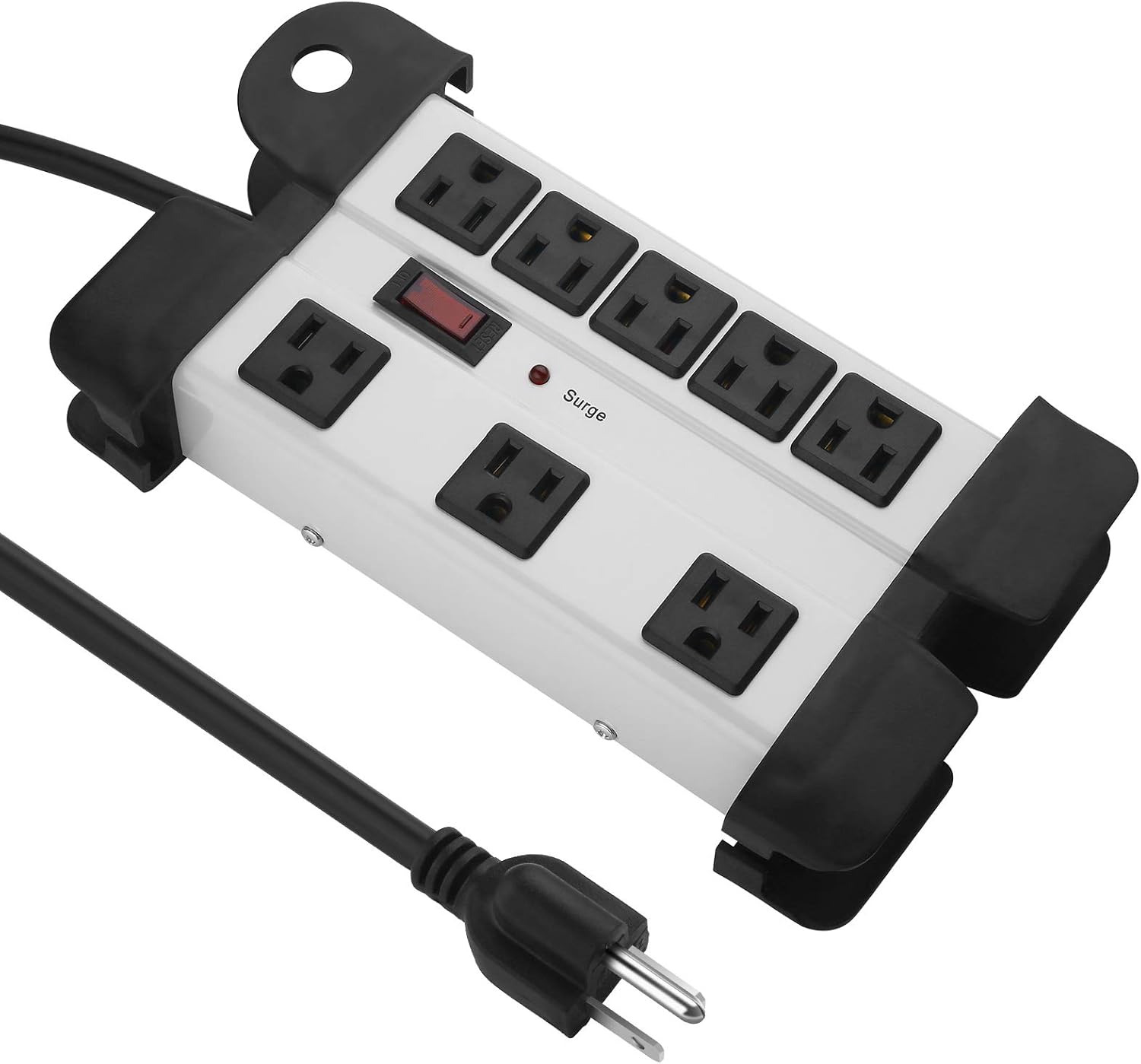
Figure 2: Top-down view of the CCCEI Surge Protector, showing the 8 outlets and power switch.
Specifications
| Model | LTS-8TS |
| Voltage | 125V |
| Maximum Current | 15A |
| Maximum Output | 1875W |
| Surge Protection | 1200 Joules |
| Power Cord | 6FT 14AWG/3C |
| Total Power Outlets | 8 |
| Product Dimensions | 9.4 x 5.51 x 1.85 inches |
| Item Weight | 1.94 pounds |
| Certifications | ETL Listed (ETL 3139719) |

Figure 3: Diagram illustrating the product dimensions, including length and width.
Setup and Installation
Connecting to Power:
- Ensure the surge protector's power switch is in the "OFF" position.
- Plug the 6-foot power cord directly into a standard 125V grounded wall outlet. Avoid using extension cords or adapters.
- Press the power switch to the "ON" position. The surge indicator light should illuminate, confirming surge protection is active.

Figure 4: Image showing the 6FT 14AWG/3C ETL Listed power cord.
Mounting the Surge Protector:
The surge protector can be mounted to a wall or workbench using the integrated hanging holes.
- Identify a suitable mounting location, ensuring it is dry and away from heat sources.
- Measure the distance between the two mounting holes on the back of the unit.
- Install two screws (not included) into the mounting surface, matching the measured distance. Leave the screw heads slightly protruding.
- Align the hanging holes on the back of the surge protector with the screw heads and slide the unit down to secure it.

Figure 5: Illustration of the wall mount hole design, demonstrating how the unit can be installed under a desk or on a wall.
Operating Instructions
Connecting Devices:
- With the surge protector powered on (surge indicator illuminated), plug your electronic devices into the 8 AC outlets.
- Utilize the wide-spaced outlets for larger power adapters to ensure all outlets remain accessible.

Figure 6: Image demonstrating the wide-spaced outlets, allowing for larger plugs to be used simultaneously.
Power On/Off and Circuit Breaker:
- The red switch controls power to all 8 outlets. Press it to turn the unit ON or OFF.
- The integrated 15A circuit breaker protects against overloads. If the total current drawn by connected devices exceeds 15A, the breaker will trip, cutting power to the outlets.
- To reset the circuit breaker, disconnect some devices to reduce the load, then press the red switch to reset.
Maintenance
- Regularly inspect the power cord and the unit for any signs of damage.
- Clean the exterior of the surge protector with a dry, soft cloth. Do not use liquid cleaners or solvents.
- Ensure the surge indicator light is always illuminated when the unit is powered on, indicating active surge protection. If it is off, the surge protection may be compromised, and the unit should be replaced.

Figure 7: View of the industrial metal power strip, showcasing the cord wrap velcro design for cable management.
Troubleshooting
| Problem | Possible Cause | Solution |
|---|---|---|
| No power to devices. | Power switch is OFF. Circuit breaker tripped. Wall outlet has no power. | Press the power switch to ON. Reduce load, then press the power switch to reset. Check the wall outlet with another device or test the circuit breaker in your home's electrical panel. |
| Surge indicator light is off. | Surge protection has been compromised due to a significant power surge. | The unit may no longer provide surge protection. Replace the surge protector to ensure continued protection for your devices. |
| Devices are not fitting into outlets. | Plug orientation or size. | Ensure plugs are oriented correctly. Utilize the wide-spaced outlets for larger adapters. |
Warranty and Support
CCCEI products are designed for reliability. If you experience any issues with your surge protector, please contact CCCEI customer support.
For support inquiries, please refer to the contact information provided with your purchase or visit the official CCCEI website. If the product is not working properly in the short term, please contact us for replacement.
Note: The product description mentions: "If there are some questions about our products or you want to know other preferential please contact us by email at the first time, (we can not find you if you ask some questions by product review page, please contact by email)." This implies direct email support is preferred.