
1. Product Overview
These Odashen replacement filters are designed to maintain the optimal performance of your Philips vacuum cleaner. They are engineered to effectively capture dust and other airborne particles, ensuring cleaner air and efficient operation.
Key Features:
- High Filtration Efficiency: Intercepts fine dust particles with a diameter of 0.3 microns or more.
- Comprehensive Particle Capture: Effectively filters pet hair, dust, dander, and other common pollutants.
- Prevents Secondary Pollution: Designed to prevent filtered particles from re-entering your breathing air.
- Compatibility: Specifically designed for Philips vacuum cleaner models FC8009, FC6723, FC6724, FC6725, FC6726, FC6727, FC6728, and FC6729.

Image 1.1: Top view of the Odashen replacement filter.
2. Setup and Installation
Proper installation of the filter is crucial for your vacuum cleaner's performance and air quality. Follow these general steps to replace your vacuum filter.
- Power Off: Ensure your Philips vacuum cleaner is turned off and unplugged from the power outlet before beginning any maintenance.
- Locate Filter Compartment: Refer to your Philips vacuum cleaner's original manual to locate the filter compartment. This is typically found near the dustbin or exhaust vent.
- Remove Old Filter: Carefully open the filter compartment and remove the old, used filter. Dispose of the old filter responsibly.
- Insert New Filter: Place the new Odashen replacement filter into the compartment. Ensure it is seated correctly and securely, matching the orientation of the filter you removed.
- Close Compartment: Close the filter compartment securely. Ensure all latches or covers are properly fastened.
- Test: Plug in and turn on your vacuum cleaner to confirm proper operation.

Image 2.1: Side view of the Odashen replacement filter, illustrating its form factor for installation.
3. Operating Instructions
Once the Odashen replacement filter is correctly installed, your vacuum cleaner is ready for use. The filter operates passively, cleaning the air as it passes through the vacuum system.
- Ensure the filter is always installed before operating the vacuum cleaner.
- Operating the vacuum without a filter or with a damaged filter can lead to reduced performance and potential damage to the motor.
4. Maintenance
Regular maintenance of your filter ensures consistent performance and extends the life of your vacuum cleaner.
Filter Replacement Schedule:
- It is recommended to replace the filter every 2 to 3 months. This schedule may vary depending on usage frequency and the amount of dust and debris collected.
- Replacing the filter regularly helps maintain the vacuum's suction power and filtration efficiency.
Cleaning the Filter:
- These filters are generally not designed for washing. Attempting to wash the filter may damage the filtration material and reduce its effectiveness.
- For light cleaning between replacements, you may gently tap the filter over a waste bin to dislodge loose dust. Do not use water or cleaning agents unless explicitly stated by the vacuum cleaner's manufacturer for this specific filter type.

Image 4.1: Close-up of the filter's foam material, which captures fine particles.
5. Troubleshooting
If you experience issues with your vacuum cleaner after installing a new filter, consider the following:
Reduced Suction Power:
- Check Installation: Ensure the filter is correctly seated in its compartment and the compartment is fully closed.
- Filter Condition: If the filter is old or heavily soiled, it may be clogged. Replace it with a new one.
- Other Blockages: Check the vacuum cleaner's hose, brush roll, and dustbin for any other blockages.
Unusual Noises:
- Filter Seating: An improperly installed filter can cause air leaks and unusual noises. Re-seat the filter firmly.
- Foreign Objects: Ensure no foreign objects are trapped in the filter compartment or other parts of the vacuum.
6. Specifications
| Attribute | Detail |
|---|---|
| Product Type | Replacement Vacuum Filter |
| Brand | Odashen |
| Compatibility | Philips FC8009, FC6723, FC6724, FC6725, FC6726, FC6727, FC6728, FC6729 |
| Dimensions (Approx.) | 90mm (Diameter) x 24mm (Height) |
| Filtration Capability | Intercepts fine dust ≥ 0.3 microns, pet hair, dust, dander |
| Quantity per Package | 4 Filters |
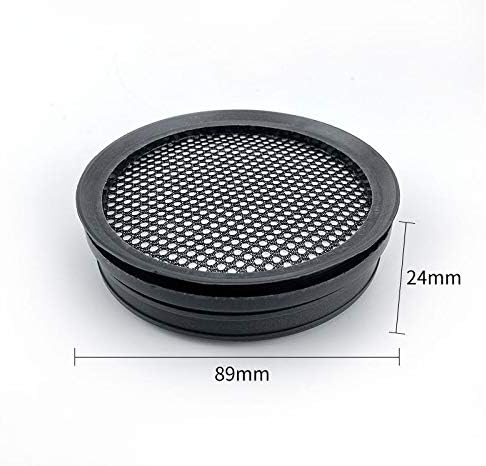
Image 6.1: Odashen filter with approximate dimensions.
7. Warranty and Support
Specific warranty information for Odashen replacement filters is not provided in this manual. Please refer to the retailer or the original product packaging for any applicable warranty details.
For further assistance or inquiries regarding this product, please contact the seller or retailer from whom you purchased the filters.