
1. Product Overview
The QDRAGON 3-in-1 Baby Walker and Activity Center is designed to support infants and toddlers aged 12+ months through various developmental stages. It functions as a push walker, an entertainment table, and a hangable activity center. This product aims to enhance coordination, leg strength, and cognitive development.
Key Features:
- 3-in-1 Design: Functions as a baby push walker, baby entertainment table, and hangable activity center.
- Detachable Entertainment Table: Features a turning cube, shape recognition block, colorful turnable gear, small beads, basketball frame, and an elephant-shaped electronic piano.
- Stable Triangle Structure: Designed with a stable triangle support structure and a four-point rectangular base to prevent rollover.
- Water Tank Structure: Allows for adding water or sand to increase chassis weight for enhanced stability during walking.
- Adjustable Speed Wheels: Rear wheels have anti-slip rings and can be adjusted to standard or low speed to accommodate different walking stages and help prevent bow legs.
- Safe Materials: Constructed from non-toxic ABS material with smooth, burr-free edges.
Product Dimensions and Weight:
- Product Dimensions: 15.7"L x 14.2"W x 18.1"H (as walker)
- Item Weight: 4.49 pounds
- Material: Plastic
- Recommended Age: 12 - 18 months

Image: The QDRAGON 3-in-1 Baby Walker and Activity Center in its walker configuration, showcasing its pink and white design with various activity features.
2. Safety Information
- Always supervise your child when using the walker or activity center.
- Ensure all parts are securely assembled before each use.
- Do not use on uneven surfaces, stairs, or near heat sources.
- Regularly inspect the product for any damage or loose parts. Discontinue use if any damage is found.
- The small balls included with the basketball hoop may pose a choking hazard for infants. Always supervise children during play with these items.
- Ensure the water tank is properly sealed if filled, to prevent spills.
- This product is intended for children aged 12-18 months. Adjust speed settings according to your child's developmental stage and walking ability.
3. Setup Instructions
Follow these steps to assemble your QDRAGON 3-in-1 Baby Walker and Activity Center. A screwdriver is required for battery installation.
3.1. Baby Walker Assembly:
- Install Batteries: Use a screwdriver to open the battery compartment in the main function part (activity panel). Insert 3x 1.5V AAA batteries.
- Remove Activity Panel: Press the white button to detach the main activity panel from the walker frame.
- Attach Handlebar: Insert the handlebar into the baby walker frame and secure it with the plastic screw.
- Fill Water Tank (Optional): Open the cover of the box and fill with water or sand to increase the weight of the walker chassis for added stability. Close the cover securely.
- Attach Rear Support: Place the heavy box (water tank compartment) at the back of the baby walker and lock it with 3 plastic screws.
- Install Walker Holders: Install the two baby walker holders (side supports).
- Install Wheels: Attach the wheels to the baby walker frame.
- Final Check: Ensure all parts are securely fastened.

Image: Visual guide for assembling the baby walker, including battery installation, handlebar attachment, water tank filling, and wheel installation.
3.2. Play Table Conversion:
- Remove Activity Panel: Press the white button to detach the main activity panel from the walker frame.
- Attach Table Legs: Install 4 holders (legs) into the designated slots on the activity panel to convert it into a play table.

Image: Visual guide for converting the activity panel into a standalone play table by attaching four legs.
3.3. Hangable Activity Center:
The detachable activity panel can also be hung on a crib or other suitable surface using straps (not explicitly mentioned in box contents, but implied by images). Ensure it is securely fastened to prevent falling.
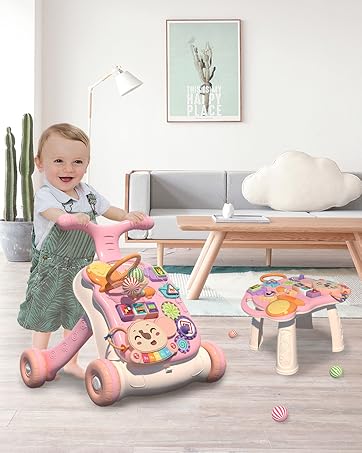
Image: A baby interacting with the detachable activity panel, which is shown hung on the side of a crib.
4. Operating Instructions
4.1. Using as a Push Walker:
- Ensure the water tank is filled for optimal stability, especially for new walkers.
- Adjust the rear wheel speed: Unlock for standard speed, lock for low speed. This helps control the pace and supports early walking development.
- The adjustable handle can be set to a comfortable height for your child.
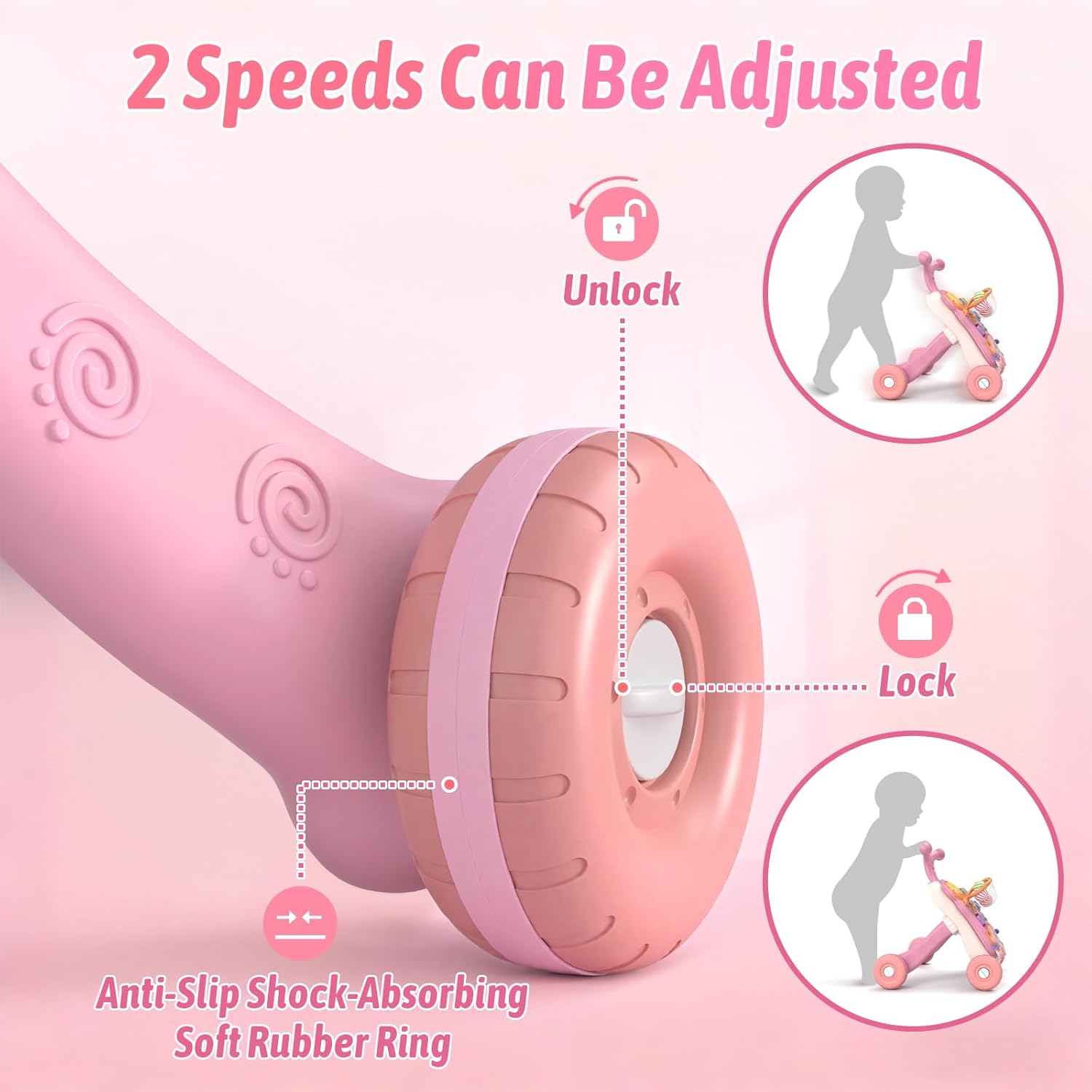
Image: A detailed view of the rear wheels, highlighting the anti-slip rubber ring and the lock/unlock mechanism for speed adjustment.

Image: Illustration of the adjustable handle and the water tank compartment, which can be filled to add weight for stability.
4.2. Interactive Activity Panel:
The activity panel offers various engaging features:
- Electronic Piano: Press the keys on the elephant-shaped piano to play melodies and sounds.
- Basketball Frame: Practice hand-eye coordination by tossing the included small balls into the hoop.
- Turning Cube & Shape Recognition: Manipulate the turning cube and fit shapes into their corresponding slots.
- Turnable Gears: Spin the colorful gears to develop fine motor skills.
- Lightful Trunk & Rattle: Engage with the light-up elephant trunk and attached rattle.

Image: A detailed view of the activity panel, highlighting features such as the basketball frame, turning cube, shape sorter, gears, and electronic piano.
4.3. Official Product Videos:
Video: This video demonstrates the QDRAGON 3-in-1 Baby Walker and Activity Center in use, showcasing its various modes and interactive features for infant and toddler development.
Video: A short video highlighting the "Cutest baby push walker" feature, demonstrating a baby interacting with the walker and its activity panel.
Video: This video provides a review of the 3-in-1 activity table and walker, showing its functionality and how a child interacts with it.
Video: A review showcasing the QDRAGON Baby Walker and Activity Center, highlighting its features and benefits for toddlers.
Video: This video demonstrates the QDRAGON Baby Walker and Activity Center, focusing on its use as a walker and activity table.
Video: A demonstration of the Sit-to-Stand Walker Toy, showing its functionality and how a child can use it for support.
Video: A brief video showcasing the QDRAGON Baby Walker, with a user expressing mixed feelings but demonstrating its use.
Video: This video highlights the QDRAGON 3-in-1 Baby Walker as a favorite, demonstrating its versatility as a walker and activity center.
Video: A video demonstrating the QDRAGON 3-in-1 Baby Walker and Activity Center, emphasizing its easy setup and multiple functions.
5. Maintenance
- Cleaning: Wipe down all plastic surfaces with a damp cloth and mild soap. Avoid abrasive cleaners.
- Drying: Ensure all parts are completely dry before storing or allowing your child to play with the product again.
- Storage: Store in a cool, dry place away from direct sunlight and extreme temperatures.
- Battery Replacement: Replace batteries in the electronic piano when sounds become faint or stop working. Ensure correct polarity.
6. Troubleshooting
- Wheels not moving smoothly:
- Check if the speed adjustment mechanism on the rear wheels is in the "unlocked" position.
- Ensure no debris is caught in the wheels.
- Note: The walker may not move well on thick or high-pile carpets. It performs best on hard, flat surfaces.
- Activity panel not producing sound/lights:
- Check if the batteries are correctly installed and not depleted. Replace if necessary.
- Ensure the power switch on the electronic piano is turned "on".
- Walker feels unstable:
- Verify that the water tank is filled with water or sand to increase stability.
- Ensure all assembly screws and connections are tight.
7. Specifications
| Product Name | QDRAGON 3-in-1 Baby Walker and Activity Center |
| Model Number | B08ZYB9NPR |
| Brand | QDRAGON |
| Material | Plastic (ABS) |
| Color | Pink |
| Product Dimensions (Walker) | 15.7"L x 14.2"W x 18.1"H |
| Item Weight | 4.49 pounds |
| Recommended Age | 12 - 18 months |
| Power Source (Piano) | 3x 1.5V AAA Batteries (not included) |
| What's in the Box | Baby walker (components for 3-in-1 modes) |
8. Warranty and Support
For warranty information or product support, please contact QDRAGON customer service directly. Refer to the product packaging or the manufacturer's official website for contact details.