
1. Introduction
This manual provides detailed instructions for the safe and efficient operation, installation, and maintenance of your ZOKOP BY-90PF Commercial Ice Machine. Please read this manual thoroughly before operating the appliance and retain it for future reference.

Image 1.1: Front view of the ZOKOP BY-90PF Commercial Ice Machine, highlighting its stainless steel construction and transparent ice-making cover.
The ZOKOP BY-90PF is a high-efficiency commercial ice machine designed for various applications including homes, restaurants, bars, hotels, and grocery stores. It is capable of producing up to 150 lbs of clear, hard cube-shaped ice per 24 hours, with an ice-making cycle ranging from 11 to 18 minutes. The unit features a 24 lbs ice storage capacity and is constructed from durable stainless steel.
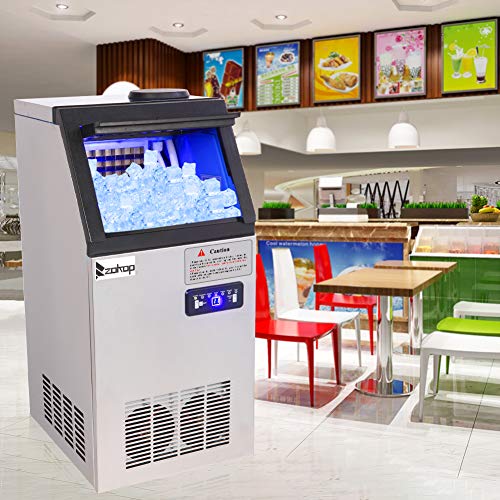
Image 1.2: The ice machine integrated into a commercial environment, demonstrating its suitability for various business settings.
2. Safety Information
Always follow basic safety precautions when using electrical appliances to reduce the risk of fire, electric shock, and injury to persons.
- Ensure the power supply matches the specifications (120V / 60Hz).
- Do not operate the machine with a damaged cord or plug.
- Keep ventilation openings clear of obstructions.
- Do not store explosive substances such as aerosol cans with a flammable propellant in this appliance.
- This appliance is not intended for use by persons (including children) with reduced physical, sensory or mental capabilities, or lack of experience and knowledge, unless they have been given supervision or instruction concerning use of the appliance by a person responsible for their safety.
- Children should be supervised to ensure that they do not play with the appliance.
- Unplug the appliance before cleaning or performing any maintenance.
3. Product Overview
Familiarize yourself with the main components and accessories of your ice machine.

Image 3.1: The ice machine shown with its standard accessories, including an ice scoop, water hose, and water filter.

Image 3.2: Overview of the ice machine and its key components, including the ice shovel and filter tube.
Control Panel

Image 3.3: Detailed view of the control panel, showing indicator lights for "ice making", "reservation", "add water", "ice full", "melting", "stoppage", "clean", and buttons for "+", "-", "ON/OFF", and "Reservation/Clean".
The control panel features various indicator lights and buttons for managing the ice machine's functions:
- Ice Making: Indicates when the machine is actively producing ice.
- Reservation: Indicates scheduled operation.
- Add Water: Lights up when water supply is low or disconnected.
- Ice Full: Indicates the ice storage bin is full.
- Melting: Indicates the ice is melting or the machine is in a defrost cycle.
- Stoppage: Indicates an error or operational halt.
- Clean: Indicates the machine is in cleaning mode.
- +/- Buttons: Used for adjusting settings, such as ice thickness or reservation time.
- ON/OFF Button: Powers the machine on or off.
- Reservation/Clean Button: Initiates reservation setting or cleaning cycle.
4. Setup
4.1 Unpacking
Carefully remove the ice machine from its packaging. Inspect for any shipping damage. Retain packaging materials for future transport if needed.
4.2 Placement
The ZOKOP BY-90PF can be used as a freestanding unit or built into a cabinet. Ensure adequate ventilation around the machine, especially at the front and rear vents. Allow at least 2 inches of clearance on all sides for proper airflow. Place the machine on a level, stable surface away from direct sunlight or heat sources.
Important: After transportation, allow the ice machine to stand upright for at least 24 hours before plugging it in. This allows the refrigerant to settle.
4.3 Water Connection
The ice machine requires a continuous water supply and a drain. Connect the water inlet pipe to a potable water source and the sewage outlet to a drain. Ensure all connections are secure to prevent leaks.

Image 4.1: Schematic illustrating the necessary connections for power, water inlet, and sewage outlet for the ice machine.
Installing the Water Filter
The included water filter should be installed in-line with the water supply to ensure clean ice production and prolong the machine's life.

Image 4.2: Visual instructions for connecting the water filter to the ice machine's water inlet. Steps include inserting the tube, securing connections, and attaching the filter.
- Connect the water inlet hose to the designated port on the back of the ice machine (refer to Image 4.2, step 1 & 2).
- Connect the other end of the hose to the water filter (refer to Image 4.2, step 3).
- Connect a separate hose from the water filter to your potable water tap (refer to Image 4.2, step 4).
- Ensure all connections are tight and leak-free.
4.4 Power Connection
Plug the ice machine into a grounded 120V / 60Hz electrical outlet. Do not use extension cords or adapters.
4.5 Initial Cleaning
Before first use, it is recommended to clean the inside walls of the water box and mold with a mild detergent. Rinse thoroughly with clean water. The machine also has a one-button cleaning function (see Section 6.2).
5. Operating Instructions
5.1 Turning On/Off
Press the ON/OFF button on the control panel to power the machine on or off. The "Ice Making" indicator will illuminate when the machine is operating.
5.2 Ice Making Cycle
Once powered on and connected to water, the machine will automatically begin the ice-making process. An ice-making cycle typically takes 11 to 18 minutes, depending on ambient temperature and water temperature. The machine will stop making ice automatically when the ice storage bin is full, indicated by the "Ice Full" light.
5.3 Adjusting Ice Thickness
The thickness of the ice cubes can be adjusted using the + and - buttons on the control panel. Press + for thicker ice and - for thinner ice. Adjusting the thickness will affect the ice-making cycle time.
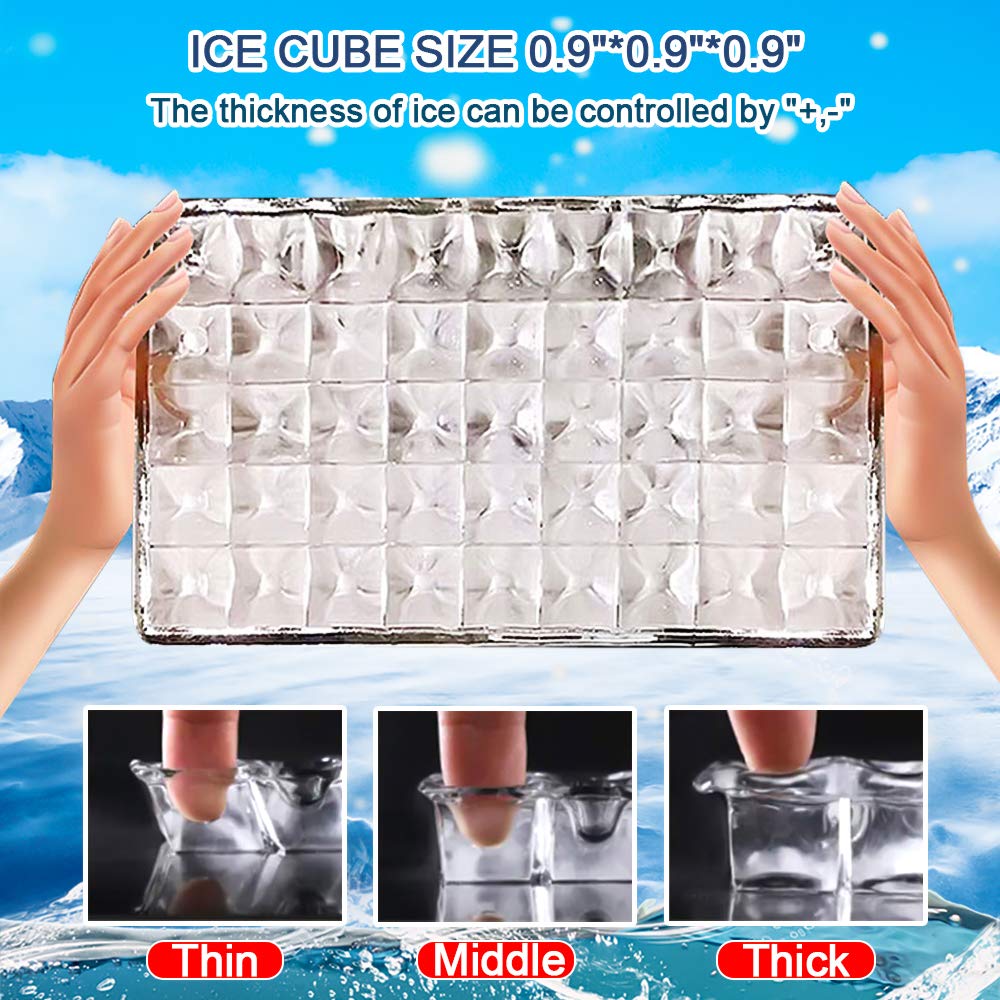
Image 5.1: Visual representation of adjustable ice cube thickness (0.9"x0.9"x0.9" nominal size), showing thin, middle, and thick options.
5.4 Reservation Function
The machine features a reservation function for scheduled shutdown and startup. To set a reservation, press the Reservation/Clean button. Use the + and - buttons to set the desired time for the machine to start or stop. Refer to the display for the set time.
5.5 NANO Blue Light for Sterilization
The ice machine is equipped with a NANO blue light feature for illumination and sterilization within the ice-making area. This function operates automatically to help maintain hygiene.
6. Maintenance
Regular maintenance ensures optimal performance and longevity of your ice machine.
6.1 Regular Cleaning
Clean the ice machine regularly, especially the ice storage bin and water reservoir, to prevent mold and bacterial growth. Use a mild, food-safe cleaning solution and rinse thoroughly with clean water.
6.2 One-Button Cleaning Function
The machine is equipped with a convenient one-button cleaning function. To activate, ensure the machine is connected to water and power, then press and hold the Reservation/Clean button until the "Clean" indicator light illuminates. The machine will run an automatic cleaning cycle. Follow up with manual cleaning of accessible parts if necessary.
6.3 Filter Replacement
The water filter should be replaced periodically, typically every 3-6 months, depending on water quality and usage. Refer to the filter manufacturer's instructions for specific replacement intervals. A clogged filter can reduce ice production and quality.
6.4 Long-Term Storage
If the ice machine will not be used for an extended period, perform a thorough cleaning cycle, drain all water from the reservoir and hoses, and unplug the unit. Store in a dry, well-ventilated area.
7. Troubleshooting
This section covers common issues you might encounter and their potential solutions. If the problem persists, contact customer support.
| Problem | Possible Cause | Solution |
|---|---|---|
| Machine does not turn on. | No power; power cord loose. | Check power outlet and ensure cord is securely plugged in. |
| "Add Water" light is on. | No water supply; water filter clogged. | Check water connection; replace water filter if necessary. |
| No ice production. | Water supply issue; machine too hot; refrigerant low. | Ensure water supply is connected; check room temperature; contact service if refrigerant is suspected. |
| Ice cubes are too thin/thick. | Ice thickness setting incorrect. | Adjust ice thickness using the +/- buttons. |
| "Ice Full" light is on, but bin is not full. | Ice sensor obstructed or faulty. | Clear any ice blocking the sensor; clean sensor area. |
8. Specifications
| Feature | Specification |
|---|---|
| Model | BY-90PF |
| Brand | ZOKOP |
| Ice Making Capacity | 150 lbs / 24 hours |
| Ice Storage Capacity | 24 lbs |
| Ice Making Cycle | 11-18 minutes |
| Power | 495W |
| Voltage / Frequency | 120V / 60Hz |
| Refrigerant | R134a |
| Foaming Agent | C5H10 |
| Ice Shape | Ice Cube (0.9 x 0.9 x 0.9 inches) |
| Unit Dimensions (L x W x H) | 14 x 17 x 30 inches (36 x 43 x 76 cm) |
| Weight | 65.5 lbs / 29.7 kg |
| Room Temperature Range | 50-100°F |
| Ambient Humidity | ≤90% |
| Climate Type | SN / N / ST / T |
9. Warranty and Support
For warranty information or technical support, please contact ZOKOP customer service. Keep your purchase receipt and product model number (BY-90PF) handy when contacting support.
Contact information can typically be found on the manufacturer's website or on the product packaging.


