
Introduction
Welcome to the user manual for your Fresh'n Rebel Twins 2 Tip Bluetooth Earbuds. These true wireless earbuds are designed for an immersive audio experience with convenient features. This manual will guide you through the setup, operation, and maintenance of your earbuds to ensure optimal performance and longevity.

Image: Fresh'n Rebel Twins 2 Tip Bluetooth Earbuds in their open charging case, showcasing the sleek design and blue color.
What's in the Box
Your Fresh'n Rebel Twins 2 Tip package includes the following components:
- Fresh'n Rebel Twins 2 Tip True Wireless Earbuds
- Charging Case (Wired & Wireless compatible)
- USB Type-A to USB Type-C Charging Cable
- Multiple sizes of eartips (S, M, L)
- Quick Start Guide

Image: An illustration showing the Fresh'n Rebel Twins 2 Tip earbuds, charging case, USB-C cable, and different eartip sizes, alongside the product packaging.
Setup
Charging the Earbuds and Case
Before first use, fully charge your Twins 2 Tip earbuds and charging case. The charging case supports both wired (USB-C) and wireless charging.
- Wired Charging: Connect the provided USB Type-A to USB Type-C cable to the charging port on the case and a power source.
- Wireless Charging: Place the charging case on a compatible wireless charging pad.
The LED indicators on the charging case will show the charging status and battery level. A full charge provides up to 4 hours of playtime for the earbuds, with the case offering an additional 16 hours, totaling 20 hours of playtime.

Image: An infographic illustrating the Twins 2 Tip features, including wireless charging, USB-C fast charging, battery indicator, IPX4 splash resistance, automatic pairing, and 20 hours total playtime.
Pairing with a Device
The Twins 2 Tip earbuds feature automatic pairing for convenience.
- Ensure your earbuds are charged.
- Open the charging case. The earbuds will automatically enter pairing mode.
- On your device (smartphone, tablet, etc.), go to Bluetooth settings and select "Fresh'n Rebel Twins 2 Tip" from the list of available devices.
- Once connected, you will hear an audio confirmation.
The earbuds also support Dual Master Technology, allowing you to use either the left or right earbud independently. Simply take one earbud out of the case, and it will connect automatically.
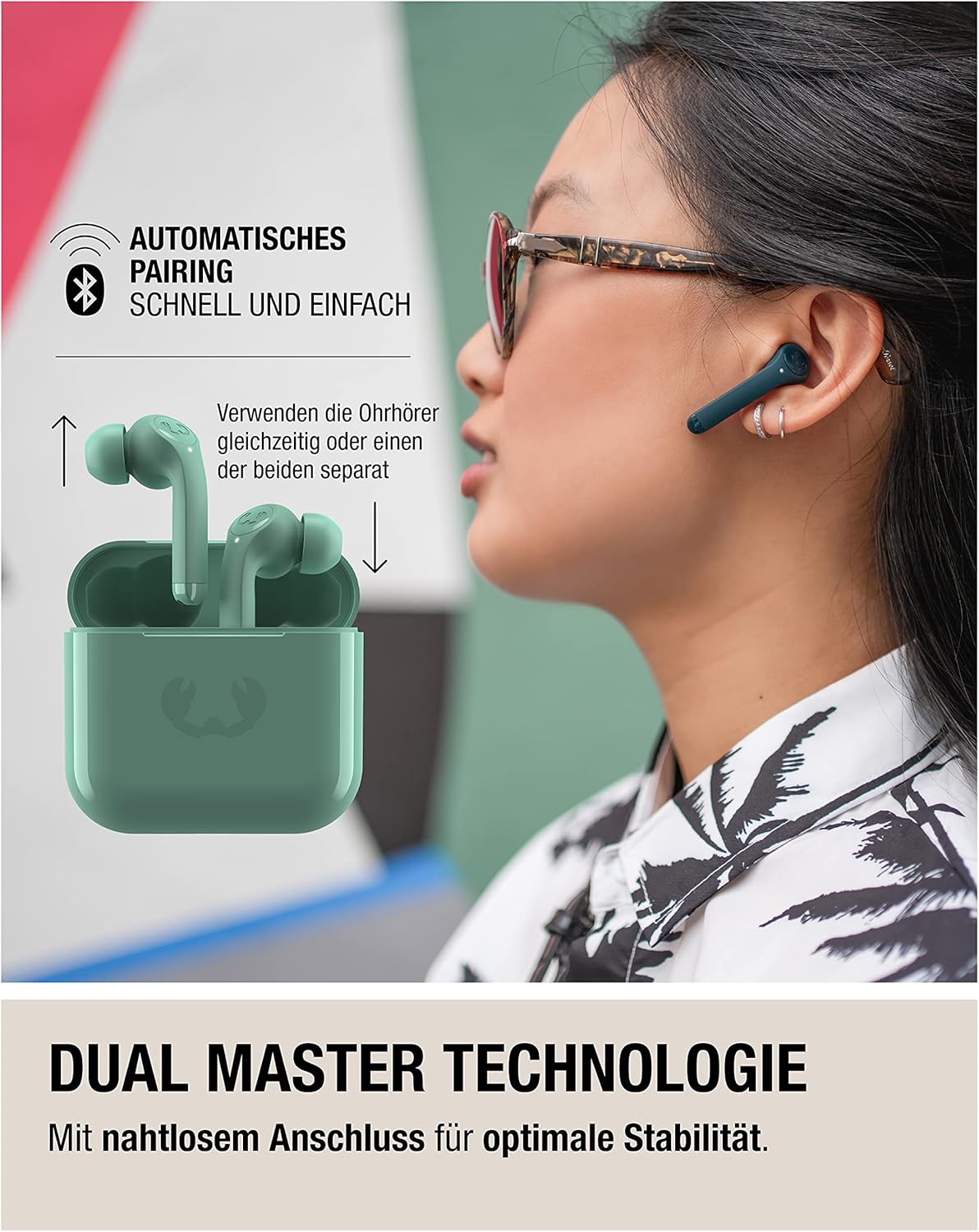
Image: An illustration demonstrating the Dual Master technology, showing how earbuds can be used together or individually with seamless connection and automatic pairing.
Operating the Earbuds
Touch Controls
The Twins 2 Tip earbuds feature intuitive touch controls on each earbud for managing music playback, calls, and voice assistant activation.
| Action | Function |
|---|---|
| Tap 1x | Play/Pause music, Answer/End call |
| Tap 2x (Right earbud) | Next track |
| Tap 2x (Left earbud) | Previous track |
| Tap 3x | Activate Voice Assistant |
| Hold 2 sec (Right earbud) | Volume Up |
| Hold 2 sec (Left earbud) | Volume Down |

Image: A detailed graphic illustrating the touch control gestures on the earbud for various functions like play/pause, skip tracks, volume control, and activating the voice assistant.
Voice Assistant
Activate your device's voice assistant (Siri, Google Assistant) by tapping the earbud three times. This allows for hands-free control and information retrieval.
Audio Quality
The Twins 2 Tip earbuds are equipped with 10mm drivers, delivering clear and balanced audio with deep bass for an enhanced listening experience.

Image: A close-up image highlighting the 10mm driver, emphasizing the high-quality audio output of the earbuds.
Maintenance
Water Resistance
The Twins 2 Tip earbuds are rated IPX4 splash-proof, meaning they are resistant to sweat and light splashes of water. They are suitable for workouts and outdoor activities but should not be submerged in water.
Cleaning
To maintain optimal performance and hygiene:
- Gently wipe the earbuds and charging case with a soft, dry, lint-free cloth.
- Remove eartips and clean them with mild soap and water if necessary, ensuring they are completely dry before reattaching.
- Avoid using abrasive materials, alcohol, or chemical cleaners.
Troubleshooting
If you encounter issues with your Fresh'n Rebel Twins 2 Tip earbuds, refer to the following common solutions:
- Earbuds not pairing:
- Ensure both earbuds are charged.
- Place earbuds back in the case, close it, then open it again to re-enter pairing mode.
- Forget the device in your phone's Bluetooth settings and try pairing again.
- Only one earbud working:
- Ensure both earbuds are charged.
- Place both earbuds back in the case, close it, then open it again.
- Check if Dual Master mode is active (if you intend to use only one).
- No sound or low volume:
- Check the volume level on both your device and the earbuds.
- Ensure earbuds are properly seated in your ears.
- Clean any debris from the earbud speakers.
- Charging issues:
- Ensure the charging cable is securely connected to both the case and the power source.
- Try a different USB-C cable or power adapter.
- For wireless charging, ensure the case is correctly positioned on the charging pad.
If problems persist, consult the Fresh'n Rebel support website for further assistance.
Specifications
| Feature | Detail |
|---|---|
| Model Name | Twins 2 Tip |
| Model Number | 3TW2100SB |
| Connectivity Technology | Wireless (Bluetooth) |
| Ear Placement | In-Ear |
| Form Factor | In-Ear |
| Material | Silicone |
| Water Resistance Level | IPX4 (Splash-proof) |
| Control Type | Touch, Volume Control |
| Special Features | Volume Control, Voice Assistant |
| Compatible Devices | Cellular Phone, Tablet |
| Charging Case Connector | USB Type-C (Wired & Wireless) |
| Included Cables | USB Type-A to USB Type-C |
| Rechargeable Battery | Yes |
| Total Playtime | Up to 20 hours (with charging case) |
| Earbud Playtime | Up to 4 hours (single charge) |
Warranty and Support
For warranty information and customer support, please refer to the documentation included with your product or visit the official Fresh'n Rebel website. Keep your proof of purchase for warranty claims.
Official Fresh'n Rebel Website: www.freshnrebel.com