
1. Introduction
Thank you for choosing the Borofone JR-BE34 Wireless TWS Bluetooth Earphones. This manual provides essential instructions for setting up, operating, and maintaining your earphones to ensure optimal performance and longevity. Please read this manual thoroughly before use.
2. Package Contents
The Borofone JR-BE34 package typically includes:
- Borofone JR-BE34 Wireless TWS Bluetooth Earphones (Left and Right)
- Charging Case
- Charging Cable
- User Manual (this document)

Image 1: The retail packaging for the Borofone JR-BE34 earphones. The image shows a white box with product branding and an illustration of the earphones and charging case.
3. Product Overview
The Borofone JR-BE34 earphones feature a compact design with a portable charging case. The earphones are designed for comfortable in-ear fit and provide touch controls for various functions.

Image 2: Borofone JR-BE34 Earphones in their charging case. The image shows the two white earbuds resting inside an open white charging case, with a small green indicator light visible on the front of the case.
Each earphone is equipped with a touch-sensitive area for controlling music playback and calls. The charging case protects the earphones and recharges them on the go.
4. Setup
4.1 Charging the Earphones and Case
Before first use, fully charge the earphones and the charging case.
- Place the earphones into the charging case. Ensure they are correctly seated.
- Connect the charging cable to the charging port on the case and to a USB power source.
- The indicator light on the charging case will show charging status. Once fully charged, the indicator light may change color or turn off.
A full charge provides approximately 3 hours of talk/music time for the earphones, and the charging case has a 350mAh battery capacity.
4.2 Bluetooth Pairing
To connect your Borofone JR-BE34 earphones to your device:
- Ensure the earphones are charged.
- Open the charging case. The earphones will automatically enter pairing mode.
- On your mobile device, go to Bluetooth settings and enable Bluetooth.
- Search for available devices. You should see "BOROFONE BE34" in the list.
- Select "BOROFONE BE34" to connect. A confirmation sound or message may indicate successful pairing.
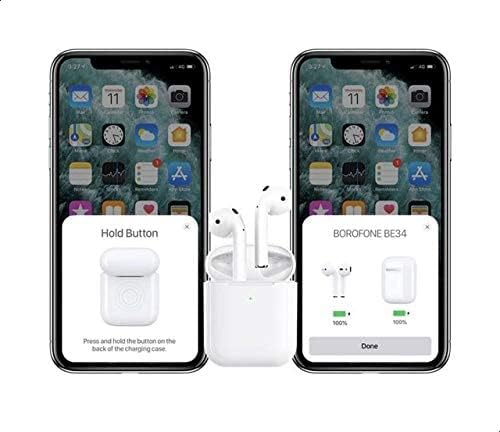
Image 3: Illustration of the pairing process. The image shows two smartphones. The left phone displays instructions to "Hold Button" on the charging case. The right phone shows a pop-up window indicating "BOROFONE BE34" with battery levels for both the case and the earphones, confirming successful connection.
For Apple devices, a pop-up window may appear on your screen to facilitate quick pairing and display battery levels.
5. Operating Instructions
5.1 Power On/Off
- Power On: Open the charging case, and the earphones will automatically power on.
- Power Off: Place the earphones back into the charging case and close the lid. They will automatically power off and begin charging.
5.2 Music Playback
Use the touch controls on either earphone:
- Play/Pause: Single tap on either earphone.
- Next Track: Double tap on the right earphone.
- Previous Track: Double tap on the left earphone.
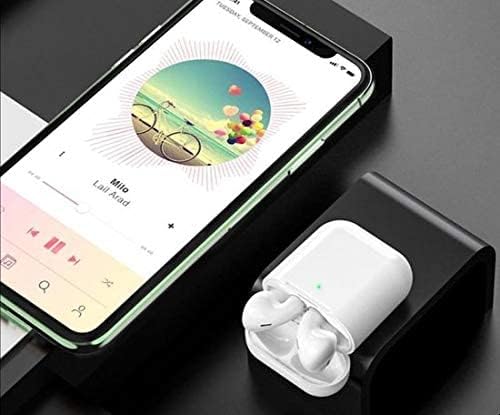
Image 4: The Borofone JR-BE34 earphones in their open charging case, positioned next to a smartphone displaying a music playback interface. This illustrates the earphones ready for use with a connected device.
5.3 Call Management
Manage phone calls using the touch controls:
- Answer/End Call: Single tap on either earphone.
- Reject Call: Press and hold on either earphone for approximately 2 seconds.
5.4 Voice Assistant
Triple tap on either earphone to activate your device's voice assistant (e.g., Siri, Google Assistant).
6. Maintenance
6.1 Cleaning
- Regularly clean the earphones and charging case with a soft, dry, lint-free cloth.
- Do not use abrasive cleaners, alcohol, or chemical sprays.
- Ensure charging contacts on both earphones and case are clean and free of debris.
6.2 Storage
- When not in use, store the earphones in their charging case to protect them and keep them charged.
- Avoid exposing the earphones to extreme temperatures, humidity, or dust.
7. Troubleshooting
| Problem | Possible Solution |
|---|---|
| Earphones not powering on | Ensure earphones and charging case are fully charged. Place earphones in case, close lid, then open again. |
| Earphones not pairing |
|
| Only one earphone working |
|
| Poor sound quality |
|
8. Specifications
| Feature | Detail |
|---|---|
| Model | JR-BE34 |
| Bluetooth Version | 5.0 |
| Bluetooth Chip | Jerry AC6936D |
| Charging Case Battery Capacity | 350mAh |
| Earphone Battery Capacity | 30mAh (each earphone) |
| Talk/Music Time | Approximately 3 hours |
| Standby Time | Approximately 200 hours |
| Connectivity | Wireless (Bluetooth) |
| Color | White |
| Dimensions (Product) | 3.6 x 9.6 x 9.6 cm |
| Weight (Product) | 136 g |
9. Warranty and Support
Borofone products are designed for reliability and performance. For warranty information, please refer to the warranty card included with your purchase or contact your local retailer. For technical support or inquiries, please visit the official Borofone website or contact their customer service.
10. Safety Information
- Do not disassemble or modify the earphones or charging case.
- Keep away from water and excessive moisture.
- Avoid prolonged exposure to high volume levels to prevent hearing damage.
- Dispose of the product responsibly according to local regulations.


