
Introduction
The YOVDA BT-A10 Motorcycle Helmet Bluetooth Headset is designed to enhance your riding experience with seamless communication and entertainment. Featuring Bluetooth 5.0 technology, intelligent noise reduction, and a long-lasting 2600mAh battery, this headset provides up to 160 hours of continuous music playback. It supports automatic/manual call answering, voice assistant, and offers clear, powerful audio even at high speeds. The unit is IP67 waterproof and includes a unique breathing light for added visibility and style.
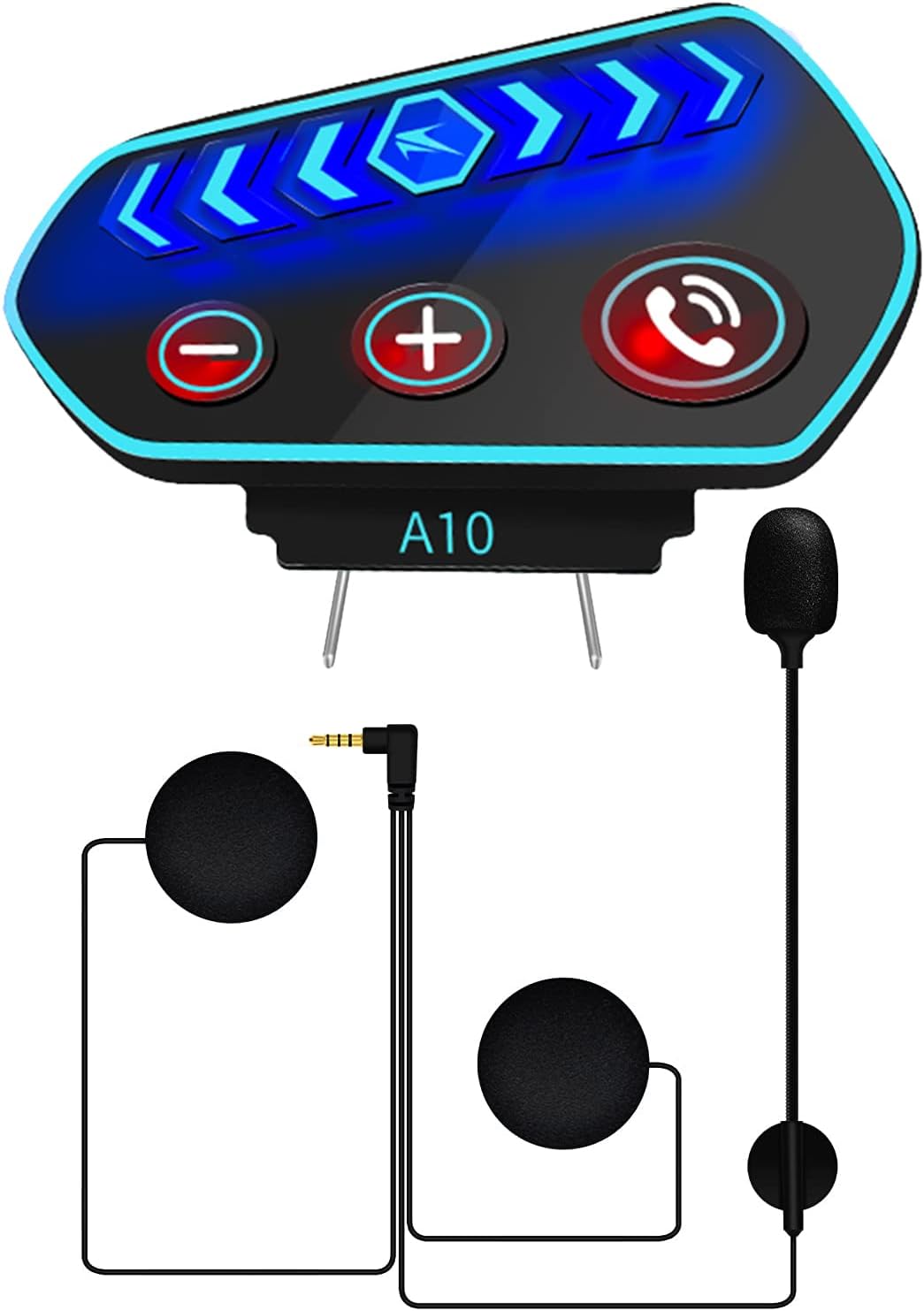
Figure 1: YOVDA BT-A10 Main Unit and Components
What's in the Box
Your YOVDA BT-A10 package includes the following components:
- Headphone main unit
- Earplugs (speakers)
- Earplug accessories (foam covers)
- Installation accessories (fixed clips, 3M stickers)
- Charging cable (USB)
- Instruction manual

Figure 2: Package Contents
Setup and Installation
The BT-A10 headset offers two primary installation methods to suit various helmet types: elastic Velcro and clamp fastening. Choose the method that best fits your helmet's design and ensures a secure fit.

Figure 3: Installation Methods
General Installation Steps:
- Prepare your helmet: Ensure the inner lining of your helmet is clean and dry where the speakers and main unit will be placed.
- Install Speakers: Place the ultra-thin speakers inside the helmet's ear pockets. Use the provided Velcro pads to secure them. Ensure they are positioned directly over your ears for optimal sound quality.
- Mount Microphone: Position the microphone arm so that the microphone is close to your mouth, typically along the left side of the helmet.
- Attach Main Unit:
- Velcro Installation: Apply the elastic Velcro to the side of your helmet and attach the main unit.
- Clamp Fastening: Secure the clamp to the edge of your helmet, then slide the main unit onto the clamp.
- Connect Cables: Plug the speaker and microphone cables into the appropriate ports on the main unit. Route the cables neatly under the helmet lining to prevent discomfort or interference.
Important Note on Helmet Compatibility: While the BT-A10 is designed for wide compatibility, helmets with built-in sun visors may present installation challenges, particularly if the sun visor mechanism interferes with the placement of the main unit or microphone arm. Ensure there is sufficient clearance before permanent installation.
Operating Instructions
Power On/Off & Pairing:
- Power On: Long press the power button until the indicator light flashes.
- Power Off: Long press the power button until the indicator light turns off.
- Bluetooth Pairing: Once powered on, the headset will automatically enter pairing mode. Search for "BT-A10" on your mobile device's Bluetooth settings and connect. The headset supports connecting to two Bluetooth devices simultaneously.
Music Playback:
- Play/Pause: Click the dial key (center button) to pause or resume music.
- Next Song: Click the "+" button to skip to the next song.
- Previous Song: Click the "-" button to go to the previous song.
- Volume Control: Long press the "+" button to increase volume. Long press the "-" button to decrease volume.
Video 1: A10-Key Adjustment Instructions. This video demonstrates how to use the buttons for music control and other functions.
Call Management:
- Answer Calls: The headset supports automatic answering of incoming calls. You can also manually answer by clicking the phone button.
- End Call: Click the phone button to end an active call.
- Reject Call: Long press the phone button to reject an incoming call.
- Voice Assistant: The headset supports voice assistant activation. Refer to your phone's voice assistant settings for specific commands.

Figure 4: Automatic Call Answering

Figure 5: Intelligent Voice Assistant
Breathing Light:
- Turn On/Off: Double-click the "+" button to toggle the breathing light on or off. This feature provides a cool appearance and enhances safety.
Charging the Device
The YOVDA BT-A10 is equipped with a built-in 2600mAh lithium-ion battery, offering extended usage time.
- Battery Life: Up to 160 hours of continuous playback on a full charge.
- Charging Time: Approximately 2-3 hours for a full charge.
- Charging Indicator: The device supports displaying power information on compatible mobile phones.
- Charging Port: Use the provided USB charging cable to connect the headset to a power source.

Figure 6: Extended Battery Life

Figure 7: Portable Integrated Host Charging Port
Care and Maintenance
- Waterproof Design: The BT-A10 headset features an IP67 waterproof rating, protecting it from dust and immersion in water up to 1 meter for 30 minutes. This makes it suitable for use in various weather conditions.
- Cleaning: Wipe the main unit with a soft, damp cloth. Avoid using harsh chemicals or abrasive cleaners. Ensure the charging port is dry before charging.
- Storage: Store the headset in a cool, dry place when not in use. Avoid extreme temperatures.
Video 2: A10 motorcycle headset with good waterproof performance. This video demonstrates the headset's water resistance.
Troubleshooting
If you encounter issues with your YOVDA BT-A10 headset, please refer to the following common problems and solutions:
- No Power: Ensure the battery is charged. Connect the headset to a power source and allow it to charge for at least 30 minutes before attempting to power on again.
- Cannot Pair with Device:
- Ensure the headset is in pairing mode (indicator light flashing).
- Turn off Bluetooth on your mobile device and turn it back on.
- Forget "BT-A10" from your device's Bluetooth list and attempt to pair again.
- Ensure no other Bluetooth devices are interfering with the connection.
- Poor Sound Quality / Low Volume:
- Check the volume levels on both the headset and your connected mobile device.
- Ensure speakers are correctly positioned over your ears inside the helmet.
- Verify that the speaker and microphone cables are securely plugged into the main unit.
- In noisy environments (e.g., high speeds), external noise may affect perceived sound quality. The headset features intelligent noise reduction, but extreme conditions can still impact audio clarity.
- Microphone Not Working:
- Ensure the microphone cable is securely connected.
- Check if the microphone is positioned correctly and not obstructed.
- Interference with Helmet Features (e.g., Sun Visor):
- Some helmet designs, particularly those with integrated sun visors, may have limited space for external accessories. If the main unit or microphone interferes with the sun visor's operation, consider adjusting the mounting position or using the Velcro installation method if the clamp is too bulky.
If the issue persists after trying these steps, please contact YOVDA customer support for further assistance.
Technical Specifications
| Feature | Specification |
|---|---|
| Model Name | BT-A10 |
| Connectivity Technology | Wireless, Bluetooth 5.0 |
| Wireless Communication Technology | Bluetooth |
| Bluetooth Version | 5.0 |
| Bluetooth Range | 10 Meters |
| Battery Life | 160 Hours (Playback) |
| Charging Time | 3 Hours |
| Battery Type | 2600mAh Lithium Ion |
| Water Resistance Level | IP67 Waterproof |
| Noise Control | Active Noise Cancellation |
| Frequency Response | 22 KHz |
| Sensitivity | 90 dB |
| Headphones Jack | 3.5 mm Jack |
| Material | IP67 Waterproof, Acrylonitrile Butadiene Styrene (ABS) |
| Item Weight | 6 Ounces |
| Product Dimensions | 6 x 3 x 1 inches |
| Recommended Uses | Cycling, Motorcycling, Audio Monitoring, Snowboarding, Skateboarding |
Warranty and Support
YOVDA products are manufactured to high-quality standards. For any warranty claims, technical support, or inquiries regarding your BT-A10 Motorcycle Helmet Bluetooth Headset, please contact YOVDA customer service through the retailer where you purchased the product or visit the official YOVDA website for contact information. Please retain your proof of purchase for warranty validation.