1. Product Overview
The BTC-D37 Mining Motherboard is a specialized motherboard designed for cryptocurrency mining operations. It features an integrated CPU and multiple PCIe slots to support a high number of graphics cards, optimizing it for mining efficiency and low power consumption. This manual provides essential information for setting up, operating, and maintaining your mining system.
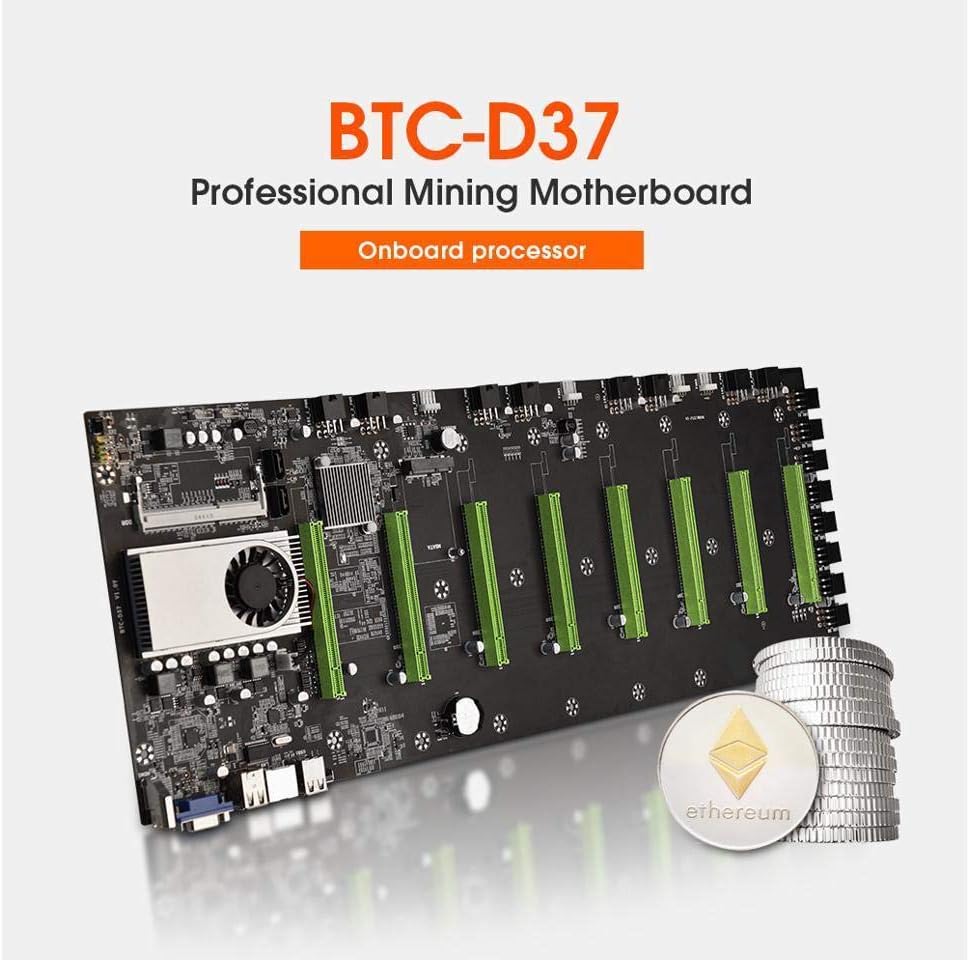
Figure 1: BTC-D37 Professional Mining Motherboard with integrated processor, designed for efficient cryptocurrency mining.
2. Key Features
- Integrated CPU: On-board Intel Celeron CPU 1037U @1.80GHz for streamlined operation.
- High GPU Support: Features 8*PCIE 16X slots (x1 GEN2 speed) for connecting multiple video cards. The slot spacing is 55mm.
- Memory: Supports SODIMM DDR3/DDR3L 1066/1333/1600MHz slot memory (ECC memory not supported).
- Display Outputs: Onboard VGA and HDMI display outputs.
- Network: 1*Realtek RTL8111F Gigabit Ethernet (supports Wake-on-LAN and PXE boot).
- Storage: Supports 1*SATA3.0 + 1*SATA2.0 + 1*mSATA3.0 hard disk interface (Hard disk not included).
- USB Ports: 8*USB2.0 ports.
- Power Supply: Designed for DC12V miner power supply (6PIN*8).
- Efficient Design: Engineered for silent performance, low power consumption, less heat generation, energy saving, and safe use.
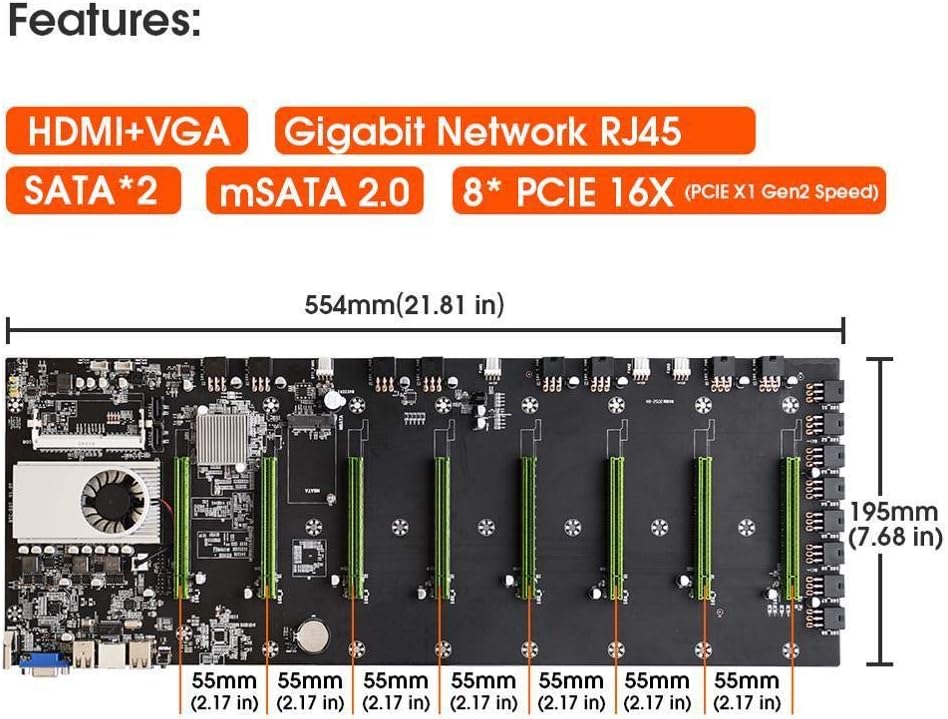
Figure 2: Overview of the BTC-D37 motherboard's key features and physical dimensions.
3. Setup Guide
Follow these steps to set up your BTC-D37 mining motherboard. Ensure all components are compatible and handle them with care to prevent electrostatic discharge.
3.1 Motherboard Installation
- Carefully place the BTC-D37 motherboard into a compatible mining case.
- Secure the motherboard using appropriate screws, ensuring it is firmly seated and aligned with the standoffs.

Figure 3: Detailed diagram showing the layout and various connection points on the BTC-D37 motherboard.
3.2 Power Supply Connection
Unlike standard DIY motherboards, the BTC-D37 does not use a traditional 24-pin ATX power header or an 8-pin CPU EPS header. Power is supplied directly through the 6-pin headers on the board.
- If using a standard PSU, connect the provided 24-pin shorter to your PSU's 24-pin cable. This will allow the PSU to power on without being connected to a traditional motherboard 24-pin header.
- Connect the 6-pin power cables from your PSU to the 6-pin headers located along the side of the motherboard. You do not need to connect all 8 headers; connecting 1 to 8 will suffice depending on your setup.
- If your PSU does not have enough 6-pin plugs, consider purchasing a PSU specifically designed for mining motherboards, which typically provide multiple 6+2pin plugs.
Video 1: Detailed guide on connecting the power supply and other components to the BTC-D37 mining motherboard. This video demonstrates the use of the 24-pin shorter and the 6-pin power headers.
3.3 Cooling Fan Connection
- Connect the 4 cooling fans to the designated fan headers on the motherboard. Ensure proper orientation for optimal airflow.
3.4 Graphic Card Installation
The motherboard supports up to 8 graphic cards. Ensure your graphic cards are compatible and have sufficient power connectors.
- Gently push each graphic card into its respective PCIe 16X slot at a 90-degree angle until it is fully seated.
- Connect the 8-pin EPS power headers on the graphic cards. If your PSU cables are too short or you need more connections, use 8-pin 1-to-2 splitters as extension cables.
3.5 Operating System and Mining Software Setup
- Install your preferred operating system (Linux or Windows are both compatible).
- Download and install the latest drivers for your graphic cards.
- Download and configure your chosen mining software. Register an account or log in to your existing one.
4. Operating Your Mining System
Once all components are connected and software is installed, you can power on your mining rig.
- Press the power button on the motherboard or the connected power switch.
- Monitor your system's performance through the mining software, checking hash rate, temperature, and power consumption.

Figure 4: A fully assembled mining rig with the BTC-D37 motherboard, displaying mining software on a monitor.
5. Maintenance
Regular maintenance is crucial for the longevity and optimal performance of your mining system.
- Dust Removal: Periodically clean dust from the fans, heatsinks, and motherboard components using compressed air. Dust buildup can lead to overheating.
- Cable Management: Ensure all cables are neatly organized and not obstructing airflow.
- Software Updates: Keep your operating system, graphic card drivers, and mining software updated to the latest versions for performance improvements and security patches.
- Environmental Control: Maintain a cool and well-ventilated environment for your mining rig to prevent overheating.
6. Troubleshooting
If you encounter issues with your BTC-D37 mining system, consider the following common troubleshooting steps:
- No Power:
- Verify all power cables are securely connected, especially the 6-pin headers on the motherboard and the 24-pin shorter on the PSU.
- Ensure the power button is correctly connected to the motherboard.
- Check the power outlet and PSU functionality.
- Graphic Cards Not Detected:
- Reseat the graphic cards in their PCIe slots.
- Ensure all 8-pin EPS power cables are securely connected to the graphic cards.
- Update or reinstall graphic card drivers.
- Check BIOS settings for PCIe slot configuration if applicable.
- Low Hash Rate or Instability:
- Check graphic card temperatures; overheating can cause performance throttling.
- Verify mining software settings and pool configuration.
- Ensure sufficient power supply to all components.
- Consider adjusting overclocking settings if applied.
- System Overheating:
- Ensure all cooling fans are operational and properly connected.
- Clean dust from heatsinks and fans.
- Improve ambient airflow around the mining rig.
7. Specifications
| Feature | Detail |
|---|---|
| Product Dimensions | 8.66 x 7.87 x 0.79 inches (554*195mm) |
| Manufacturer | ASPIRING ELECTRONICS TECHNOLOGY CO., LTD |
| Item Model Number | btc-d37 |
| Brand | ASPIRING |
| CPU Socket | 1037U (On-board Intel Celeron CPU 1037U @1.80GHz) |
| Compatible Devices | Personal Computer |
| RAM Memory Technology | DDR3 / DDR3L (1066/1333/1600MHz) |
| Compatible Processors | Intel Celeron |
| Chipset Type | Intel HM65 |
| Expansion Slots | 8*PCIE 16X slot (x1 GEN2 speed) |
| Storage Interfaces | 1*SATA3.0 + 1*SATA2.0 + 1*mSATA3.0 |
8. Warranty and Support
For warranty information, technical support, or service inquiries, please contact ASPIRING customer support directly. Refer to your purchase documentation for specific warranty terms and contact details.
You can also visit the ASPIRING Store on Amazon for more product information and support resources.