
1. Product Overview
The Blueskysea TS610 is a Solar TPMS (Tire Pressure Monitoring System) designed for RVs and trailers, featuring 6 external wireless sensors. This system provides real-time tire pressure and temperature data, enhancing driving safety and optimizing tire longevity. It includes an adjustable bracket for versatile display placement and supports dual charging methods: solar and USB.
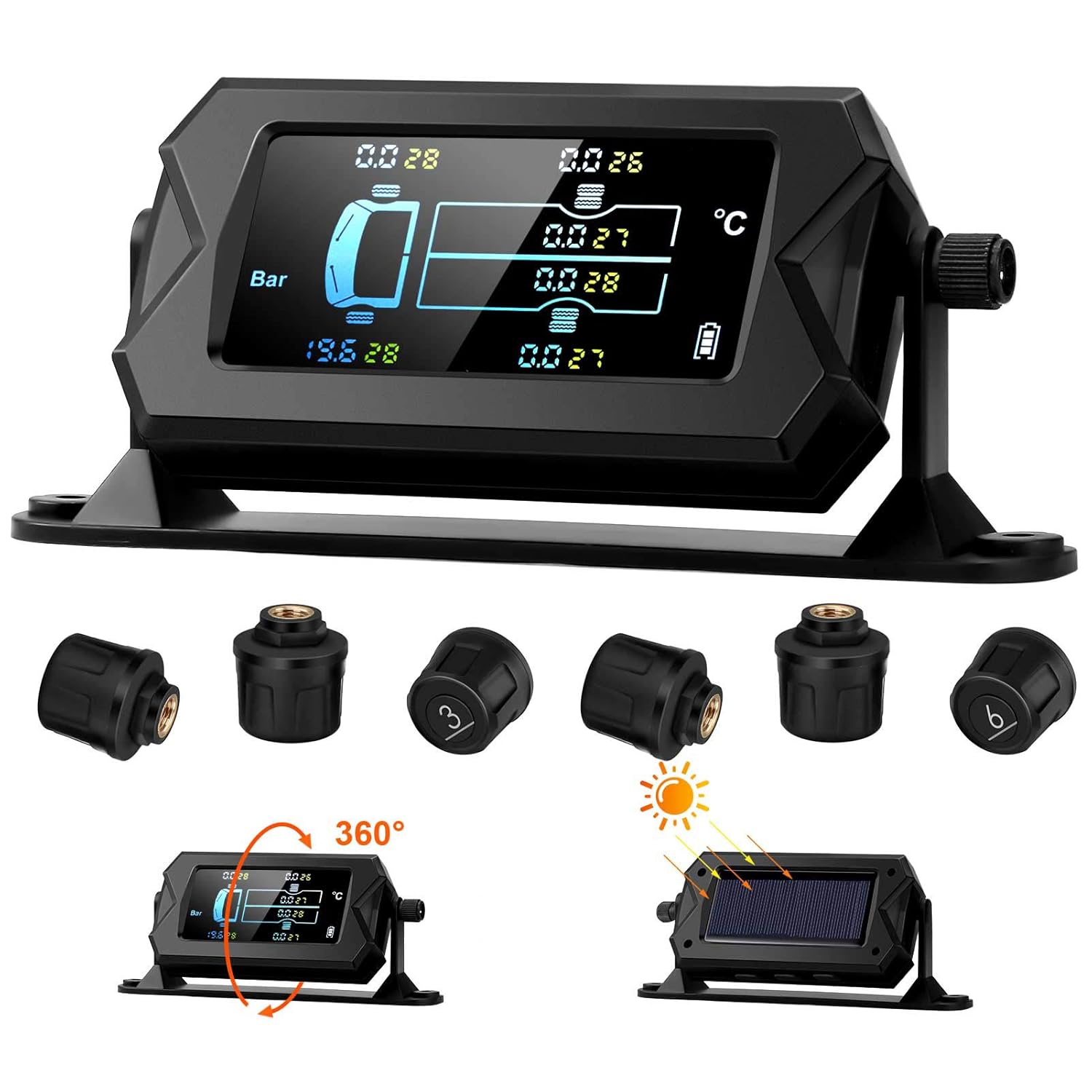
Image: The Blueskysea TS610 TPMS display unit with its solar panel and six external wireless tire pressure sensors.
2. Key Features
- Real-time Monitoring: Displays tire pressure and temperature for up to 6 tires simultaneously.
- Adjustable Display: 180° adjustable bracket for optimal viewing on dashboard or windshield.
- Dual Charging: Supports solar power and USB charging for continuous operation.
- Multiple Alarm Modes: Includes fast leak, slow leak, high pressure, high temperature, sensor fault, and low sensor battery alarms.
- High Accuracy Sensors: Equipped with 6 external wireless sensors with 100% pure copper valve cores, offering stable and accurate signal transmission.
- Durable Sensors: IP5K4K waterproof grade, dust-proof, anti-freeze, and anti-theft design.
- Tire Position Exchange: Allows for easy re-calibration after tire rotation.

Image: Visual representation of the various monitoring and alarm modes, including low pressure, low power, air leak, high pressure, high temperature, and no signal warnings.
3. Package Contents
Please verify that all items listed below are included in your package:
- 1 x Tire Pressure Monitor (Display Unit)
- 6 x External Sensors (Battery Included)
- 1 x USB Cable
- 1 x Anti-Slip Pad
- 6 x Nuts
- 1 x Screw
- 1 x Open-Wrench
- 1 x User Manual

Image: A complete view of the package contents, including the display unit, sensors, USB cable, anti-slip pad, nuts, screw, wrench, and user manual.
4. Installation Guide
4.1 Display Unit Installation
The display unit features a 180° adjustable bracket, allowing for flexible placement. It can be easily installed on your vehicle's dashboard or attached to the front windshield for optimal visibility.
- Choose a location on your dashboard or windshield that does not obstruct your view or interfere with driving.
- Use the provided anti-slip pad to secure the display unit on the dashboard.
- Adjust the angle of the display unit using the bracket to ensure clear visibility of the screen.

Image: Demonstrates the 180° adjustable bracket and suggested installation locations on the dashboard and front windshield of a vehicle.
4.2 External Sensor Installation
Follow these steps to install the external wireless sensors on your tires:
- Step 1: Install the anti-theft washer onto the tire valve stem first.
- Step 2: Tighten the sensor onto the valve stem. Ensure it is snug.
- Step 3: Use the provided open-wrench to tighten the anti-theft washer counter-clockwise against the sensor. This secures the sensor and prevents theft.
- Step 4: Finish the installation. Repeat for all 6 tires.

Image: Detailed steps for external sensor installation, showing the anti-theft washer and tightening process.
5. Charging the Device
The Blueskysea TS610 offers two convenient charging methods to ensure continuous operation:
- Solar Charging: The display unit is equipped with a large solar panel. Place the unit in direct sunlight to charge its built-in battery. This is the primary charging method during daytime use.
- USB Charging: For charging in low-light conditions or when the battery is low, connect the display unit to a USB power source using the provided USB cable.

Image: Visual guide to the solar and USB dual charging methods for the TPMS display unit.
6. Operating the System
6.1 Real-time Monitoring
Once installed and powered on, the display unit will automatically begin monitoring the pressure and temperature of all 6 tires. The large screen provides clear, real-time data. The system automatically updates all monitoring data.

Image: Highlights the importance of real-time monitoring in preventing tire-related incidents such as skids, collisions, air leakage, and excessive wear.
6.2 Alarm Modes
The system is designed to alert the driver to abnormal tire conditions through voice alarms and flashing warning lights. The 6 alarm modes include:
- Fast Leak Alarm: Alerts to rapid pressure loss.
- Slow Leak Alarm: Warns of gradual pressure decrease.
- High Pressure Alarm: Indicates tire pressure exceeding safe limits.
- High Temperature Alarm: Notifies of dangerously high tire temperatures.
- Sensor Fault Alarm: Alerts if a sensor is malfunctioning.
- Sensor Battery Low Power Alarm: Indicates a sensor battery needs replacement.
6.3 Tire Position Exchange
The system supports tire position exchange, allowing you to easily re-calibrate the display after rotating your tires. Refer to the detailed instructions in the included user manual for specific steps on how to perform this function.
7. Maintenance
7.1 Sensor Battery Replacement
When a sensor battery low power alarm is triggered, follow these steps to replace the battery:
- Step 1: Remove the battery cover from the sensor using the provided open-wrench or a suitable tool.
- Step 2: Remove the old battery slice from the sensor.
- Step 3: Carefully take out the battery from its compartment.
- Step 4: Replace with a new battery (CR1632 or equivalent, refer to the full manual for exact type). Ensure correct polarity. Reassemble the sensor.
Image: Detailed steps for replacing the battery within an external sensor.
7.2 General Care
The sensors are designed to be durable with IP5K4K waterproof grade, dust-proof, anti-freeze, and anti-theft features. To ensure longevity:
- Regularly clean the display unit with a soft, dry cloth.
- Ensure the solar panel on the display unit is clean and unobstructed for efficient charging.
- Periodically check the sensors for any physical damage or loose connections.

Image: Illustrates the robust features of the wireless sensors, including their resistance to dust, water, extreme temperatures, and theft.
8. Troubleshooting
If you encounter issues with your Blueskysea TS610 TPMS, please refer to the following common problems and solutions:
| Problem | Possible Cause | Solution |
|---|---|---|
| Display shows '0' for pressure/temperature or no signal. | Sensor not installed correctly, sensor battery low/dead, sensor not paired, signal interference. | Ensure sensors are tightened correctly. Check/replace sensor batteries. Re-pair sensors if necessary (refer to full manual). Move display unit to reduce interference. |
| Constant alarm sounding. | Tire pressure/temperature outside set thresholds, faulty sensor, incorrect alarm settings. | Check actual tire pressure/temperature and adjust if needed. Verify alarm thresholds in settings. If a specific sensor is faulty, replace it. |
| Display unit not charging. | Insufficient sunlight for solar charging, USB cable/port issue, internal battery issue. | Ensure solar panel is clean and exposed to direct sunlight. Try charging via USB with a different cable/port. If issues persist, contact support. |
| Inaccurate readings. | Sensor not fully seated, external factors (extreme temperature changes), sensor malfunction. | Re-tighten sensors. Allow time for readings to stabilize in new environments. Compare with a reliable tire gauge. If consistently inaccurate, a sensor may need replacement. |
For more detailed troubleshooting steps or issues not listed here, please consult the complete user manual or contact Blueskysea customer support.
9. Specifications
| Specification | Value |
|---|---|
| Product Dimensions | 18.29 x 13.41 x 6.3 cm |
| Weight | 358 Grams |
| Item Model Number | TS610 |
| Style | Modern |
| Measurement Accuracy | ±2% |
| Measuring Range (Wireless Signal) | Up to 32FT (10M) |
| Sensor Waterproof Grade | IP5K4K |
| Charging Methods | Solar Power & USB Charging |
| Applicable Vehicles | Cars, RVs, Minivans, Trucks, Buses (ideal for 6-tire vehicles) |

Image: The Blueskysea TS610 TPMS is suitable for a variety of 6-tire vehicles, including cars, RVs, trailers, trucks, and buses.
10. Warranty and Support
For information regarding warranty coverage, technical support, or replacement parts, please refer to the official Blueskysea website or contact their customer service directly. Keep your purchase receipt as proof of purchase for any warranty claims.