
Introduction
Thank you for purchasing the Baztoy 2-in-1 RC Car & Robot. This product is designed to provide an engaging play experience, transforming between a remote-controlled car and a robot. This manual provides essential information for the safe and proper operation, maintenance, and troubleshooting of your new toy. Please read this manual thoroughly before use and retain it for future reference.

Image: The Baztoy 2-in-1 RC Car & Robot, showcasing its car and robot forms alongside the remote control.
Package Contents
Please check the package contents to ensure all items are present:
- 1 x Baztoy 2-in-1 RC Car & Robot (Model 515)
- 1 x 2.4 GHz Remote Control
- 1 x 3.7V/800mAh Rechargeable Battery (for the car)
- 1 x USB Charging Cable
- 1 x Screwdriver (for battery compartments)

Image: The complete package contents, featuring the RC car, remote control, rechargeable battery, USB charging cable, and a screwdriver.
Product Overview
RC Car / Robot
The Baztoy 2-in-1 RC Car & Robot features a durable ABS construction, allowing it to transform between a sleek sports car and an upright robot. It is equipped with a powerful motor for various movements and a 360-degree rotation capability.
Remote Control
The 2.4 GHz remote control provides an interference-free connection up to 50 meters. It features intuitive buttons for movement, transformation, and a one-key demonstration function.
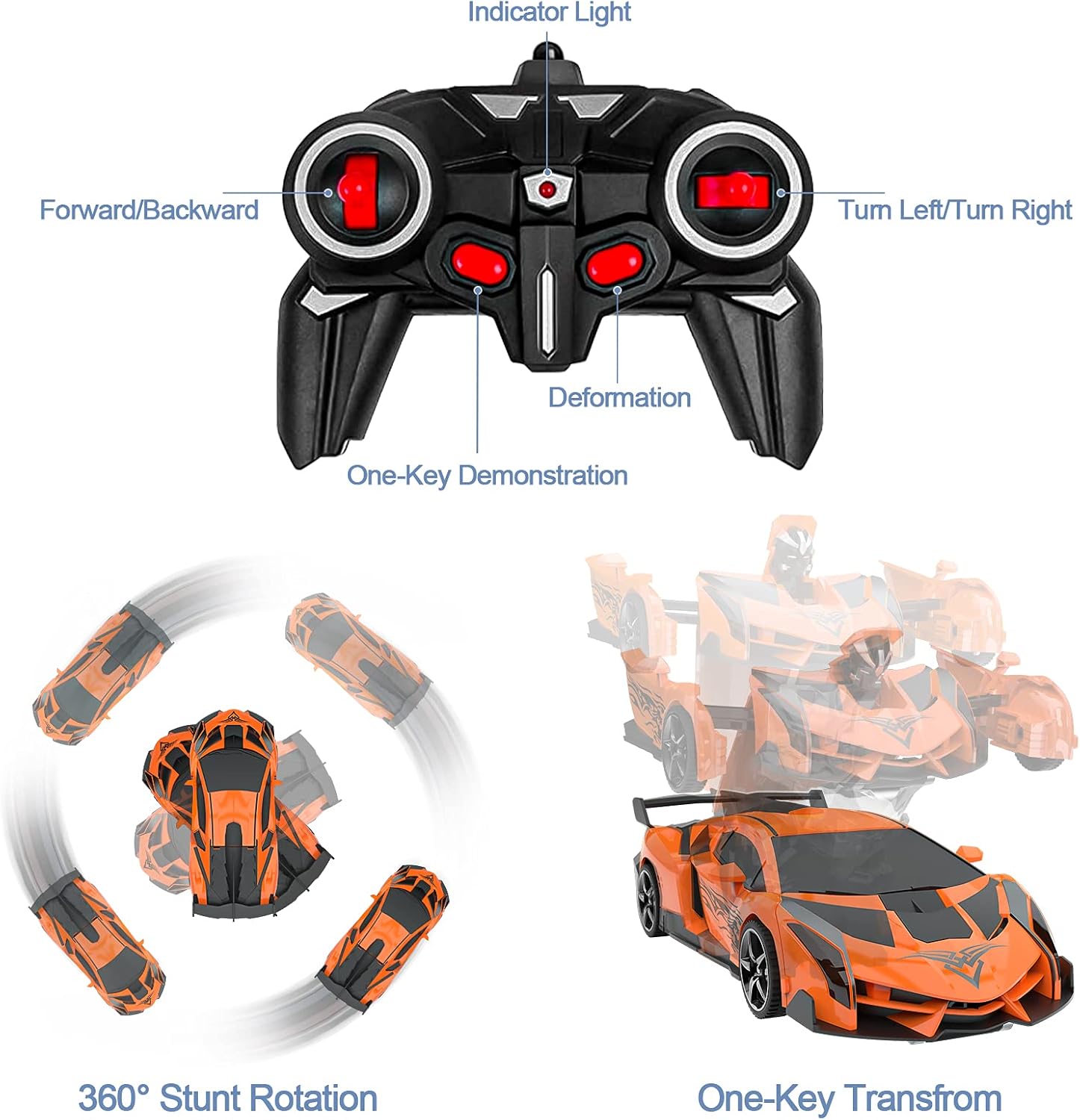
Image: Detailed view of the remote control, highlighting its various buttons and their functions, including movement, transformation, and demonstration.
Setup
1. Charging the Car Battery
- Locate the rechargeable 3.7V/800mAh battery and the USB charging cable.
- Connect the battery to the USB charging cable.
- Plug the USB cable into a standard USB power adapter (not included), computer USB port, or power bank.
- The indicator light on the USB cable will show the charging status. It typically turns red during charging and off or green when fully charged.
- A full charge takes approximately 1 hour. Do not overcharge the battery.

Image: Illustration of the USB charging process for the car's rechargeable battery, indicating power levels.
2. Installing the Car Battery
- Using the provided screwdriver, open the battery compartment on the underside of the RC Car.
- Carefully connect the fully charged 3.7V/800mAh battery to the car's connector.
- Place the battery inside the compartment and close the cover securely with the screw.
3. Installing Remote Control Batteries
- Using the provided screwdriver, open the battery compartment on the back of the remote control.
- Insert two 1.5V 'AA' batteries (not included), ensuring correct polarity (+/-).
- Close the battery compartment securely with the screw.
Operating Instructions
1. Pairing the Remote Control
- Ensure both the RC Car and the remote control have fresh or fully charged batteries installed.
- Turn on the RC Car using the power switch (usually located on the underside).
- Turn on the remote control. The indicator light on the remote will flash.
- Wait a few seconds for the remote control and car to pair automatically. The remote's indicator light will become solid once paired.

Image: Two children operating their RC cars, illustrating the 2.4GHz interference-free remote control technology.
2. Driving the Car
- Use the left joystick for Forward/Backward movement.
- Use the right joystick for Turn Left/Turn Right.
- The car can perform 360-degree stunt rotations.

Image: The RC car demonstrating its 360-degree rotation capability.
3. Transforming (Car to Robot & Robot to Car)
Press the Deformation button on the remote control to switch between car and robot modes. The car will automatically transform with a single press.

Image: A visual sequence illustrating the transformation of the toy from a car into a robot.
4. One-Key Demonstration
Press the One-Key Demonstration button on the remote control. The RC Car/Robot will automatically perform a sequence of its functions, including movements and transformation, to showcase its capabilities.
Maintenance
- Cleaning: Wipe the car and remote control with a soft, dry cloth. Do not use water or chemical cleaners.
- Storage: When not in use for extended periods, remove all batteries from both the car and the remote control. Store the product in a cool, dry place away from direct sunlight.
- Battery Care: Always ensure the rechargeable battery is fully charged before use. Do not leave batteries charging unattended.
Troubleshooting
| Problem | Possible Cause | Solution |
|---|---|---|
| Car does not turn on. | Battery not charged or incorrectly installed. | Ensure car battery is fully charged and correctly inserted. Check power switch is ON. |
| Remote control not responding. | Remote control batteries are low or incorrectly installed. Not paired. | Replace remote control batteries. Ensure correct polarity. Re-pair the remote control with the car. |
| Short operating time. | Battery not fully charged or old battery. | Fully charge the car battery. Consider replacing the rechargeable battery if it's old. |
| Interference during operation. | Operating near other 2.4GHz devices. | Move to an area with less wireless interference. |
Specifications
- Model: 515
- Material: Acrylonitrile Butadiene Styrene (ABS)
- Car Dimensions (L x W x H): Approximately 23.5 x 9 x 5.5 cm
- Robot Dimensions (L x W x H): Approximately 14 x 15.5 x 19.5 cm
- Battery (Car): 3.7V/800mAh Rechargeable (included)
- Battery (Remote Control): 2 x 1.5V 'AA' (not included)
- Charging Time: Approximately 1 hour
- Control Frequency: 2.4 GHz
- Control Range: Up to 50 meters
- Recommended Age: 3-10 years

Image: Detailed measurements of the RC car in both its compact car form and its extended robot configuration.
Safety Information
- This product is suitable for children aged 3 years and above. Adult supervision is recommended.
- Do not operate the toy near people, pets, or fragile objects to prevent injury or damage.
- Avoid operating in wet conditions or on uneven terrain.
- Do not modify or disassemble the product, as this may cause malfunction or injury.
- Dispose of batteries responsibly according to local regulations.
Warranty and Support
Specific warranty information is not provided in this manual. For warranty claims or technical support, please refer to the retailer where the product was purchased or contact Baztoy customer service directly through their official channels.