
1. Introduction
This instruction manual provides essential information for the safe and efficient operation, maintenance, and troubleshooting of your BLUBERY 3500 PSI Gas Pressure Washer. Please read this manual thoroughly before initial use and retain it for future reference.

Figure 1: BLUBERY 3500 PSI Gas Pressure Washer (Model 3500PSI)
2. Important Safety Information
Operating a pressure washer requires adherence to safety precautions to prevent injury or damage. Always follow these guidelines:
- Read the Entire Manual: Understand all instructions and warnings before operation.
- Personal Protective Equipment: Wear appropriate eye protection, hearing protection, and sturdy footwear.
- Keep Clear: Do not spray towards people, animals, electrical devices, or outlets. Keep children and pets away from the operating area.
- Hot Surfaces: The muffler and engine components become very hot during operation. Allow the machine to cool completely before touching or storing.
- Fuel Safety: Use fuel with less than 10% ethanol. Never refuel a hot engine. Ensure adequate ventilation when refueling.
- Oil Level: Always check the engine oil level (SAE 10W-30) before starting. The engine will shut down if oil is low.
- Water Supply: Never run the pump without water, as this can cause severe damage. Ensure the water inlet temperature is below 40°C (104°F).
- Secure Connections: Ensure all hose and gun connections are firmly tightened to prevent leaks and maintain pressure.
3. Setup and Assembly
Follow these steps to assemble and prepare your pressure washer for first use:
- Unpacking: Carefully remove all components from the packaging.
- Wheel Assembly: Attach the wheels to the frame. The large off-road tires are designed for stability and easy movement.
- Handle Assembly: Secure the handle to the main unit.
- Add Engine Oil:
- Locate the oil fill cap/dipstick.
- Using a funnel, pour approximately 600ml of SAE 10W-30 motor oil into the engine.
- Check the oil level with the dipstick; it should reach at least the 'L' mark. Do not overfill.
Video: Filling engine oil. Ensure oil level is correct before starting.
- Add Fuel:
- Unscrew the fuel tank cap.
- Fill the fuel tank with gasoline (less than 10% ethanol). The fuel tank capacity is 3.6L (approximately 0.95 gallons). Do not overfill.
- Securely replace the fuel tank cap.
- Connect Water Supply:
- Insert the water filter into the pump inlet.
- Attach a garden hose to the pump inlet. Ensure all connections are firmly tightened.
- Open the water source completely.
Video: Step-by-step installation of the pressure washer components.
- Connect High-Pressure Hose and Spray Gun:
- Connect one end of the 30-foot high-pressure hose to the pump outlet.
- Connect the other end of the high-pressure hose to the spray gun.
- Ensure all connections are firmly tightened.
- Purge Air from System: Squeeze the trigger on the spray gun to purge air from the pump and hose until a steady stream of water emerges. This helps in easier engine starting.
4. Operating Instructions
Once assembled and prepared, follow these steps to start and operate your BLUBERY pressure washer:
- Engine Controls:
- Turn the engine switch to the "ON" position.
- Move the choke lever to the "OFF" position (left side) for a cold engine. If the engine is warm or during summer, switch to "ON" (right side).
- Turn the fuel valve to the "ON" position (right side).

Figure 2: Engine starting controls (Oil valve switch, Air inlet switch).
- Starting the Engine:
- Locate the recoil cord. Pull it slowly until resistance is felt.
- At this point, pull the cord rapidly and firmly to start the engine.
- Once the engine starts, turn the choke lever to the "ON" position (right side). If the engine does not start, repeat the process.
Video: Guide on how to start the pressure washer, addressing common starting issues.
- Nozzle Selection:
The pressure washer comes with 5 quick-connect nozzles for various cleaning tasks:
- 0° (Red): Ultra high pressure for tough, concentrated cleaning.
- 15° (Yellow): High pressure for general cleaning of hard surfaces.
- 25° (Green): Medium pressure for versatile cleaning.
- 40° (White): Low pressure wide spray for delicate surfaces.
- Soap Nozzle (Black): For applying cleaning solutions.
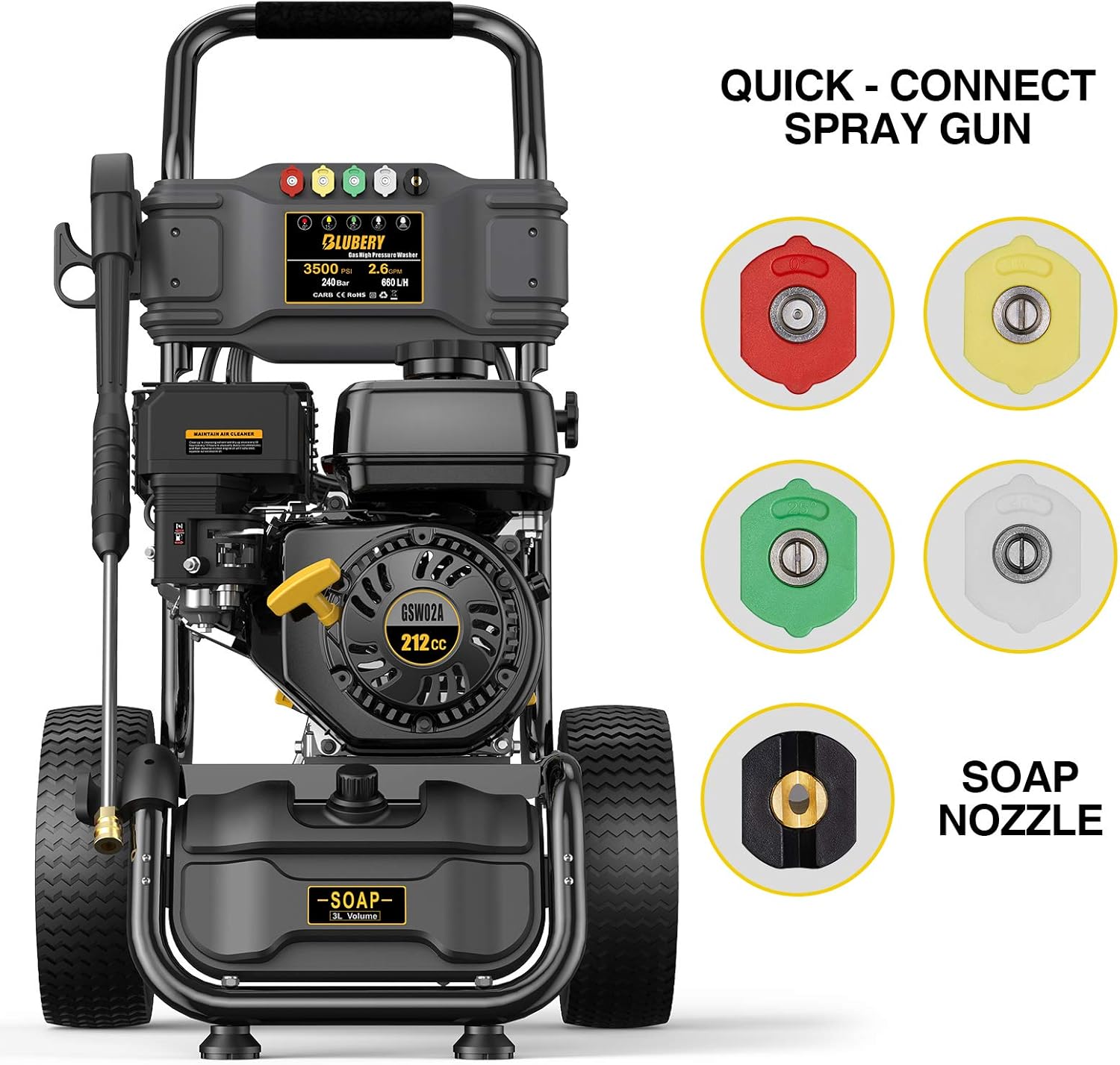
Figure 3: Quick-connect spray gun with different nozzles.
Select the appropriate nozzle for your task and securely attach it to the spray gun.
- Applying Soap (Optional):
- Fill the onboard soap tank (1 Gallon capacity) with your desired cleaning solution.
- Attach the black soap nozzle to the spray gun.
- The pressure washer will automatically draw soap when the soap nozzle is in use.
- Cleaning: Hold the spray gun firmly and maintain a safe distance from the surface being cleaned. Always start with a wider spray pattern (higher degree nozzle) and adjust as needed.
5. Maintenance
Regular maintenance ensures the longevity and optimal performance of your pressure washer:
- Engine Oil: Check the oil level before each use. Change oil according to the engine manufacturer's recommendations (typically after the first 5 hours, then every 50 hours).
- Air Filter: Clean the air filter regularly, especially in dusty conditions. Refer to the engine manual for specific instructions.
- Spark Plug: Inspect and clean the spark plug periodically. Replace if worn.
- Water Filter: Regularly check the water filter at the pump inlet for debris. Clean or replace if necessary to prevent blockages.
- Nozzles: Clean clogged nozzles using the provided nozzle cleaning tool.
- Storage: Before long-term storage, drain all fuel from the tank and carburetor. Run the engine until it stops from lack of fuel. Drain water from the pump and hoses to prevent freezing damage.
6. Troubleshooting
If you encounter issues, consult this section before contacting support:
| Problem | Possible Cause | Solution |
|---|---|---|
| Engine will not start | No fuel or low fuel level Low engine oil level Engine switch OFF Choke lever incorrect Spark plug issue | Fill fuel tank Fill engine oil to 'L' mark Turn engine switch ON Adjust choke lever (see Operating Instructions) Check/replace spark plug |
| No water pressure | Water supply off or restricted Clogged nozzle Air in pump/hose Damaged pump | Ensure water supply is fully open and hose is not kinked Clean or replace nozzle Purge air by squeezing trigger with engine off Contact customer support |
| Engine runs rough | Stale fuel Clogged air filter Incorrect choke setting | Drain old fuel and refill with fresh gasoline Clean or replace air filter Adjust choke lever |
Video: Guide on how to start the pressure washer, addressing common starting issues.
7. Specifications
| Feature | Detail |
|---|---|
| Brand | BLUBERY |
| Model Number | 3500PSI |
| Power Source | Gas Powered |
| Maximum Pressure | 3500 PSI |
| Maximum Flow Rate | 2.6 GPM |
| Engine Type | 212cc 4-Stroke BLUBERY OHV Horizontal Shaft Engine |
| Hose Length | 30 Feet |
| Soap Tank Volume | 1 Gallon (approx. 3.6L) |
| Item Weight | 72 Pounds |
| Product Dimensions | 25.6"L x 23.2"W x 40.2"H |
| Nozzle Types | 0°, 15°, 25°, 40°, Soap |
| Certification | EPA |

Figure 4: Product dimensions.
8. Warranty and Support
This product is functionally tested at the factory and may contain minimal residual fuel/oil or fuel smell. While this item is generally non-returnable due to hazardous materials regulations, if the item arrives damaged or defective, please contact the after-sales support for assistance. You may be eligible for a partial refund or replacement parts.
For customer support, refer to the contact information provided in your product packaging or on the official BLUBERY website. Please have your model number (3500PSI) and purchase details ready when contacting support.