
KETOTEK KT99
KETOTEK KT99 Temperature Controller User Manual
Model: KT99
1. Overview
The KETOTEK KT99 is a versatile digital thermostat regulator designed for precise temperature control in various applications. It features two independent direct outputs and comes with two 1.5m NTC waterproof sensors, allowing it to manage two separate heating or cooling devices simultaneously. The unit displays temperature in Fahrenheit and offers a wide control range from -58°F to 248°F.
Key features include:
- Dual Independent Outputs: Control two devices (heater/cooler) with separate temperature settings.
- Wide Control Range: Operates from -58°F to 248°F, suitable for diverse environments.
- Compressor Delay Time: Adjustable delay (0-5 minutes) for cooler protection.
- High/Low Temperature Alarms: Set alarm values to protect equipment and environments.
- Data Storage & Reset: All parameter settings are saved after power loss and can be reset.
- Temperature Calibration: ±1°F control accuracy with a calibration range of -30°F to 30°F.

Figure 1.1: KETOTEK KT99 Dual Temperature Controller with its two NTC waterproof probes.

Figure 1.2: Key features of the KT99 controller, including alarm, delay time, dual NTC sensors, dual heater/cooler functionality, and temperature correction.
2. Setup and Installation
Proper installation and wiring are crucial for the safe and effective operation of your KT99 temperature controller. Please follow these instructions carefully.
2.1 Wiring Diagram
The KT99 controller operates on 120V AC power. It provides two independent 120V outputs for connecting your heating or cooling loads. Ensure all connections are secure and insulated.

Figure 2.1: Wiring diagram for the KT99. Connect 120V power supply to the central red and black wires. Output 1 (black and yellow wires) and Output 2 (red and yellow wires) provide 120V to connected loads. Warning: Outputs are live when the indicator light is on.
- Power Supply: Connect your 120V AC power source to the central red and black wires.
- Output 1 (Heater/Cooler): Connect your first load (e.g., heater or cooler) to the black and yellow wires labeled 'Output 1'.
- Output 2 (Heater/Cooler): Connect your second load to the red and yellow wires labeled 'Output 2'.
- Sensors: Plug the two NTC waterproof sensors into their respective ports on the controller.
Important Safety Note: The output terminals provide direct 120V power when active. Exercise extreme caution during wiring and ensure power is disconnected before making any connections. It is recommended to consult a qualified electrician if you are unsure about the wiring process.
2.2 Physical Installation
The KT99 is designed for easy integration into various setups. Its compact size allows for flexible placement.

Figure 2.2: Dimensions of the KT99 controller (approx. 2.95 x 1.22 x 2.16 inches) and its components.
- Mount the controller in a secure location, away from direct moisture or excessive heat, unless specifically designed for such environments.
- Ensure adequate ventilation around the unit.
- Position the NTC waterproof probes in the areas where temperature measurement is required. The 1.5m cable length provides flexibility.

Figure 2.3: Example installation of the KT99 controller within an electrical box.
3. Operating Instructions
The KT99 controller is designed for straightforward operation. Temperature control is achieved by setting the desired start and stop temperatures for each output.
3.1 Basic Temperature Setting
The unit features two digital displays, one for each output (OUT1 and OUT2), showing the current temperature. Use the up and down arrow buttons below each display to adjust the set points.
3.2 Parameter Settings
The KT99 allows for advanced configuration through specific parameter codes. These settings are crucial for optimizing performance for your specific application.
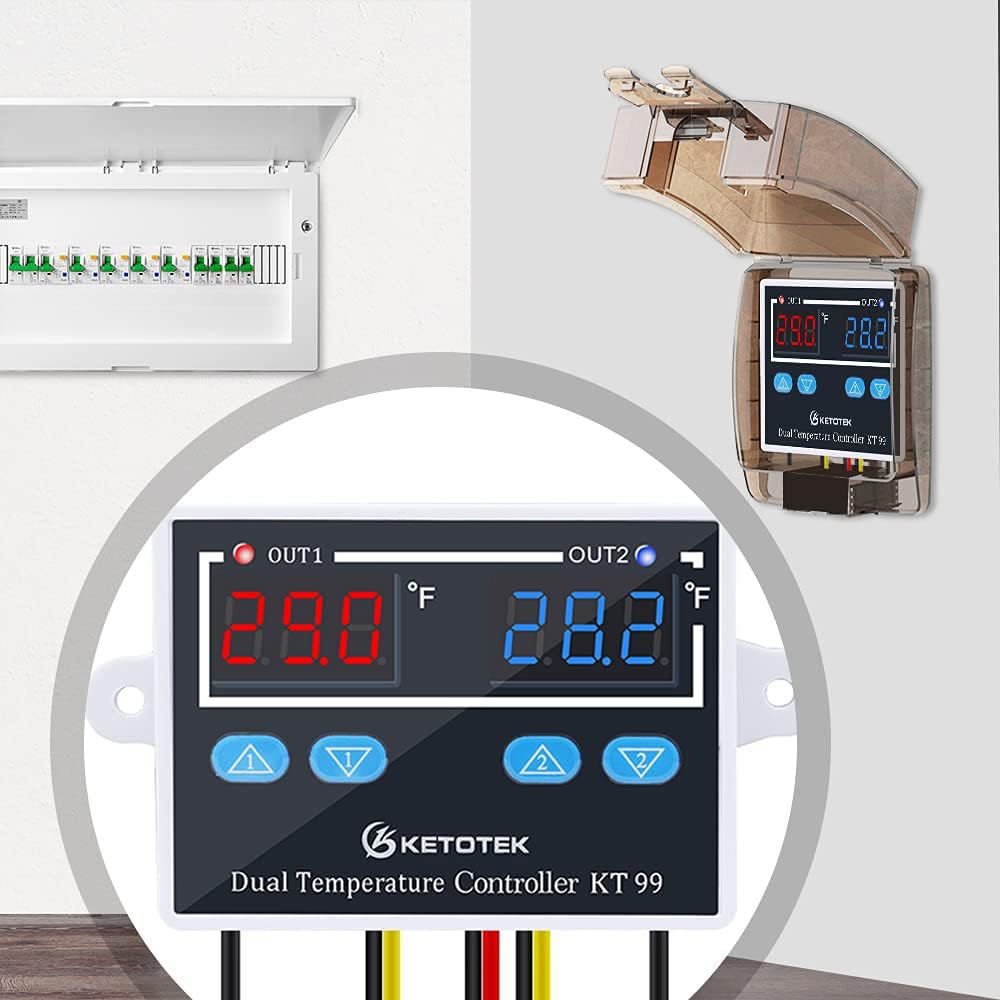
Figure 3.1: Parameter settings table for the KT99 controller.
| Code | Function | Set Range | Default |
|---|---|---|---|
| P0 | Compressor 1 delay time | 0-5min | 0 |
| P1 | Compressor 2 delay time | 0-5min | 0 |
| P2 | High temperature alarm value | -58~248°F | 248°F |
| P3 | Low temperature alarm value | -58~248°F | -58°F |
3.3 Temperature Calibration
The KT99 allows for temperature calibration to ensure accuracy. If you have a known accurate thermometer, you can adjust the controller's reading to match it within a range of -30°F to 30°F. Refer to the user guide for specific steps on how to enter calibration mode.
3.4 Applications
The KT99 is suitable for a wide range of temperature control applications, including:

Figure 3.2: Common applications for the KT99 controller.
- Aquariums: Maintain stable water temperatures for aquatic life.
- Incubators: Provide precise temperature control for hatching eggs.
- Greenhouses: Regulate environmental temperatures for plant growth.
- Home Brewing: Control fermentation temperatures.
- Refrigeration: Manage cooling cycles for various storage needs.
4. Maintenance
The KETOTEK KT99 temperature controller requires minimal maintenance to ensure long-term performance.
- Cleaning: Periodically wipe the unit with a soft, dry cloth to remove dust and debris. Do not use abrasive cleaners or solvents.
- Sensor Care: Ensure the NTC waterproof probes are clean and free from buildup that could affect temperature readings. While waterproof, avoid unnecessary prolonged submersion in harsh chemicals.
- Data Storage: All parameter settings are automatically saved after short circuits or power outages, eliminating the need for frequent re-configuration.
- Reset Function: If needed, the unit can be reset to factory default settings. Refer to the detailed user guide for the specific button combination or menu option to perform a reset.
5. Troubleshooting
If you encounter issues with your KT99 temperature controller, refer to the following common problems and solutions.
| Problem | Possible Cause | Solution |
|---|---|---|
| Controller does not power on. | No power supply; incorrect wiring. | Check 120V power connection. Verify wiring according to Section 2.1. Ensure main power is supplied to the correct input terminals. |
| Output (heater/cooler) does not activate. | Incorrect temperature settings; compressor delay active; wiring issue; faulty load. | Verify start/stop temperature settings. Check if compressor delay (P0/P1) is preventing immediate activation. Confirm load wiring is correct and the load itself is functional. |
| Inaccurate temperature readings. | Sensor not properly placed; sensor damaged; need for calibration. | Ensure sensor is correctly positioned in the measurement area. Inspect sensor for physical damage. Perform temperature calibration (refer to Section 3.3). |
| Sensors melting at high temperatures. | Operating temperature exceeds sensor's material limits. | The included NTC sensors are rated for the specified operating range. If used in environments approaching or exceeding 248°F, the plastic casing may deform. Ensure the application's maximum temperature is within the sensor's safe operating limits. Consider alternative high-temperature probes if necessary. |
| Alarm triggers unexpectedly. | Alarm limits (P2/P3) set too close to operating range; sudden temperature fluctuation. | Adjust P2 (High Temp Alarm) and P3 (Low Temp Alarm) values to provide sufficient buffer from your desired operating temperature range. |
6. Specifications
Detailed technical specifications for the KETOTEK KT99 Temperature Controller.
| Specification | Value |
|---|---|
| Model Number | KT99 |
| Brand | KETOTEK |
| Voltage | 120 Volts |
| Current Rating | 10A (Relay rating; actual constant rating may be lower based on wiring) |
| Display Type | LED |
| Operating Temperature Range | -58°F to 248°F |
| Control Accuracy | ±1°F |
| Temperature Calibration Range | -30°F to 30°F |
| Sensor Type | NTC Waterproof Probe (1.5m length) |
| Product Dimensions | 2.95 x 1.22 x 2.16 inches (approx.) |
| Item Weight | 6.6 ounces |
| Material | Plastic |
| Color | Black |
| Included Components | Temperature controller with sensors |
| Batteries Required | No |
7. Warranty and Support
Information regarding product warranty and customer support was not available in the provided data. Please refer to the product packaging or the manufacturer's official website for details on warranty coverage and how to contact customer support for assistance.