
1. Introduction
Thank you for purchasing the Blackstar ID:Core Stereo 10 Sugar Skull V2 Limited Edition amplifier. This 10-watt (2x5W) stereo combo amplifier is designed to provide a versatile and high-quality sound experience for electric guitarists. It features Blackstar's patented ISF (Infinite Shape Feature) control, a range of voices, and built-in effects, making it ideal for practice, recording, and small performances. This manual provides essential information for safe and effective use of your amplifier.
2. Important Safety Instructions
- Read Instructions: Read all safety and operating instructions before using this product.
- Retain Instructions: Keep these instructions for future reference.
- Heed Warnings: Follow all warnings on the product and in the operating instructions.
- Water and Moisture: Do not use this apparatus near water.
- Cleaning: Clean only with a dry cloth.
- Ventilation: Do not block any ventilation openings. Install in accordance with the manufacturer's instructions.
- Heat: Do not install near any heat sources such as radiators, heat registers, stoves, or other apparatus (including amplifiers) that produce heat.
- Power Cord Protection: Protect the power cord from being walked on or pinched, particularly at plugs, convenience receptacles, and the point where they exit from the apparatus.
- Unplug During Storms: Unplug this apparatus during lightning storms or when unused for long periods of time.
- Servicing: Refer all servicing to qualified service personnel. Servicing is required when the apparatus has been damaged in any way, such as power-supply cord or plug is damaged, liquid has been spilled or objects have fallen into the apparatus, the apparatus has been exposed to rain or moisture, does not operate normally, or has been dropped.
3. Package Contents
Please check the box for the following items:
- Blackstar ID:Core Stereo 10 Sugar Skull V2 Limited Edition Amplifier
- Power Supply Unit
- USB Cable
- User Manual (this document)
4. Controls and Features
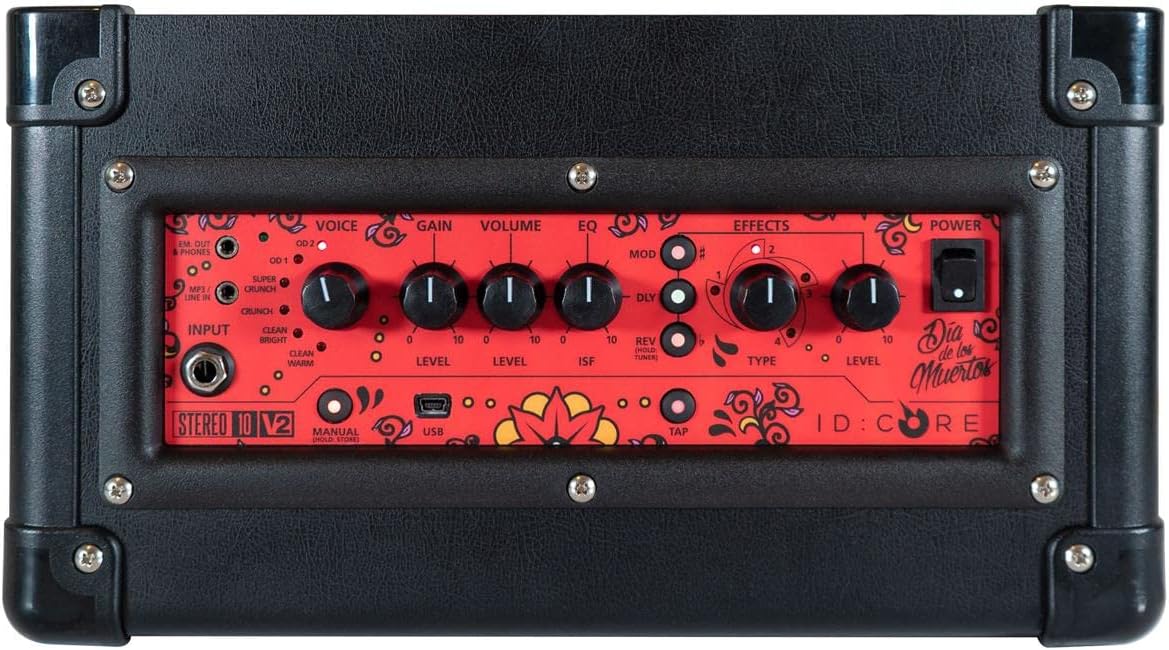
Image: Top view of the amplifier's control panel, showing all knobs, buttons, and input/output jacks.
Front Panel Controls:
- Input: 6.35mm (1/4") jack for connecting your guitar.
- Voice: Rotary switch to select one of six Blackstar voices: Clean Warm, Clean Bright, Crunch, Super Crunch, OD 1, OD 2.
- Gain: Controls the amount of overdrive or distortion.
- Volume: Adjusts the overall output level of the amplifier.
- EQ: Tone control.
- ISF (Infinite Shape Feature): Patented control that shifts the tone stack response between a USA-style (counter-clockwise) and a UK-style (clockwise) amplifier.
- Mod (Modulation): Rotary switch to select and adjust the level of modulation effects (Chorus, Flanger, Phaser, Tremolo).
- Dly (Delay): Rotary switch to select and adjust the level of delay effects (Linear, Analogue, Tape, Multi).
- Rev (Reverb): Rotary switch to select and adjust the level of reverb effects (Room, Hall, Spring, Plate).
- Type: Selects the specific effect type within the Mod, Dly, or Rev categories.
- Level: Adjusts the overall level of the selected effect.
- Tap: Button to set the tempo for time-based effects (Delay, Tremolo).
- Power: On/Off switch for the amplifier.
- USB: USB-B port for connecting to a computer for recording and using Blackstar's Architect software.
- Em. Out / Phones: 6.35mm (1/4") jack for headphones or direct recording output with speaker emulation.
- MP3 / Line In: 3.5mm (1/8") stereo jack for connecting external audio devices like MP3 players or phones.

Image: Front view of the Blackstar ID:Core Stereo 10 amplifier, showcasing the unique Sugar Skull V2 design on the speaker grille.
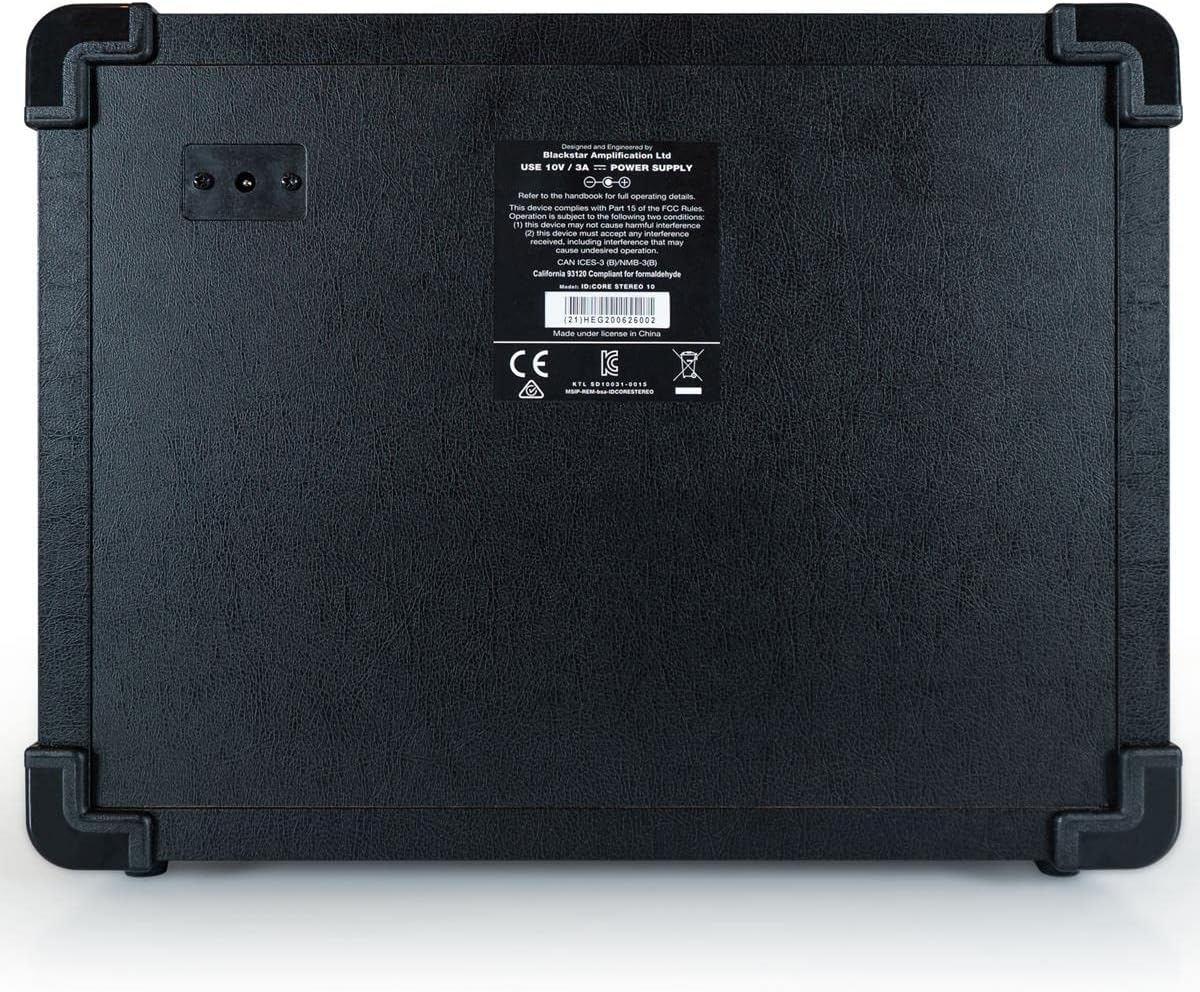
Image: Rear view of the Blackstar ID:Core Stereo 10 amplifier, displaying the product information label and power input.
5. Setup
- Unpacking: Carefully remove the amplifier and all accessories from the packaging. Retain the packaging for future transport or storage.
- Placement: Place the amplifier on a stable, flat surface. Ensure adequate ventilation around the unit. Avoid placing it near heat sources or in direct sunlight.
- Power Connection: Connect the supplied power supply unit to the DC input jack on the rear of the amplifier. Plug the power supply into a suitable mains outlet. Ensure the amplifier's power switch is in the OFF position before connecting.
- Guitar Connection: Connect your electric guitar to the Input jack on the front panel using a standard 6.35mm (1/4") instrument cable.
- External Audio (Optional): To play along with music, connect an MP3 player, phone, or other audio source to the MP3 / Line In jack using a 3.5mm stereo cable.
- USB Connection (Optional): For recording or using the Blackstar Architect software, connect the amplifier to your computer using the supplied USB cable.
6. Operating Instructions
- Power On: Ensure all connections are secure, then switch the Power button to the ON position. The power indicator light will illuminate.
- Set Volume: Start with the Volume knob at a low setting to avoid sudden loud sounds.
- Select Voice: Rotate the Voice switch to choose your desired amplifier type (e.g., Clean Warm, Crunch, OD 1).
- Adjust Gain: Use the Gain knob to control the amount of drive. Lower settings provide cleaner tones, while higher settings introduce more distortion.
- Shape Tone with EQ and ISF: Adjust the EQ knob for general tone shaping. Experiment with the ISF control to blend between American (tight low-end, aggressive mids) and British (woodier, less aggressive) amplifier characteristics.
- Apply Effects:
- Select a modulation, delay, or reverb effect using the Mod, Dly, or Rev rotary switches.
- Use the Type knob to select a specific effect within that category (e.g., Chorus, Flanger for Mod).
- Adjust the effect's intensity with the Level knob.
- For time-based effects (Delay, Tremolo), press the Tap button repeatedly at your desired tempo to synchronize the effect.
- Headphone/Recording Output: Connect headphones to the Em. Out / Phones jack for silent practice. This output also provides a speaker-emulated signal for direct recording.
- USB Audio: When connected to a computer via USB, the amplifier acts as an audio interface, allowing you to record your guitar directly into a DAW or use the Blackstar Architect software for deeper editing and patch management.
- Power Off: When finished, turn the Volume down, then switch the Power button to the OFF position.
7. Maintenance
- Cleaning: Clean the amplifier's exterior with a soft, dry cloth. Do not use abrasive cleaners, solvents, or waxes.
- Storage: When not in use for extended periods, store the amplifier in a dry, cool place, away from direct sunlight and extreme temperatures.
- Ventilation: Ensure that the ventilation openings are always clear to prevent overheating.
- Cable Care: Always handle power and instrument cables carefully. Avoid bending or kinking them sharply.
8. Troubleshooting
| Problem | Possible Cause | Solution |
|---|---|---|
| No sound from amplifier |
|
|
| Poor sound quality / Buzzing noise |
|
|
| Effects not working |
|
|
9. Specifications
- Model: IDCORE10 V3
- Output Wattage: 10 Watts (2 x 5W Stereo)
- Speakers: 2 x 3" Blackstar Speakers
- Voices: 6 (Clean Warm, Clean Bright, Crunch, Super Crunch, OD 1, OD 2)
- Effects: Modulation (Chorus, Flanger, Phaser, Tremolo), Delay (Linear, Analogue, Tape, Multi), Reverb (Room, Hall, Spring, Plate)
- Controls: Voice, Gain, Volume, EQ, ISF, Mod, Dly, Rev, Type, Level, Tap, Power
- Inputs: Guitar Input (6.35mm jack), MP3/Line In (3.5mm stereo jack), USB-B
- Outputs: Emulated Out/Headphones (6.35mm jack)
- Power Source: Corded Electric
- Compatible Devices: Electric Guitar
- Item Weight: 10 pounds (4.54 kg)
- Product Dimensions: 16 x 18 x 14 inches (40.6 x 45.7 x 35.6 cm)
- ASIN: B08Z88WN8T
10. Warranty and Support
Blackstar Amplification products are designed and manufactured to the highest standards. For detailed warranty information specific to your region and product, please refer to the warranty card included with your purchase or visit the official Blackstar Amplification website. For technical support or service inquiries, please contact your authorized Blackstar dealer or Blackstar customer support directly.
Online Resources:
- Blackstar Amplification Official Website: www.blackstaramps.com
- Blackstar Architect Software: www.blackstaramps.com/architect