
1. Introduction
This manual provides essential instructions for the WINFLIKE AA59-00559A replacement remote control. It is designed to function as a direct replacement for various Samsung TV models, offering convenient control without complex setup procedures. Please read this manual thoroughly to ensure proper use and maintenance of your remote control.
2. Product Overview
The WINFLIKE AA59-00559A remote control features an ergonomic design for comfortable handling and intuitive button placement for ease of use. It is constructed from durable ABS material.
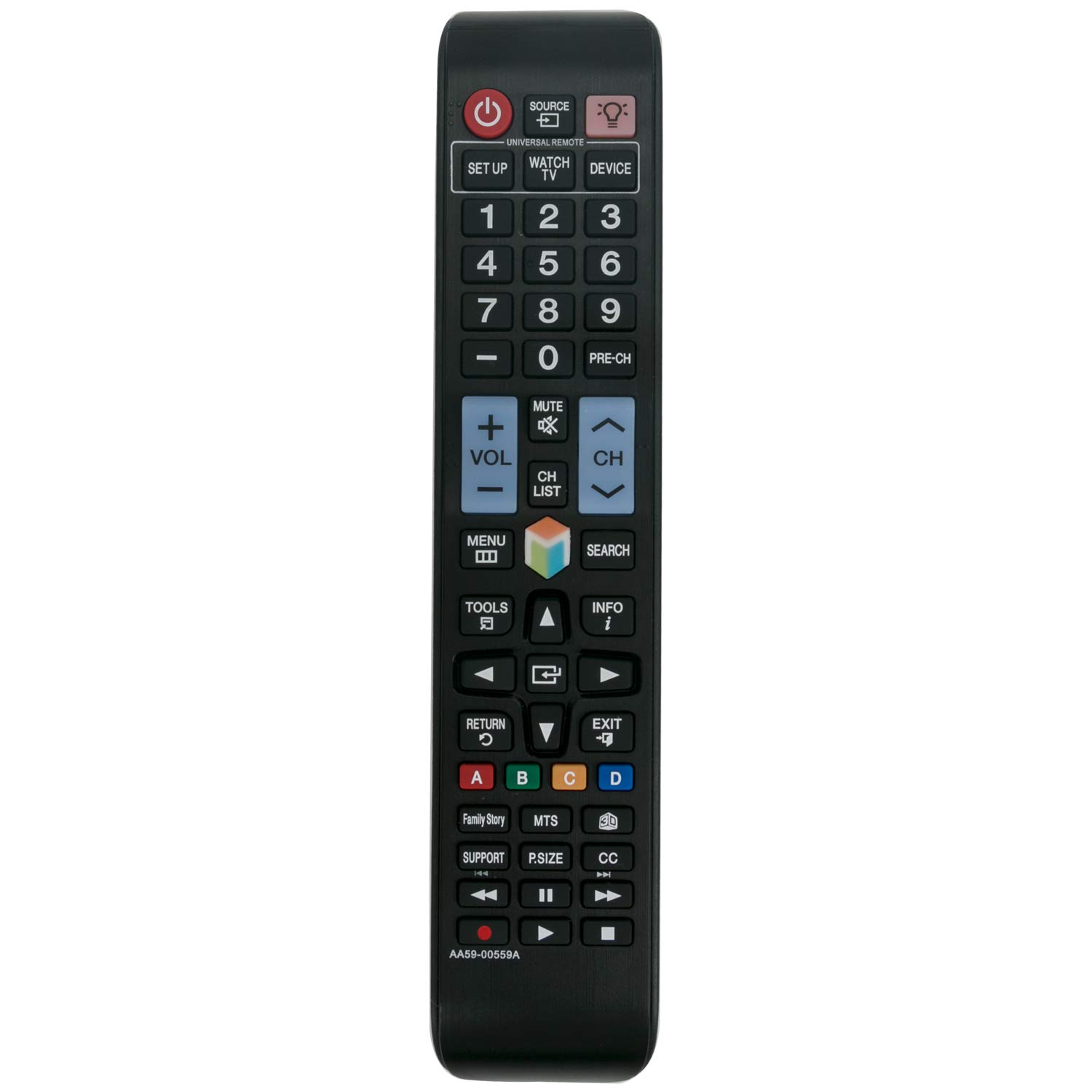
Figure 2.1: Front view of the WINFLIKE AA59-00559A remote control, showing all buttons including power, number pad, volume, channel, menu, and navigation controls.

Figure 2.2: Angled view of the remote control, highlighting its ergonomic shape and button layout.
3. Setup
3.1 Battery Installation
The WINFLIKE AA59-00559A remote control requires two AAA alkaline batteries (not included). Follow these steps to install them:
- Locate the battery compartment cover on the back of the remote control.
- Slide the cover downwards or press the latch and lift to open the compartment.
- Insert two AAA batteries, ensuring the positive (+) and negative (-) terminals align correctly with the markings inside the compartment.
- Replace the battery compartment cover by sliding it back into place until it clicks securely.

Figure 3.1: Back view of the remote control with the battery compartment open, showing where to insert AAA batteries.
3.2 Initial Use
No programming or pairing is required for this remote control. Once new alkaline batteries are installed, the remote is ready for immediate use with compatible Samsung TV models.
4. Operating Instructions
Point the remote control directly at your Samsung TV's infrared receiver. Ensure there are no obstructions between the remote and the TV.
- Power Button: Press to turn the TV on or off.
- Number Buttons (0-9): Use to directly select channels.
- Volume Up/Down: Adjust the TV's audio level.
- Channel Up/Down: Navigate through TV channels.
- Mute Button: Temporarily silence the TV audio.
- Menu/Tools Button: Access the TV's main menu or quick settings.
- Navigation Buttons (Up/Down/Left/Right) and Enter: Navigate through menus and confirm selections.
- Return/Exit Button: Go back to the previous screen or exit a menu.
- Source Button: Change input sources (e.g., HDMI 1, AV).
5. Compatible Samsung TV Models
This remote control is compatible with a wide range of Samsung TV models, including but not limited to:
- UN60ES6500F
- UN60ES6500FXZA
- PN60E6500EFXZA
- UN65ES6500
- UN65ES6500F
- UN65ES6500FXZA
- UN32ES6500
- UN32ES6500F
- UN32ES6500FXZA
- UN40ES6550
- UN46ES6550
- UN55ES6500
- UN55ES6550
- UN55ES6580
- UN60ES6500
- UN50ES6580
- PN51E6500EF
- PN60E7000FF
- PN51E7000
- PN60E7000
- PN51E6500
- UN40EH6030F
- UN40ES6500F
- UN40ES6500FXZA
- UN40ES6580F
- UN40ES6580FXZA
- UN46ES6500F
- UN46ES6500FXZA
- UN46ES6580F
- UN46ES6580FXZA
- UN46ES6600F
- UN46ES6600FXZA
- UN46ES6850FXZA
- UN50ES6500
- UN50ES6500F
- UN50ES6500FXZA
- UN50ES6580F
- UN50ES6580FXZA
- UN55ES6500F
- UN55ES6500FXZA
- UN55ES6580F
- UN55ES6580FXZA
- UN55ES6600F
- UN55ES6600FXZA
- PN51E7000FF
- PN60E6500
- PN60E6500EF
- PN64E7000
- PN64E7000FF
- PN51E6500EFXZA
- PN51E7000FFXZA
- PN60E7000FFXZA
- PN64E7000FFXZA
6. Troubleshooting
Remote Not Responding
- Check Batteries: Ensure batteries are inserted correctly with the correct polarity (+/-).
- Replace Batteries: If the remote is unresponsive or intermittent, replace the old batteries with new alkaline AAA batteries.
- Line of Sight: Make sure there are no objects blocking the path between the remote control and the TV's infrared sensor.
- Distance: Ensure you are within an effective range of the TV.
7. Specifications
| Feature | Specification |
|---|---|
| Model Number | AA59-00559A |
| Brand | WINFLIKE |
| Compatible Brand | Samsung |
| Material | ABS Material |
| Color | Black |
| Special Feature | Ergonomic Design |
| Max Number of Supported Devices | 1 (Television) |
| Package Dimensions | 9.02 x 1.85 x 1.02 inches |
| Item Weight | 3.84 ounces |
8. Maintenance
- Cleaning: Wipe the remote control with a soft, dry cloth. Do not use liquid cleaners or abrasive materials.
- Battery Care: Remove batteries if the remote will not be used for an extended period to prevent leakage. Replace batteries promptly when they are depleted.
- Storage: Store the remote in a cool, dry place away from direct sunlight and extreme temperatures.
9. Warranty and Support
For any issues or questions regarding your WINFLIKE AA59-00559A remote control, please contact the seller or manufacturer directly through your purchase platform for assistance. Specific warranty details may vary by retailer.