
Panasonic SCHC410K
Panasonic SCHC410K Compact Stereo System User Manual
Model: SCHC410K
Introduction
The Panasonic SCHC410K is a compact stereo system designed to integrate seamlessly into modern living spaces. It features advanced audio technologies like Space Tune for optimized sound placement and LincsD-Amp for clear digital music playback. This manual provides essential information for setting up, operating, and maintaining your stereo system.
Safety Information
Please read all safety instructions carefully before using the product. Keep this manual for future reference.
- Do not expose the unit to rain or moisture.
- Do not open the casing; refer servicing to qualified personnel.
- Ensure proper ventilation around the unit.
- Use only the specified power supply.
Package Contents
Verify that all items are included in the package:
- Panasonic SCHC410K Compact Stereo System
- AC Power Cord
- Remote Control
- Battery for remote (Alkaline)
- FM Indoor Antenna
- Wall Mount Bracket and Holder
- User Manual (this document)
Product Overview
Familiarize yourself with the components and controls of your stereo system.

Figure 1: Front view of the Panasonic SCHC410K, showcasing its sleek black design and central display.
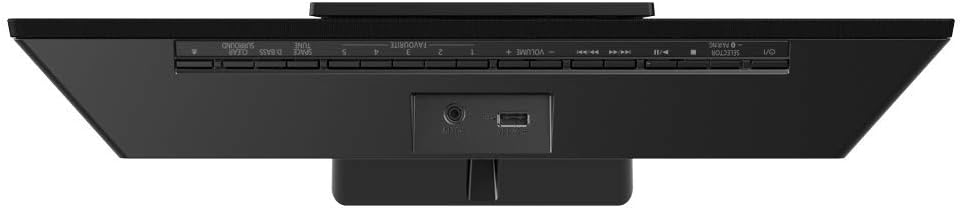
Figure 2: Top view of the system, illustrating the control buttons and rear connectivity ports including USB and AUX-IN.
Front Panel Controls:
- Display: Shows current mode, track information, and settings.
- CD Tray: For inserting audio CDs.
- Power Button: Turns the unit on or off.
- Volume +/-: Adjusts the audio output level.
- Source/Function Button: Selects input source (CD, FM, Bluetooth, USB, AUX).
- Play/Pause, Skip/Search Buttons: For media playback control.
Rear Panel Connections:
- AC IN: Connects to the power cord.
- AUX-IN: 3.5mm stereo input for external audio devices.
- USB Port: For connecting USB storage devices for audio playback.
- FM Antenna Terminal: Connects the supplied FM indoor antenna.
Setup
1. Placement and Space Tune
The SCHC410K is designed for versatile placement, including wall-mounting. The unique Space Tune function optimizes sound based on its location.
- Near the Wall: For placement close to a wall.
- On the Wall: For wall-mounted installations.
- Near the Corner: For placement in a room corner.
Select the appropriate Space Tune preset in the system settings for optimal audio performance.

Figure 3: The SCHC410K shown in a wall-mounted configuration, highlighting its slim profile.
2. Connecting Power
- Connect the supplied AC power cord to the AC IN terminal on the rear of the unit.
- Plug the other end of the power cord into a wall outlet.
3. Connecting the FM Antenna
- Connect the supplied FM indoor antenna to the FM antenna terminal on the rear of the unit.
- Extend the antenna for better reception.
4. Installing Remote Control Battery
- Open the battery compartment on the back of the remote control.
- Insert the supplied alkaline battery, ensuring correct polarity (+/-).
- Close the battery compartment.
Operating Instructions
Power On/Off
Press the [POWER] button on the unit or remote control to turn the system on or off.
Selecting a Source
Press the [FUNCTION] button on the unit or remote control repeatedly to cycle through available sources: CD, FM, Bluetooth, USB, AUX-IN.
Bluetooth Pairing and Playback
- Select the Bluetooth source. The display will show "PAIRING".
- On your Bluetooth device (e.g., smartphone), enable Bluetooth and search for "SCHC410K".
- Select "SCHC410K" from the list to pair. Once connected, the display will show "CONNECTED".
- Start playing audio on your Bluetooth device.
CD Playback
- Select the CD source.
- Gently insert a CD into the CD slot with the label side facing up. The system will automatically load and begin playback.
- Use the [PLAY/PAUSE], [SKIP], and [STOP] buttons on the unit or remote for control.
FM Radio Tuning
- Select the FM source.
- Press the [TUNE +/-] buttons on the remote or unit to manually tune to a station.
- Press and hold [TUNE +/-] for automatic scanning to the next available station.
- To preset a station, tune to the desired frequency, then press [MEMORY] followed by a number button (1-5) to save.
USB Playback
- Insert a USB storage device into the USB port on the rear of the unit.
- Select the USB source. The system will automatically detect and begin playing compatible audio files (MP3, WMA, AAC, WAV).
- Use the playback controls for navigation.
AUX-IN Playback
- Connect an external audio device (e.g., smartphone, MP3 player) to the AUX-IN port using a 3.5mm stereo audio cable (not supplied).
- Select the AUX-IN source.
- Start playback on your connected device.
Sound Adjustments
- Space Tune: As described in the Setup section, select the appropriate preset (Near the Wall, On the Wall, Near the Corner) to optimize sound based on placement.
- D-Bass: Enhances bass frequencies for a richer sound. Press the [D-BASS] button on the remote to toggle on/off.
- Clear Surround: Creates a wider soundstage. Press the [CLEAR SURROUND] button on the remote to toggle on/off.
Maintenance
Proper care ensures the longevity of your stereo system.
- Cleaning: Wipe the unit with a soft, dry cloth. Do not use liquid cleaners or abrasive cloths.
- CD Lens Care: Avoid touching the CD lens. If necessary, use a specialized CD lens cleaner disc.
- Ventilation: Ensure the ventilation openings are not blocked to prevent overheating.
- Storage: If storing the unit for an extended period, disconnect the power cord and remove batteries from the remote control.
Troubleshooting
Refer to this section for common issues and their solutions.
| Problem | Possible Cause | Solution |
|---|---|---|
| No power | Power cord not connected securely. | Check power cord connection to unit and wall outlet. |
| No sound | Volume is too low; incorrect source selected. | Increase volume; select the correct input source. |
| Bluetooth pairing fails | Device too far; Bluetooth not enabled on device. | Ensure device is within 10m; enable Bluetooth on device; try re-pairing. |
| Poor FM reception | Antenna not extended or positioned correctly. | Adjust the position of the FM indoor antenna. |
| CD does not play | CD inserted incorrectly; CD is dirty or scratched. | Re-insert CD correctly; clean or replace CD. |
Specifications
| Feature | Detail |
|---|---|
| Model Number | SCHC410K |
| Brand | Panasonic |
| Audio Output Mode | Stereo |
| Speaker Configuration | 2.0 Channel (8cm full-range speakers) |
| Supported Audio Formats | CD-DA, MP3, WMA, AAC, WAV |
| Connectivity | Bluetooth, USB, AUX-IN |
| Tuner Technology | FM |
| Power Source | Corded Electric |
| Product Dimensions (L x W x H) | 42 x 10.2 x 22.5 cm |
| Weight | 3.2 kg |
| Mounting Options | Wall-Mountable |
| Special Features | Space Tune, LincsD-Amp, Twisted Acoustic Port |
Warranty and Support
For warranty information, please refer to the warranty card included with your product or visit the official Panasonic website for your region. Keep your purchase receipt as proof of purchase.
For technical support, troubleshooting assistance beyond this manual, or service inquiries, please contact Panasonic Customer Service:
- Panasonic Official Website: www.panasonic.com
- Refer to the website for regional contact numbers and support options.
Related Documents - SCHC410K
 |
FR Receiver Replacement Battery Guide: BV92620 (4500mAh) This guide provides instructions for replacing the battery in the FR receiver model BV92620 (4500mAh) with a higher capacity 6000mAh battery. It covers both self-standing and wall-mounted types, detailing the necessary parts and procedures for each. |
 |
Panasonic FV-SW20VEC1 Wall Control: Installation and Operating Instructions This document provides detailed installation and operating instructions for the Panasonic FV-SW20VEC1 Wall Control, a component for ventilation systems. It covers essential safety information, a list of supplied accessories, unit dimensions, step-by-step installation procedures, button and display descriptions, operational modes (including standby, function, ASHRAE, defrost, and boost), troubleshooting common fault codes, and technical specifications. Designed for easy use and maintenance, this guide ensures proper setup and optimal performance of the Panasonic ventilation system. |
 |
Panasonic TV Accessories and Controls Guide Comprehensive guide to Panasonic TV accessories, including optional wall-hanging brackets, and a detailed overview of TV and remote control functions for easy operation. |
 |
Panasonic FV-06VE1 WhisperComfort 60 Energy Recovery Ventilator Installation and Operation Manual This document provides comprehensive installation, operation, and maintenance instructions for the Panasonic FV-06VE1 WhisperComfort 60 Energy Recovery Ventilator. It includes safety information, wiring diagrams, installation procedures for ceiling and wall mounting, and maintenance guidelines. |
 |
Panasonic 2016 Projectors and Professional Displays Quick Reference Guide A comprehensive 2016 quick reference guide for Panasonic projectors and professional displays, detailing models, specifications, and series categories. |
 |
Panasonic F-MU50H Wall Fan: Operating and Installation Instructions This manual provides comprehensive operating and installation instructions for the Panasonic F-MU50H wall fan, including safety precautions, maintenance, parts identification, assembly, and usage guidelines for light commercial applications. |
Ask a question about this manual
Ask about setup, troubleshooting, compatibility, parts, safety, or missing instructions. Manuals+ will review the question and use this page’s manual context to help answer it.