
ARUASTUDIO T001W
Aruastudio Retro Interior Light Switch Instruction Manual
Model: T001W
Introduction
This manual provides detailed instructions for the installation, operation, and maintenance of your Aruastudio Retro Interior Light Switch. This product is designed to enhance your interior with a unique and stylish lighting control solution.
The Aruastudio Retro Interior Light Switch features a sturdy steel construction with a powder-coated finish for durability and high quality. The switch itself is a certified product, with its surface anodized twice for improved quality and longevity.
Package Contents
Please ensure all components are present before beginning installation:
- Toggle Switch
- Plate Cover
- Wire
- Heat Shrink Tubing
- Screws
- Connectors
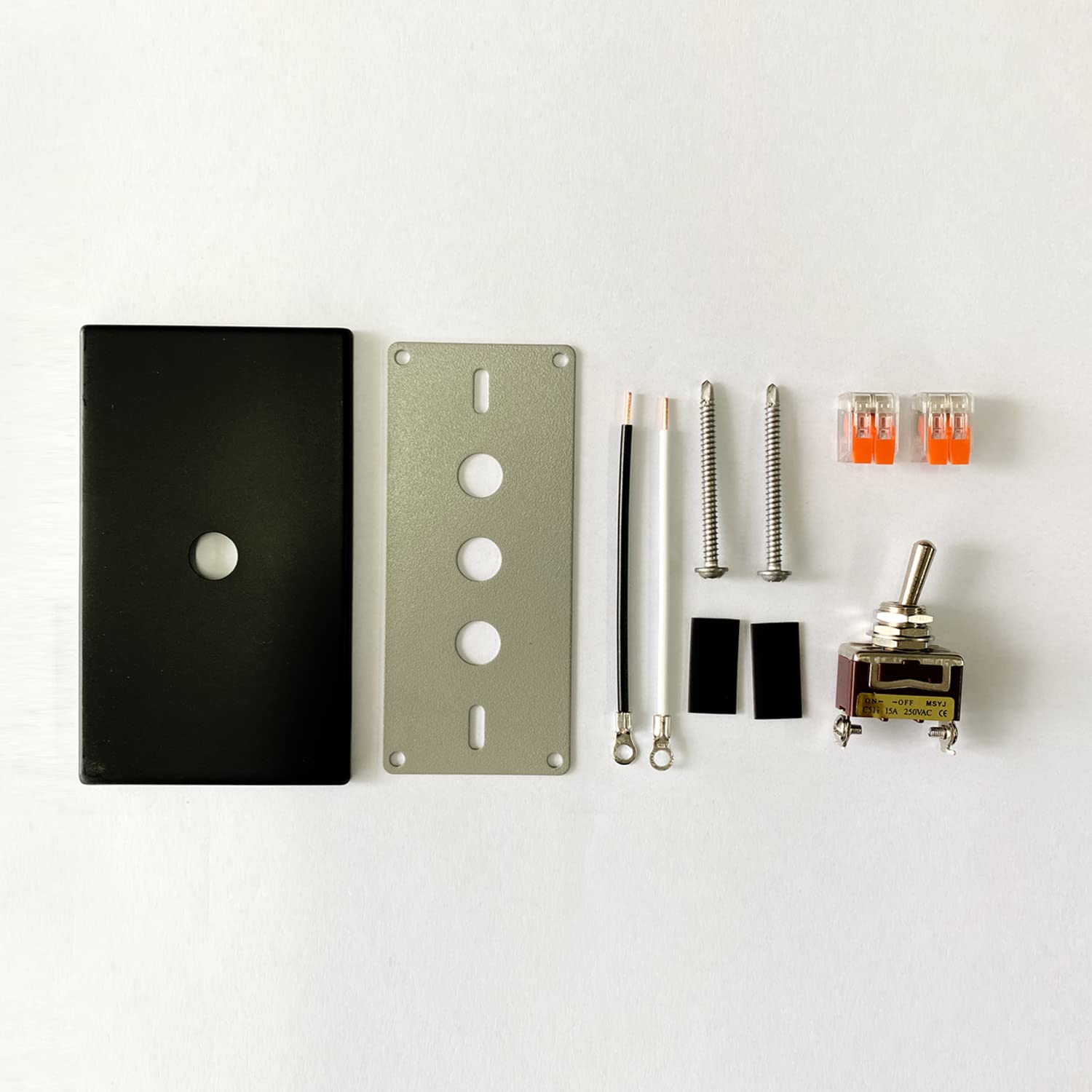
Image: All components included in the package, ready for assembly.
Specifications
| Feature | Detail |
|---|---|
| Model Number | T001W |
| Brand | ARUASTUDIO |
| Mounting Type | Wall Mount |
| Material | Metal |
| Voltage Rating | 250 Volts AC |
| Current Rating | 15 Amps |
| Switch Type | Single Pole (1-Way) Toggle ON/OFF |
| Dimensions (Package) | 5.79 x 3.19 x 1.46 inches |
| Weight (Package) | 7.05 ounces |
Installation
Step-by-Step Installation Instructions
Follow these steps carefully for proper installation. It is recommended to consult a qualified electrician if you are unsure about any part of the wiring process.
- Attach the toggle switch to the plate. Ensure it is securely fastened.
- Connect the enclosed wire to the switch. Make sure connections are firm.
- Wrap the connected wire with heat shrink tubing, and apply heat with a lighter to shrink the heat shrink tubing. This provides insulation and protection.
- Using the enclosed connector, connect the switch wire with the wire from the wall. Ensure proper polarity and secure connections.
- Using the enclosed screw, install the plate at your preferred location. Securely mount the plate to the wall.
- Put the cover on top of the installed plate, and use a nut to fix the cover in place.

Image: Visual guide for the installation process.
Wiring Diagram
Refer to the following diagrams for correct wiring. Note that depending on location, the colors of the power wire and lighting wire may differ.

Image: Wiring diagrams for various switch configurations.
Instructions for Assembly (Nuts)
Properly securing the nuts is crucial for the switch's stability and appearance.
- Put one nut and one washer all the way up against the switch.
- Install the gray plate so that it is vertical with the wall.
- After installing the switch on the wall, install the switch cover on top.
- If while installing the switch cover there is no space to put the last nut, remove the most nut closest to the wall as seen in Figure 2. It is okay to use only 2 nuts.

Image: Detailed view of nut assembly for the toggle switch.
Operating Instructions
The Aruastudio Retro Interior Light Switch operates as a standard ON/OFF toggle switch. Simply push the toggle lever up or down to control the connected light fixture.
- Pushing the toggle lever to the UP position typically turns the light ON.
- Pushing the toggle lever to the DOWN position typically turns the light OFF.
- The switch provides a satisfying clicking sound with each operation, indicating a positive engagement.


Image: Examples of the installed light switch in single and double configurations.
Maintenance
To ensure the longevity and proper functioning of your Aruastudio light switch, follow these simple maintenance guidelines:
- Cleaning: Use a soft, dry cloth to wipe the surface of the switch plate. Avoid abrasive cleaners, solvents, or excessive moisture, as these can damage the finish.
- Inspection: Periodically check the switch plate and toggle for any signs of damage, loose connections, or wear.
- Environment: Ensure the switch is installed in a dry environment, away from direct water exposure or high humidity, to prevent electrical hazards and corrosion.
Troubleshooting
If you encounter any issues with your Aruastudio light switch, consider the following common troubleshooting steps:
- Light Not Turning On/Off:
- Check if the circuit breaker for the light fixture has tripped.
- Ensure the light bulb is working and properly screwed in.
- Verify all wiring connections are secure and correct according to the wiring diagram.
- Switch Feels Loose:
- Ensure the mounting screws are tightened securely.
- Check the nuts securing the toggle to the plate as per the assembly instructions.
- Unusual Sounds or Smells:
Immediately turn off power at the circuit breaker and consult a qualified electrician. Do not attempt to fix electrical issues yourself if you are not trained.
If the problem persists after attempting these steps, please contact ARUASTUDIO customer support or a certified electrician.
Warranty and Support
ARUASTUDIO is committed to providing high-quality products. For any questions, concerns, or support needs regarding your Retro Interior Light Switch, please contact our customer service team.
While specific warranty details are not provided in this manual, please refer to the product's original packaging or the ARUASTUDIO official website for comprehensive warranty information and terms.
For technical assistance or to report an issue, please visit the ARUASTUDIO support page or contact us directly through the retailer where the product was purchased.
Ask a question about this manual
Ask about setup, troubleshooting, compatibility, parts, safety, or missing instructions. Manuals+ will review the question and use this page’s manual context to help answer it.