
1. Introduction
The NEBO Rambler 20K Power Bank is a portable charging device designed to provide power to your electronic devices on the go. It features a high-capacity battery, multiple charging ports, and an integrated floodlight. This manual provides essential information for the safe and efficient use of your Rambler 20K Power Bank.

Image 1.1: The NEBO Rambler 20K Power Bank, showcasing its design and branding.
2. Safety Information
Please read all safety instructions before using this product. Failure to follow these instructions may result in electric shock, fire, or injury.
- Do not disassemble, open, or attempt to repair the device.
- Keep the device away from water, moisture, and extreme temperatures.
- Avoid dropping, impacting, or subjecting the device to strong vibrations.
- Do not expose the device to fire or direct sunlight for prolonged periods.
- Use only approved charging cables and adapters.
- Dispose of the device according to local regulations for electronic waste.
- This device is TSA and FAA approved for carry-on luggage; however, always verify current airline regulations before travel.
3. Package Contents
Verify that all items are present in your package:
- NEBO Rambler 20K Power Bank (Model NR20000PBL)
- 1x 24-inch USB-C to USB-C Cable
4. Product Overview
Familiarize yourself with the components of your Rambler 20K Power Bank:
- Digital Display: Shows the current battery percentage.
- USB-C Port: Bi-directional port for charging the power bank and charging external devices.
- USB-A Port: For charging external devices.
- Power Button: Activates the digital display and controls the floodlight.
- COB Floodlight: Integrated light source for illumination.
- Kickstands: Dual integrated kickstands for cable management and adjusting floodlight angle.

Image 4.1: The NEBO Rambler 20K Power Bank highlighting its illuminated floodlight and digital display.
5. Setup
5.1 Initial Charging of the Power Bank
- Connect the included USB-C to USB-C cable to the USB-C port on the Rambler 20K Power Bank.
- Connect the other end of the cable to a compatible USB wall adapter (not included) or a powered USB-C port.
- The digital display will show the charging progress. Allow the power bank to fully charge to 100% before first use. A full charge takes approximately 5.5 hours.

Image 5.1: The digital display indicating a full 100% charge.
6. Operating Instructions
6.1 Charging External Devices
The Rambler 20K Power Bank can charge up to two devices simultaneously using its USB-A and bi-directional USB-C ports. It supports 18W Quick Charge and 20W Power Delivery for efficient charging.
- Connect your device's charging cable to either the USB-A or USB-C port on the power bank.
- Connect the other end of the cable to your electronic device.
- The power bank will automatically begin charging your device. The digital display will show the remaining battery percentage of the power bank.
- Pass-Through Charging: The power bank supports pass-through charging, allowing it to be recharged while simultaneously charging connected devices.

Image 6.1: Charging an external device using the NEBO Rambler 20K Power Bank.
6.2 Using the COB Floodlight
The integrated COB floodlight provides 200 lumens of illumination.
- Press the Power Button once to activate the digital display.
- Press and hold the Power Button to turn the floodlight ON/OFF.
- The dual kickstands can be used to angle the floodlight up or down for directional lighting.

Image 6.2: The NEBO Rambler 20K Power Bank demonstrating its adjustable floodlight feature.
6.3 Cable Management
The dual kickstands also serve as a cable management solution.
- Wrap your charging cables around the extended kickstands to keep them organized and prevent tangling.
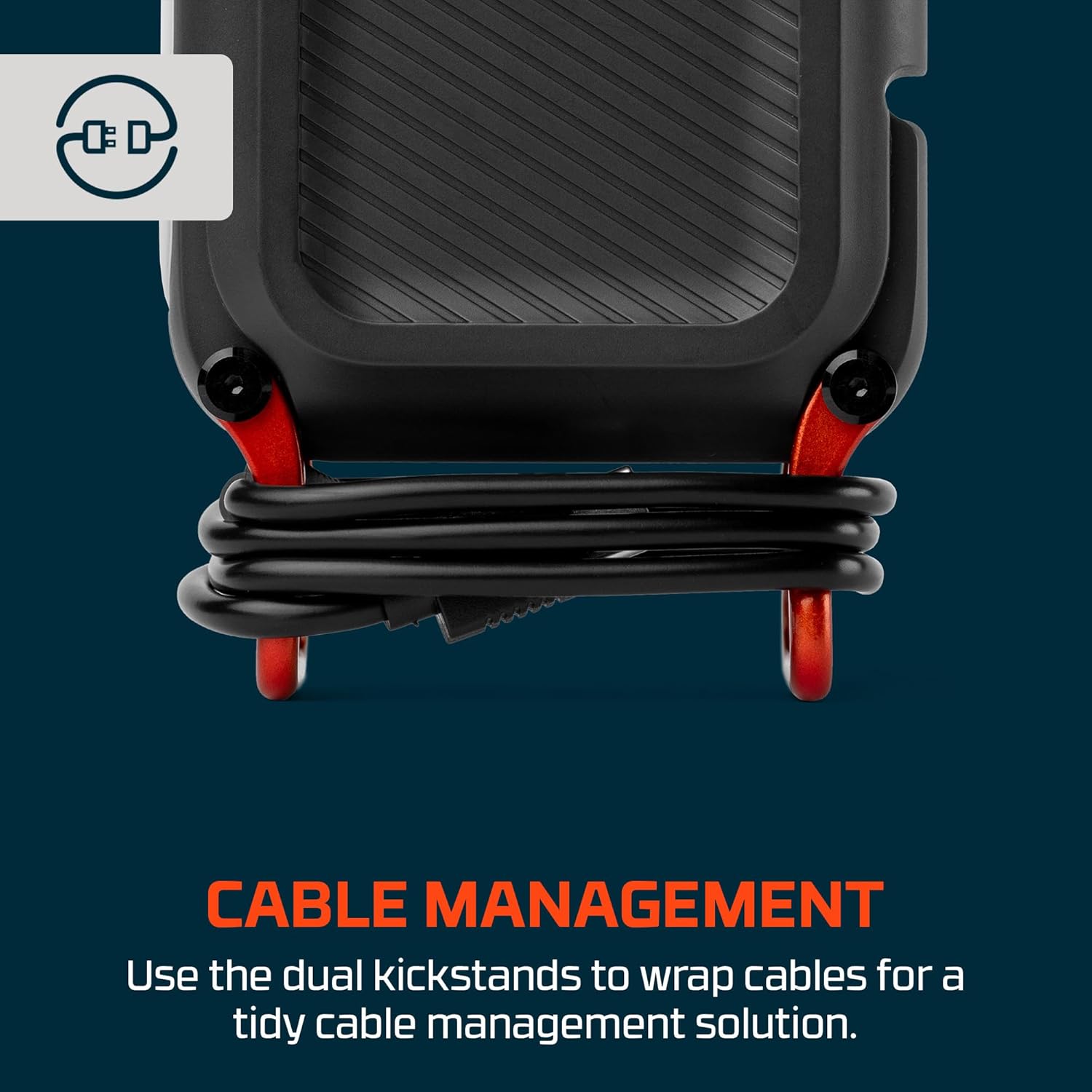
Image 6.3: Cable management using the integrated kickstands.
7. Maintenance
- Cleaning: Wipe the device with a soft, dry cloth. Do not use abrasive cleaners or solvents.
- Storage: Store the power bank in a cool, dry place away from direct sunlight and extreme temperatures. For long-term storage, charge the power bank to approximately 50-70% every 3-6 months to maintain battery health.
- Battery Care: Avoid fully discharging the battery frequently, as this can reduce its lifespan.
8. Troubleshooting
| Issue | Possible Cause | Solution |
|---|---|---|
| Power bank not charging | Faulty cable or adapter; USB-C port issue | Try a different USB-C cable and wall adapter. Ensure connections are secure. |
| Device not charging from power bank | Power bank battery low; faulty cable; device incompatibility | Check power bank battery level. Try a different charging cable. Ensure your device is compatible with USB charging. |
| Floodlight not working | Power bank battery low; incorrect operation | Charge the power bank. Ensure you are pressing and holding the power button to activate the floodlight. |
| Slow charging | Cable quality; device input limits; multiple devices charging | Use high-quality cables. Some devices may have slower charging limits. Charging multiple devices simultaneously may reduce individual charging speeds. |
If issues persist, please contact customer support.
9. Specifications
| Feature | Detail |
|---|---|
| Model Number | NR20000PBL |
| Battery Capacity | 20,000 mAh (74Wh) |
| Battery Type | Lithium Ion |
| Input | USB-C |
| Output | 1x USB-C (bi-directional), 1x USB-A |
| Charging Technology | 18W Quick Charge (QC), 20W Power Delivery (PD) |
| Recharge Time | Approximately 5.5 hours (full charge) |
| Integrated Light | COB Floodlight (200 Lumens) |
| Dimensions | 2.95 x 5.7 x 1.14 inches |
| Weight | 0.98 lbs (15.68 ounces) |
| Color | Storm Gray |
| Included Accessories | 1x 24-inch USB-C to USB-C Cable |
10. Warranty and Support
For warranty information and customer support, please refer to the documentation included with your purchase or visit the official NEBO website. Keep your proof of purchase for warranty claims.


