
Introduction
This manual provides detailed instructions for the setup, operation, and maintenance of your AFROG 5th Gen Multifunctional LED Desk Lamp. Designed for optimal illumination and convenience, this lamp features adjustable lighting modes, brightness levels, integrated wireless charging, and a USB charging port. Please read this manual thoroughly before use to ensure proper function and longevity of your device.
What's in the Box
Carefully unpack all components and ensure the following items are included:
- AFROG Multifunctional LED Desk Lamp x 1
- Power Adapter x 1

Image: Contents of the AFROG Desk Lamp packaging, including the lamp, power adapter, and user manual.
Product Overview and Features
The AFROG 5th Gen Multifunctional LED Desk Lamp is equipped with advanced features to enhance your lighting and charging experience:
- 15W Super Bright Illumination: Provides up to 1800 Lux, illuminating a wide area (up to 47 inches) without flicker, ideal for reading, working, or studying.
- 35 Brightness Choices: Offers a unique combination of 5 color modes and 7 brightness levels for customizable lighting.
- 10W Fast Wireless Charger: Integrated into the lamp base for convenient and rapid charging of compatible smartphones.
- 5V/2A USB Charging Port: An additional port for charging other devices via USB cable.
- Touch Control: Intuitive touch-sensitive controls for power, brightness, color mode, and timer functions.
- Auto-Off Timer: Features 40-minute and 60-minute timer options for automatic shut-off.
- Eye-Caring Technology: Designed to provide flicker-free light that is gentle on the eyes, reducing strain during prolonged use.
- Foldable Design: Allows for compact storage and portability.

Image: Key features of the AFROG Desk Lamp, including charging capabilities and lighting options.

Image: The AFROG Desk Lamp in its standard upright position, showcasing its sleek design and wireless charging pad.
Setup
- Unpack the Lamp: Carefully remove the lamp and all accessories from the packaging.
- Place the Lamp: Position the lamp on a stable, flat surface such as a desk or table.
- Connect Power: Insert the power adapter cable into the DC input port located at the back of the lamp base. Plug the adapter into a standard electrical outlet.
- Adjust Lamp Arm: Gently unfold and adjust the lamp arm and head to your desired lighting angle. The lamp is designed to be foldable for compact storage.
Operating Instructions
The lamp features touch-sensitive controls on its base for easy operation.
1. Power On/Off
- Touch the Power button () on the base to turn the lamp on or off.
2. Brightness Adjustment
- With the lamp on, touch the Brightness Up button () to increase brightness.
- Touch the Brightness Down button () to decrease brightness. There are 7 levels of brightness.
3. Color Mode Selection
- Touch the Mode button () to cycle through 5 different color temperature modes (e.g., warm white, natural white, cool white).
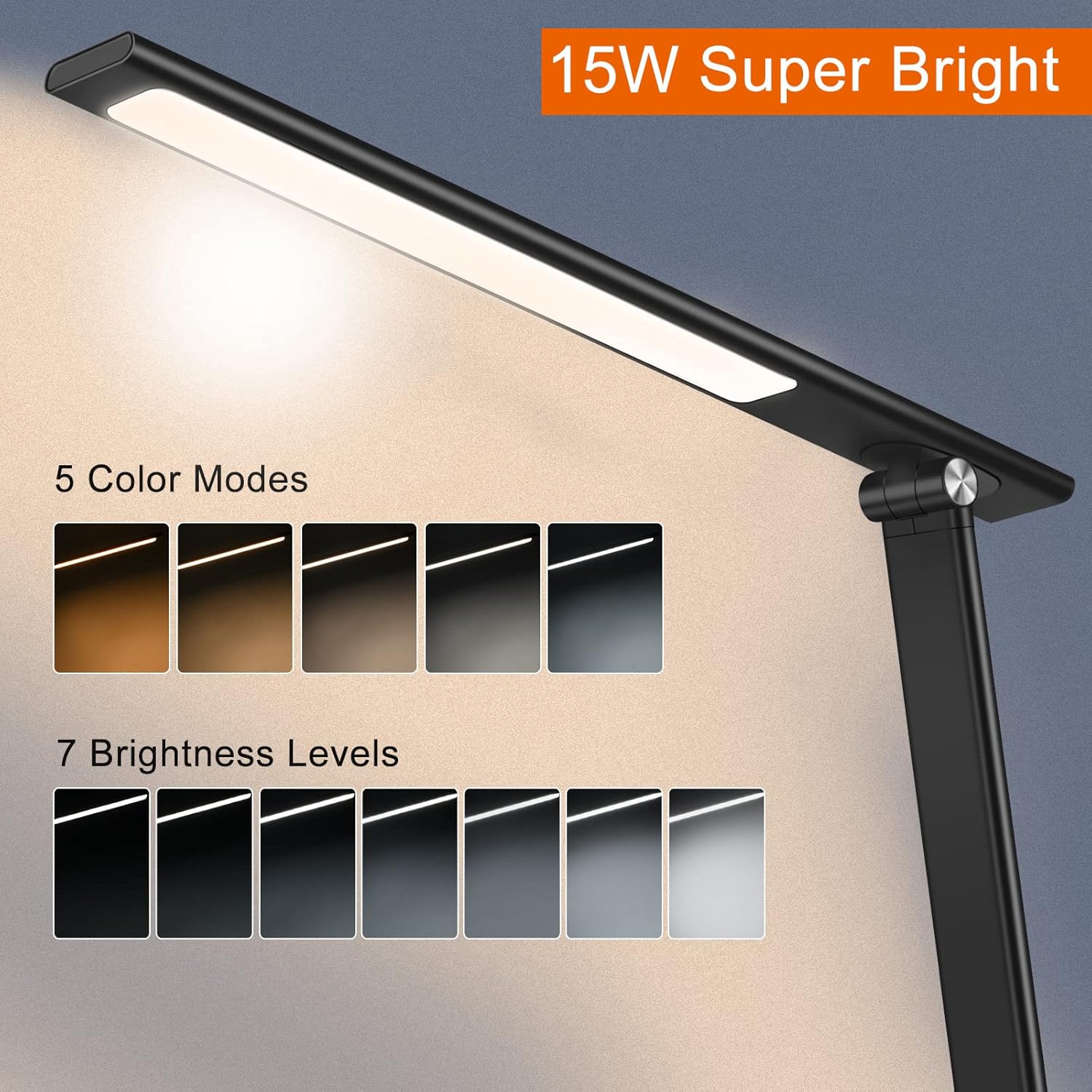
Image: Visual representation of the 5 distinct color modes and 7 brightness levels available on the lamp.
4. Wireless Charging
- Place your Qi-compatible smartphone on the designated wireless charging pad on the lamp base.
- Ensure the phone is centered on the pad for optimal charging. The lamp supports 10W fast wireless charging.

Image: A smartphone being charged wirelessly on the lamp's base, demonstrating the 10W fast wireless charging capability.
5. USB Charging Port
- Connect your device's USB charging cable to the 5V/2A USB port located at the back of the lamp base.
- This port can charge various USB-powered devices.

Image: The lamp's base with a smartphone connected to the integrated USB charging port.
6. Auto-Off Timer
- Touch the Timer button () to activate the auto-off timer.
- Press once for a 40-minute timer, press again for a 60-minute timer. The lamp will automatically turn off after the selected duration.
7. Night Light Function
- Touch the Night Light button () to activate a soft, dim light suitable for nighttime use.

Image: The lamp in use as a night light, demonstrating its soft illumination and timer function.
8. Eye-Caring Feature
- The lamp is designed to emit flicker-free light, which helps reduce eye strain during extended periods of use.

Image: The lamp providing flicker-free, eye-friendly illumination on a desk setup.
Maintenance
To ensure the longevity and optimal performance of your AFROG Desk Lamp, follow these maintenance guidelines:
- Cleaning: Disconnect the power adapter before cleaning. Use a soft, dry cloth to wipe the lamp. Do not use abrasive cleaners, waxes, or solvents as they may damage the finish.
- Handling: Handle the lamp with care. Avoid dropping or subjecting it to strong impacts.
- Storage: When not in use for extended periods, fold the lamp into its compact position and store it in a dry, cool place.
- Power Cord: Regularly inspect the power cord for any damage. If damaged, discontinue use and contact customer support.
Troubleshooting
If you encounter issues with your AFROG Desk Lamp, please refer to the following common problems and solutions:
| Problem | Possible Cause | Solution |
|---|---|---|
| Lamp does not turn on. | Power adapter not properly connected or no power from outlet. | Ensure the power adapter is securely plugged into both the lamp and a working electrical outlet. Test the outlet with another device. |
| Lamp remains dimly lit even when turned off. | Residual power or minor electrical leakage. | This can sometimes occur with LED lights. If it is bothersome, unplug the lamp from the power outlet when not in use. If the issue persists or worsens, contact customer support. |
| Wireless charging is not working or is slow. | Phone not properly aligned on the charging pad; phone case is too thick; phone is not Qi-compatible. | Ensure your phone is centered on the charging pad. Remove thick phone cases. Verify your phone supports Qi wireless charging. |
| USB charging is not working. | USB cable is faulty; device is not compatible; lamp is not powered on. | Try a different USB cable. Ensure the lamp is powered on. Verify your device can be charged via a standard 5V/2A USB port. |
| Light flickers or is inconsistent. | Unstable power supply; internal component issue. | Ensure the lamp is connected to a stable power source. If the issue persists, contact customer support. |
Specifications
Detailed technical specifications for the AFROG 5th Gen Multifunctional LED Desk Lamp:
| Attribute | Value |
|---|---|
| Model Number | EK009A |
| Product Dimensions | 14.6"D x 4.7"W x 16.5"H (37.1 cm x 11.9 cm x 41.9 cm) |
| Item Weight | 1.4 Pounds (0.64 kg) |
| Material | Metal, Plastic |
| Light Source Type | LED |
| Wattage | 15 Watts (Lamp), 24 Watts (Max Compatible) |
| Brightness | 1800 Lux |
| Color Temperature | 2700K-6500K (5 Modes) |
| Color Rendering Index (CRI) | 95.00 |
| Average Life | 50,000 Hours |
| Control Method | Touch Control |
| Wireless Charging Output | 10W (Fast Wireless Charger) |
| USB Charging Output | 5V/2A |
| Cable Length | 47 Inches (1.2 meters) |
| Power Source | DC |
| Indoor/Outdoor Usage | Indoor |
Warranty and Support
The AFROG 5th Gen Multifunctional LED Desk Lamp comes with a 12-month warranty from the date of purchase. This warranty covers manufacturing defects and issues arising from normal use.
For warranty claims, technical support, or any inquiries regarding your product, please contact AFROG customer service through the retailer's platform or the official AFROG website. Please have your purchase receipt and product model number (EK009A) ready when contacting support.
Official Product Videos
Based on the provided product data, no official seller-created video content was available for embedding in this manual.