
Introduction
Thank you for choosing the 1st Player DK D3-A Micro ATX Case. This manual provides detailed instructions for the proper installation, operation, and maintenance of your new PC case. Please read this manual thoroughly before beginning installation to ensure optimal performance and longevity of your system.
Product Overview
The 1st Player DK D3-A is a compact Micro ATX gaming case designed for efficient cooling and aesthetic appeal. It features a mesh front panel for enhanced airflow, housing a large 200mm RGB fan. The case includes a full power supply shroud for clean cable management and a tempered glass side panel to showcase your internal components.

Image 1: Front view of the 1st Player DK D3-A case, highlighting the 200mm RGB fan.
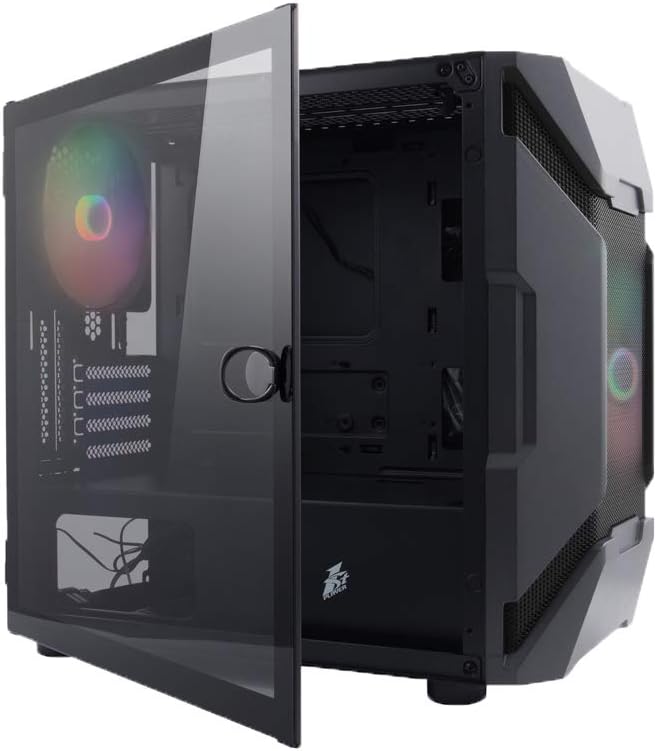
Image 2: Side view of the case with the hinged tempered glass panel open.
Setup Guide
1. Unpacking
Carefully remove the case from its packaging. Inspect for any damage that may have occurred during shipping. Retain the packaging for future transport or warranty claims.
2. Accessing the Interior
The tempered glass side panel is hinged. Gently open it to access the interior of the case. It can be lifted off its hinges for easier installation if needed.

Image 3: Interior layout of the DK D3-A case.
3. Motherboard Installation
- Ensure the correct standoffs are installed for your Micro-ATX or Mini-ITX motherboard.
- Install the I/O shield into the rear opening of the case.
- Carefully place your motherboard onto the standoffs, aligning the screw holes.
- Secure the motherboard with the provided screws.
4. Power Supply Unit (PSU) Installation
The case features a dedicated PSU shroud at the bottom. Install your PSU from the rear of the case, securing it with screws.
5. Storage Drive Installation
Locate the drive bays for 2.5-inch SSDs and 3.5-inch HDDs. Install your storage devices and secure them with screws.
6. Expansion Card Installation
Remove the necessary PCI-E slot covers at the rear of the case. Insert your graphics card or other expansion cards into the motherboard's PCI-E slots and secure them with screws.
7. Front I/O Panel Connections
Connect the front panel cables (USB, audio, power, reset, RGB control) to the corresponding headers on your motherboard. Refer to your motherboard manual for specific header locations.

Image 4: Top view showing the front I/O panel.
8. Cable Management
Utilize the space behind the motherboard tray and the PSU shroud to route and tie down cables for a clean build and improved airflow.
Operating Instructions
Powering On
After all components are installed and connected, close the side panel. Connect your power cable to the PSU and press the power button on the front I/O panel to start your system.
RGB Fan Control
The case includes RGB fans. There is typically a dedicated button on the front I/O panel to cycle through various RGB lighting modes. Press and hold this button for approximately 2 seconds to turn the RGB lighting on or off.
Maintenance
Cleaning
To maintain optimal airflow and component longevity, regularly clean your PC case. Use compressed air to remove dust from fans and mesh panels. The top panel features a magnetic dust filter that can be easily removed and cleaned with water or a soft brush. Ensure the case is powered off and unplugged before cleaning.
Troubleshooting
- No Power: Ensure all power cables (24-pin ATX, 8-pin CPU, GPU power) are securely connected to the motherboard and components. Verify the PSU switch is in the 'ON' position.
- Fans Not Spinning: Check that all fan headers are correctly connected to the motherboard or fan controller. Ensure the RGB controller (if separate) is powered.
- No Display: Confirm your monitor is connected to the graphics card (not the motherboard's integrated graphics ports, unless you are using integrated graphics). Reseat the graphics card and RAM modules.
- RGB Lights Not Working: Verify the RGB control cables are properly connected. Use the dedicated RGB button on the case to cycle modes or turn them on.
Specifications
| Feature | Specification |
|---|---|
| Brand | 1ST PLAYER |
| Model Number | D3-A-BK |
| Product Type | Micro-ATX, Mini-ITX Case |
| Motherboard Compatibility | Micro-ATX, Mini-ITX |
| Case Type | Mini-Tower |
| Material | Tempered Glass |
| Cooling Method | Air |
| Item Weight | 4.3 Kilograms |
| Total USB Ports | 1 (USB 3.0) |
| Number of USB 2.0 Ports | 1 |
| Total Internal Bays | 1 |
Warranty and Support
Information regarding spare parts availability and guaranteed software updates is not available in the provided product data. For warranty claims or technical support, please refer to the retailer or manufacturer's official website where the product was purchased.


