
1. Introduction
This manual provides essential information for the safe and effective use of your HXJNLDC 3.7V 1200mAh Li-Polymer Battery Replacement, model 624038. This battery is designed as a replacement for various Sony Bluetooth Wireless Noise Canceling Stereo Headsets, including models WH-1000XM3, WH-1000XM4, WH-XB900N, WH-H910N, and WH-CH710N. Please read this manual thoroughly before installation and use.
2. Important Safety Information
Failure to follow these safety instructions may result in fire, explosion, electric shock, or other hazards.
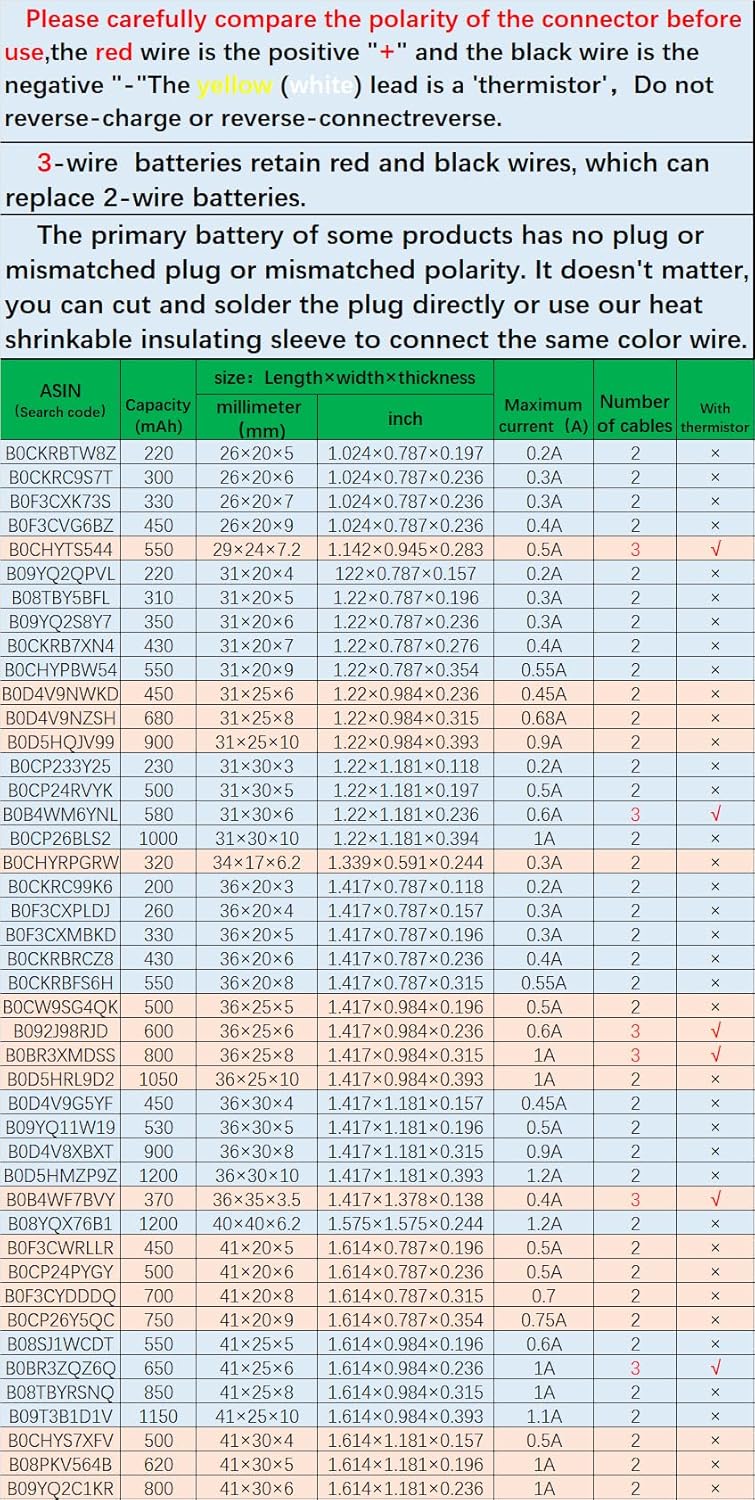
- Polarity: The red wire is the positive terminal ("+"), and the black wire is the negative terminal ("-"). Do not reverse the connections. Incorrect polarity can damage the battery and your device.
- Damage: Do not charge or use the battery if it is punctured, damaged, bloated, expanded, swelling, or otherwise deformed. Stop using the battery immediately if abnormal heat, odor, deformation, or any abnormal condition is detected.
- Charging: Do not charge batteries unattended. Monitor the charging process and react to potential problems. Do not charge batteries with a higher voltage or current than specified (nominal 3.7V, full charge 4.2V).
- Handling: Do not disassemble, crush, or modify the battery. Keep away from flammable materials. Risk of fire, explosion, or burning.
- Environment: Do not put the battery into fire, water, or allow it to get wet. Avoid charging near a fire or in direct sunlight. Do not use in high-temperature environments.
- Children: Keep out of reach of children. Swallowing can lead to chemical burns, perforation of soft tissue, and death. Severe burns can occur within 2 hours.
3. Product Specifications
| Feature | Specification |
|---|---|
| Model Number | 624038 |
| Battery Type | Li-Polymer (Lithium Polymer) |
| Nominal Voltage | 3.7V |
| Full Charge Voltage | 4.2V |
| Capacity | 1200mAh |
| Power | 4.44Wh |
| Dimensions (L×W×T) | 1.575 x 1.535 x 0.244 inches (40×39×6.2mm) |
| Weight | 0.74 oz (21g) |
| Maximum Current | 1.2A |
| Connector Type | JST Pitch 1.5mm 2-wire connector module |
| Protection Features | Overcharge, overdischarge, overcurrent, short circuit protection |
4. Compatible Devices
This HXJNLDC 3.7V 1200mAh Li-Polymer battery (Model 624038) is a replacement for the following Sony Bluetooth Wireless Noise Canceling Stereo Headsets:
- Sony WH-1000XM3
- Sony WH-1000XM4
- Sony WH-XB900N
- Sony WH-H910N
- Sony WH-CH710N
It can also be used in other 3.7-5V electronic products with power less than 4.44Wh (1200mAh), provided the connector specifications and polarity are compatible.
5. Installation Instructions
Note: Battery replacement in electronic devices requires careful handling and basic technical skills. If you are unsure, seek professional assistance. Tools are typically not included with the battery and may need to be acquired separately.
- Preparation: Ensure your device is powered off and disconnected from any power source. Gather necessary tools (e.g., small screwdrivers, prying tools, wire cutters, soldering iron if needed, heat gun/lighter for heat-shrink tubing).
- Accessing the Battery: Carefully open your headset according to its specific service manual or online repair guides. Many users find video tutorials on platforms like YouTube helpful for visual guidance on disassembling Sony WH-1000XM3/XM4 series headphones.
- Disconnecting the Old Battery: Locate the existing battery. Gently disconnect its connector from the circuit board. Observe the wiring (red for positive, black for negative).
- Verifying Connector Compatibility: Compare the connector on your new HXJNLDC battery with the connector from your old battery.
- If the connectors are identical and compatible, proceed to step 5.
- If the original battery has no plug, an incompatible plug, or incorrect polarity, you will need to transfer the old connector to the new battery.
- Connector Transfer (if necessary):
- Carefully cut off the connector from your old battery, leaving sufficient wire length.
- Cut off the connector from the new HXJNLDC battery.
- Strip a small portion of insulation from the ends of the red and black wires on both the new battery and the old connector.
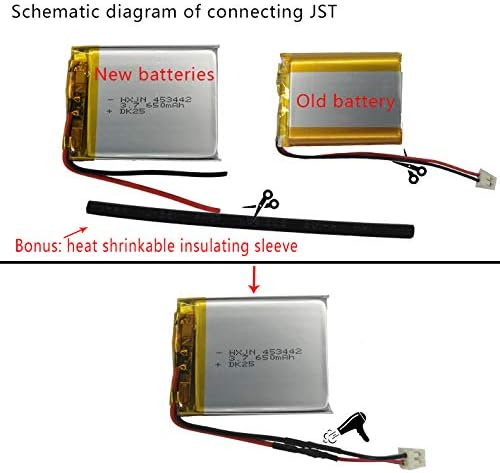
- Crucially, match the colors: Connect the red wire from the new battery to the red wire of the old connector. Connect the black wire from the new battery to the black wire of the old connector. Ensure a secure electrical connection, preferably by soldering.
- Use the included heat-shrink insulating tubing to cover and insulate the soldered connections. Apply heat (e.g., with a heat gun or carefully with a lighter) to shrink the tubing for a secure, insulated joint.

This diagram shows the process of replacing a battery connector. It depicts cutting off the old connector, connecting the new battery's wires to the old connector's wires (matching colors), and securing the connection with heat-shrink insulating sleeves. - Installing the New Battery: Carefully place the new battery into its designated compartment. Connect the battery's plug to the circuit board. Ensure the connection is firm and correctly oriented.
- Reassembly: Carefully reassemble your device, ensuring all components are correctly seated and screws are tightened appropriately.
- Initial Charge: After reassembly, connect your device to its charger and allow it to fully charge before initial use.

6. Operating the Battery
Once installed, the HXJNLDC replacement battery operates like the original battery in your device.
- Charging: Use the original charger and charging cable provided with your headset. The battery will charge to its full capacity of 4.2V.
- Usage: The battery provides power to your headset for its intended functions. Battery life will vary depending on usage patterns, volume levels, and features like noise canceling.
- First Use: It is recommended to fully charge the battery before its first use to calibrate the device's battery indicator.
7. Maintenance and Storage
- Storage: If storing the battery for an extended period, ensure it is charged to approximately 50-60% capacity. Store in a cool, dry place away from direct sunlight and extreme temperatures.
- Cleaning: Keep the battery and its contacts clean and dry.
- Disposal: Do not dispose of the battery in household waste. Follow local regulations for proper disposal of lithium-polymer batteries, which typically involves recycling at designated facilities.
8. Troubleshooting
If you encounter issues after replacing the battery, consider the following:
- Battery Not Charging / Low Battery Indication:
- Verify all connections are secure and correctly seated.
- Double-check the polarity of the red (+) and black (-) wires if you performed a connector transfer. Incorrect polarity will prevent charging.
- Ensure the charging cable and adapter are functional.
- If the issue persists, the battery itself might be faulty, or there could be an issue with the device's charging circuit.
- Device Not Powering On:
- Ensure the battery is properly connected and has some charge.
- Confirm the device was reassembled correctly and no internal cables were pinched or damaged.
- Reduced Battery Life:
- Ensure the battery has undergone a few full charge/discharge cycles to optimize performance.
- High volume, continuous noise canceling, or other power-intensive features will reduce battery life.
For complex issues, consulting online forums or professional repair services for your specific headset model may be beneficial.
9. Warranty and Support
If there are any quality issues with your HXJNLDC battery within one year of purchase, please contact us via email for replacement or support. Refer to your purchase documentation for contact details.