1. Introduction
Thank you for choosing the CONTROL EXPERT remote control. This remote is designed as a direct replacement for your original remote, offering seamless compatibility with various Smart TV models, including ATVIO, VIOS, and HARMONTEC, specifically for models like UDL55MK662. It provides convenient access to essential TV functions and popular streaming services like Netflix and YouTube.
Important: This remote control is recommended only if your original remote is identical in appearance to the one shown in this manual.
2. Product Features
- Direct Compatibility: Works with ATVIO, VIOS, and HARMONTEC Smart TVs, including model UDL55MK662.
- No Programming Required: Ready to use right out of the box after battery installation.
- Dedicated App Buttons: Features direct access buttons for Netflix and YouTube.
- Full Functionality: Controls all standard television functions such as power, volume, channel selection, input, and menu navigation.

Figure 2.1: Front view of the remote control, showing all buttons.
3. Setup
3.1 Battery Installation
The remote control requires two AAA batteries (not included) for operation. Follow these steps to install them:
- Locate the battery compartment cover on the back of the remote control.
- Gently slide the cover downwards or press the latch (if present) and lift to open the compartment.
- Insert two AAA batteries, ensuring the positive (+) and negative (-) terminals align correctly with the markings inside the compartment.
- Replace the battery compartment cover by sliding it back into place until it clicks securely.

Figure 3.1: Back view of the remote control, highlighting the battery compartment.
After installing the batteries, the remote control is ready for immediate use with your compatible TV. No additional programming is required.
Video 3.1: Demonstration of battery installation and initial use of the remote control.
4. Operating Instructions
This remote control provides intuitive access to all standard television functions and dedicated buttons for popular streaming applications.
4.1 Button Functions Overview

Figure 4.1: Labeled diagram of the remote control buttons and their corresponding functions.
- Power Button (Red): Turns the TV on or off.
- Number Pad (0-9): Directly selects channels.
- Input: Cycles through available input sources (HDMI, AV, etc.).
- Volume Up/Down (+/-): Adjusts the TV volume.
- Channel Up/Down (CH +/-): Changes TV channels.
- Mute: Mutes or unmutes the TV audio.
- Navigation Pad (Up/Down/Left/Right/OK): Used to navigate menus and confirm selections.
- Back/Return: Returns to the previous screen or menu.
- Exit: Exits the current menu or application.
- Netflix Button: Launches the Netflix application directly.
- YouTube Button: Launches the YouTube application directly.
- List: Displays a list of channels or content.
- Home: Returns to the TV's main home screen.
- Menu/Options: Opens the TV's main menu or options.
- EPG (Electronic Program Guide): Displays the program guide.
- Media Control Buttons (Play, Pause, Stop, Rewind, Fast Forward): Controls media playback.
- Color Buttons (Red, Green, Yellow, Blue): Used for specific functions within certain applications or menus, as indicated on-screen.
4.2 Using Dedicated App Buttons
To quickly access Netflix or YouTube, simply press the corresponding dedicated button on the remote control. Ensure your Smart TV is connected to the internet for these applications to function correctly.
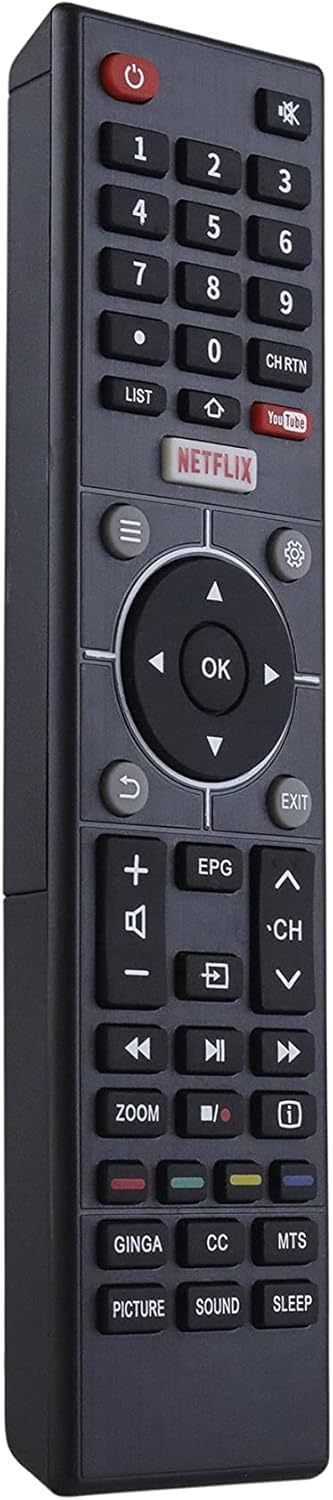
Figure 4.2: Remote control in use, demonstrating ease of operation.
5. Troubleshooting
If you encounter issues with your remote control, please refer to the following common solutions:
- Remote not responding:
- Check if the batteries are inserted correctly with the correct polarity (+/-).
- Replace old batteries with new AAA batteries.
- Ensure there are no obstructions between the remote control and the TV's infrared sensor.
- Point the remote directly at the TV's IR sensor.
- Specific buttons not working:
- Clean the remote control buttons and surface with a soft, dry cloth to remove any dirt or residue.
- If only app buttons (Netflix, YouTube) are not working, ensure your TV has an active internet connection and the apps are installed and updated.
- Intermittent functionality:
- This could indicate low battery power. Replace the batteries.
- Minimize strong light sources (like direct sunlight or bright fluorescent lights) that might interfere with the IR signal.
If the problem persists after trying these steps, please contact customer support.
6. Specifications
| Feature | Detail |
|---|---|
| Brand | CONTROL EXPERT |
| Model Number | UDL55MK662 |
| Compatible Devices | ATVIO, VIOS, HARMONTEC Smart TVs (e.g., UDL55MK662) |
| Connectivity Technology | Infrared (IR) |
| Power Source | 2 x AAA Batteries (not included) |
| Color | Black |
| Dimensions (approx.) | 24.6 x 7.9 x 3.9 cm |
| Weight (approx.) | 70 g |
7. Warranty and Support
7.1 Warranty Information
This CONTROL EXPERT remote control comes with a standard manufacturer's warranty. Please refer to your purchase documentation for specific warranty terms and duration. The warranty typically covers defects in materials and workmanship under normal use.
7.2 Customer Support
For technical assistance, troubleshooting, or warranty claims, please contact CONTROL EXPERT customer support through the retailer where the product was purchased or visit the official CONTROL EXPERT website for contact information.