
1. Product Overview
The Maxim Corona Fandelight, Model 61002BK, is a 27.5-inch ceiling fixture combining a fan and an LED light. It features a black finish with a cage design housing three fan blades and a high-powered LED ring for downlighting. This unit is designed for indoor use and offers both air circulation and dimmable lighting capabilities.
Key features include:
- Sleek and Modern Design: An elegant cage of bent metal in a black finish, housing three innovatively curved fan blades.
- Versatile LED Lighting: A high-powered LED ring provides additional downlight. The lighting is dimmable for adjustable brightness.
- Energy Efficient: LED lighting with a Color Rendering Index (CRI) of 80 ensures accurate color representation and energy savings.
- Damp Rated: Suitable for damp locations.
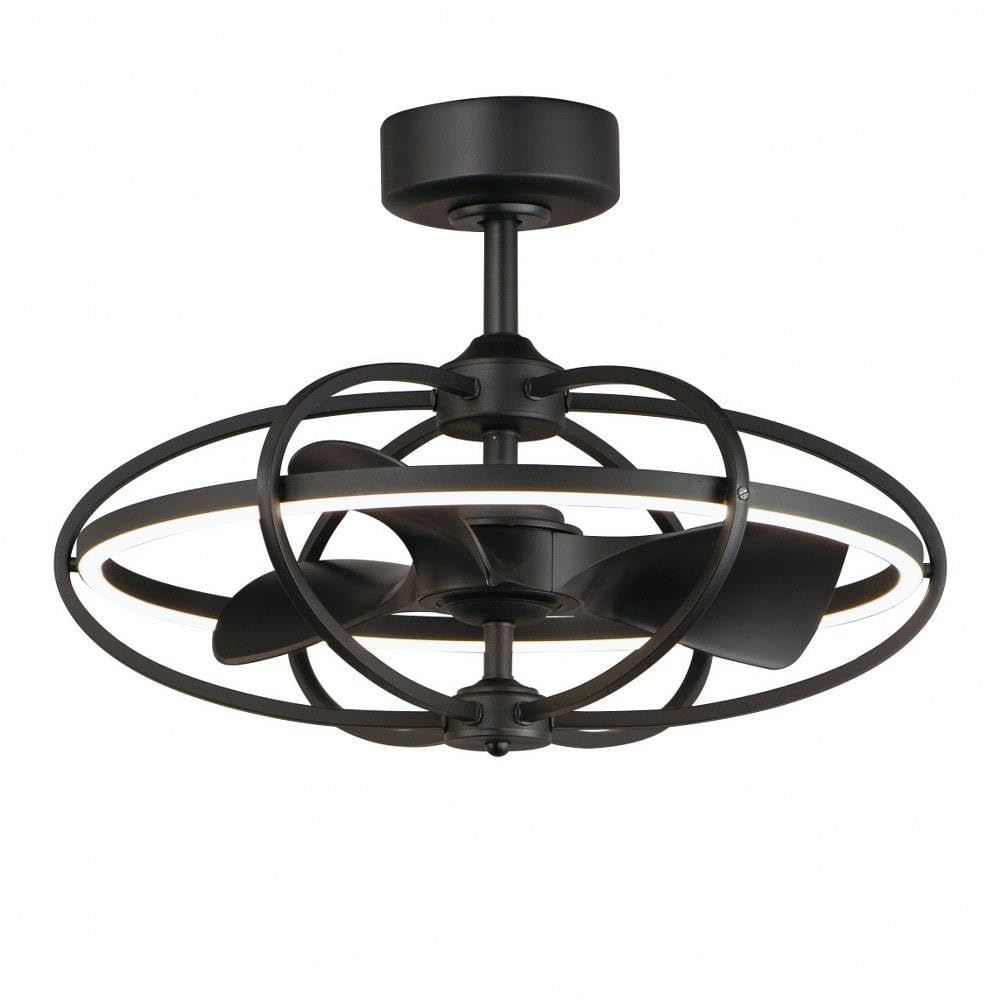
Figure 1: Maxim Corona 61002BK Fandelight, showcasing its black finish and integrated design.
2. Safety Information
Read all instructions carefully before beginning installation. Failure to follow these instructions may result in electric shock, fire, or other hazards. Keep this manual for future reference.
- Electrical Safety: Always disconnect power at the circuit breaker or fuse box before installation, cleaning, or servicing. Ensure all electrical connections comply with local codes and ordinances. If you are unsure about wiring, consult a qualified electrician.
- Mounting: The mounting structure must be capable of supporting the weight of the fanlight (approximately 15.9 pounds).
- Blade Clearance: Ensure there is adequate clearance between the fan blades and any obstructions.
- Damp Location Rated: This fixture is damp rated, meaning it can be used in locations subject to moisture, but not direct water exposure.
- Proposition 65 Warning: This product may contain chemicals known to the State of California to cause cancer and birth defects or other reproductive harm. Wash hands after handling.
3. Package Contents
Verify that all components are present and undamaged before proceeding with installation. If any parts are missing or damaged, contact customer support.
- Fandelight Assembly (with integrated LED and fan blades)
- Mounting Canopy
- Downrod/Stem (6.00 inches length)
- Remote Control
- Hardware Pack (screws, wire nuts, etc.)
- Instruction Manual (this document)
4. Setup and Installation
Professional installation by a qualified electrician is recommended. Ensure power is OFF at the circuit breaker before beginning.
- Prepare Mounting Location:
Ensure the electrical junction box is securely mounted to the building structure and can support the fanlight's weight. Run electrical wires to the junction box.
- Assemble Downrod:
Attach the downrod (stem) to the fanlight motor housing. Secure with pins and screws as per the detailed diagrams in the included hardware instructions.
- Mount Canopy:
Secure the mounting bracket to the junction box using the provided screws. The canopy (7.25 inches diameter) will cover this bracket and the electrical connections.
- Wiring Connections:
Connect the fanlight's electrical wires to the household wiring according to the wiring diagram. Typically, this involves connecting live, neutral, and ground wires. Ensure all connections are secure with wire nuts.
Important Note: Some units may ship with two control modules that need to fit within the canopy. If you encounter difficulty fitting these modules, contact Maxim customer support. Newer units may feature a combined module for easier installation.
- Hang Fandelight:
Carefully lift the fandelight assembly and hang it onto the mounting bracket. Ensure the downrod ball is properly seated in the canopy's opening.
- Secure Canopy:
Slide the canopy up to the ceiling and secure it to the mounting bracket with the provided screws.

Figure 2: Detailed view of the fan blades and internal structure, relevant for assembly and maintenance.
5. Operating Instructions
The Maxim Corona Fandelight is controlled via the included remote control. Ensure batteries are installed in the remote (not included).
- Power On/Off: Press the POWER button to turn the fanlight on or off.
- Light Control:
- Press the LIGHT button to turn the LED light on or off.
- Hold the LIGHT button to dim or brighten the LED light. Release when the desired brightness is achieved.
- Fan Speed Control:
- Press the FAN SPEED buttons (e.g., 1, 2, 3) to adjust the fan speed.
- Press the FAN OFF button to turn the fan off.
- WiFi Connectivity:
Refer to the separate WiFi setup guide (if provided) for instructions on connecting your fandelight to your home network and controlling it via a smart device application. This feature allows for advanced control and scheduling.

Figure 3: The illuminated LED ring, demonstrating the lighting function.
6. Maintenance
Regular maintenance ensures optimal performance and longevity of your fandelight. Always disconnect power before performing any maintenance.
- Cleaning:
Wipe the exterior surfaces of the fandelight with a soft, damp cloth. Do not use abrasive cleaners or solvents, as these can damage the finish. Ensure the cloth is not dripping wet to avoid electrical hazards.
- Blade Cleaning:
Periodically clean dust from the fan blades to maintain efficient air circulation. Use a soft cloth or a duster.
- LED Light Source:
The LED light source is integrated and not user-replaceable. If the LED light fails, contact customer support for service.
- Tighten Fasteners:
Periodically check and tighten all screws and fasteners on the mounting bracket and fandelight assembly to ensure secure operation.
7. Troubleshooting
If you experience issues with your Maxim Corona Fandelight, consult the following troubleshooting guide. If the problem persists, contact customer support.
| Problem | Possible Cause | Solution |
|---|---|---|
| Fandelight does not turn on. | No power to the fixture; loose wiring; remote control batteries dead or not paired. | Check circuit breaker. Ensure all wiring connections are secure. Replace remote batteries or re-pair remote according to its instructions. |
| Fan does not operate. | Fan motor wiring issue; remote control malfunction. | Verify fan motor wiring. Ensure remote is functioning and paired. |
| Light does not turn on or dim. | LED driver failure; wiring issue; remote control malfunction. | Check wiring connections. If LED is integrated, contact customer support for service. Ensure remote is functioning. |
| Fandelight wobbles or makes noise. | Loose mounting screws; unbalanced blades; improper installation. | Ensure mounting bracket and downrod connections are tight. Check for any obstructions. Re-verify installation steps. |
| Difficulty fitting control modules during installation. | Older unit with separate, oversized control modules. | Contact Maxim customer support for a replacement combined control module if available. |
8. Specifications
| Feature | Detail |
|---|---|
| Model Name | 61002BK |
| Brand | Maxim |
| Dimensions (L x W x H) | 27.5" x 27.5" x 20" |
| Item Weight | 15.9 pounds |
| Color | Black |
| Material | Metal (Fixture), Glass (Shade) |
| Light Source Type | Integrated LED |
| Wattage | 30 Watts |
| Brightness | 3420 Lumens |
| Color Temperature | 4000 Kelvin (Warm White) |
| CRI | 80 |
| Voltage | 120 Volts |
| Control Method | Remote Control, WiFi-Enabled |
| Installation Type | Ceiling Mount (Stem/Downrod) |
| Indoor/Outdoor Usage | Indoor, Damp Rated |
| UPC | 783209251960 |
9. Warranty Information
This Maxim Corona Fandelight is covered by a manufacturer's warranty. For specific details regarding warranty duration, coverage, and claims process, please refer to the warranty documentation included with your purchase or contact Maxim Lighting directly.
The warranty typically covers defects in materials and workmanship under normal use and service. It does not cover damage resulting from improper installation, misuse, abuse, or acts of nature.
10. Customer Support
For technical assistance, replacement parts, or warranty inquiries, please contact Maxim Lighting customer support.
- Website: Visit the official Maxim Lighting website for support resources, FAQs, and contact information.
- Phone: Refer to the contact details provided in your product packaging or on the manufacturer's website.
- Email: Use the email address provided on the manufacturer's website for written inquiries.
When contacting support, please have your model number (61002BK) and proof of purchase readily available.