
Product Overview
The Y&H 2000W 2KW Grid Tie Inverter with Power Limiter is an advanced and efficient solution for solar power systems. It is designed to convert direct current (DC) electricity generated by solar panels into alternating current (AC) electricity that can be fed into the utility grid or used to power home appliances.
- High Efficiency: This grid tie power inverter offers high efficiency, making it a technologically advanced inverter for solar power systems.
- Integrated Limiter Sensor: It delivers only the power needed by the load, preventing excess power from being sent to the grid.
- LCD Display: Features a large LCD display for easy monitoring and adjustment of all parameters.
- MPPT Functionality: Improves the efficiency of the entire solar power system by ensuring each panel operates at its maximum power point.
- Safety Features: Includes low power consumption, over current protection, over temperature protection, Anti-island protection, and reverse polarity protection.
- Battery Discharge Function: Can be used with batteries to power the inverter and utilize timed discharge, reducing peak load and electricity costs.
Package Contents
Upon opening the package, ensure all components are present and in good condition. The standard package for the Y&H Grid Tie Inverter includes:
- Y&H SUN-Inverter Unit
- Instruction Manual / Specification Documents
- AC Output Cable Line
- Limiter Sensor
Video: Unboxing and Package Contents. This video demonstrates the unpacking process of the Y&H Grid Tie Inverter, showcasing the main unit, instruction manuals, AC cable, and the limiter sensor included in the box.

Image: The Y&H Grid Tie Inverter shown with its included accessories, including the AC power cable and limiter sensor.
Product Components and Ports
Familiarize yourself with the various components and connection ports of the inverter for proper installation and operation.

Image: Front view of the Y&H 2000W Grid Tie Inverter, highlighting the LCD display and control buttons.
Input/Output Ports:
- DC Input Terminals: Located on the side, these are for connecting the solar panel array. Ensure correct polarity (positive and negative).
- Remote Port (WIFI Plug Connection): Used for connecting a WIFI module for remote monitoring and control.
- Internal Limiter Sensor Connection: This port is for connecting the external limiter sensor, which helps regulate power output to match household consumption.
- AC Output Socket: This is where the inverter connects to your home's electrical grid.
Video: Port Introduction. This segment of the video details the various input and output ports on the Y&H inverter, including DC input, WIFI plug connection, limiter sensor connection, and the AC output socket.
Cooling System:
- Dual Cooling Fans: The inverter is equipped with dual cooling fans to maintain optimal operating temperature and ensure longevity.
Installation and Connection
Follow these steps carefully to ensure safe and proper installation of your Y&H Grid Tie Inverter.
- Solar Panel Connection:
Connect the positive and negative cables from your solar panel array to the corresponding DC input terminals on the inverter. Ensure the voltage of your solar panels is within the inverter's specified DC input range (DC60-110V). Important: Do not connect the positive and negative terminals in reverse.
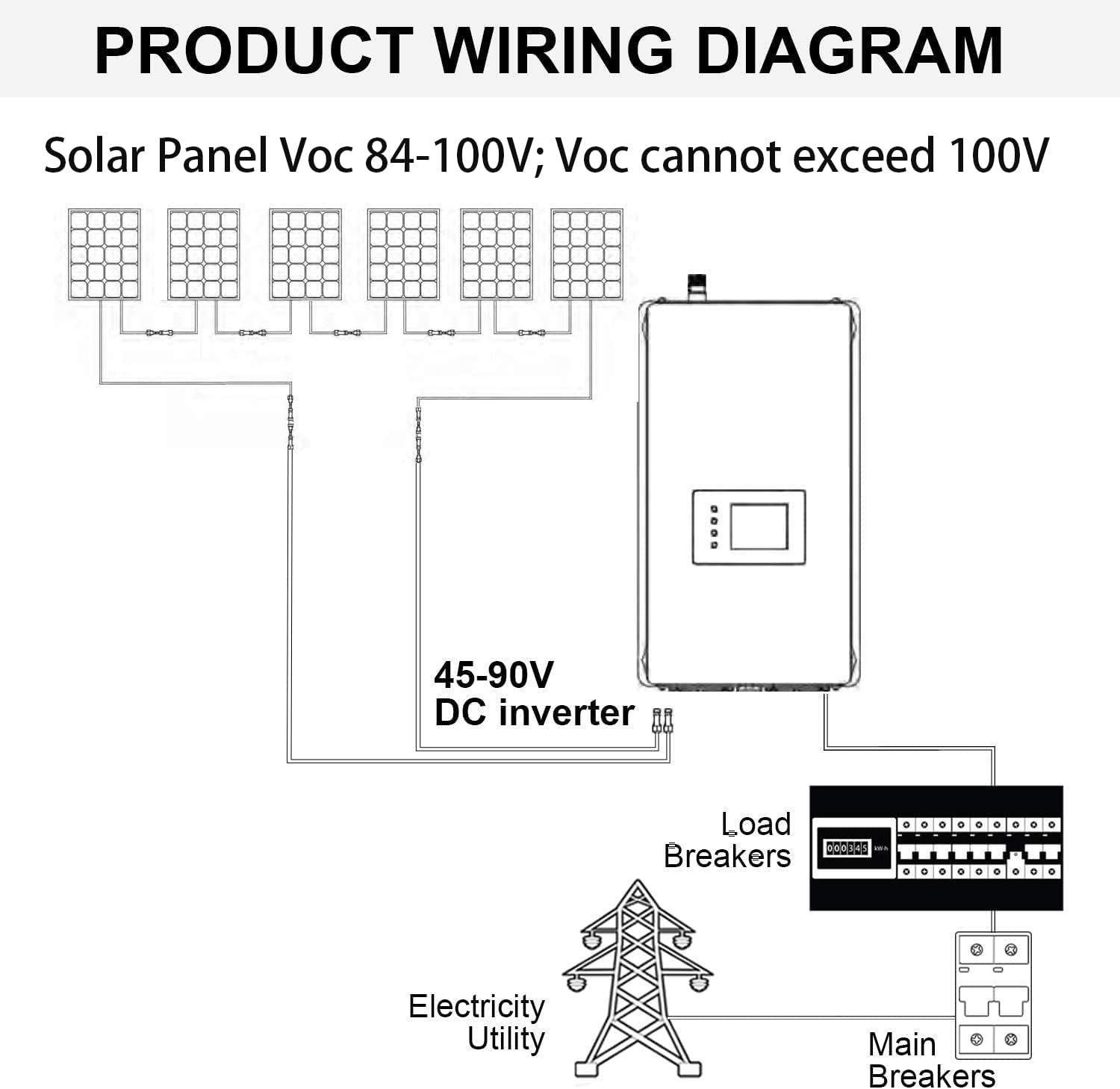
Image: A detailed product wiring diagram illustrating the connection of solar panels to the Y&H Grid Tie Inverter and then to the home grid.
Video: Solar Panel Connection. This part of the video demonstrates how to correctly connect solar panel cables to the inverter's DC input terminals.
- Battery Connection (Optional):
If using batteries with the inverter, connect the battery cables to the appropriate terminals. Ensure the battery voltage matches the inverter's requirements. This setup allows for timed discharge to optimize electricity usage.
Video: Connecting Battery. This video segment illustrates the process of connecting a battery bank to the inverter, demonstrating the proper cable connections.
- Home Grid Connection:
Plug the AC output cable from the inverter into a suitable AC outlet in your home. For US 240V systems, ensure the L1/L2 connections are correctly made. Note: When connected to the public grid, remember to turn on the outlet switch.

Image: Close-up view of the AC OUT port on the Y&H Grid Tie Inverter, showing the connections for a US 240V system.
Video: Connect to the Home Grid. This video demonstrates the final step of connecting the inverter to the home's electrical grid via the AC output.
Operating the Inverter and LCD Display
The inverter features an intuitive LCD display and control buttons for monitoring and adjusting settings.

Image: Detailed view of the LCD screen display and its corresponding control buttons (Setting/Confirm, Up, Down, Home). Various display modes like Grid Waveform, Energy Menu, Power View, Clock Setting, and Date Setting are also shown.
On-Screen Data Display:
The LCD provides real-time data on power generation, voltage, and other system parameters. Use the navigation buttons to cycle through different display modes and settings.
Video: On-screen Data Display. This video demonstrates the various data points and settings accessible via the inverter's LCD screen, including real-time power output and configuration options.
Limiter Function and Anti-Islanding:

Image: Diagram explaining the Limiter function, which ensures power output matches consumption, and the Anti-islanding function, which disconnects the inverter during power failures for safety.
- Limiter Function: This feature ensures that the inverter only supplies power to your home's loads, preventing excess power from being exported to the grid. This is crucial for compliance with local regulations and avoiding unnecessary charges.
- Anti-Islanding Protection: In the event of a power failure from the utility grid, the inverter automatically disconnects its power output. This safety feature prevents the inverter from feeding power into a de-energized grid, protecting utility workers and equipment.
Technical Specifications
Below are the detailed technical specifications for the Y&H 2000W 2KW Grid Tie Inverter Power Limiter.
| Specification | Value |
|---|---|
| Product Dimensions | 21.2 x 12.2 x 6.1 inches |
| Item Weight | 14.22 pounds |
| Item Model Number | SUN-2000GTIL2-T |
| Brand | Y&H |
| Power Source | Battery Powered (for timed discharge) |
| Wattage | 2000 watts |
| Color | Blue |
| Manufacturer | Y&H |
| First Available Date | March 11, 2021 |

Image: Illustrates the high efficiency (99%) of the Y&H Grid Tie Inverter due to its Maximum Power Point Tracking (MPPT) functionality, ensuring optimal solar power utilization.
Troubleshooting
This section provides general guidance for common issues. For specific error codes or persistent problems, refer to the full user manual or contact Y&H customer support.
- No Power Output: Check all connections, especially DC input polarity and AC output connection to the grid. Ensure the utility grid is active and the outlet switch is on.
- LCD Display Not Working: Verify power supply to the inverter. If the backlight is off, check settings on the LCD.
- Low Power Output: Ensure solar panels are clean and receiving adequate sunlight. Check for shading or damage to panels. Verify MPPT settings are correctly configured.
- Over Temperature Protection: Ensure the inverter is installed in a well-ventilated area. Clear any obstructions around the cooling fans.
- Anti-Islanding Activation: This is a safety feature. If the grid power is interrupted, the inverter will stop outputting power. It should resume automatically once grid power is restored.
Maintenance
Regular maintenance helps ensure the longevity and optimal performance of your Y&H Grid Tie Inverter.
- Cleanliness: Periodically clean the exterior of the inverter and ensure the cooling fan vents are free from dust and debris. Use a soft, dry cloth.
- Connection Checks: Annually inspect all electrical connections (DC and AC) for tightness and signs of corrosion.
- Environmental Conditions: Ensure the inverter is kept within its specified operating temperature and humidity ranges. Avoid direct exposure to harsh weather conditions unless the unit is rated for outdoor use.
Warranty and Support
Y&H is committed to providing reliable products and excellent customer service. For warranty information, technical support, or any inquiries regarding your inverter, please refer to the official Y&H website or contact their customer support channels.
For additional resources, you may visit the Y&H Store on Amazon.


