
Important Safety Information
Before operating the Hover-1 Nano Kick Scooter, please read and understand all safety instructions. Failure to follow these instructions may result in serious injury.
- Age and Weight Limit: This scooter is designed for children aged 5 years and older, with a maximum weight limit of 110 lbs (50 kg).
- Wear Safety Gear: Always wear appropriate safety gear, including a helmet, knee pads, and elbow pads, when riding the scooter.
- Supervision: Children should always be supervised by an adult while riding.
- Riding Conditions: Ride on smooth, paved surfaces away from traffic. Avoid riding on uneven terrain, loose gravel, or wet surfaces.
- Visibility: The scooter features multi-color LED lights on the wheels, stem, and deck to enhance visibility, especially in low-light conditions. However, always be aware of your surroundings.
- Braking: The scooter is equipped with a rear braking system. Practice braking in a safe area before riding at higher speeds.
- Avoid Stunts: Do not attempt stunts, jumps, or aggressive riding, as this can lead to loss of control and injury.
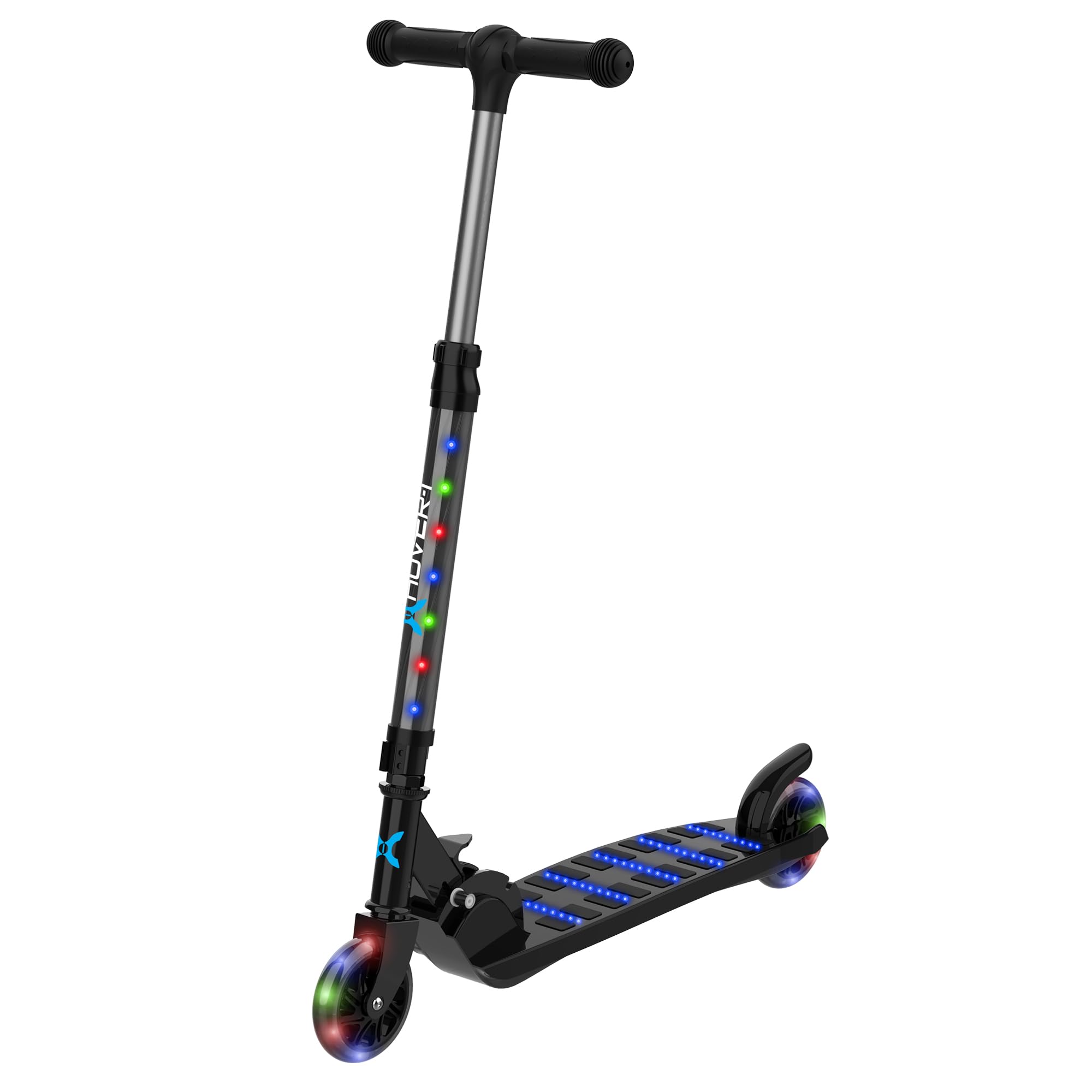
Image: A child safely riding the Hover-1 Nano Kick Scooter, demonstrating the importance of safety gear.
Product Overview and Components
The Hover-1 Nano Kick Scooter is designed for a fun and safe riding experience. Familiarize yourself with its main components:
- Adjustable Handlebar: Allows for height customization to suit different riders.
- Soft Grip Handles: Provide comfort and secure grip during use.
- Lean-to-Steer Axle: Enables intuitive steering by leaning.
- Solid PU Tires: Durable and provide a smooth ride.
- Multi-Color LED Lights: Integrated into the wheels, stem, and deck for enhanced visibility and style.
- Folding Design: For easy storage and portability.
- Rear Brake: For controlled stopping.

Image: Detail of the scooter's soft, comfortable handles for improved grip.

Image: The scooter showcasing its multi-colored LED lights on the wheels, stem, and deck.
Setup and Assembly
The Hover-1 Nano Kick Scooter requires minimal assembly. Follow these steps to prepare your scooter for use:
- Unpack: Carefully remove all components from the packaging.
- Handlebar Installation: Insert the handlebar stem into the main scooter body until it clicks securely into place. Ensure it is fully engaged.
- Adjust Handlebar Height:
- Locate the clamp on the stem of the scooter.
- Open the clamp and adjust the handlebar to the desired height, ensuring it is comfortable for the rider.
- Close the clamp firmly to secure the handlebar in position. Ensure the handlebar is stable and does not wobble.
- Battery Installation (for LED lights):
- The scooter's LED lights require 3 AA batteries (not included).
- Locate the battery compartment, typically on the underside of the deck or within the stem.
- Open the compartment, insert the batteries according to the polarity indicators (+/-), and securely close the cover.

Image: The adjustable handlebar mechanism, allowing customization for rider height.
Operating Instructions
Operating the Hover-1 Nano Kick Scooter is straightforward. Follow these guidelines for a safe and enjoyable ride:
- Starting: Place one foot firmly on the scooter deck. Use the other foot to push off the ground to gain momentum.
- Steering (Lean-to-Steer): The scooter uses a lean-to-steer mechanism. To turn, gently lean your body in the desired direction. The front wheels will pivot accordingly.
- Braking: To slow down or stop, apply pressure to the rear brake located above the rear wheel with your foot. Apply gradual pressure for smooth stops.
- Folding for Storage:
- Locate the folding mechanism near the base of the handlebar stem.
- Follow the instructions on the scooter to release the locking mechanism and fold the handlebar down towards the deck.
- Ensure the scooter is securely folded before carrying or storing.

Image: The scooter in its compact, folded design, highlighting its portability and ease of storage.
Maintenance
Regular maintenance ensures the longevity and safe operation of your Hover-1 Nano Kick Scooter:
- Cleaning: Wipe the scooter with a damp cloth after use. Avoid using harsh chemicals or abrasive cleaners. Do not hose down the scooter.
- Wheel Inspection: Periodically check the solid PU tires for wear and tear. Ensure they are free from debris.
- Handlebar and Connections: Regularly check that the handlebar is securely fastened and that all clamps and bolts are tight.
- Battery Replacement: When the LED lights dim or stop working, replace the 3 AA batteries in the designated compartment. Ensure correct polarity.
- Storage: Store the scooter in a dry, cool place away from direct sunlight and moisture. Use the folding feature for compact storage.
Troubleshooting
If you encounter issues with your Hover-1 Nano Kick Scooter, refer to the following common solutions:
- LED Lights Not Working:
- Check if the 3 AA batteries are correctly installed with the proper polarity.
- Replace old or depleted batteries with new ones.
- Handlebar Wobbles:
- Ensure the handlebar stem is fully inserted and the clamp is securely tightened.
- Inspect for any loose screws or connections in the handlebar assembly.
- Scooter Not Rolling Smoothly:
- Check wheels for debris or obstructions.
- Ensure wheel axles are not overly tight or loose.
For further assistance, please contact Hover-1 customer support.
Specifications
| Brand | Hover-1 |
| Model Name | Nano- Folding Kick Scooter |
| Age Range (Description) | Youth (5+ Years Old) |
| Weight Limit | 110 Pounds (50 kg) |
| Item Weight | 3.1 Pounds (1.4 kg) |
| Number of Wheels | 2 |
| Wheel Material | Polyurethane (Solid PU) |
| Frame Material | Aluminum, Plastic |
| Handlebar Type | Adjustable |
| Wheel Size | 3 Inches |
| Brake Style | Rear Braking |
| Special Feature | Lightweight, LED Lights |
| UPC | 888255211835 |
Warranty and Support
Warranty: The Hover-1 Nano Kick Scooter comes with a 90-day warranty from the date of purchase. This warranty covers manufacturing defects under normal use. Please retain your proof of purchase for warranty claims.
Customer Support: For product support, troubleshooting assistance, or warranty inquiries, please visit the official Hover-1 Brand Store or contact their customer service department. You can find more information and contact details on the Hover-1 Brand Store on Amazon.
