
1. Product Overview
This manual provides essential instructions for the safe and effective use of your AOLIKES 552826 3.7V 350mAh rechargeable lithium polymer battery. This battery is designed as a replacement for specific Sennheiser wireless headphone models.
1.1. Compatibility
The AOLIKES 552826 battery is compatible with the following Sennheiser headphone models:
- Sennheiser SDW 5016 Wireless Headset
- Sennheiser SDW 5015 Wireless Headset
- Sennheiser SDW 5014 Wireless Headset
- Sennheiser SDW 5013 Wireless Headset
- Sennheiser HD 350BT Headset
- Sennheiser SDW 3016 Headset
- Sennheiser SDW 3015 Headset
This battery is a direct replacement for the AHB552826TPC battery.
2. Safety Information
Lithium Polymer (LiPo) batteries require careful handling. Please read and follow all safety instructions to prevent potential hazards, including fire, serious injury, or property damage.
- Do not disassemble, crush, puncture, or short-circuit the battery.
- Do not expose the battery to extreme temperatures (above 60°C / 140°F or below -10°C / 14°F), direct sunlight, or fire.
- Do not immerse the battery in water or other liquids.
- Use only compatible chargers designed for 3.7V LiPo batteries.
- Keep the battery away from children and pets.
- If the battery shows signs of damage, swelling, leakage, or overheating, discontinue use immediately and dispose of it properly.
- Dispose of used batteries according to local regulations. Do not dispose of with household waste.
The battery features built-in protection against overcharging, overheating, and short circuits to ensure safe operation.
3. Setup and Installation
This battery is designed for "plug and play" installation, meaning it connects directly to the headphone's internal battery port without requiring soldering. However, always exercise caution when opening electronic devices.
- Power Off Device: Ensure your Sennheiser wireless headphones are completely powered off before beginning the battery replacement process.
- Locate Battery Compartment: Refer to your specific Sennheiser headphone model's original manual for instructions on how to safely open the device and access the battery compartment. This usually involves removing screws or carefully prying open casing sections.
- Disconnect Old Battery: Carefully disconnect the old battery's connector from the circuit board. Do not pull on the wires; grasp the connector itself.
- Remove Old Battery: Gently remove the old battery from its housing. Note its orientation for correct placement of the new battery.
- Install New Battery: Place the AOLIKES 552826 battery into the compartment, ensuring it fits correctly.
- Connect New Battery: Align the connector of the new battery with the port on the circuit board and gently push it in until it is securely seated. Ensure the polarity is correct (though the connector design typically prevents incorrect insertion).
- Secure Device: Carefully reassemble your headphones, ensuring all screws are tightened and casing sections are properly closed.
- Initial Charge: After installation, fully charge the new battery before its first use.
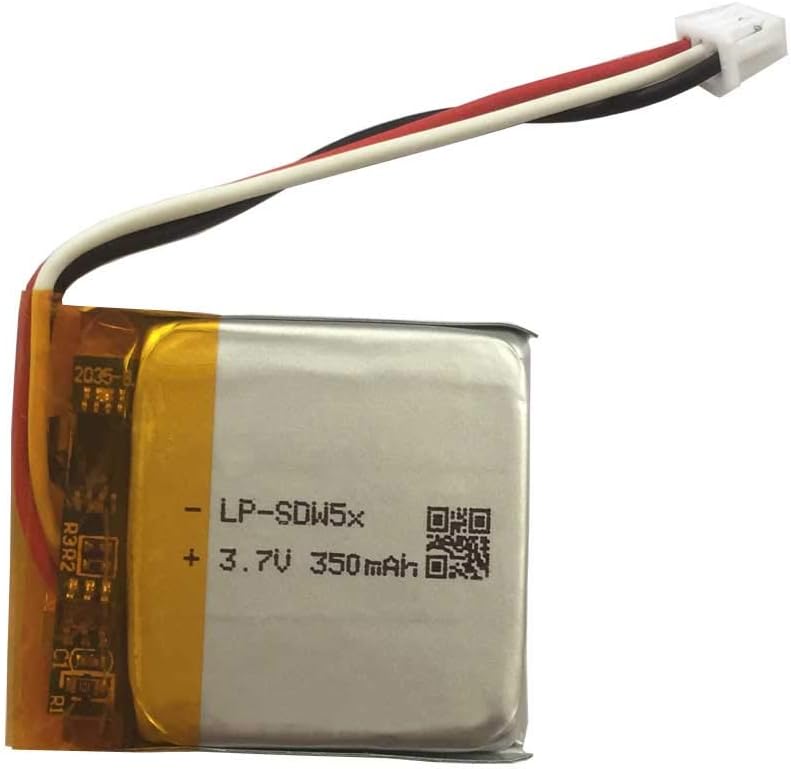
Image 1: The AOLIKES 552826 3.7V 350mAh rechargeable battery, showing its compact size and connector for plug-and-play installation.
4. Operating Instructions
4.1. Charging the Battery
Charge the battery using the original charging cable and adapter provided with your Sennheiser headphones. The battery's nominal voltage is 3.7V, with a limited charge voltage of 4.2V. The built-in protection circuit manages the charging process.
- Connect your headphones to their charger.
- Allow the battery to charge fully before disconnecting. Refer to your headphone's indicator lights for charging status.
- Avoid overcharging by disconnecting the charger once the battery is full, although the internal protection helps prevent this.
4.2. Normal Usage
Once installed and charged, the battery operates like the original. Power on your headphones as usual. Battery life will vary depending on usage patterns, volume levels, and features enabled.
5. Maintenance
Proper maintenance can extend the lifespan of your battery:
- Avoid Deep Discharge: Do not allow the battery to completely drain frequently. Recharge it when the device indicates low battery.
- Storage: If storing the battery or headphones for an extended period, charge the battery to approximately 50-60% capacity. Store in a cool, dry place away from direct sunlight.
- Temperature: Operate and store the battery within recommended temperature ranges to prevent degradation.
- Cleaning: Keep the battery and its connectors clean and free from dust or debris.
6. Troubleshooting
If you encounter issues after replacing the battery, consider the following:
- Headphones Not Powering On:
- Ensure the battery connector is securely seated.
- Verify the battery has been charged.
- Double-check that the battery is correctly installed according to the headphone's internal layout.
- Battery Not Charging:
- Confirm the charging cable and adapter are working correctly with other devices.
- Ensure the charging port on the headphones is clean and free of debris.
- Verify the battery is properly connected internally.
- Short Battery Life:
- Ensure the battery has been fully charged.
- Consider environmental factors (extreme cold can reduce battery performance).
- High volume usage or continuous wireless connection can consume more power.
If problems persist, contact AOLIKES customer support or a qualified technician.
7. Specifications
| Feature | Specification |
|---|---|
| Battery Type | Polymer Lithium Ion Rechargeable Battery |
| Battery Capacity | 350 mAh |
| Nominal Voltage | 3.7 V |
| Limited Charge Voltage | 4.2 V |
| Power | 1.3 Wh |
| Model Number | 552826 battery |
| Item Weight | 1.41 ounces (approximately 40 grams) |
| Package Dimensions | 2.24 x 1.57 x 0.35 inches |
8. Warranty and Support
For warranty information, technical support, or any questions regarding your AOLIKES 552826 battery, please contact AOLIKES customer service directly. Refer to the product packaging or the retailer's website for contact details.