
Introduction
This manual provides comprehensive instructions for the MONSIATUG Replacement Remote Control, designed for various Sony DVD player models. Please read this manual carefully to ensure proper use and to maximize the functionality of your remote control.
Product Overview
The MONSIATUG Replacement Remote Control is a universal remote specifically pre-programmed for a wide range of Sony DVD players. It offers direct functionality without the need for complex setup procedures.

Image: Front and back view of the MONSIATUG replacement remote control. The front displays various control buttons for DVD playback and menu navigation. The back shows a textured surface designed for grip.
Compatible Models:
- Sony DVP-NS57P, DVP-NS57P/B, DVP-NS601HP, DVP-NS41, DVP-NS41P
- Sony DVP-SR200P, DVP-SR201P, DVP-SR210P, DVP-SR370, DVP-SR405P, DVP-SR400HP
- Sony DVP-SR510H, DVP-SR500H, DVP-PR50P, DVP-SR320
Setup
1. Battery Installation
The remote control requires two (2) AA batteries (not included). Follow these steps to install them:
- Locate the battery compartment cover on the back of the remote control.
- Press down on the tab and slide the cover off.
- Insert two AA batteries, ensuring the positive (+) and negative (-) terminals align with the markings inside the compartment.
- Slide the battery compartment cover back into place until it clicks securely.

Image: The back of the remote control with the battery compartment cover removed, showing the slots for two AA batteries.
2. Initial Use
This replacement remote control is pre-programmed and does not require any setup or programming with your DVD player. Simply install the batteries, and it is ready for use.
Operating Instructions
Familiarize yourself with the buttons on your remote control:
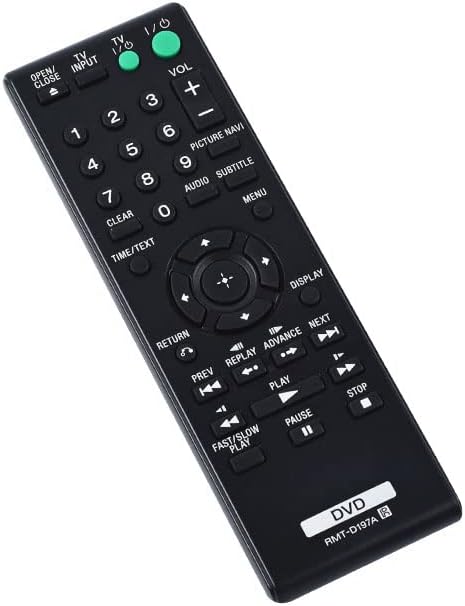
Image: An angled view of the MONSIATUG replacement remote control, highlighting the ergonomic design and button layout.
| Button | Function |
|---|---|
| I/O (Power) | Turns the DVD player on or off. |
| OPEN/CLOSE | Opens or closes the disc tray. |
| INPUT | Selects the input source (if applicable to your DVD player). |
| VOL +/- | Adjusts the volume level. |
| Number Buttons (0-9) | Direct selection of tracks, chapters, or menu items. |
| CLEAR | Clears numerical entries or selections. |
| PICTURE NAVI | Navigates picture settings or features. |
| AUDIO | Selects audio tracks or modes. |
| SUBTITLE | Toggles or selects subtitle options. |
| MENU | Accesses the disc menu or system menu. |
| TIME/TEXT | Displays time information or text features. |
| Navigation (Up/Down/Left/Right/Enter) | Navigates through menus and confirms selections. |
| RETURN | Goes back to the previous menu or screen. |
| DISPLAY | Shows on-screen display information. |
| PREV / NEXT | Skips to the previous or next track/chapter. |
| REPLAY / ADVANCE | Replays a short segment or advances a short segment. |
| PLAY / PAUSE / STOP | Controls disc playback (start, pause, stop). |
| FAST/SLOW PLAY | Adjusts playback speed. |
Maintenance
- Cleaning: Wipe the remote control with a soft, dry cloth. Do not use abrasive cleaners or solvents.
- Battery Replacement: Replace batteries when the remote's response becomes sluggish or stops working. Always replace both batteries at the same time with new ones of the same type (AA).
- Storage: If the remote will not be used for an extended period, remove the batteries to prevent leakage.
Troubleshooting
| Problem | Solution |
|---|---|
| Remote is not working. |
|
| Some buttons do not respond. |
|
Specifications
- Brand: MONSIATUG
- Model Number: 748303987795
- Compatible Devices: Sony DVD/Blu-ray Players (specific models listed above)
- Connectivity Technology: Infrared
- Max Number of Supported Devices: 1
- Special Feature: Ergonomic design
- Battery Type: 2 x AA (not included)
- Item Weight: 2.08 ounces
- Package Dimensions: 7.8 x 4.8 x 1.34 inches
Warranty and Support
This product comes with a 30-day warranty from the date of purchase. For any issues or support inquiries, please contact your retailer or the manufacturer directly.