
1. Introduction
This manual provides comprehensive instructions for the safe and efficient operation, setup, and maintenance of the YOU LIAN MT-200 Automatic Round Bottle Labeling Machine. Please read this manual thoroughly before operating the machine.
Key Features:
- Integrated PLC with LCD touch screen panel for clear setting and operation.
- Constructed from stainless steel and high-grade aluminum alloy, complying with GMP requirements.
- Functions include guiding, separating, labeling, attaching, and counting.
- Adjustable labeling height.
- Designed for integration into production lines with a conveyor belt.
2. Safety Instructions
Adherence to safety guidelines is crucial for preventing injury and equipment damage. Always follow these instructions:
- Electrical Safety: Ensure the machine is properly grounded. Do not operate with wet hands or in damp environments. Disconnect power before performing any maintenance or adjustments.
- Moving Parts: Keep hands, hair, and loose clothing away from all moving parts during operation.
- Emergency Stop: Familiarize yourself with the location and operation of the emergency stop button. Use it immediately in case of malfunction or danger.
- Authorized Personnel: Only trained and authorized personnel should operate or maintain this equipment.
- Work Area: Maintain a clean and clear work area around the machine.
3. Setup
3.1 Unpacking and Placement
Carefully unpack the machine and place it on a stable, level surface. Ensure adequate space around the machine for operation and maintenance.
3.2 Power Connection
Connect the machine to a suitable power supply as indicated on the machine's rating plate. Ensure the power supply matches the machine's requirements.
3.3 Component Overview

Figure 3.3.1: Product Structure Diagram. This diagram illustrates the main components of the MT-200 machine, aiding in identification during setup and operation.
3.4 Loading Label Roll
Load the label roll onto the designated spindle. Ensure the labels are oriented correctly for application. Refer to the label and bottle size specifications below for compatibility.

Figure 3.4.1: Standard Label and Bottle Size Diagram. This image provides critical dimensions for compatible labels and bottles, including outer and inner label roll diameter, label width and length ranges, and bottle diameter and height.
3.5 Adjusting Bottle Guides
Adjust the bottle guiding mechanism to match the diameter of the bottles being labeled. Ensure bottles move smoothly along the conveyor without obstruction.

Figure 3.5.1: Labeling Mechanism and Conveyor. This image shows the label roll, label application head, and the conveyor system with bottle guides.
4. Operating Instructions
4.1 Control Panel Overview
The machine is equipped with an LCD touch screen panel for controlling all functions. Navigate through the menus to access settings for speed, label position, and counting.
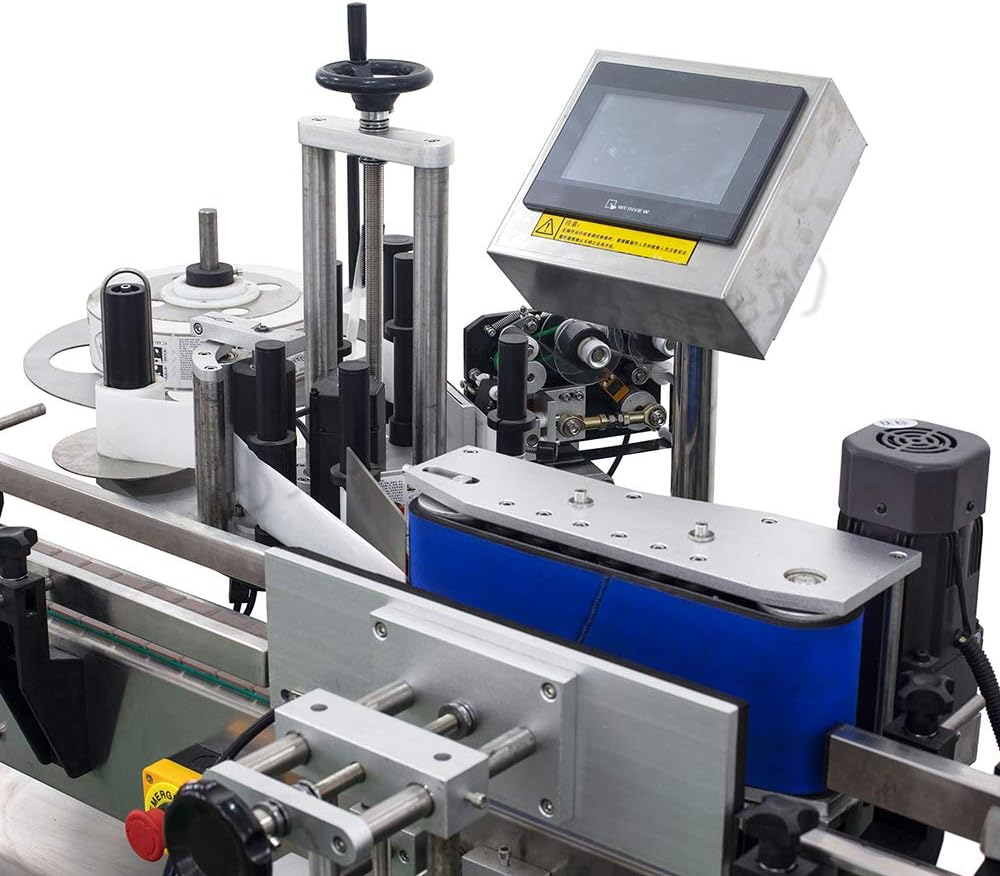
Figure 4.1.1: Control Panel and Labeling Head. This image highlights the LCD touch screen interface and the adjacent label application components.
4.2 Basic Operation
- Power on the machine using the main switch.
- Use the touch screen to select the desired operating mode and adjust parameters such as labeling speed and delay.
- Place bottles onto the conveyor belt. The machine will automatically guide, separate, label, and count them.
- Monitor the labeling process. Adjust settings as needed for optimal performance.
- To stop operation, press the designated stop button on the touch screen or the emergency stop button if necessary.

Figure 4.2.1: Label Application in Progress. This image shows a bottle being labeled as it passes through the application mechanism.
4.3 Operational Videos
Video: How to use MT-200
This video demonstrates the operational steps for the MT-200 automatic labeling machine, including bottle feeding and label application.
Video: MT-200 Automatic Labeling Machine
This video provides an overview of the MT-200 automatic labeling machine in operation, showcasing its functionality in a production environment.
5. Maintenance
Regular maintenance ensures the longevity and optimal performance of your MT-200 machine.
- Cleaning: Regularly clean the machine's surfaces, especially the conveyor belt and label application area, to prevent adhesive buildup and dust accumulation. Use a soft, dry cloth.
- Inspection: Periodically inspect all moving parts, sensors, and electrical connections for wear, damage, or loose fittings.
- Lubrication: Consult the manufacturer's guidelines for any specific lubrication requirements for moving components.
- Label Path: Ensure the label path is clear of any debris or adhesive residue that could interfere with label feeding.
6. Troubleshooting
This section addresses common issues you might encounter during operation.
| Problem | Possible Cause | Solution |
|---|---|---|
| Machine does not power on | Power cable disconnected; Emergency stop engaged; Power supply issue | Check power cable connection; Release emergency stop button; Verify power outlet functionality |
| Labels not applying correctly | Incorrect label roll loading; Label sensor dirty or misaligned; Labeling speed incorrect | Re-load label roll correctly; Clean/adjust label sensor; Adjust labeling speed via touch screen |
| Bottles not feeding smoothly | Bottle guides misaligned; Conveyor belt obstructed; Bottle size incompatible | Adjust bottle guides; Clear any obstructions; Ensure bottles meet size specifications |
| Touch screen unresponsive | Software glitch; Loose connection | Restart the machine; Contact technical support if issue persists |
7. Specifications
| Feature | Detail |
|---|---|
| Brand | YOU LIAN |
| Model Name | MT 200 |
| Connectivity Technology | USB |
| Printing Technology | Thermal |
| Special Feature | Automatic |
| Color | Black with Silver |
| Printer Output | Monochrome |
| Item Weight | 200 kg |
| Maximum Media Size | 4 inches |
| Print Media | Labels |
| Printer Type | Thermal |
| Printer Output Type | Monochrome |
| Ink Color | Black |
| Additional Printer Functions | Print Only |
| Control Method | Touch |
| Processor Count | 1 |
| Display Type | LCD |
| Maximum Print Resolution Black and White | 203 dpi |
| Duplex | Automatic |
| Hardware Interface | Serial Interface |
| Maximum Copy Resolution Black and White | 300 dpi |
| UPC | 736538522751 |
| ASIN | B08Y66QP9X |
8. Warranty and Support
For warranty information, technical support, or service inquiries, please contact the manufacturer, YOU LIAN, or your authorized dealer. Keep your purchase receipt and model number (MT-200) available when contacting support.